PaaS Community Blog
Home | Pages | Archives
Creating a Mobile-Optimized REST API Using Oracle Service Bus – Part 2 by Steven Davelaar
February 9, 2015 08:17
Introduction
 To build functional and performant mobile apps, the back-end data services need to be optimized for mobile consumption. RESTful web services using JSON as payload format are widely considered as the best architectural choice for integration between mobile apps and back-end systems. At the same time, most existing enterprise back-end systems provide a SOAP-based web service application programming interface (API) or proprietary file-based interfaces. In this article series we will discuss how Oracle Service Bus (OSB) 12c can be used to transform these enterprise system interfaces into a mobile-optimized REST-JSON API. This architecture layer is sometimes referred to as Mobile Oriented Architecture (MOA) or Mobile Service Oriented Architecture (MOSOA). A-Team has been working on a number of projects with OSB 12c to build this architecture layer. We will explain step-by-step how to build this layer, and we will share tips, lessons learned and best practices we discovered along the way. In part 1 we discussed the design of the REST API, in this second part we will discuss the implementation of the “read” (GET) RESTful services in service bus by transforming ADF BC SDO SOAP service methods
Getting Started
As of release 12.1.3 you can develop and test service bus applications inside JDeveloper. For this you need to download and install a separate “SOA Suite Quick Start” version of JDeveloper. Download page is here, installation instructions can be found here.
The SOA Suite Quick Start release of JDeveloper 12.1.3 has the same version number as the “vanilla” JDeveloper 12.1.3 release. This means that by default they will use the same system directory. This can cause weird and unexpected behavior. You need to make sure both JDeveloper releases use their own system directory by setting the JDEV_USER_HOME environment variable in the executable file that you use to launch JDeveloper (custom .bat file on Windows, JDeveloper Unix executable file inside package contents on Mac).
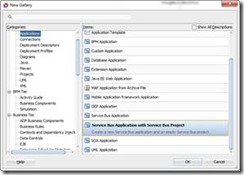
After starting the JDeveloper 12.1.3 release that comes with the SOA Suite Quick Start, you go to the File -> New -> Application gallery and choose Service Bus Application with Service Bus Project. Read the complete article here.
SOA & BPM Partner Community
For regular information on Oracle SOA Suite become a member in the SOA & BPM Partner Community for registration please visit www.oracle.com/goto/emea/soa (OPN account required) If you need support with your account please contact the Oracle Partner Business Center.
 Blog
Blog  Twitter
  LinkedIn
 ![image[7][2][2][2]](https://paascommunity.com/wp-content/uploads/2013/04/image7222.png?w=20&h=20 "image[7][2][2][2]") Facebook
Facebook ![clip_image002[8][4][2][2][2]](https://paascommunity.com/wp-content/uploads/2013/04/clip_image00284222.jpg?w=26&h=23 "clip_image002[8][4][2][2][2]") Wiki
Wiki
Posted by Jürgen Kress
Categories: SOA
Tags: Jürgen Kress, OPN, Oracle BPM, Oracle SOA, OSB, Service bus, Steven Davelaar
« Older Newer »
Leave a Reply
Mobile Site | Full Site
Get a free blog at WordPress.com Theme: WordPress Mobile Edition by Alex King.