How to create a Large Profile SOA 12c Repository running RCU in Silent Mode by Simon Haslam
April 17, 2016 Leave a comment
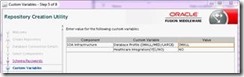
One of the really nice features of SOA 12c is the ability to automatically create partitioned instance tables in the SOA repository. To do this you need to specify a LARGE “Database Profile” in RCU when you install the system:
(see http://docs.oracle.com/middleware/1213/core/RCUUG/rcu_screens.htm#RCUUG381)
Unfortunately none of the documentation that I found (even now, a year after SOA 12c was released) tells you how to do this when running RCU in silent mode. This might have been the obvious place to mention it: https://docs.oracle.com/middleware/1213/core/INSOA/planning.htm#INSOA524
On the RCU command line what you need to do is specify the SOA_PROFILE_TYPE variable (which sounds obvious once you know!), e.g.:
$ORACLE_HOME/oracle_common/bin/rcu -silent -createRepository -connectString <db_connect_string> -dbUser <db_user> -dbRole <db_role> -useSamePasswordForAllSchemaUsers true -schemaPrefix <schema_prefix> -variables SOA_PROFILE_TYPE=LARGE <components> -f < <password_file>
The valid values, as the screen-shot above suggests, are LARGE, MED (not medium) and SMALL. LARGE is the only option to produce partitioned tables. Both MED and SMALL produce an identical SOAINFRA schema in the current release but I assume Oracle might be thinking of more optimisation options later.
Note: the O-box SOA appliance uses partitioned tables for the SOA repository by default – the Partitioning Option for the Oracle Database is relatively inexpensive and, even with the built-in repository purging scripts in 12c, setting up partitioning from the start is much easier than migrating later when a system is very busy or has grown dramatically in size. I’ll write more about this another day.
Anyway, sorry it’s taken me so long to get round to blogging about this but, if you’re just now looking to provision SOA 12c automatically (and you should be of course!), this might save you an evening or so of reverse engineering RCU (a fairly thankless task I can tell you!). Read the complete. Read the complete article here.
For regular information on Oracle SOA Suite become a member in the SOA & BPM Partner Community for registration please visit www.oracle.com/goto/emea/soa (OPN account required) If you need support with your account please contact the Oracle Partner Business Center.
 Blog
Blog  Twitter
  LinkedIn
 ![image[7][2][2][2]](https://paascommunity.com/wp-content/uploads/2013/04/image7222.png?w=20&h=20 "image[7][2][2][2]") Facebook
Facebook ![clip_image002[8][4][2][2][2]](https://paascommunity.com/wp-content/uploads/2013/04/clip_image00284222.jpg?w=26&h=23 "clip_image002[8][4][2][2][2]") Wiki
Wiki
Technorati Tags: SOA Community,Oracle SOA,Oracle BPM,OPN,Jürgen Kress
 About Jürgen Kress

 PaaS Community Blog