Suppress Approval Controls from BPM Workspace 12c – Hidden Feature by Antonis Antoniou
May 1, 2016 Leave a comment
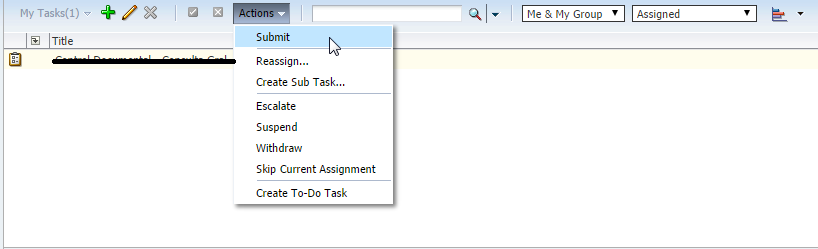 I recently came across a very interesting discussion on the Oracle BPM forum which stimulated my interest for investigation; how to suppress the human task custom outcomes from the action bar in the BPM Workspace application in 12c!
When you deploy a BPM process or a BPEL service that includes a human task component, the BPM Workspace will automatically include in its action bar the custom outcomes that you have defined on your human task.
In the image above it’s assumed that a composite has been deployed that includes a human task component that defines a custom outcome "Submit".
There are cases though that you might want to suppress this default behavior and not have your custom actions appearing in the actions list but just have them displayed in the task details.
In 11g this was "officially" supported with a checkbox option ("Show approval controls in task details only") in the advanced human task properties. Read the complete article here.
For regular information on Oracle SOA Suite become a member in the SOA & BPM Partner Community for registration please visit www.oracle.com/goto/emea/soa (OPN account required) If you need support with your account please contact the Oracle Partner Business Center.
 Blog
Blog  Twitter
  LinkedIn
 ![image[7][2][2][2]](https://paascommunity.com/wp-content/uploads/2013/04/image7222.png?w=20&h=20 "image[7][2][2][2]") Facebook
Facebook ![clip_image002[8][4][2][2][2]](https://paascommunity.com/wp-content/uploads/2013/04/clip_image00284222.jpg?w=26&h=23 "clip_image002[8][4][2][2][2]") Wiki
Wiki
 About Jürgen Kress

 PaaS Community Blog