SOA Cloud – Create Oracle Storage Cloud Service Container by Vivek Garg
May 23, 2017 Leave a comment
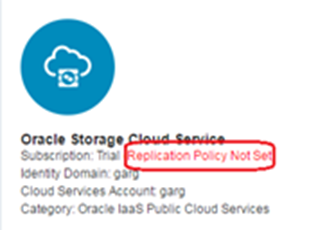
In this post, I will show how you can create container for Oracle Storage Cloud Service.Oracle Storage Cloud Service container is required before we proceed further with creation of Oracle Database Cloud Service and SOA Cloud Service. You will not be able to configure SOA Cloud service until and unless we create this container.
Before you proceed to this post, you need to install OpenStack client. You can refer this post to see how to install it.
Follow below steps to create the Oracle Storage Service Container.
Step 1:Replication Policy: Open your service dashboard and go to Oracle Storage Cloud Service. By default replication policy is not set so you need to set it first. To set it click on “Set Replication Policy” option.
Choose any one replication policy, for this post, we have selected em2. Read the complete article here.
For regular information on Oracle SOA Suite become a member in the SOA & BPM Partner Community for registration please visit www.oracle.com/goto/emea/soa (OPN account required) If you need support with your account please contact the Oracle Partner Business Center.
 Blog
Blog  Twitter
  LinkedIn
 ![image[7][2][2][2]](https://paascommunity.com/wp-content/uploads/2013/04/image7222.png?w=20&h=20 "image[7][2][2][2]") Facebook
Facebook ![clip_image002[8][4][2][2][2]](https://paascommunity.com/wp-content/uploads/2013/04/clip_image00284222.jpg?w=26&h=23 "clip_image002[8][4][2][2][2]") Wiki
Wiki
Technorati Tags: SOA Community,Oracle SOA,Oracle BPM,OPN,Jürgen Kress
 About Jürgen Kress

 PaaS Community Blog