SOA Suite 12.2.1 – OWSM WSM-02084 issue by Michel Schildmeijer
June 30, 2017 Leave a comment
Here another short tech tip
Another issue I encountered is not yet identified at MOS, not in the context I encountered it. The error was written to the logs every minute:
<Error> <oracle.wsm.resources.policymanager> <WSM-02084> <Access denied. Permission "oracle.wsm.security.PolicyManagerPermission" is required to access the wsm policy manager "UsageTracker" method "recordUsage".>
The only MOS reports on this was partially applicable for my situation: Bug 23279489 : WSM-02084 ERROR WHILE STARTING WSM/SOA SERVER IN DOMAIN PARTITION SETUP
The SOA Suite Domain was setup using a separate SOA and separate WSM Cluster, however the MOS note speaks about a created partition to be deleted… however domain partition is not yet supported for SOA 12.2.1 so that surprised me.
So here’s what brought me the solution.
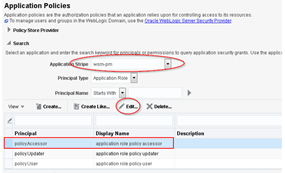
- Login to Fusion Middleware Control, expand the hamburger menu and right click on the domain, select Security and the Application Policies
- Select the ws-pm application stripe and edit the policy for policy.Acessor Read the complete article here.
For regular information on Oracle SOA Suite become a member in the SOA & BPM Partner Community for registration please visit www.oracle.com/goto/emea/soa (OPN account required) If you need support with your account please contact the Oracle Partner Business Center.
 Blog
Blog  Twitter
  LinkedIn
 ![image[7][2][2][2]](https://paascommunity.com/wp-content/uploads/2013/04/image7222.png?w=20&h=20 "image[7][2][2][2]") Facebook
Facebook ![clip_image002[8][4][2][2][2]](https://paascommunity.com/wp-content/uploads/2013/04/clip_image00284222.jpg?w=26&h=23 "clip_image002[8][4][2][2][2]") Wiki
Wiki
Technorati Tags: SOA Community,Oracle SOA,Oracle BPM,OPN,Jürgen Kress
 About Jürgen Kress

 PaaS Community Blog