Use HTML Content with UMS Adapters in OSB 12c by Chris Laurente
July 28, 2017 Leave a comment
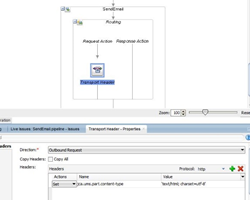
In this post, we will learn how to send html content for the emails using a UMS adapter in OSB 12c. There we go:
Pre-requirements
First, we need to verify that we have the UMS adapter and the email driver already working. These configurations are in the previous post Using UMS Adapter to send emails with OSB 12c.
Steps
So first we have to edit the UMS adapter and go to the step 5, Set the option “Message is Opaque (Base64Binary)”
Now, we need to encode the information to Base64 and use use it in the businees service. To accomplish this task we could use a Java callout and use it to encode the information. I have created a Jar file that encode and decode as Base64 and you can download it here.
Extract the jar library and import into the SB Project. Read the complete article here.
For regular information on Oracle SOA Suite become a member in the SOA & BPM Partner Community for registration please visit www.oracle.com/goto/emea/soa (OPN account required) If you need support with your account please contact the Oracle Partner Business Center.
 Blog
Blog  Twitter
  LinkedIn
 ![image[7][2][2][2]](https://paascommunity.com/wp-content/uploads/2013/04/image7222.png?w=20&h=20 "image[7][2][2][2]") Facebook
Facebook ![clip_image002[8][4][2][2][2]](https://paascommunity.com/wp-content/uploads/2013/04/clip_image00284222.jpg?w=26&h=23 "clip_image002[8][4][2][2][2]") Wiki
Wiki
Technorati Tags: SOA Community,Oracle SOA,Oracle BPM,OPN,Jürgen Kress
 About Jürgen Kress

 PaaS Community Blog