Automated Deployment to SOA Cloud Services using Developer Cloud Services by Roland Koenn
August 18, 2017 Leave a comment
Introduction
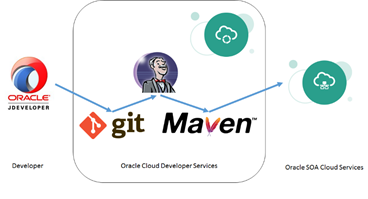
The process of deploying SOA Projects to Oracle SOA Cloud Services (SOACS) can be significantly simplified and streamlined using the Oracle Developer Cloud Services (DevCS) by facilitating the inbuilt Maven and GIT repositories. This article is a walk-through on how create a SOA Project in JDeveloper and get it deployed on SOACS using DevCS. It is based on Windows, but other operating systems work in a very similar way. The following graphic shows the simplified process.
Prerequisites
JDeveloper: Download and install SOA Suite 12.1.3 QuickStart from OTN. This contains the JDeveloper version required for this example. Please note that this example will work for SOA 12.2.1 as well, but you will additionally need to follow the steps described in My Oracle Support (MOS) note2186338.1
Maven: Download and install Maven from here.
Access to a Oracle SOA Cloud Services 12.1.3 instance. Details can be found here.
Access to Oracle Developer Cloud Services – this comes as part of the SOA Cloud Services subscription. You will receive an email with details on how to login with the subscription activation.
Creating the GIT repository
Login to the Oracle Developer Cloud Services and Select Create New Project. I am going with a Private Project, but using the Shared project is identical. Make sure to select an Empty Project and select your favourite Wiki Markup. Read the complete article here.
For regular information on Oracle SOA Suite become a member in the SOA & BPM Partner Community for registration please visit www.oracle.com/goto/emea/soa (OPN account required) If you need support with your account please contact the Oracle Partner Business Center.
 Blog
Blog  Twitter
  LinkedIn
 ![image[7][2][2][2]](https://paascommunity.com/wp-content/uploads/2013/04/image7222.png?w=20&h=20 "image[7][2][2][2]") Facebook
Facebook ![clip_image002[8][4][2][2][2]](https://paascommunity.com/wp-content/uploads/2013/04/clip_image00284222.jpg?w=26&h=23 "clip_image002[8][4][2][2][2]") Wiki
Wiki
Technorati Tags: SOA Community,Oracle SOA,Oracle BPM,OPN,Jürgen Kress
 About Jürgen Kress

 PaaS Community Blog