Cloud Control 13.2 and SOA Suite 12.2.1.1 by Matthias Fuchs
August 21, 2017 Leave a comment
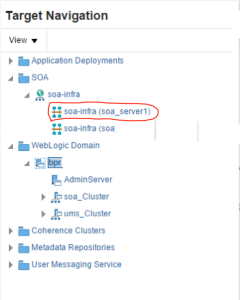
The intention is to monitor a SOA/BPM Cluster installation with 2 managed servers on two hosts with Cloud Control 13.2. There is a different user for weblogic and cloud control agent.
First step is to install the agents on 2 servers. Each server has one managed server. The easiest installation for agents is to install it with AgentPull Scripts.
Here is a short script, for further information about agent install see oracle documentation.
Please replace agent_home_dir with your agent base directory
Discover the SOA/BPM domain in Cloud control. After this, we start to check the functionality of the SOA monitoring part.
Open the domain
Choose a SOA Domain – here BPM_…
Check SOA infra
click on soa infra on left menu inside middleware domain. Read the complete article here.
For regular information on Oracle SOA Suite become a member in the SOA & BPM Partner Community for registration please visit www.oracle.com/goto/emea/soa (OPN account required) If you need support with your account please contact the Oracle Partner Business Center.
 Blog
Blog  Twitter
  LinkedIn
 ![image[7][2][2][2]](https://paascommunity.com/wp-content/uploads/2013/04/image7222.png?w=20&h=20 "image[7][2][2][2]") Facebook
Facebook ![clip_image002[8][4][2][2][2]](https://paascommunity.com/wp-content/uploads/2013/04/clip_image00284222.jpg?w=26&h=23 "clip_image002[8][4][2][2][2]") Wiki
Wiki
Technorati Tags: SOA Community,Oracle SOA,Oracle BPM,OPN,Jürgen Kress
 About Jürgen Kress

 PaaS Community Blog