BPM 12.2.1 ADF Auto-Generation Issue Solutions by Dan Atwood
September 5, 2017 Leave a comment
Others may disagree, but I am a fan of creating the first cut of ADF forms for Oracle BPM using the human task’s auto-generation feature. While this worked well in previous releases, in both 12.2.1.1 and 12.2.1.2 small manual edits are now required to eliminate the errors on the generated form.
There are now two types of errors caused by 12.2.1 auto-generation – edAttTy errors and duplicate ID errors.
edAttTy Errors
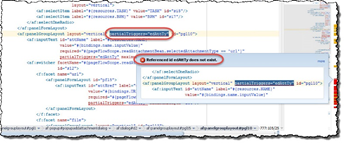
The first type of error on the generated page causes "Referenced id edAttTy does not exist" errors throughout the form:
Although customer support document Doc ID 2192543.1 describes the issue, this describes how the forms can be fixed.
1. In JDeveloper, click the Source tab at the lower left corner of the form that has the error. Read the complete article here.
For regular information on Oracle SOA Suite become a member in the SOA & BPM Partner Community for registration please visit www.oracle.com/goto/emea/soa (OPN account required) If you need support with your account please contact the Oracle Partner Business Center.
 Blog
Blog  Twitter
  LinkedIn
 ![image[7][2][2][2]](https://paascommunity.com/wp-content/uploads/2013/04/image7222.png?w=20&h=20 "image[7][2][2][2]") Facebook
Facebook ![clip_image002[8][4][2][2][2]](https://paascommunity.com/wp-content/uploads/2013/04/clip_image00284222.jpg?w=26&h=23 "clip_image002[8][4][2][2][2]") Wiki
Wiki
Technorati Tags: SOA Community,Oracle SOA,Oracle BPM,OPN,Jürgen Kress
 About Jürgen Kress

 PaaS Community Blog