Getting Started with Oracle Process Cloud Service by Andreas Chatziantoniou
October 9, 2017 Leave a comment
Coming from a Business Process Management (BPM) environment, the Oracle Process Cloud Service (PCS) certainly looks and feels different, and has a number of merits that might go unnoticed. This article shows how to discover the potential of PCS and put it to good use in your projects.
The World We Live In
For a number of years, budgets having been moving away from IT departments and into the business organization. This has led to a situation in which we encounter "citizen developers," typical business users who (at least in theory) write their own application.
Because many services now reside in the cloud, these citizen developers can start right away and do not need to wait weeks for the IT department to provision the systems. These cloud services are immediately accessible and provide an easy-to-use development environment for the quick release of small business applications.
So let’s have a look how a citizen developer might use PCS.
The Interface
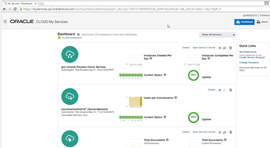
As with all Oracle Cloud Services, you will see a somewhat technical dashboard when first logging in to your domain. This is definitely aimed for developers and cloud administrators.
For somebody who has dealt with the typical Oracle Enterprise Manager Cloud Control, this certainly looks very dressed down. Remember that we are not — I repeat: NOT — managing the environment, which is in the cloud. What you see here is all you need to see — uptime and the number of instances/conversations/documents, etc.– that make up your cloud service. Read the complete article here.
For regular information on Oracle SOA Suite become a member in the SOA & BPM Partner Community for registration please visit www.oracle.com/goto/emea/soa (OPN account required) If you need support with your account please contact the Oracle Partner Business Center.
 Blog
Blog  Twitter
  LinkedIn
 ![image[7][2][2][2]](https://paascommunity.com/wp-content/uploads/2013/04/image7222.png?w=20&h=20 "image[7][2][2][2]") Facebook
Facebook ![clip_image002[8][4][2][2][2]](https://paascommunity.com/wp-content/uploads/2013/04/clip_image00284222.jpg?w=26&h=23 "clip_image002[8][4][2][2][2]") Wiki
Wiki
Technorati Tags: SOA Community,Oracle SOA,Oracle BPM,OPN,Jürgen Kress
 About Jürgen Kress

 PaaS Community Blog