ADF Autogeneration from Oracle BPM Human Tasks by Dan Atwood
October 12, 2017 Leave a comment
 Something we typically have to learn on our own is how to (1) auto-generate an ADF form and project from an Oracle BPM project and (2) how to reuse the ADF project when subsequently generating more ADF forms.
This has changed slightly in 12.2.1, and this provides step-by-step instructions on how to do this. This is an excerpt from Lesson 3 of AVIO’s new Oracle BPM Developer Training for 12.2.1.
Create an ADF Project and Form from a Human Task
Because human tasks in Oracle BPM projects are associated with the interactive activities, ADF forms can be automatically generated from the information flowing into and out of the human tasks.
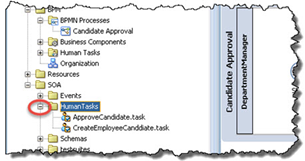
1. Inside the Applications tab, expand the SOA folder -> expand the Human Tasks folder.
2. Double click ApproveCandidate.task.
3. As shown below, click the Form dropdown -> Launch Task Form Wizard. Read the complete article here.
For regular information on Oracle SOA Suite become a member in the SOA & BPM Partner Community for registration please visit www.oracle.com/goto/emea/soa (OPN account required) If you need support with your account please contact the Oracle Partner Business Center.
 Blog
Blog  Twitter
  LinkedIn
 ![image[7][2][2][2]](https://paascommunity.com/wp-content/uploads/2013/04/image7222.png?w=20&h=20 "image[7][2][2][2]") Facebook
Facebook ![clip_image002[8][4][2][2][2]](https://paascommunity.com/wp-content/uploads/2013/04/clip_image00284222.jpg?w=26&h=23 "clip_image002[8][4][2][2][2]") Wiki
Wiki
Technorati Tags: SOA Community,Oracle SOA,Oracle BPM,OPN,Jürgen Kress
 About Jürgen Kress

 PaaS Community Blog