Web Forms in Oracle Process Cloud Service by Antonis Antoniou
March 4, 2018 Leave a comment
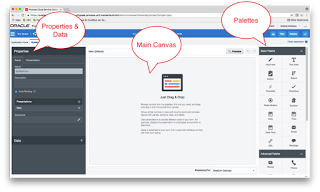
The September 2016 release introduced an entirely new web forms functionality called “Web Forms”, an alternative to its existing Frevvo web forms with the latter being renamed to “Basic Forms”. The new “Web Forms” functionality is more business user-friendly, promoting important development principles like multiple views, re-use, branding, list of values and fetching data using REST connections.
The new “Web Forms” group its functionality into three areas; the left area which includes the “Properties” section and the “Data” section, the right area that includes the palettes (basic, advanced, forms and business types) and the main area which is the drawing canvas.
Using drag and drop gestures you can design your form using any components from all four palettes. The “Basic Palette” includes basic components like the input text, button, checklist, radio button, date, etc. while the “Advanced Palette” includes components like image, video, section, tab, table, etc.
You can also use the “Forms Palette” to re-use previously created forms or you can use the “Business Type Palette” to create a user interface using a “data-first” approach (Oracle Process Cloud Service will automatically create a form using the data definitions of the business type). Read the complete article here.
For regular information on Oracle SOA Suite become a member in the SOA & BPM Partner Community for registration please visit www.oracle.com/goto/emea/soa (OPN account required) If you need support with your account please contact the Oracle Partner Business Center.
 Blog
Blog  Twitter
  LinkedIn
 ![image[7][2][2][2]](https://paascommunity.com/wp-content/uploads/2013/04/image7222.png?w=20&h=20 "image[7][2][2][2]") Facebook
Facebook ![clip_image002[8][4][2][2][2]](https://paascommunity.com/wp-content/uploads/2013/04/clip_image00284222.jpg?w=26&h=23 "clip_image002[8][4][2][2][2]") Wiki
Wiki
Technorati Tags: SOA Community,Oracle SOA,Oracle BPM,OPN,Jürgen Kress
 About Jürgen Kress

 PaaS Community Blog