Purging Strategies in Oracle SOA Suite 12c – Part II by Arturo Viveros
May 3, 2018 Leave a comment
In my earlier post about purging the Oracle SOA product database, I mentioned that this is one of the most critical tasks when it comes to ensuring the stability and performance of SOA/BPM Suite production environments.
This means that you should never neglect this or expect it to magically take care of itself.
So let’s take a look at a couple of extra tips to get a better grip on this:
In 12c we have auto-purge, which can be configured and scheduled from the EM console. Unfortunately, EM still lacks a reporting / alerting feature to provide purging statistics or at least make sure the jobs are actually running successfully. So, if you’re blindly trusting this feature, it could very well be that instances are piling up by the millions without you noticing until it becomes a problem.
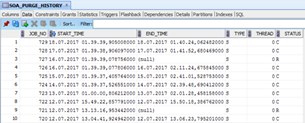
Luckily, there’s a very simple way to find out and keep track, just by looking into the SOA_PURGE_HISTORY table inside the SOAINFRA schema:
This table is pretty straightforward, as it will tell us the start & end time, if it was the single or the parallel script and the final status: C (Completed) or R (Rollbacked).
The out-of-the-box scripts are quite sensitive and enforce a lot of validations, which means that if anything goes wrong they will rollback everything and no instances will be purged whatsoever. So in case there’s a malfunction it’s good to be able to know and take the necessary steps to correct it before everything blows up. Read the complete article here.
For regular information on business process management and integration become a member in the SOA & BPM Partner Community for registration please visit www.oracle.com/goto/emea/soa (OPN account required) If you need support with your account please contact the Oracle Partner Business Center.
 Blog
Blog  Twitter
  LinkedIn
 ![image[7][2][2][2]](https://paascommunity.com/wp-content/uploads/2013/04/image7222.png?w=20&h=20 "image[7][2][2][2]") Facebook
Facebook ![clip_image002[8][4][2][2][2]](https://paascommunity.com/wp-content/uploads/2013/04/clip_image00284222.jpg?w=26&h=23 "clip_image002[8][4][2][2][2]") Wiki
Wiki
Technorati Tags: SOA Community,Oracle SOA,Oracle BPM,OPN,Jürgen Kress
 About Jürgen Kress

 PaaS Community Blog