ICS SOAP Connection – Retrieve File Uploaded WSDL by Greg Mally
June 3, 2018 Leave a comment
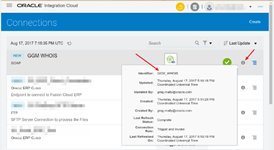
When working with Oracle Integration Cloud Service (ICS) SOAP Connections, it is common to upload a WSDL file when configuring the Connection Properties:
The focus of this blog is how to retrieve/recover the WSDL in the event the original file is not available. This can be accomplished in several ways that include an on-line and/or off-line approach. Regardless of the approach, it is important to understand that when the WSDL file is uploaded it is added to the connection as an attachment.
On-Line WSDL Retrieval via REST AP
ICS provides a set of REST APIs for managing and monitoring integrations, adapters, connections, lookups, and packages (https://docs.oracle.com/en/cloud/paas/integration-cloud-service/rest-api.html). One of these APIs can be used to retrieve the attached WSDL for the SOAP connection and interestingly enough, it is called Retrieve an Attachment. There are quite a few ways to work with REST APIs that include tools like SoapUI, browser add-ons like Postman/RESTClient, or linux commands like cURL. For this blog, we will be using linux cURL (https://curl.haxx.se/).
The Retrieve an Attachment API requires three pieces of information to construct the URL for the REST call:
1. ICS host name ([domain].integration.[region].oraclecloud.com … the first part of the ICS Console URL)
2. ICS Connection ID:
3. ICS Connection Property Name (targetWSDLURL). Read the complete article here.
For regular information on Oracle SOA Suite become a member in the SOA & BPM Partner Community for registration please visit www.oracle.com/goto/emea/soa (OPN account required) If you need support with your account please contact the Oracle Partner Business Center.
 Blog
Blog  Twitter
  LinkedIn
 ![image[7][2][2][2]](https://paascommunity.com/wp-content/uploads/2013/04/image7222.png?w=20&h=20 "image[7][2][2][2]") Facebook
Facebook ![clip_image002[8][4][2][2][2]](https://paascommunity.com/wp-content/uploads/2013/04/clip_image00284222.jpg?w=26&h=23 "clip_image002[8][4][2][2][2]") Wiki
Wiki
Technorati Tags: SOA Community,Oracle SOA,Oracle BPM,OPN,Jürgen Kress
 About Jürgen Kress

 PaaS Community Blog