ICS On-Premise Monitor – Agent Ping by Greg Mally
June 14, 2018 Leave a comment
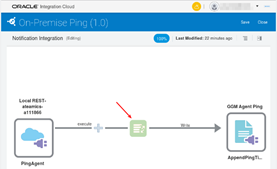
The Integration Cloud Service (ICS) Connectivity Agent is a feature of ICS that helps with the cloud to ground (on-premise) use case that is common to companies who are moving into cloud technologies. The agent provides an ICS subscriber the ability to create ICS integrations that interact with on-premise resources like legacy applications, databases, etc. without compromising the on-premise resource. In an attempt to make the agent as simple and secure as possible, it is located behind the firewall where the on-premise resource is located and communicates to the Oracle Public Cloud (OPC) via HTTP only. This allows the agent to use existing firewall configurations without added requirements on the “typical” organization network. However, some networks are more secure, complex, and/or stable than others and therefore are less “typical”. When these types of networks are encountered, it prevents the Connectivity Agent from successfully communicating from ground to cloud (or ICS communicating from cloud to ground). This blog focuses on a scenario where the network that the agent is installed on is flaky/unstable.
Although the Connectivity Agent has gone through a fair amount of maturity due to exposure to a wide range of network environments, there are those edge-case networks that can introduce communication challenges from ground to cloud. Sometimes these environments impact communication such that the agent thinks everything is working fine when in fact messaging has broken down between the on-premise network and OPC. What do you do when you know the agent is not receiving messages and the various ICS/agent logs do not indicate any problem? To make the scenario more complex, the communication breakdown does not follow any type of pattern (i.e., it is random). The key to finding the root cause is to narrow the window where the problem surfaces. Once the window is narrowed down, things like tcpdumps and/or tools like Wireshark can be leveraged. Read the complete article here.
For regular information on Oracle PaaS become a member in the SOA & BPM Partner Community for registration please visit www.oracle.com/goto/emea/soa (OPN account required) If you need support with your account please contact the Oracle Partner Business Center.
 Blog
Blog  Twitter
  LinkedIn
 ![image[7][2][2][2]](https://paascommunity.com/wp-content/uploads/2013/04/image7222.png?w=20&h=20 "image[7][2][2][2]") Facebook
Facebook ![clip_image002[8][4][2][2][2]](https://paascommunity.com/wp-content/uploads/2013/04/clip_image00284222.jpg?w=26&h=23 "clip_image002[8][4][2][2][2]") Wiki
Wiki
Technorati Tags: SOA Community,Oracle SOA,Oracle BPM,OPN,Jürgen Kress
 About Jürgen Kress

 PaaS Community Blog