Fixed SOA Suite CS Error in Oracle Cloud: Validation Failed – Unable to Create Service / Invalid Storage Container by Frank Munz
July 27, 2018 Leave a comment
This post should provide some help for those working for the first time with SOA CS in the Oracle Cloud.
After working a lot with ACCS, OCCS, Developer CS, and JCS, surprisingly I struggled with the provisioning of SOA CS in the Oracle Cloud. Part of the problem was that the storage service seems to be accessed in (at least) three different ways within OPC .
- The syntax StorageName-IDDomain/chosenContainerName workes fine for DB and Java CS. There also you can create the storage container while provisioning the service.
- I have seen slides at OOW2017 where the storage container name was specified as a single identifier, e.g. “xyzcontainer” (however I cannot find the my paparazzi for that cloud service right now).
- For SOA CS none of this worked. Also the reported solution in the ODC forum did not apply in this case. The tooltip actually suggested the syntax 1).
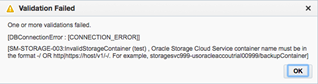
Also the error message(s) is not that helpful. “Validation Failed” could mean anything. “Check the log file for the real cause” makes me wonder in case of a PaaS service. What worked for SOA CS is using pre-creating the container and using the REST endpoint of the storage service.
Some Details
For SOA CS, when using the syntax that nicely worked for DB and JCS as described in 1) be prepared to see the following error message: Read the complete article here.
For regular information on Oracle PaaS become a member in the SOA & BPM Partner Community for registration please visit www.oracle.com/goto/emea/soa (OPN account required) If you need support with your account please contact the Oracle Partner Business Center.
 Blog
Blog  Twitter
  LinkedIn
 ![image[7][2][2][2]](https://paascommunity.com/wp-content/uploads/2013/04/image7222.png?w=20&h=20 "image[7][2][2][2]") Facebook
Facebook ![clip_image002[8][4][2][2][2]](https://paascommunity.com/wp-content/uploads/2013/04/clip_image00284222.jpg?w=26&h=23 "clip_image002[8][4][2][2][2]") Wiki
Wiki
Technorati Tags: SOA Community,Oracle SOA,Oracle BPM,OPN,Jürgen Kress
 About Jürgen Kress

 PaaS Community Blog