Troubleshooting Oracle API Platform Cloud Service by Lonneke Dikmans
September 25, 2018 Leave a comment
One of the challenges when working in integration is troubleshooting. This becomes even more challenging with when you start using a new product.
Recently I worked with Oracle Product management (Thank you Darko and Lohit) to troubleshoot issues with an OAuth configuration of APIs in Oracle API Platform Cloud Service.
Setup
The setup was as follows:
- An API Gateway node deployed to Oracle Compute Cloud Classic as an infrastructure provider
- Oracle Identity Management Cloud Service in the role of OAuth provider
We setup an API with several policies, including OAuth for security. When we called the service, it gave us a ‘401 unauthorized’ error.
Oracle API Platform Cloud Service troubleshooting
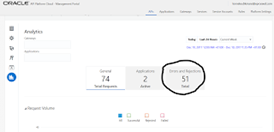
The Oracle API Platform Service offers analytics for each API. You can navigate there by opening the API Platform Management portal, click on the API you want to troubleshoot and click on the Analytics tab (this is the bottom tab).
Click on Errors and Rejections, after setting the period you are interested in. Usually when you are troubleshooting, you would like to see the last hour. Read the complete article here.
For regular information on Oracle PaaS become a member in the SOA & BPM Partner Community for registration please visit www.oracle.com/goto/emea/soa (OPN account required) If you need support with your account please contact the Oracle Partner Business Center.
 Blog
Blog  Twitter
  LinkedIn
 ![image[7][2][2][2]](https://paascommunity.com/wp-content/uploads/2013/04/image7222.png?w=20&h=20 "image[7][2][2][2]") Facebook
Facebook ![clip_image002[8][4][2][2][2]](https://paascommunity.com/wp-content/uploads/2013/04/clip_image00284222.jpg?w=26&h=23 "clip_image002[8][4][2][2][2]") Wiki
Wiki
Technorati Tags: SOA Community,Oracle SOA,Oracle BPM,OPN,Jürgen Kress
 About Jürgen Kress

 PaaS Community Blog