Oracle Integration Cloud Tips & Tricks: Work-around for no Script Activity by Jan Kettenis
January 3, 2019 Leave a comment
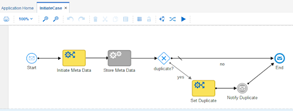
Oracle Process Cloud Services (PCS) nor the Process Builder in Oracle Integration Cloud (OIC) have a Script activity like there is in (on-premise) BPM Suite. In the BPM Suite you can use a Script activity for data mappings as well as Groovy. That OIC does not support Groovy is by design as the idea is to keep it as simple as possible. However missing the data mapping feature of the Script activity can make it even more complex than ever. Fortunately there is some data mapping activity on the road-map of some next version of OIC. Until then you can make use of the work-around below.
There can be several reasons why you may want to have an activity just for mapping data, among them:
- Readability of the process model, making it clear which data is set where in the process.
- Data mapping is conditional, making it too complex or impossible to do it in the Input or Output mapping of (for example) a Service activity.
- A conditional mapping before a Gateway.
- Iterative development, requiring (temporary) "hard-coding".
The work-around is to use a Rule activity which uses an input and output parameter of the type of the data object you want to map the data to.
A such the Rule activity is deprecated as it is superseded by the Decision activity, but as long as it is there (and a Mapping activity is not) we can make good use of it. Read the complete article here.
For regular information on Oracle PaaS become a member in the SOA & BPM Partner Community for registration please visit www.oracle.com/goto/emea/soa (OPN account required) If you need support with your account please contact the Oracle Partner Business Center.
 Blog
Blog  Twitter
  LinkedIn
 ![image[7][2][2][2]](https://paascommunity.com/wp-content/uploads/2013/04/image7222.png?w=20&h=20 "image[7][2][2][2]") Facebook
Facebook ![clip_image002[8][4][2][2][2]](https://paascommunity.com/wp-content/uploads/2013/04/clip_image00284222.jpg?w=26&h=23 "clip_image002[8][4][2][2][2]") Wiki
Wiki
Technorati Tags: SOA Community,Oracle SOA,Oracle BPM,OPN,Jürgen Kress
 About Jürgen Kress

 PaaS Community Blog