Extending analytics for Integration cloud using Elastic stack by Mani Krishnan Introduction
February 14, 2019 Leave a comment
 Oracle Integration Cloud (OIC) offers industry-leading SaaS integration capabilities. It provides extensive monitoring, tracking and reporting features out-of-the-box. Occasionally, enterprises do have reporting and analysis needs those are better met by additional reporting and analytics products. This article discusses couple of such use cases and describes how to implement one of them using Elastic stack. Information in this article is applicable to release 18.1.3 of integration cloud.
Main article
Let’s consider these scenarios:
- Customer’s integrations are deployed to multiple instances of OIC. Customer wants a consolidated view of all integrations on single dashboard.
- Customer needs to customize several aspects of reporting such as type of charts and data retention.
- Customer wants end-to-end view of transactions across multiple applications, including those deployed to OIC.
Use cases represented by these scenarios can be met by externalizing integration metrics from OIC into another platform specializing on analytics. Let’s look at some recommended ways to extract metrics from OIC and importing them into ELK (Elastic-LogStash-Kibana). Elastic stack is a widely-used opensource platform for analytics and dashboards. Jump to one of the sections by click the link.
- Why Elastic stack?
- Patterns
- Extracting integration metrics
- Extracting information for tracking
- Indexing data using LogStash
- Visualizing data using Kibana
Why Elastic stack?
Elastic is among products that allow infinite scaling and support map-reduce for efficient distributed queries. Note that other products such as Oracle big-data analytics cloud service or Oracle log analytics can also meet aforementioned requirements. Elastic is used in this blog for its simplicity for demonstration purposes.
For sake of simplicity, the post does not address deployment of ELK stack. Refer to Elastic web site for instructions. A simple installation could run on a laptop. More complex, distributed deployments will require careful planning of compute, storage resources and indexes.
Patterns
Now that the basics on collecting relevant metrics are covered here are patterns that will help meet the requirements.
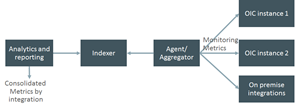
Consolidated Reporting is achieved by collecting monitoring metrics from multiple OIC instances and feeding them into one analytics application instance.
With ELK stack, LogStash is the agent/aggregator, Elastic is the indexer and Kibana is the analytics and reporting client. This pattern could help building reports for billing and historic analytics or correlate traffic patterns from multiple integration platforms.
End-to-end transaction monitoring can be achieved by collecting start, end times, tracking id and completion status for parts of an end-to-end transaction from each participating application, feeding them into an analytics application and running map-reduce queries that correlate parts of a transaction using tracking id. Read the complete article here.
For regular information on Oracle PaaS become a member in the SOA & BPM Partner Community for registration please visit www.oracle.com/goto/emea/soa (OPN account required) If you need support with your account please contact the Oracle Partner Business Center.
 Blog
Blog  Twitter
  LinkedIn
 ![image[7][2][2][2]](https://paascommunity.com/wp-content/uploads/2013/04/image7222.png?w=20&h=20 "image[7][2][2][2]") Facebook
Facebook ![clip_image002[8][4][2][2][2]](https://paascommunity.com/wp-content/uploads/2013/04/clip_image00284222.jpg?w=26&h=23 "clip_image002[8][4][2][2][2]") Wiki
Wiki
Technorati Tags: SOA Community,Oracle SOA,Oracle BPM,OPN,Jürgen Kress
 About Jürgen Kress

 PaaS Community Blog