ICS to OIC Migration by Abhay Kumar
April 5, 2019 Leave a comment
Introduction
Oracle Integration Cloud (OIC) and Integration Cloud Service (ICS) are iPaaS offerings from Oracle. ICS was released back in 2015 has now been superseded by OIC. Customers on ICS can choose to be on ICS or migrate to OIC to take advantage of new features and services built into OIC. The comparison of ICS and OIC is out-of-scope of this blog post.
This blog post describes migration steps from ICS to OIC. Customers who have a implemented ICS can make use of this blog post to migrate from ICS to OIC.
Migration from ICS to OIC
Currently ICS has a feature to export one ICS integration flow/interface at a time from ICS UI. After a flow is exported from ICS, this flow can then be imported into OIC using import functionality on OIC UI. This should allow an integration flow to migrate from ICS to OIC. However, this approach is cumbersome when there are many flows in ICS that are to be migrated to OIC since every flow needs to be exported and imported one by one.
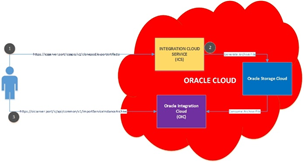
Thankfully there is Clone Utility provided for bulk export of all the integrations, connections, packages, libraries and other artifacts from ICS to OIC. The Clone Utility is a bunch of REST APIs in ICS and OIC. ICS provides REST APIs to bulk export ICS artifacts and OIC provides REST APIs to import these exported artifacts.
Prerequisites
1. Existing ICS service with Admin role access to the service.
2. Provisioned OIC service with Admin role access to the service.
3. The Clone Utility feature is NOT Generally Available(GA) yet. A feature flag has to be enabled on OIC to enable this feature. To turn on the feature flag, one should open a SR with Oracle support.
4. Access to create and update a container on Oracle Storage Cloud
What can be Exported?
The clone utility helps export all ICS/OIC artifacts expect the agent and agent groups. The agent and agent groups need to be created manually. Here are the list of items the clone utility exports and imports –
1. All integration flows of all patterns
2. All connections including url, username and password credentials
3. All packages
4. All Libraries
5. All certificates configured in ICS
6. All Lookups
High Level Steps
The following picture provides the high-level steps involved.
Detailed Steps
STEP 1: IDENTIFY STORAGE URL Read the complete article here.
For regular information on Oracle PaaS become a member in the SOA & BPM Partner Community for registration please visit www.oracle.com/goto/emea/soa (OPN account required) If you need support with your account please contact the Oracle Partner Business Center.
 Blog
Blog  Twitter
  LinkedIn
 ![image[7][2][2][2]](https://paascommunity.com/wp-content/uploads/2013/04/image7222.png?w=20&h=20 "image[7][2][2][2]") Facebook
Facebook ![clip_image002[8][4][2][2][2]](https://paascommunity.com/wp-content/uploads/2013/04/clip_image00284222.jpg?w=26&h=23 "clip_image002[8][4][2][2][2]") Wiki
Wiki
Technorati Tags: SOA Community,Oracle SOA,Oracle BPM,OPN,Jürgen Kress
 About Jürgen Kress

 PaaS Community Blog