Jarvis Pizzeria: Deploying and reverting to Snapshots by Richard Olrichs & Marcel van de Glind & Marc Kuijpers

image

When working on a PCS application, you save and publish your changes often. However, when you publish a certain state of the application, you can decide to create a snapshot of this state of the application.
This can be very helpful if the publish represents a certain version of the application. Later these snapshots can be deployed or reverted to in case you want to roll back to a previous version. It is also possible to see what was in the application at the time of the snapshot creation.
In this blog we will show you how to work with snapshots.

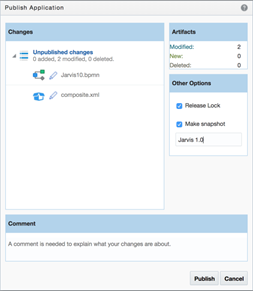
When publishing, in the popup on the right hand side there is an option to ‘Make Snapshot’, when this checkbox is checked you can enter a name for the snapshot, in this case the snapshot will represent Jarvis 1.0! Read the complete article here.

PaaS Partner Community

For regular information on Oracle PaaS become a member in the SOA & BPM Partner Community for registration please visit www.oracle.com/goto/emea/soa (OPN account required) If you need support with your account please contact the Oracle Partner Business Center.

Blog Twitter LinkedIn image[7][2][2][2] Facebook clip_image002[8][4][2][2][2] Wiki

Technorati Tags: SOA Community,Oracle SOA,Oracle BPM,OPN,Jürgen Kress

PaaS (Process & Integration) Partner Community Newsletter September 2018

Dear PaaS Partner Community,

The PaaS Summer Camp took place the 8th time in Lisbon Portugal from August 27th to 31st 2018. It was a busy week full of hands-on training. With 145 attendees and 725 attendee days we would like to say special thanks to our partners for the huge time investment. The conference was rated with an average of 4,6 out of maximum 5 point! Or how Rutger Hierck from Accenture quoted “Best workshop in years”. For some impressions please see twitter #PaaSSummerCamp and visit our Facebook page. In case you could not attend training material is available via the community workspace (membership required). An excellent training which provides the complete PaaS overview as the Innovate & Integrate and Extend SaaS Bootcamps across EMEA. For developers we offer the local Meetup groups. The next opportunity to network with the community is during the Oracle OpenWorld 2018 Reception in San Francisco.

Thanks to the community for sharing all the Integration articles: API Gateway SSL configuration in Production & Now available: Cloud Integration & API Management for Dummies, 2nd Edition & Download and Run Connectivity Agent Oracle Integration Cloud (OIC) & How to use Litmus to create OIC Integration unit tests automatically and run them to catch regressions & Scaling Autonomous Oracle Integration Cloud & OIC Integration 101 Part V – Social adapters – Facebook and Twitter & How to enable and use Tracing in less than 5 min & Migrate Integration Cloud Service (ICS) Integrations to Integration Cloud (OIC) & OIC integration with Fusion HCM & the efficacy of BI reports & HCM REST APIs & Leverage Microsoft Email Adapter to send email using Oracle Integration Cloud (OIC) (Part-1) & Lift and Shift SOA 11G to Oracle SOA Cloud Service & Road to Oracle Cloud & UiPath leverages Oracle Cloud Platform for Robotic Process Automation & SOA Suite on containerized platform – Docker.

In the BPM section Eduardo published Evolution of Business Process Modeling and Niall OIC Process & VB CS Part 3 – Starting a Process and Workspace & Building your First VBCS Application.

Thanks to the community for sharing all innovation articles: Introducing Oracle Autonomous Blockchain Cloud Service on-demand webcast & Call for papers OUGN Spring Conference 2019.

For a short summery of our key monthly information watch the Fusion Middleware & PaaS Partner Updates on YouTube. The September edition highlights the PaaS Summer Camp. This month’s community webcast will introduce the new PaaS pricing to Innovate, Extend and Integrate SaaS, please join our monthly PaaS Partner Community Webcast – September 18th 2018.

Want to publish your best practice article & news in the next community newsletter? Please feel free to send it via Twitter @soaCommunity #PaaSCommunity!


To read the newsletter please visit www.tinyurl.com/PaaSNewsSeptember2018 (OPN Account required)

Please like and share the newsletter at Twitter and LinkedIn

Jürgen Kress

PaaS Partner Adoption
Oracle EMEA
Tel. +49 89 1430 1479
E-Mail: juergen.kress@oracle.com
clip_image003Blog clip_image004LinkedIn clip_image005 Twitter

To become a member of the SOA Partner Community please register at http://www.oracle.com/goto/emea/soa (OPN account required) If you need support with your account please contact the Oracle Partner Business Center.

Newsletter Logo 2017

Blog Twitter LinkedIn image[7][2][2][2] Facebook

Technorati Tags: newsletter,SOA Community newsletter,SOA Community,Oracle,OPN,Jürgen Kress

Quick look into Oracle BPM 12c REST APIs by Sebastian Marucci

image

Back in mid-2014, Oracle was releasing Oracle BPM 11g Bundle Patch 3 and with it, the first version of its BPM REST APIs. That first cut was a good starting point, but it just offered a limited amount of functionality (find my previous post here). In this post, we’ll take a look at the BPM REST APIs version 12.2.1.2, released in August 2016, and see how they evolved after 2 years.

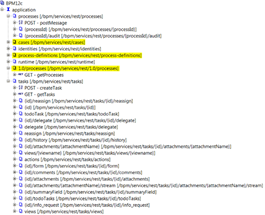
The list of available services can be obtained by accessing to http://yourserver:port/bpm/services/rest/application.wadl.

The picture above shows all the REST services included in this new version; highlighted in yellow are the new services introduced since the first version of the REST APIs. There’s one curious thing, the two processes services (1.0/processes and /processes). Like in the very first version of processes service, if you execute getProcess operation, the response is just “Processes.”. Likewise with runtime service, if you execute getRuntime operation, the response is an empty string. Read the complete article here.

PaaS Partner Community

For regular information on Oracle PaaS become a member in the SOA & BPM Partner Community for registration please visit www.oracle.com/goto/emea/soa (OPN account required) If you need support with your account please contact the Oracle Partner Business Center.

Blog Twitter LinkedIn image[7][2][2][2] Facebook clip_image002[8][4][2][2][2] Wiki

Technorati Tags: SOA Community,Oracle SOA,Oracle BPM,OPN,Jürgen Kress

Unshackle the Business – Best Practices in UI and Process Designs by Mark Peterson

image

To remain competitive, companies have to continually drive down costs while maintaining value in the products and services they offer. One area where companies look to reduce costs is in Business Process Management (BPM).

When it comes to IT expenditures, some companies may invest a small fortune in BPM, while others may simply rely on basic tools, such as spreadsheets and Post-it notes. Regardless of the amount spent, if the tools are hard to use or the process is cumbersome then your business has become shackled and is wasting time and energy.

Are your company’s internal business processes helping or hurting efficiency? Take this simple assessment:

  • Do your employees have relevant and useful tools to complete their work or do they waste time navigating complicated or out-of-date systems?
  • Do their tools or user interfaces (UIs) involve countless forms or spreadsheets or are they streamlined and concise?
  • Do the business processes or workflow they must follow slow them down or accelerate their work?

AVIO has developed best practices in UI and business process design that help organizations reduce their cost of doing business and increase worker satisfaction. These practices and designs, when implemented, empower employees and help drive organizational change, which can ultimately affect the company’s bottom line. Read the complete article here.

PaaS Partner Community

For regular information on Oracle PaaS become a member in the SOA & BPM Partner Community for registration please visit www.oracle.com/goto/emea/soa (OPN account required) If you need support with your account please contact the Oracle Partner Business Center.

Blog Twitter LinkedIn image[7][2][2][2] Facebook clip_image002[8][4][2][2][2] Wiki

Technorati Tags: SOA Community,Oracle SOA,Oracle BPM,OPN,Jürgen Kress

Jarvis Pizzeria: Deploying and Reverting to Snapshots by Richard Olrichs & Marcel van de Glind

image

When working on a PCS application, you save and publish your changes often. However, when you publish a certain state of the application, you can decide to create a snapshot of this state of the application.

This can be very helpful if the publish represents a certain version of the application. Later these snapshots can be deployed or reverted to in case you want to roll back to a previous version. It is also possible to see what was in the application at the time of the snapshot creation.
In this blog we will show you how to work with snapshots.

When publishing, in the popup on the right hand side there is a option to ‘Make Snapshot’, when this checkbox is checked you can enter a name for the snapshot, in this case the snapshot will represent Jarvis 1.0!

After the Changes have been published and a snapshot is created we go to the deploy screen by clicking the deploy button. Read the complete article here.

PaaS Partner Community

For regular information on Oracle PaaS become a member in the SOA & BPM Partner Community for registration please visit www.oracle.com/goto/emea/soa (OPN account required) If you need support with your account please contact the Oracle Partner Business Center.

Blog Twitter LinkedIn image[7][2][2][2] Facebook clip_image002[8][4][2][2][2] Wiki

Technorati Tags: SOA Community,Oracle SOA,Oracle BPM,OPN,Jürgen Kress

Jarvis Pizzeria: Workaround for XSD list-element issue in WebForms by Richard Olrichs & Marcel van de Glind

image

In a previous blog we have made notices that it is not possible to create a Webform based on a xsd-type that contains a list elements. In our case a list of pizza ingredients.

In this post we will give an alternative way to create a webform that displays the data, including the list of ingredients. For this we have created a new form IngredientsWebForm.

As we tried before, It does not work to drop the full business object on the canvas. Therefore, we have now made up the form of separate components. 4 input text components, of which 2 are listed in a table component and a number component that is also displayed in the table. This results in the following format.

This is the form we will use for all different presentation (one of our next posts will be about different presentation of one and the same WebForm), but first we will use it in its default. In the top left corner you see that this is the main presentation which is also the default. It is quite logically that it is the default, because it’s the only one 🙂

After saving the WebForm we go back to the process to update the various tasks.

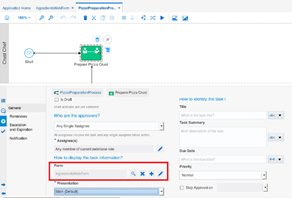
For each task we have switched the form reference to the new IngredientsWebForm. The below example shows this for the ‘Prepare Pizza Crust’ task. The example also shows that the Main presentation is selected for the task. Read the complete article here.

PaaS Partner Community

For regular information on Oracle PaaS become a member in the SOA & BPM Partner Community for registration please visit www.oracle.com/goto/emea/soa (OPN account required) If you need support with your account please contact the Oracle Partner Business Center.

Blog Twitter LinkedIn image[7][2][2][2] Facebook clip_image002[8][4][2][2][2] Wiki

Technorati Tags: SOA Community,Oracle SOA,Oracle BPM,OPN,Jürgen Kress

Jarvis Pizzeria: Human Tasks: Design First WebForms in PCS by Richard Olrichs & Marcel van de Glind

image

To create simple Human Tasks we use web forms in Process Cloud Service (PCS). Within the Delivery Process of the Jarvis Pizzeria, we are going to implement the HT for ‘Try Contacting the Customer’. This human task should become available after we have checked that the Customer is not a member and we do not know his email address. 

Try contacting the non-regular / member from Jarvis Pizzeria, in the swimlane of the CallCenter.

We will take the Design First approach, meaning we will design the form and know what data objects we need afterwards, instead of looking at the data we need for the Human Task first.

This means we can start by creating a new web form.

In the properties window from the task we click the add ‘+’ icon next to the Form.

We want to, but also only can select the ‘New Web Form’ option, the basic form is the old form used in previous versions of PCS. It is still available in the engine for backwards compatibility. Selecting this option will open the ‘Create New Web Form’. Read the complete article here.

PaaS Partner Community

For regular information on Oracle PaaS become a member in the SOA & BPM Partner Community for registration please visit www.oracle.com/goto/emea/soa (OPN account required) If you need support with your account please contact the Oracle Partner Business Center.

Blog Twitter LinkedIn image[7][2][2][2] Facebook clip_image002[8][4][2][2][2] Wiki

Technorati Tags: SOA Community,Oracle SOA,Oracle BPM,OPN,Jürgen Kress

Jarvis Pizzeria: Notification Task in PCS by Richard Olrichs & Marcel van de Glind


imageSo far we have covered most standard components of the PCS suite. However, we haven’t looked at the “Notification Task” in-depth yet. We have used the on-premises variant at various projects but it was the hassle of setting up the User Messaging Service (UMS) that made you reluctant to use this feature on beforehand. Will the PCS variant be a gamechanger? Let’s find out!

We implemented a basic process with a standard notification task and configured it to send an email to marc.kuijpers@rubix.nl. The implementation details are shown below:

We deployed the process and sent a SOAP message to the corresponding endpoint. Looking at our instance in the workspace we see the following successful instance:

Yaaay! But before we ship this version to a production environment let’s see if we have received an email…..Unfortunately the answer is no 😦

Hmm, have we missed a setting? Do we have to configure something? Crawling to the settings in the Business Process Workspace we encountered the infrastructure tab. And it turns out that this is the place where we can configure the notification service. Read the complete article here.

PaaS Partner Community

For regular information on Oracle PaaS become a member in the SOA & BPM Partner Community for registration please visit www.oracle.com/goto/emea/soa (OPN account required) If you need support with your account please contact the Oracle Partner Business Center.

Blog Twitter LinkedIn image[7][2][2][2] Facebook clip_image002[8][4][2][2][2] Wiki

Technorati Tags: SOA Community,Oracle SOA,Oracle BPM,OPN,Jürgen Kress

Jarvis Pizzeria: Different presentations for the same WebForm by Richard Olrichs & Marcel van de Glind

image

In a previous blog we created a default WebForm for the Pizza Preparation process. In each human interaction of the process we used this default WebForm with the default presentation. In this post we will create a different presentation for each human interaction in the process.

  1. Crust Preparation Will only show the pizza name and size. Both fields are editable.
  2. Filling the Pizza Shows alle data. The pizza name and size are read-only. The ingredients are editable. It’s also possible to add or remove ingredients.
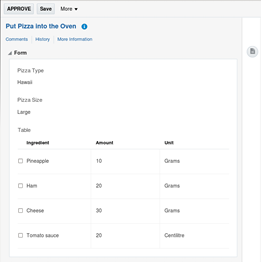
  3. Put in Oven All data is shown read-only.
  4. Get out the Oven The Pizza naam and size are shown read-only.

As a starting point for this blog, we use the end result of the above mentioned blog. We begin by adding presentations to the IngredientsWebForm. Read the complete article here.

PaaS Partner Community

For regular information on Oracle PaaS become a member in the SOA & BPM Partner Community for registration please visit www.oracle.com/goto/emea/soa (OPN account required) If you need support with your account please contact the Oracle Partner Business Center.

Blog Twitter LinkedIn image[7][2][2][2] Facebook clip_image002[8][4][2][2][2] Wiki

Technorati Tags: SOA Community,Oracle SOA,Oracle BPM,OPN,Jürgen Kress

PaaS (Process & Integration) Partner Community Newsletter August 2018

Dear PaaS Partner Community,

The Next-Generation Cloud of autonomous services becomes available. For an overview of the Autonomous PaaS Platform watch the on-demand webcast here. You can also attend an upcoming hands-on Innovate & Integrate and Extend SaaS Bootcamps across Europe. This Bootcamps are designed for consultants who implement CX, ERP or HCM Cloud solutions and for developers who want to get a PaaS overview.

In case you missed our Autonomous Oracle Integration Cloud (OIC) kickoff webcast on demand recording is available here. You can also attend an Integration Day across the US. Thanks to Niall who published an OIC technical overview series part I and part II. Thanks to the community for sharing all the Integration articles: ICS to OIC Migration & Digital Success Demands Integration Excellence & Vibrant and Growing: The Current State of API Management & Apply SSL certificate on API CS physical Gateway node & Read XML file using Oracle ICS / OIC FTP adapter & SOASuite12c – BPEL: JTA transaction is not in active state

In the BPM section we published an article from Barry on How robotics can humanise your workforce.

UiPath and Oracle joined a partnership to offer a complete robotic process automation (RPA) platform. For partners we offer a partner resource kit. To start with RPA join our monthly community webcast.

Blockchain Cloud Service is a transformation technology. With the availability of Blockchain Cloud Service we published a partner resource kit here. This kit includes sales material including a customer presentation in ppt format, cheat sheet and elevator pitch, references, training material and free cloud trials. For an Blockchain introduction watch Joost and Robert’s videos

Thanks to the community for sharing all innovation articles: Analyzing the Blockchain Advantage & Prepping for the Oracle AI Cloud: Machine Learning & Oracle Cloud – Using AI cloud Platform to find a parking spot & What’s new in Oracle IoT Production Monitoring – Summer 2018 edition.

For a short summery of our key monthly information watch the Fusion Middleware & PaaS Partner Updates on YouTube. The August edition highlights the availability of Blockchain Cloud Service, Chabot and Innovate SaaS hands-on training’s. This month’s community webcast will introduce the Robotic Process Automation, please join our monthly Partner Community Webcast – August 21st 2018.


To read the newsletter please visit www.tinyurl.com/PaaSNewsAugust2018 (OPN Account required)

Please like and share the newsletter at Twitter and LinkedIn

Jürgen Kress

PaaS Partner Adoption
Oracle EMEA
Tel. +49 89 1430 1479
E-Mail: juergen.kress@oracle.com
clip_image003Blog clip_image004LinkedIn clip_image005 Twitter

To become a member of the SOA Partner Community please register at http://www.oracle.com/goto/emea/soa (OPN account required) If you need support with your account please contact the Oracle Partner Business Center.

Newsletter Logo 2017

Blog Twitter LinkedIn image[7][2][2][2] Facebook

Technorati Tags: newsletter,SOA Community newsletter,SOA Community,Oracle,OPN,Jürgen Kress