ADF Runtime Interface Generator for BPM Human Tasks by Pedro Gabriel


clip_image002Pedro Gabriel, an Oracle BPM Consultant at Link Consulting, based this 2 Minute Tech Tip on ADF Runtime Interface Generator for BPM Human Tasks, an OTN technical article he wrote with co-authors Diogo Franqueira Henriques and Danilo Alexandre Manmohanlal.

Watch the video here. Want more 2 Minute Tech Tips? Click here.

SOA & BPM Partner Community

For regular information on Oracle SOA Suite become a member in the SOA & BPM Partner Community for registration please visit www.oracle.com/goto/emea/soa (OPN account required) If you need support with your account please contact the Oracle Partner Business Center.

Blog Twitter LinkedIn image[7][2][2][2] Facebook clip_image002[8][4][2][2][2] Wiki

Technorati Tags: SOA Community,Oracle SOA,Oracle BPM,OPN,Jürgen Kress
RESTful Invoke BPM Process Using Apache CXF by John Featherly


clip_image002Apache CXF is a services framework that is the open source evolution of IONA Celtix and Codehaus XFire, hence the name CXF. CXF has extensive support for Web Service standards WS-*, JAX-WS and JAX-RS APIs etc. but the focus of this article is on the CXF web service client proxy factory and running it in a WebLogic web app implementing a REST service. As a demonstration we will build a service using JDeveloper that invokes an Oracle BPM process with a message start service interface. REST “clients” are lightweight and simpler to implement than SOAP web service clients. A REST to SOAP converter for BPM processes make them more accessible.

For the impatient, the two key enablers are to determine the proper subset of CXF library jars and resolve any conflicts with WebLogic libraries. The CXF distribution has 149 jars and you don’t want to just simply add them all to your project. The following list is based on the dynamic client sample in the CXF distribution from the 3.1.0 release.

The Demo Service

The demo is a RESTful service that invokes a message start BPM process via the usual SOAP Web Service call based on the published WSDL for the process. The service will be deployed and run on WebLogic. The process can have any number of parameters which we will assume to be all of type string to keep things simple. It would be straightforward to handle arbitrary types since we introspect the generated proxy class but I’ll leave that as an exercise for the reader. The most common BPM process invoke is asynchronous with no callback, go do your work and don’t ever bother me about it. That is call mechanism implemented in the demo.

BPM Process

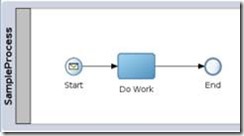
A sample BPM process is needed to test the REST service. A representative process will have a message Start with End type set to None since we won’t be listening for a callback.

The defined interface with four sample string arguments would look like: Read the complete article here.

SOA & BPM Partner Community

For regular information on Oracle SOA Suite become a member in the SOA & BPM Partner Community for registration please visit www.oracle.com/goto/emea/soa (OPN account required) If you need support with your account please contact the Oracle Partner Business Center.

Blog Twitter LinkedIn image[7][2][2][2] Facebook clip_image002[8][4][2][2][2] Wiki

Technorati Tags: SOA Community,Oracle SOA,Oracle BPM,OPN,Jürgen Kress

SOA Suite 12c and BPM Suite 12c Live virtual classes free of charge starting March 7th 2016 !


clip_image002SOA Suite 12c CIS TOD

    • Requirement for soon to be announced PaaS Specializations – “SOA Cloud Service” and “Integration Cloud Platform"
      • Specialization to support the following product/cloud services: SOA 12c, SOA Cloud, Integration Cloud
    • Lab format: hosted, 07Mar16 – 01Apr16
    • Register here

Creating BPM Process with BPM Composer by Waslley Souza


clip_image002The Oracle Business Process Composer application is designed to allow you to easily create, edit, and manage BPM projects. With the BPM Composer, the Business Analyst can model, test and simulate a process before implementing it. Let’s create a simple process!

Start your BPM Domain and go to BPM Composer.

http://HOST:PORT/bpm/composer

Create a new BPM Project.

In the process, change the Default Role to Process Owner.

Add an Initiator between Start and End Events. Read the complete article here.

SOA & BPM Partner Community

For regular information on Oracle SOA Suite become a member in the SOA & BPM Partner Community for registration please visit www.oracle.com/goto/emea/soa (OPN account required) If you need support with your account please contact the Oracle Partner Business Center.

Blog Twitter LinkedIn image[7][2][2][2] Facebook clip_image002[8][4][2][2][2] Wiki

Technorati Tags: SOA Community,Oracle SOA,Oracle BPM,OPN,Jürgen Kress

BPM 12c Events (Part 3 of 3): Intermediate Events by Antonis Antoniou


clip_image001The third and last set of events are referred to as "Intermediate Events" and as the name implies they can occur between the start events and end events.
"Intermediate Events" are sub-classified into two groups, "Catch Events" and "Throw Events".
"Catch Events" can occur anywhere in the middle of the process and what they do is that they block the process for specific conditions. We do have a variety of "Catch Event" activities such as a "Catch Message", a "Catch Timer" and a "Catch Signal" activity.
The "Catch Timer" event provides a delay mechanism in a process flow. The delay can be based on a specific date and time or on a recurring interval, for example, every day at a specific time.

The "Catch Message" activity is also used to model a request-response and receive-reply patterns. It is equivalent to a BPEL receive, so instead of having a "Send Activity" to call a service or a process and a "Receive Activity" to receive the response from a service or a process, you can use a "Throw Message" and a "Catch Message" respectively. Read the complete article here.

SOA & BPM Partner Community

For regular information on Oracle SOA Suite become a member in the SOA & BPM Partner Community for registration please visit www.oracle.com/goto/emea/soa (OPN account required) If you need support with your account please contact the Oracle Partner Business Center.

Blog Twitter LinkedIn image[7][2][2][2] Facebook clip_image002[8][4][2][2][2] Wiki

Technorati Tags: SOA Community,Oracle SOA,Oracle BPM,OPN,Jürgen Kress

Subversion revision of a deployed BPM/SOA composite? By Luc Gorissen

clip_image002

So there you are: a production error was reported … in your code (of all places) … but no one knows what release the code came from?

Wouldn’t it be great if it was easy to link deployed composites to their Subversion location and revision?

This article show an approach based on ‘Subversion keywords expansion’. This is illustrated with the following steps:

  1. Add properties to the composite.xml file
  2. Set Subversion keywords for composite.xml
  3. Query the deployed composite with wlst
  4. Solve the limitations in Subversion keyword expansion

Let’s get started:

Step 1: add properties to the composite.xml

In composite.xml, add the below lines after the properties for productVersion and compositeID that JDeveloper already added: Read the complete article here.

SOA & BPM Partner Community

For regular information on Oracle SOA Suite become a member in the SOA & BPM Partner Community for registration please visit www.oracle.com/goto/emea/soa (OPN account required) If you need support with your account please contact the Oracle Partner Business Center.

Blog Twitter LinkedIn image[7][2][2][2] Facebook clip_image002[8][4][2][2][2] Wiki

Technorati Tags: SOA Community,Oracle SOA,Oracle BPM,OPN,Jürgen Kress

Quick tips on Case Management audit events by Vikram Bailur


clip_image001Adaptive Case Management has rich APIs to retrieve the events that transpired within a case instance. Here is an example of using case events and some important tips. This information applies to Oracle BPM 11g and 12c.

Create a java class with a main method to retrieve the case audit events

Some key tips:

1. Passing a null value for TEventType will retrieve all the case events just like the default view on the case workspace. Passing a specific value retrieves only those specific event types – see the API for more details.

2. Make sure the pageNum and pageSize are in the correct position when calling the method – it will not retrieve any values if they are wrong.

3. Using additionalCaseEventInfo.add(ICaseConstants.CaseEventInfo.taskInfo); will work only for Case activities that are Human Tasks (does not work on BPMN or custom case activities). This retrieves an oracle.bpm.casemgmt.task.model.TaskInfo object that will retrieve all the details on the task including task assignees (see oracle.bpm.casemgmt.task.model.Task API for more details). Read the complete article here.

SOA & BPM Partner Community

For regular information on Oracle SOA Suite become a member in the SOA & BPM Partner Community for registration please visit www.oracle.com/goto/emea/soa (OPN account required) If you need support with your account please contact the Oracle Partner Business Center.

Blog Twitter LinkedIn image[7][2][2][2] Facebook clip_image002[8][4][2][2][2] Wiki

Technorati Tags: SOA Community,Oracle SOA,Oracle BPM,OPN,Jürgen Kress

Process Cloud Application Player by Andrejus Baranovskis


clip_image002With Oracle Process Cloud you can forget these days when you was waiting long to deploy BPM process and test Human Task UI. No need to wait anymore, in Oracle Process Cloud you could use Application Player feature, this allows to run the process and test Human Task UI almost instantly.
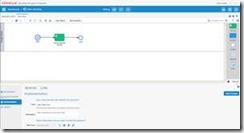
To demonstrate Application Player functionality, I have implemented basic process of Data Entry for the Claim Handling:

This process is using Web Form in the Start activity to capture data, human activity Claim Expense Review allows to review entered data, before submitting it:

This is how Web Form UI design looks like: Read the complete article here.

SOA & BPM Partner Community

For regular information on Oracle SOA Suite become a member in the SOA & BPM Partner Community for registration please visit www.oracle.com/goto/emea/soa (OPN account required) If you need support with your account please contact the Oracle Partner Business Center.

Blog Twitter LinkedIn image[7][2][2][2] Facebook clip_image002[8][4][2][2][2] Wiki

Technorati Tags: SOA Community,Oracle SOA,Oracle BPM,OPN,Jürgen Kress

Process Cloud Service – Reusable Subprocesses by Niall Commiskey


clip_image002Simple scenario here –
Process A calling process B.
B has a human task –

I now validate the application –

Let’s look at the implementation of the Call activity –
Note: no processes in the dropdown list –

Reusable Subprocesses

So what’s needed here is a reusable sun-process.

This is a process with a "None" start activity.

Here is mine – as you can see, I have added an Approval task.

Read the complete article here.

SOA & BPM Partner Community

For regular information on Oracle SOA Suite become a member in the SOA & BPM Partner Community for registration please visit www.oracle.com/goto/emea/soa (OPN account required) If you need support with your account please contact the Oracle Partner Business Center.

Blog Twitter LinkedIn image[7][2][2][2] Facebook clip_image002[8][4][2][2][2] Wiki

Technorati Tags: SOA Community,Oracle SOA,Oracle BPM,OPN,Jürgen Kress

Process Cloud Service – Consuming ADF BC REST Service in Web Form by Andrejus Baranovskis


clip_image002With the introduction of Oracle Process Cloud Service (https://cloud.oracle.com/process) there is an option to run your business process in the cloud. You can implement very similar things as it is possible with BPM 12c in JDeveloper, but only in the cloud. There is no option to implement human task UI with ADF, it must be done with Web Forms (light UI forms implementation framework). This is disadvantage, as it will require to externalise complex business logic and access data collections through REST calls, instead of processing it locally in ADF extension. However, this is how it is implemented currently in the BPM cloud version.
This is how it looks – Web Form editor in Process Cloud Service:

You have an option to select specific types from component palette. There are such types as money, email, phone, text. Components are provided with built in validation, checks for valid email address, etc. User who implements a form, needs to drag and drop components one by one (generally it works OK, but sometimes may get stuck and page refresh will be required). Properties section is available to enter details for the selected component.
Cool part about it – we can define business logic rules. For example, to show/hide customer field based on trip type, etc. One of the rules below, shows how REST service can be called inline and REST response is applied for drop-down field. This is pretty simple to fetch data from external REST service and use it for the Web Form component. Just invoke REST service and assign collection to the component supporting array of data: Read the complete article here.

SOA & BPM Partner Community

For regular information on Oracle SOA Suite become a member in the SOA & BPM Partner Community for registration please visit www.oracle.com/goto/emea/soa (OPN account required) If you need support with your account please contact the Oracle Partner Business Center.

Blog Twitter LinkedIn image[7][2][2][2] Facebook clip_image002[8][4][2][2][2] Wiki

Technorati Tags: SOA Community,Oracle SOA,Oracle BPM,OPN,Jürgen Kress