Fusion Middleware 12c – Selective tracing by Michel Schildmeijer


clip_image002For doing a good diagnosis in case of a problem in your Oracle Fusion Middleware Product, the platform offers you many methods and techniques to do your investigation. The disadvantage from some of these methods is that they have some impact on your system, such as if you would raise the log or debuglevel or use diagnostic snapshots.

Selective Tracing is a facility available through Enterprise Manager to limit the scope of trace logging.This allows for debugging of a production system without overloading the system with logging activity. To use Selective Tracing, perform the following method:

1. On the left expand ‘WebLogic Domain’
2. Open Enterprise Manager: http://<your host>:7001/em

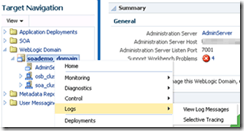
3. Right click your domain name -> Logs -> Selective Tracing. This will bring you to the following screen where you can configure your Selective Tracing session. Click on add fields and select as below: Read the complete article here.

SOA & BPM Partner Community

For regular information on Oracle SOA Suite become a member in the SOA & BPM Partner Community for registration please visit www.oracle.com/goto/emea/soa (OPN account required) If you need support with your account please contact the Oracle Partner Business Center.

Blog Twitter LinkedIn image[7][2][2][2] Facebook clip_image002[8][4][2][2][2] Wiki

BPM Central at Oracle OpenWorld 2015

clip_image001Each year at OOW, we drive the best and most innovative sessions for our attendees. This year is no different. With over 30 speaking sessions reflecting strategy and perspectives from our executives, technology experts, customers, partners, user groups and industry thought leaders; 10 live product demos; and 7 hands-on-labs devoted to Oracle Business Process Management (BPM)  and our Cloud Content and Collaboration solutions, we are excited to showcase our product innovations, customer successes and vision at OOW 2015.

This Year’s Highlights:

· Over 30 sessions featuring customers and partners like Lincoln Financial Group, the Sherwin Williams Company, Nextel, South California Gas Company,  TekStream Solutions, Capgemini, Booz Allen Hamilton, Mythics and many more

· A Meet the Experts session on Tuesday, October 27 from 7:00 p.m. – 8:00 p.m. on “Oracle’s Digital Experience Strategy: Oracle BPM, and Oracle Cloud Services”

· 7 live product demo stations; 6 hands-on labs sessions, including Cloud labs  focusing on Documents Cloud, Process Cloud and soon to be launched Sites Cloud Service.

· Innovation Awards ceremony with winners and representation from Digital Experience, BPM, Documents Cloud Service and Process Cloud Service

Must Attend Sessions:

Don’t miss the Strategy and Vision sessions for the overall portfolio and each of the respective solution and cloud technologies. Invite your prospects and customers to attend these not-to-be-missed sessions that can help organizations plan their roadmaps. Attendees will also get an opportunity to hear from customer organizations on implementation successes.

Monday, October 26, 2015

Digital Experience and Collaboration Roadmap—Oracle WebCenter, BPM, and Cloud Services [CON9207]
11:00 am – 11:45 am | Moscone West—2024

Oracle Process Cloud Service and the Oracle BPM Suite—Vision, Strategy, and Roadmap [CON9181]
1:30 pm – 2:15 pm | Moscone West—2024

Tuesday, October 27, 2015

Oracle’s Digital Experience Strategy: Oracle WebCenter, Oracle BPM, and Oracle Cloud Services [MTE10051]
7:15 pm – 8:00 pm | Moscone South—301

There are PaaS General Sessions and many more sessions highlighting customer successes, product deep dives, partner discussions, persona and/or industry based discussions, Cloud/PaaS lessons, live product demonstrations and Hands-On-Labs (HOL) sessions so do bookmark the following links for a complete, up to date listing:

Focus on: Digital Experience, Content and Business Process Management

Focus on: Content and Collaboration in the Cloud

BPM Auxiliary Events at OOW:

In addition to regularly scheduled programs of sessions, hands-on labs and demos, we have planned additional events for our customers and partners to actively engage in product roadmap feedbacks and network with their peers. These auxiliary events include:

· Partner Advisory Council (PAC) – Friday 10/23 – 8:30am – 5:30pm (By Invitation Only |Event Contact)

· Customer Advisory Board (CAB) – Sunday 10/25 – 8:30am – 6:30pm (By Invitation Only |Event Contact)

· Customer Appreciation Reception – Monday 10/26 – 6:30pm – 8:30pm (Event Contact | Invite and RSVP | URL: http://tinyurl.com/wcappreception2015 | OOW Registration NOT Required)

· Innovation Awards Ceremony (CON10374) – Tuesday 10/27– 4:00pm – 5:30pm, YBCA Theater (Event Contact | OOW Registration Required)

· Oracle Appreciation Event at OOW 15 with Elton John, featuring Beck – Wednesday 10/28 – 6:30 pm – 12:00 am (Event Information)

Looking forward to a successful #OOW15!

SOA & BPM Partner Community

For regular information on Oracle SOA Suite become a member in the SOA & BPM Partner Community for registration please visit www.oracle.com/goto/emea/soa (OPN account required) If you need support with your account please contact the Oracle Partner Business Center.

Blog Twitter LinkedIn image[7][2][2][2] Facebook clip_image002[8][4][2][2][2] Wiki

Video on Using Force Commit for Non-Idempotent Activities in BPM 12c by Jaideep


clip_image002In BPM 11g it was not possible to explicitly ask the engine to dehydrate the bpm process instance state. The only way to do this was to model a timer catch event set to one second or longer. Oracle BPM 12c has introduced a new property for activities called ‘Force Commit after execution’ to enable us to do this. This video is an excerpt from one of our Oracle BPM Training courses which explains why this property is important especially when you have Non-Idempotent activities in your process.

If you like our videos and blogs, be sure to click on the buttons below to follow us on LinkedIn and Twitter so that you can get notified when we post new content. Read the complete article here.

SOA & BPM Partner Community

For regular information on Oracle SOA Suite become a member in the SOA & BPM Partner Community for registration please visit www.oracle.com/goto/emea/soa (OPN account required) If you need support with your account please contact the Oracle Partner Business Center.

Blog Twitter LinkedIn image[7][2][2][2] Facebook clip_image002[8][4][2][2][2] Wiki

BPM 12c Events (Part 2 of 3): End Events by Antonis Antoniou


clip_image002End events define how a process should finish and just like with start events, processes can have more than one end event.

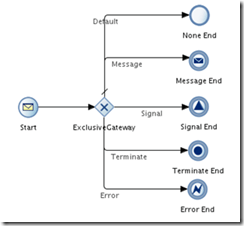
As you can see from the sample process below, we are provided with a plethora of end events that include a “None End” event, a “Message Send” event, a “Signal” event and a “Terminate End” and “Error End” event.

The “None End” event is the default end event in a manual and reusable process and as it’s name implies, it is used when your process doesn’t need to perform any action upon completion. When all process instance tokens reach the “None End” event, the instance is completed.

The "Message End" event, as the name implies, will send a message before an instance completion and is especially useful when you want to trigger another process or instance. The "Message End" event has one unique particularity, it can only be used with either a message start event or a message catch event.

The "Signal Event" will publish a signal before completion.

The "Terminate End" is used to terminate, immediately, without any error handling, a process.

The "Error End" will throw an error before completion. This type of end event is used most commonly in subprocesses to trigger an exception to a main process.

Let’s see how you can use these end events in practice.
Create the basic BPM application and BPM project (named both application and project "EndEventsDemo") and select "Composite with BPMN Process" in step 3. Read the complete article here.

SOA & BPM Partner Community

For regular information on Oracle SOA Suite become a member in the SOA & BPM Partner Community for registration please visit www.oracle.com/goto/emea/soa (OPN account required) If you need support with your account please contact the Oracle Partner Business Center.

Blog Twitter LinkedIn image[7][2][2][2] Facebook clip_image002[8][4][2][2][2] Wiki

How to fix java.io.InvalidClassException error when accessing Oracle ACM Case API via Jdeveloper by Vikram Bailur


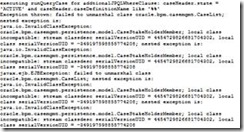
clip_image002Here is a quick and useful tip. This was an error I got when I was running a custom java client to query the Oracle Adaptive Case Management API.

From a sort-of related metalink on Oracle which says :

Although the problem couldn’t be recreated by the development team on demand, from the exception is clear that the root cause of the problem is the differnce of the version of the org.eclipse.persistence jar distributed with Oracle JDeveloper and Oracle WLS.

I figured this was something to do with the version of eclipselink libraries currently running on the soa server were different from Jdeveloper install.

In my JDeveloper project, I had some libraries and classpath pointing to my JDeveloper install and some others pointing to my SOA middleware home install for example. Read the complete article here.

SOA & BPM Partner Community

For regular information on Oracle SOA Suite become a member in the SOA & BPM Partner Community for registration please visit www.oracle.com/goto/emea/soa (OPN account required) If you need support with your account please contact the Oracle Partner Business Center.

Blog Twitter LinkedIn image[7][2][2][2] Facebook clip_image002[8][4][2][2][2] Wiki

Video on Team Collaboration Using Oracle BPM 12c PAM by Jaideep


clip_image002

When teams work on an Oracle BPM project, they can use the Process Asset Manager (PAM) to collaborate on the project. Oracle BPM 12c PAM helps Process developers using BPM Studio (JDeveloper) to collaborate with analysts using the Oracle BPM Composer. Team members can ‘publish’ or ‘commit’ BPM artifacts into PAM and ‘check-out’ or ‘update’ BPM artifacts from PAM. The Oracle BPM 12c PAM also supports versioning functionality. It’s basically a subversion repository that is built into the product. It also includes support for Security and Access Control, Conflict Resolution, Diff and Merge, Reporting of business assets in the catalog and their history, and the ability to create project snapsots, so that you can revert back to a stable version of the project. Watch the video here.

SOA & BPM Partner Community

For regular information on Oracle SOA Suite become a member in the SOA & BPM Partner Community for registration please visit www.oracle.com/goto/emea/soa (OPN account required) If you need support with your account please contact the Oracle Partner Business Center.

Blog Twitter LinkedIn image[7][2][2][2] Facebook clip_image002[8][4][2][2][2] Wiki

Creating a simple BPM Manual Process by Waslley Souza

clip_image001

A Manual Process in Oracle BPM Suite 12c is a process that the user starts through a Human Task.
In this post we will create a BPM Process to add employees through a Human Task and generate a XML file through File Adapter.
Download the sample application: BpmHelloWorldApp.zip.

Create a new BPM Application, name it as BpmHelloWorldApp and click Finish.
Right-click the project name and choose New > BPMN 2.0 Process.
In the BPMN 2.0 Process Wizard, choose Manual Process, name it as AddEmployee and click Finish.

Our BPM application was created.
Before we start to model our process, we need to create a new user.
Start the WebLogic Server, go to Console and create the hrofficer user.

Read the complete article here.

SOA & BPM Partner Community

For regular information on Oracle SOA Suite become a member in the SOA & BPM Partner Community for registration please visit www.oracle.com/goto/emea/soa (OPN account required) If you need support with your account please contact the Oracle Partner Business Center.

Blog Twitter LinkedIn image[7][2][2][2] Facebook clip_image002[8][4][2][2][2] Wiki

Provisioning Oracle BPM Suite on Oracle Java Cloud Service free Tutorial

clip_image002This tutorial describes the process for extending an Oracle WebLogic Server domain on an Oracle Java Cloud Service instance with Oracle Business Process Management Suite (Oracle BPM Suite).

Oracle BPM Suite provides a complete set of tools that you can use to create, execute, and optimize business processes. Oracle Java Cloud Service enables you to use an Oracle WebLogic Server domain and set up your Oracle BPM Suite environment without worrying about the infrastructure or platform components. All Oracle Java Cloud Service instances are preconfigured to use your Oracle Database Cloud Service instance and an object storage container that you create in Oracle Storage Cloud Service.

Oracle Java Cloud Service provides a platform to develop and deploy business applications in the cloud. Oracle Java Cloud Service provides instant access to a cloud environment with Oracle WebLogic Server, integrated security, and database access.

What Do You Need?

To create a storage container, an Oracle Database Cloud Service instance and an Oracle Java Cloud Service instances, ensure that you have a subscription to each of the following:

  • Oracle Storage Cloud Service
  • Oracle Database Cloud Service (Database as a Service [DBaaS])
  • Oracle Java Cloud Service

For more information, see Getting Started with Oracle Cloud. Get the Tutorial here.

SOA & BPM Partner Community

For regular information on Oracle SOA Suite become a member in the SOA & BPM Partner Community for registration please visit www.oracle.com/goto/emea/soa (OPN account required) If you need support with your account please contact the Oracle Partner Business Center.

Blog Twitter LinkedIn image[7][2][2][2] Facebook clip_image002[8][4][2][2][2] Wiki

Video on Business Architecture in BPM 12c by Jaideep

clip_image002

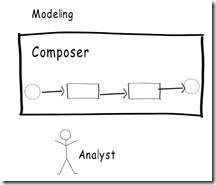
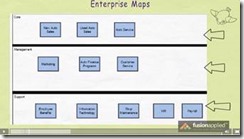
BPM 12c has introduced the capability to create business architecture projects in BPM Composer. Business architecture models help you to take a top-down approach to discover, refine and create a more formal link between the organization’s business goals and BPM projects.

Oracle BPM Composer 12c has introduced the capability to create the following types of business architecture models

  • Enterprise Maps
  • Value Chain Models
  • Strategy Models

This is an introductory video on business architecture in Oracle BPM 12c. It’s an excerpt from one of our self paced Oracle BPM Training courses. Watch the video here.

SOA & BPM Partner Community

For regular information on Oracle SOA Suite become a member in the SOA & BPM Partner Community for registration please visit www.oracle.com/goto/emea/soa (OPN account required) If you need support with your account please contact the Oracle Partner Business Center.

Blog Twitter LinkedIn image[7][2][2][2] Facebook clip_image002[8][4][2][2][2] Wiki

Process Data Definition – Part II… and Web form introduction by Red Maveriks


clip_image002So here’s our new article, completing the data definition series. We’ll build the remaining Business and Data Objects as well as build our first web form based on those objects.

Using your data inside the Request a Parking Space process

Last time, we saw how we defined the data that will be governed by our Business Process.

Now it’s time to make use of it during the process execution. It’s this data that will be input, manipulated and condition the actual process flow for every process instance.

If you remember from the last article, you had some homework

You had to build the Parking Space Business Object. Check what you did against our proposal. It should feature the same attributes, give or take a few…

Parking Space

  • Space Nr.
  • Reservation Start Date&Time
  • Reservation End Date&Time
  • Reserved for
  • AllSpacesOccupied?
  • Meeting with
  • Employee Nr

Important Note: Remember that processes govern data, they don’t keep it. Data is kept in the database. That’s how you have to think.

Again, the purpose of this series is to help business analysts and process owners model and automate processes without writing any code, so we’ll assume that the IT department did their work and expose some services that check if there’s a parking space available for the time slot that the requester wishes to reserve and, if so, returns the information defined in the Parking Space Business Object, and if not, returns an response that indicates all parking spaces are occupied.

Remaining Data Objects

Let’s create our remaining data objects: one for the parking space and one of our special data objects that help us govern the process flow, an instance of the ProcessStatusBO.

Inside the process BPMN diagram, click on the Data Objects option Read the complete article here.

SOA & BPM Partner Community

For regular information on Oracle SOA Suite become a member in the SOA & BPM Partner Community for registration please visit www.oracle.com/goto/emea/soa (OPN account required) If you need support with your account please contact the Oracle Partner Business Center.

Blog Twitter LinkedIn image[7][2][2][2] Facebook clip_image002[8][4][2][2][2] Wiki