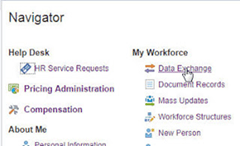
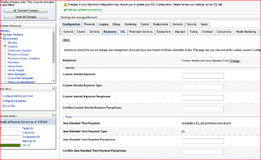
OIC integration with Fusion HCM & the efficacy of BI reports & HCM REST APIs by Niall Commiskey

imageI am not a HCM expert, but playing around with the Oracle HCM adapter did force me to dig a bit deeper into how HCM works. It all began with a relatively simple file based integration that "imported" a worker into HCM. The integration had a REST trigger and leveraged the Oracle HCM adapter as well as the technical SOAP adapter.
I ran a test from Postman, with, what a colleague told me was, a valid REST payload, one of the attributes being BusinessUnitID.

{ "PersonNumber":"77012", "StartDate":"2014/01/01", "DateOfBirth":"1988/05/23", "LegislationCode":"US", "FirstName":"FirstName0112", "LastName":"LastName0112", "LegalEmployerName":"US1 Legal Entity", "BusinessUnitId":"458", "JobId":"300100003260508" }

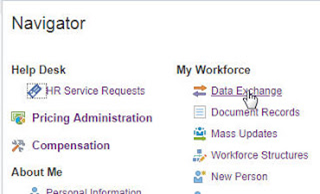
I tested the integration and then went into Fusion HCM to validate what I had done. From an OIC perspective, the integration flow had executed successfully. So off I ventured into HCM. Read the complete article here.

PaaS Partner Community

For regular information on Oracle PaaS become a member in the SOA & BPM Partner Community for registration please visit www.oracle.com/goto/emea/soa (OPN account required) If you need support with your account please contact the Oracle Partner Business Center.

clip_image003 Blog clip_image005 Twitter clip_image004 LinkedIn image[7][2][2][2] Facebook clip_image002[8][4][2][2][2] Wiki

Technorati Tags: SOA Community,Oracle SOA,Oracle BPM,OPN,Jürgen Kress
Migrate Integration Cloud Service (ICS) Integrations to Integration Cloud (OIC) by Ankur Jain

image

This article is written to show how to migrate ICS artifacts including Integrations, Connections, Lookups, packages, libraries etc. to OIC. Since, ICS /OIC provides the export and import feature but this is limited to single integration at a time. What about, if there are 100’s of integration which are there in the ICS and wanted to migrate all integrations once.

To do so, there is Clone utility which is provided for bulk export all the integrations, connections, packages, libraries and other artifacts from ICS to OIC. This clone utility is the set of REST APIs in ICS / OIC. ICS provides REST APIs to bulk export ICS artifacts and OIC provides REST APIs to import these exported artifacts.

Prerequisites:

  • Oracle Cloud Storage Container with create / update permissions
  • Existing ICS service with Admin role access to the service
  • OIC service with Admin role access to the service
  • A feature flag has to be enabled on OIC to enable clone utility. To turn on the feature flag, open a Service Request with Oracle support

Artifacts, which can be exported using the Clone Utility:

  • Integrations
  • Connections including credentials
  • Lookups
  • Libararies
  • Certificates
  • Packages

Note: Agent groups can not be exported, this need to be created manually

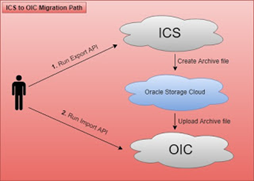
Below is the pictorial representation, which will give a high level, thought on how migration works

Let me explain the diagram in more detail

  • Execute the export API to export ICS artifacts
  • The first steps will create the archive file automatically and save into Oracle Storage Cloud container. Read the complete article here.

PaaS Partner Community

For regular information on Oracle PaaS become a member in the SOA & BPM Partner Community for registration please visit www.oracle.com/goto/emea/soa (OPN account required) If you need support with your account please contact the Oracle Partner Business Center.

clip_image003 Blog clip_image005 Twitter clip_image004 LinkedIn image[7][2][2][2] Facebook clip_image002[8][4][2][2][2] Wiki

Technorati Tags: SOA Community,Oracle SOA,Oracle BPM,OPN,Jürgen Kress

How to enable and use Tracing in less than 5 min by Muthu Palanisamy

image

In this short blog, I’d like to show you how easy it is to enable tracing in OIC Integration and start tracing your integration flows. When Tracing is enabled, OIC Integration prints detailed info before and after each action that is executed (optionally the payload if needed). Hence care should be taken to make sure that it is enabled only for debugging purposes and turned off before going production.

Global Tracing

Let’s assume that you have a requirement where you would like to enable or disable tracing for every integration you have created. You can use the global tracing for accomplishing the same. Enable the Global tracing with below steps:

· Login as an administrator.

· Click Settings on the left side.

· Click Trace on the left side.

· Select Global Tracing On and Click Save on the top right.

· Optionally you can select Include Payload which will additionally write the payload.

Integration Level Tracing

If your requirement is to enable the tracing for one or more integrations and disable tracing for the rest of the integrations, you can use Integration Level tracing. Enable the Integration tracing with below steps: Read the complete article here.


Developer Partner Community

For regular information become a member in the WebLogic Partner Community please visit: http://www.oracle.com/partners/goto/wls-emea ( OPN account required). If you need support with your account please contact the Oracle Partner Business Center.

clip_image003 Blog clip_image005 Twitter clip_image004 LinkedIn image[7][2][2][2] Facebook image Meetups

Technorati Tags: PaaS,Cloud,Middleware Update,WebLogic, WebLogic Community,Oracle,OPN,Jürgen Kress

OIC Integration 101 Part V – Social adapters – Facebook and Twitter by Niall Commiskey

image

Just a quick introduction to some of our Social adapters. Facebook – social media for over 50s

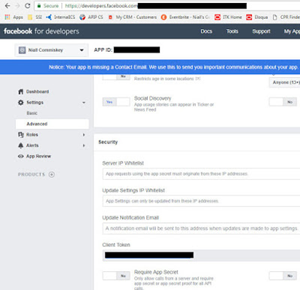
You will need a Facebook account to do this lab. Essentially, you will create a new page under your Facebook account. Then you will leverage the OIC Facebook adapter to retrieve Page details and then retrieve Page posts. So let’s begin –

developers.facebook.com setup

You will need an account at developers.facebook.com
Simply go in and create one.
Essentially what you do is create an App.
The work that we do via the FB adapter will be in the context of this app.

Note the App ID and App Secret they will be needed for creating the OIC connection to Facebook. You also need to set the callback url for OIC. Read the complete article here.


PaaS Partner Community

For regular information on Oracle PaaS become a member in the SOA & BPM Partner Community for registration please visit www.oracle.com/goto/emea/soa (OPN account required) If you need support with your account please contact the Oracle Partner Business Center.

clip_image003 Blog clip_image005 Twitter clip_image004 LinkedIn image[7][2][2][2] Facebook clip_image002[8][4][2][2][2] Wiki

Technorati Tags: SOA Community,Oracle SOA,Oracle BPM,OPN,Jürgen Kress

Scaling Oracle Integration Cloud by Antony Reynolds

image

Latest release of Oracle Integration Cloud includes the ability to scale in and scale out the number of message packs, allowing the service to be scaled up for peak times and then scaled back for quieter periods.  This is useful for companies with very variable production loads, such as retailers.

Below I outline the steps to find these new features.

  • Navigate to Autonomous Integration Cloud from Cloud Console Dashboard
  • Open the Service Console
  • If you don’t see the instance you want then hit the view link below the summary.
  • You can access the scale options from the menu to the left of your instance name
  • You can also drill down into your instance and access the scale options from the menu near the top right. Read the complete article here.

PaaS Partner Community

For regular information on Oracle PaaS become a member in the SOA & BPM Partner Community for registration please visit www.oracle.com/goto/emea/soa (OPN account required) If you need support with your account please contact the Oracle Partner Business Center.

clip_image003 Blog clip_image005 Twitter clip_image004 LinkedIn image[7][2][2][2] Facebook clip_image002[8][4][2][2][2] Wiki

Technorati Tags: SOA Community,Oracle SOA,Oracle BPM,OPN,Jürgen Kress
How to use Litmus to create OIC Integration unit tests automatically and run them to catch regressions by Muthu Palanisamy

image

In this blog, I’d like to show you how easy it is to use Oracle Litmus, a new feature added to Oracle Integration Cloud for creating unit tests automatically with a few clicks and run those tests to catch regressions. Litmus supports the following use cases:

· Enable Integration Cloud users to create unit tests automatically and play them back to catch regressions when they modify their integrations (typically when they enhance an already created integration before making it production).

· Enable Integration Cloud QA to catch product regressions as part of a new release of Integration Cloud.

· Send Oracle a recorded instance so that Oracle can play back the instance to reproduce an issue or a bug. This is difficult without Litmus because all the dependent endpoints and third party adapters might not be available in-house to reproduce the issue. With Litmus, the endpoints are simulated and hence not needed to reproduce the issue.

Enabling Litmus

Let’s assume that you have built an integration which runs as per your requirements and you have completed all your manual testing. Now you are ready to go production. At this point, you might want to create a Litmus Test and want to check that into your source repository. This is so that when you want to change that integration later, you can rely on the Litmus test to catch regressions. Regression in this case is an assertion failing because the response you’re sending to the client has changed due to a bug that was introduced in a mapping as an example.

Enable the Litmus with below steps:

· A feature flag has to be enabled in OIC to enable Oracle Litmus. To turn on the feature flag, open a Service Request with Oracle support.

· Once the feature flag is enabled, login as a developer.

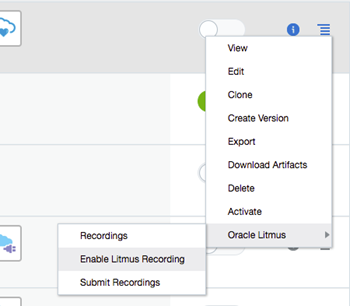
· From the list of integrations displayed in the integrations page, click the inline menu for the integration and click Oracle Litmus -> Enable Litmus Recording

· You can also enable Litmus as part of the Activation as well. Read the complete article here.

PaaS Partner Community

For regular information on Oracle PaaS become a member in the SOA & BPM Partner Community for registration please visit www.oracle.com/goto/emea/soa (OPN account required) If you need support with your account please contact the Oracle Partner Business Center.

clip_image003 Blog clip_image005 Twitter clip_image004 LinkedIn image[7][2][2][2] Facebook clip_image002[8][4][2][2][2] Wiki

Technorati Tags: SOA Community,Oracle SOA,Oracle BPM,OPN,Jürgen Kress

Download and Run Connectivity Agent Oracle Integration Cloud (OIC) by Ankur Jain

image

The Oracle On-Premises Agent i.e Connectivity Agent is required for Oracle Integration Cloud to communicate to on-premise applications. In ICS the connectivity agent was very heavy and agent installer was approximately 1.7 GB, however, OIC agent installer is very light weigh agent and it is approximately 142 MB. Below is the system requirement to install the connectivity agent.

Product

Version / Size

JDK

JDK Version 8 and 9

OS

* Oracle Enterprise Linux 6.x
* Oracle Enterprise Linux 7.2
* RedHat Enterprise Linux 6.6
* RedHat Enterprise Linux 7.2
* Suse Linux Enterprise Edition 12 SP2
* Windows Standard Edition 2016

RAM

Minimum 4GB

Space

8 GB

Above system requirement as per the Oracle Documentation. I myself tried to install the connectivity agent on Windows 10 64 bit and it’s running perfectly. Below are high-level steps to download and run connectivity agent:

  • Create Agent Group in Oracle Integration Cloud
  • Download Connectivity Agent
  • Install Connectivity Agent
  • Verify Connectivity Agent

Create Agent Group in Oracle Integration Cloud

  • Login into Oracle Integration Cloud instance
  • Click on Integrations tab


PaaS Partner Community

For regular information on Oracle PaaS become a member in the SOA & BPM Partner Community for registration please visit www.oracle.com/goto/emea/soa (OPN account required) If you need support with your account please contact the Oracle Partner Business Center.

clip_image003 Blog clip_image005 Twitter clip_image004 LinkedIn image[7][2][2][2] Facebook clip_image002[8][4][2][2][2] Wiki

Technorati Tags: SOA Community,Oracle SOA,Oracle BPM,OPN,Jürgen Kress
Now available: Cloud Integration & API Management for Dummies, 2nd Edition by Vika Mlonchina

image

Your Cloud Integration and API Management just got easier with the 2nd Edition of Oracle’s Cloud Integration & API Management for Dummies.
Jumpstart your path to digital transformation with simplified cloud integration and API management. Check out the 2nd edition which includes the latest on blockchain integration, autonomous integration, self-service integration, and a look at the differences between app and data integration.
Read this guide and you will discover how to:
· Simplify integration in the cloud
· Monetize with API management
· Empower “citizen” developers
· Read the complete article here.

PaaS Partner Community

For regular information on Oracle PaaS become a member in the SOA & BPM Partner Community for registration please visit www.oracle.com/goto/emea/soa (OPN account required) If you need support with your account please contact the Oracle Partner Business Center.

clip_image003 Blog clip_image005 Twitter clip_image004 LinkedIn image[7][2][2][2] Facebook clip_image002[8][4][2][2][2] Wiki

Technorati Tags: SOA Community,Oracle SOA,Oracle BPM,OPN,Jürgen Kress
API Gateway SSL configuration in Production by Gaurav Gupta

image

Introduction

This blog provides steps to configure SSL certificate in Oracle API Gateway node’s trust store. It becomes necessary when API gateway in installed in “production” mode. Without SSL certificate you won’t able to deploy an API to gateway node, because in production mode gateway must communicate with APIP management tier over SSL. Another use-case is when backend service is SSL enabled.

  1. We will discuss both the scenarios in this blog.
  2. 1. Configure certificate in gateway node for SSL based communication with APIP management tier
    2. Configure certificate in gateway node when API is consuming SSL enabled backend service.

Scenario#1 : When gateway is installed in Production mode (gatewayExecutionMode=”Production”), it communicates with APIP management tier over SSL.

There are certain configurations need to be done in gateway for successful SSL Handshake with management tier. Before we jump into the gateway configuration, let’s see types of certificates configured in management tier.

Mostly there are 2 types of Digital certificates configured in management tier.

(i) WebLogic Self-signed certificate (Provided by default as WebLogic “demo” certificate. Not recommended for Production environment)
(ii) Custom CA Signed certificate (It is recommended that you should replace WebLogic demo cert with CA signed cert for production usage) (To learn how to configure CA singed certificate you can refer A-team blog – http://www.ateam-oracle.com/api-platform-custom-host-name-and-certificate/)

Now, Let’s see kind of problems you may face in absence of certificate.

PROBLEM-1

  • Once GW is installed & registered successfully to management tier, If you try to deploy an API on gateway it won’t get deployed and will remain in “waiting” state. If you check apics.log file in gateway node you are likely to see SSLHandshakeException as shown in snippet below. (apics.log file location – <GatewayInstallDirectory>/domain/gateway1/apics/logs). Read the complete article here.


PaaS Partner Community

For regular information on Oracle PaaS become a member in the SOA & BPM Partner Community for registration please visit www.oracle.com/goto/emea/soa (OPN account required) If you need support with your account please contact the Oracle Partner Business Center.

clip_image003 Blog clip_image005 Twitter clip_image004 LinkedIn image[7][2][2][2] Facebook clip_image002[8][4][2][2][2] Wiki

Technorati Tags: SOA Community,Oracle SOA,Oracle BPM,OPN,Jürgen Kress
Additional new content PaaS Partner Community

image

· How Organizations Can Get Ready for the New Virtual Reality Autonomous is set to dramatically transform industries. Here’s how your organization can be ready.

· Top 5 Industry Early Adopters of Autonomous Systems For companies in these five industries, it’s now just a matter of when they will adopt AI and autonomous systems, not if.

· Pizza, Beer, and Dev Expertise at Your Local Meet-up: Is it the beer? The pizza? Listen as a panel of meet-up organizers discusses what meet-ups have that can be hard to find at big conferences, and shares tips on organizing and fine-tuning your own meet-up

· API Platform Service Callouts using a Groovy Policy

· Five Steps to Digital Transformation: Build the Roadmap July 24 | Online

· Setting Innovation Free Discover the four key steps to scaling up success.

Internet of Things Helps Noble Plastics Keep People off the Graveyard Shift With the Oracle Internet of Things Cloud Service, small and midsize businesses can monitor their industrial equipment remotely.


PaaS Partner Community

For regular information on Oracle PaaS become a member in the SOA & BPM Partner Community for registration please visit www.oracle.com/goto/emea/soa (OPN account required) If you need support with your account please contact the Oracle Partner Business Center.

clip_image003 Blog clip_image005 Twitter clip_image004 LinkedIn image[7][2][2][2] Facebook clip_image002[8][4][2][2][2] Wiki

Technorati Tags: SOA Community,Oracle SOA,Oracle BPM,OPN,Jürgen Kress