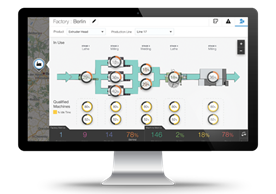
Oracle IoT Cloud Apps Rollout in Mexico City by Albert Chiang

image 

After the official launch of Oracle IoT Cloud Apps at Modern Supply Chain Conference 2017, we received a stream of requests for information – from potential customers, system integrators, and device makers. Many of them did not know Oracle offered an IoT solution. And most of them did not know that Oracle offered IoT originally as a PaaS – and also now as a SaaS.  This intrigued them.

Mexico and Its Shift to High End Assembly & Manufacturing

So perhaps it wasn’t surprising that the Oracle IoT rollout in Mexico City was a standing room only event. IoT has gained the interest of manufacturers (sometimes also called Industry 4.0) to be able to track manufacturing output, monitor the status of machines in manufacturing, and predicatively call for maintenance.   With Mexico’s strong manufacturing base,  the country has become the third largest source of imports into the U.S., with a total 2-way trade of $579 billion. And that number should change as BMW gears up to produce its popular 3-series car in Mexico by 2019. Read the complete article here.

PaaS Partner Community

For regular information on Oracle PaaS become a member in the SOA & BPM Partner Community for registration please visit www.oracle.com/goto/emea/soa (OPN account required) If you need support with your account please contact the Oracle Partner Business Center.

Blog Twitter LinkedIn image[7][2][2][2] Facebook clip_image002[8][4][2][2][2] Wiki

Technorati Tags: SOA Community,Oracle SOA,Oracle BPM,OPN,Jürgen Kress
Machine Learning with Oracle on-demand webcast

image

Watch the webinar here.


PaaS Partner Community

For regular information on Oracle PaaS become a member in the SOA & BPM Partner Community for registration please visit www.oracle.com/goto/emea/soa (OPN account required) If you need support with your account please contact the Oracle Partner Business Center.

Blog Twitter LinkedIn image[7][2][2][2] Facebook clip_image002[8][4][2][2][2] Wiki

Technorati Tags: SOA Community,Oracle SOA,Oracle BPM,OPN,Jürgen Kress

Unshackle the Business – Best Practices in UI and Process Designs by Mark Peterson

image

To remain competitive, companies have to continually drive down costs while maintaining value in the products and services they offer. One area where companies look to reduce costs is in Business Process Management (BPM).

When it comes to IT expenditures, some companies may invest a small fortune in BPM, while others may simply rely on basic tools, such as spreadsheets and Post-it notes. Regardless of the amount spent, if the tools are hard to use or the process is cumbersome then your business has become shackled and is wasting time and energy.

Are your company’s internal business processes helping or hurting efficiency? Take this simple assessment:

  • Do your employees have relevant and useful tools to complete their work or do they waste time navigating complicated or out-of-date systems?
  • Do their tools or user interfaces (UIs) involve countless forms or spreadsheets or are they streamlined and concise?
  • Do the business processes or workflow they must follow slow them down or accelerate their work?

AVIO has developed best practices in UI and business process design that help organizations reduce their cost of doing business and increase worker satisfaction. These practices and designs, when implemented, empower employees and help drive organizational change, which can ultimately affect the company’s bottom line. Read the complete article here.

PaaS Partner Community

For regular information on Oracle PaaS become a member in the SOA & BPM Partner Community for registration please visit www.oracle.com/goto/emea/soa (OPN account required) If you need support with your account please contact the Oracle Partner Business Center.

Blog Twitter LinkedIn image[7][2][2][2] Facebook clip_image002[8][4][2][2][2] Wiki

Technorati Tags: SOA Community,Oracle SOA,Oracle BPM,OPN,Jürgen Kress

Jarvis Pizzeria: Deploying and Reverting to Snapshots by Richard Olrichs & Marcel van de Glind

image

When working on a PCS application, you save and publish your changes often. However, when you publish a certain state of the application, you can decide to create a snapshot of this state of the application.

This can be very helpful if the publish represents a certain version of the application. Later these snapshots can be deployed or reverted to in case you want to roll back to a previous version. It is also possible to see what was in the application at the time of the snapshot creation.
In this blog we will show you how to work with snapshots.

When publishing, in the popup on the right hand side there is a option to ‘Make Snapshot’, when this checkbox is checked you can enter a name for the snapshot, in this case the snapshot will represent Jarvis 1.0!

After the Changes have been published and a snapshot is created we go to the deploy screen by clicking the deploy button. Read the complete article here.

PaaS Partner Community

For regular information on Oracle PaaS become a member in the SOA & BPM Partner Community for registration please visit www.oracle.com/goto/emea/soa (OPN account required) If you need support with your account please contact the Oracle Partner Business Center.

Blog Twitter LinkedIn image[7][2][2][2] Facebook clip_image002[8][4][2][2][2] Wiki

Technorati Tags: SOA Community,Oracle SOA,Oracle BPM,OPN,Jürgen Kress
Jarvis Pizzeria: Workaround for XSD list-element issue in WebForms by Richard Olrichs & Marcel van de Glind

image

In a previous blog we have made notices that it is not possible to create a Webform based on a xsd-type that contains a list elements. In our case a list of pizza ingredients.

In this post we will give an alternative way to create a webform that displays the data, including the list of ingredients. For this we have created a new form IngredientsWebForm.

As we tried before, It does not work to drop the full business object on the canvas. Therefore, we have now made up the form of separate components. 4 input text components, of which 2 are listed in a table component and a number component that is also displayed in the table. This results in the following format.

This is the form we will use for all different presentation (one of our next posts will be about different presentation of one and the same WebForm), but first we will use it in its default. In the top left corner you see that this is the main presentation which is also the default. It is quite logically that it is the default, because it’s the only one 🙂

After saving the WebForm we go back to the process to update the various tasks.

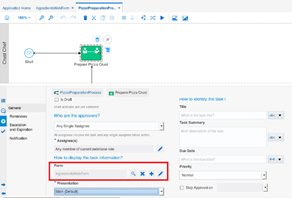
For each task we have switched the form reference to the new IngredientsWebForm. The below example shows this for the ‘Prepare Pizza Crust’ task. The example also shows that the Main presentation is selected for the task. Read the complete article here.

PaaS Partner Community

For regular information on Oracle PaaS become a member in the SOA & BPM Partner Community for registration please visit www.oracle.com/goto/emea/soa (OPN account required) If you need support with your account please contact the Oracle Partner Business Center.

Blog Twitter LinkedIn image[7][2][2][2] Facebook clip_image002[8][4][2][2][2] Wiki

Technorati Tags: SOA Community,Oracle SOA,Oracle BPM,OPN,Jürgen Kress
Jarvis Pizzeria: Human Tasks: Design First WebForms in PCS by Richard Olrichs & Marcel van de Glind

image

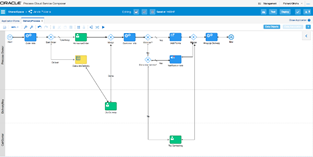
To create simple Human Tasks we use web forms in Process Cloud Service (PCS). Within the Delivery Process of the Jarvis Pizzeria, we are going to implement the HT for ‘Try Contacting the Customer’. This human task should become available after we have checked that the Customer is not a member and we do not know his email address. 

Try contacting the non-regular / member from Jarvis Pizzeria, in the swimlane of the CallCenter.

We will take the Design First approach, meaning we will design the form and know what data objects we need afterwards, instead of looking at the data we need for the Human Task first.

This means we can start by creating a new web form.

In the properties window from the task we click the add ‘+’ icon next to the Form.

We want to, but also only can select the ‘New Web Form’ option, the basic form is the old form used in previous versions of PCS. It is still available in the engine for backwards compatibility. Selecting this option will open the ‘Create New Web Form’. Read the complete article here.

PaaS Partner Community

For regular information on Oracle PaaS become a member in the SOA & BPM Partner Community for registration please visit www.oracle.com/goto/emea/soa (OPN account required) If you need support with your account please contact the Oracle Partner Business Center.

Blog Twitter LinkedIn image[7][2][2][2] Facebook clip_image002[8][4][2][2][2] Wiki

Technorati Tags: SOA Community,Oracle SOA,Oracle BPM,OPN,Jürgen Kress

Jarvis Pizzeria: Notification Task in PCS by Richard Olrichs & Marcel van de Glind


imageSo far we have covered most standard components of the PCS suite. However, we haven’t looked at the “Notification Task” in-depth yet. We have used the on-premises variant at various projects but it was the hassle of setting up the User Messaging Service (UMS) that made you reluctant to use this feature on beforehand. Will the PCS variant be a gamechanger? Let’s find out!

We implemented a basic process with a standard notification task and configured it to send an email to marc.kuijpers@rubix.nl. The implementation details are shown below:

We deployed the process and sent a SOAP message to the corresponding endpoint. Looking at our instance in the workspace we see the following successful instance:

Yaaay! But before we ship this version to a production environment let’s see if we have received an email…..Unfortunately the answer is no 😦

Hmm, have we missed a setting? Do we have to configure something? Crawling to the settings in the Business Process Workspace we encountered the infrastructure tab. And it turns out that this is the place where we can configure the notification service. Read the complete article here.

PaaS Partner Community

For regular information on Oracle PaaS become a member in the SOA & BPM Partner Community for registration please visit www.oracle.com/goto/emea/soa (OPN account required) If you need support with your account please contact the Oracle Partner Business Center.

Blog Twitter LinkedIn image[7][2][2][2] Facebook clip_image002[8][4][2][2][2] Wiki

Technorati Tags: SOA Community,Oracle SOA,Oracle BPM,OPN,Jürgen Kress
Jarvis Pizzeria: Different presentations for the same WebForm by Richard Olrichs & Marcel van de Glind

image

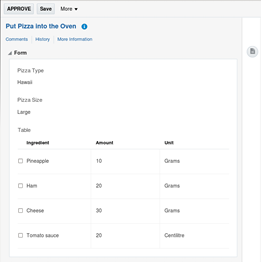
In a previous blog we created a default WebForm for the Pizza Preparation process. In each human interaction of the process we used this default WebForm with the default presentation. In this post we will create a different presentation for each human interaction in the process.

  1. Crust Preparation Will only show the pizza name and size. Both fields are editable.
  2. Filling the Pizza Shows alle data. The pizza name and size are read-only. The ingredients are editable. It’s also possible to add or remove ingredients.
  3. Put in Oven All data is shown read-only.
  4. Get out the Oven The Pizza naam and size are shown read-only.

As a starting point for this blog, we use the end result of the above mentioned blog. We begin by adding presentations to the IngredientsWebForm. Read the complete article here.

PaaS Partner Community

For regular information on Oracle PaaS become a member in the SOA & BPM Partner Community for registration please visit www.oracle.com/goto/emea/soa (OPN account required) If you need support with your account please contact the Oracle Partner Business Center.

Blog Twitter LinkedIn image[7][2][2][2] Facebook clip_image002[8][4][2][2][2] Wiki

Technorati Tags: SOA Community,Oracle SOA,Oracle BPM,OPN,Jürgen Kress

Oracle Management Cloud: Find SOA Suite issues quick and easy by MichelSchildmeijer

image

One of the services which are delivered by the Oracle Management Cloud is the monitoring of infrastructure. Now in this case, infrastructure spans from host to software platform. In this blogpost I will try to explain how you can effectively behind issues in your Oracle SOA Suite operational environment. OMC can monitor some parts specific to the SOA suite, in fact all the engines which are enclosed in a SOA Suite running envrioment. These are:

  • The BPEL engine
  • The Mediator engine
  • The Descion Service Engine or Business Rules Engine

I simulated a test which processed a lot of transactions through the payment process of my company. SOA Suite was handling this payment process through an OSB service in the frontend and an enrichment though a SOA composite which did a validation based on some rules.

The company deployed a new release and adapter to get more benefit out of it.

During tests, I suddeny received an alert from OMC that the error rate on the BPEL engine was increased. When I looked into the Performance table of my soainfra entity I found the following:

Click on the SOA Composite field I could detect which composite was causing the error, the ValidatePayment. Read the complete article here.

PaaS Partner Community

For regular information on Oracle PaaS become a member in the SOA & BPM Partner Community for registration please visit www.oracle.com/goto/emea/soa (OPN account required) If you need support with your account please contact the Oracle Partner Business Center.

Blog Twitter LinkedIn image[7][2][2][2] Facebook clip_image002[8][4][2][2][2] Wiki

Technorati Tags: SOA Community,Oracle SOA,Oracle BPM,OPN,Jürgen Kress
PaaS – How to setup an Oracle Integration Cloud instance by Onkar Shoker

image

What is Oracle Cloud Integration?
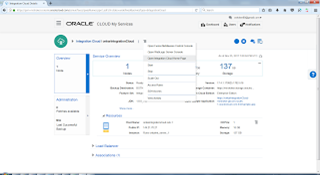
As you may be aware, Oracle have released the next installment of their PaaS Integration products: Oracle Integration Cloud. Don’t be alarmed, the Oracle Integration Cloud is not a brand new product, but it is rather a bundle of existing PaaS offerings.
A new option has been added under the PaaS Integration options: ‘App Integration’ (Oracle Integration Cloud).
Oracle Integration Cloud comes with:

  • Integrations (ICS)
  • Processes (PCS)
  • Visual Builder (VBCS, previously known as ABCS)
  • Insights / Integration Analytics

Oracle Integration Cloud, Oracle’s compelling new cloud offering combines Application Integration, Process Automation, Visual Application Building and Integration Analytics into one unified cloud service. Read the complete article here.


PaaS Partner Community

For regular information on Oracle PaaS become a member in the SOA & BPM Partner Community for registration please visit www.oracle.com/goto/emea/soa (OPN account required) If you need support with your account please contact the Oracle Partner Business Center.

Blog Twitter LinkedIn image[7][2][2][2] Facebook clip_image002[8][4][2][2][2] Wiki

Technorati Tags: SOA Community,Oracle SOA,Oracle BPM,OPN,Jürgen Kress