Process Cloud Service update – DMN capabilities SOA & BPM Partner Community Webcast – May 23rd 2017

imageAttend our May edition of the SOA & BPM Partner Community Webcast live on April 23rd 2017 at 17:00 CET.

Oracle DMN is one of the first DMN cloud-based services to come to market. In addition to adhering to the DMN standard and its cloud-based provisioning mechanism, users and developers can assemble decisions that are accessible anywhere and anytime. Come to this session to learn more about Oracle’s DMN service and its capabilities and how it can be easily leveraged within Oracle Process Cloud Service.

Eduardimageo Chiocconi LinkedIn & Twitter

Visit the registration page here.

Call ID: 5566478 Call Passcode: 333111 and WebEx Session Number: 592619237

UK: +44 (0) 208 118 1001 & United States: 140 877 440 73

More Local Numbers

Schedule:

April 23rd 2017 at 17:00-18:00 CET

Visit the registration page here.

Missed our SOA & BPM Partner Community Webcast? – watch the on-demand versions:

· Drive DevOps Agility and Operational Efficiency with Oracle Management Cloud April 25th 2017

· Implementing DevOps and Agile Methodologies in Oracle Projects March 21st 2017

· Mobile Cloud Service & Chat Bots February 28th 2017

· b2b January 31st 2017

· Community Resources & free Cloud trails December 20th 2016

· SOA 12 & BPM Suite 12c Roadmap update November 29th 2016

· Microservices October 25th 2016

· Oracle OpenWorld 2016 update September 27th 2016

· API Cloud Platform Service August 30th 2016

· BPM Suite & PCS Update July 26th 2016

· Integration Cloud Service June 28th 2016

· Sales Plays Webcast June 9th 2016

· Real-Time Integration Business Insight May 31st 2016

For the latest information please visit Community Updates Wiki page (SOA Community membership required).

SOA & BPM Partner Community

For regular information on Oracle SOA Suite become a member in the SOA & BPM Partner Community for registration please visit www.oracle.com/goto/emea/soa (OPN account required) If you need support with your account please contact the Oracle Partner Business Center.

Blog Twitter LinkedIn image[7][2][2][2] Facebook clip_image002[8][4][2][2][2] Wiki

Digitalisierung: Die Reise beginnt mit Inspiration


Tom Gansor von Opitz Consulting kennt die Herausforderungen von Kunden ganz genau. Digitalisierung sorgt bei Untenrhemen nicht nur für leuchtende Augen, sondern auch für Unsicherheit. Wie sich Unternehmen – mit Inspiration und Kreativität – auf die Reise machen können, das sehen Sie hier.

Interested to showcase Oracle PaaS solutions to your customers? Get access to cloud services here and please contact us here.

SOA & BPM Partner Community

For regular information on Oracle SOA Suite become a member in the SOA & BPM Partner Community for registration please visit www.oracle.com/goto/emea/soa (OPN account required) If you need support with your account please contact the Oracle Partner Business Center.

Blog Twitter LinkedIn image[7][2][2][2] Facebook clip_image002[8][4][2][2][2] Wiki

Technorati Tags: SOA Community,Oracle SOA,Oracle BPM,OPN,Jürgen Kress

Process Cloud Service Communicating to Database as a Service (DbaaS) by Santosh Shetgar

image

Oracle Database Cloud Service provides two offerings, Database as a Service and Database Schema Service. In this example, I will be creating sample business process using Oracle Process Cloud Service (PCS) and expose RESTful webservices on the Oracle Database Cloud Service (Oracle Database Cloud – Database Schema Service). PCS will invoke DBaaS over REST API exposed at DBaaS and provides response to the PCS.

In the following step I have quickly created RESTful service in the DBaaS. In the step 2 I will create PCS application which calls DBaaS REST API to retrieve the results from the database.

Step 1 – Creating RESTful service using DBaaS.

Create INTG_TTK table with following details  in the  Oracle Database Cloud – Database Schema Service.

For the created table, RESTful web service can be created using DBaaS and exposed as REST service.

In  the DBaaS , navigate to SQL Workshop RESTful services and provide following inputs to expose as service.

Once the RESTful services are created, it’s ready to consume and appear as follows in the DBaaS RESTful services.

Step 2 – Creating PCS Application and Invoke DBaaS REST service.

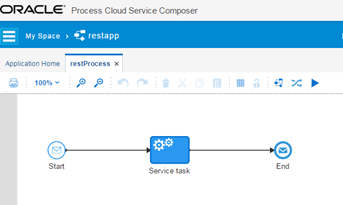
Create PCS application with message type as start and it can be synchronous service. Configure the service task in the application with the above create RESTful service. Here’s how it look alike:

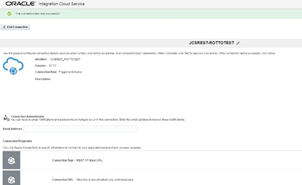
The service task will be configured with REST service and it has to be configured in the PCS connectors.configuration of REST connector in the PCS look alike below.

Here, In the service task i have configured the REST connector. REST connector can be configured as: Read the complete article here.

SOA & BPM Partner Community

For regular information on Oracle SOA Suite become a member in the SOA & BPM Partner Community for registration please visit www.oracle.com/goto/emea/soa (OPN account required) If you need support with your account please contact the Oracle Partner Business Center.

Blog Twitter LinkedIn image[7][2][2][2] Facebook clip_image002[8][4][2][2][2] Wiki

Technorati Tags: SOA Community,Oracle SOA,Oracle BPM,OPN,Jürgen Kress

API Catalog for RESTful Services by Richard Bingham

image

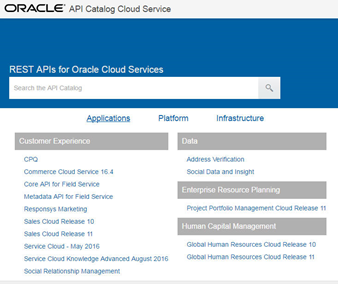
Since we looked at the retirement of OER, I am please to share another new set of resources for developers working with Oracle Cloud applications. The existing resources were extended recently with a centralized interface to information about the RESTful web services.

The new Oracle API Catalog provides a one-stop-shop for integration developers, including documentation, examples, and descriptive content in the Swagger standard format. As shown below for the HCM employee service (emps), the material includes resource usage details, and extensive descriptions on each supported method and their queries/parameters. Read the complete article here.

SOA & BPM Partner Community

For regular information on Oracle SOA Suite become a member in the SOA & BPM Partner Community for registration please visit www.oracle.com/goto/emea/soa (OPN account required) If you need support with your account please contact the Oracle Partner Business Center.

Blog Twitter LinkedIn image[7][2][2][2] Facebook clip_image002[8][4][2][2][2] Wiki

Technorati Tags: SOA Community,Oracle SOA,Oracle BPM,OPN,Jürgen Kress

Oracle Cloud Test Drive: Beeindruckend bessere Ergebnisse by Danilo Schmiedel

Danilo Schmiedel ist bei Opitz Consulting der Oracle- und Kunden-“Versteher”. Auf der Inspire IT 2017 hat er mit dem Oracle Cloud Test Drive eine pragmatische Alternative zu Keynotes und Vorträgen geschaffen. So konnten Kunden “hands on” erleben, wie einfach es ist, in 40 Minuten beeindruckende Ergebnisse zu erzielen. Watch the video here &  Opitz Cloud consulting offerings.

Interested to showcase Oracle PaaS solutions to your customers? Get access to cloud services here and please contact us here.

SOA & BPM Partner Community

For regular information on Oracle SOA Suite become a member in the SOA & BPM Partner Community for registration please visit www.oracle.com/goto/emea/soa (OPN account required) If you need support with your account please contact the Oracle Partner Business Center.

Blog Twitter LinkedIn image[7][2][2][2] Facebook clip_image002[8][4][2][2][2] Wiki

Technorati Tags: SOA Community,Oracle SOA,Oracle BPM,OPN,Jürgen Kress

.

Implementing Oracle Integration Cloud Service book – trial chapter by Phil Wilkins, Robert van Mölken

image

Understanding Oracle’s Integration Cloud Service and how to get the most out of your implementation

Businesses are built on data, and applications that access that data. In modern businesses the same cloud-based data stores and applications might be accessed by hundreds of different applications from thousands of different devices via APIs. To make this happen, APIs must be wired together i.e. integrated. Oracle Integration Cloud Service provides a complete method for integrating enterprise applications in the cloud. Integration Cloud Service (ICS) provides a cloud hosted means to integrate systems together using a graphical means to define and represent integrations.

This book will be a comprehensive, hands-on guide to building successful, high-availability integrations on ICS. This book sets out to demonstrate how ICS can be used to effectively implement integrations that work both in the cloud and on-premise. It starts with a fast, practical introduction to what ICS can do for your business and then shows how ICS allows you to develop integrations not only quickly but in a way that means they are maintainable and extensible. Gradually it moves into more advanced integrations, showing how to achieve sophisticated results with ICS and work with external applications. Finally the book shows you how to monitor cloud apps and go beyond ICS to build even more powerful integrated applications. Get the book here and visit our SOA Book wiki here.


SOA & BPM Partner Community

For regular information on Oracle SOA Suite become a member in the SOA & BPM Partner Community for registration please visit www.oracle.com/goto/emea/soa (OPN account required) If you need support with your account please contact the Oracle Partner Business Center.

Blog Twitter LinkedIn image[7][2][2][2] Facebook clip_image002[8][4][2][2][2] Wiki

Technorati Tags: SOA Community,Oracle SOA,Oracle BPM,OPN,Jürgen Kress

SOA Cloud – Create Oracle Database Cloud Service Instance by Vivek Garg

image

Now days we hear lot about cloud and like to explore more on it. Recently Oracle launched cloud services that we can use to create service instances. This post is specific to Database Cloud service.

DBaaS (Database as a Service) is a service instance in Oracle Database Cloud. On premises setup we use to install Oracle database server on local hardware but in cloud, no need to have a setup, just need to confirm some parameters and we are good to use it.

In this post, we will show how you can create service instance of Oracle Database Cloud. Follow below steps for the same.

Step 1: Go to here

Login with your credentials that you have received from Oracle when you register for trial version.

Click on “Service Console” option as shown in below screen shot in “Oracle Database Cloud Service” section. Read the complete article here.

SOA & BPM Partner Community

For regular information on Oracle SOA Suite become a member in the SOA & BPM Partner Community for registration please visit www.oracle.com/goto/emea/soa (OPN account required) If you need support with your account please contact the Oracle Partner Business Center.

Blog Twitter LinkedIn image[7][2][2][2] Facebook clip_image002[8][4][2][2][2] Wiki

Technorati Tags: SOA Community,Oracle SOA,Oracle BPM,OPN,Jürgen Kress

SOA Cloud- Generate SSH Key Pair using Putty by Vivek Garg

image

In Oracle Cloud, we need to have public key when we need to create a service instance and private key is also required when we need to access it using SSH utility. In this post, we will show how we can create key pair (private and public keys).

For this post, we will use PUTTY to generate these keys as it is available for both windows and Linux.

Follow the below steps to generate key pair.

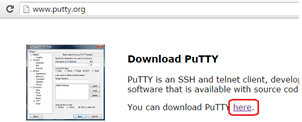
Step 1: Download the Putty key generator from www.putty.org link as shown in below screen shots.

Step 2: Open the puttygen.exe file and it opens another window as shown below. In parameters, select “SSH-2 RSA” and “2048” in Number of bits in the generated key as SSH 2 is most recent version of SSH. Read the complete article here.

SOA & BPM Partner Community

For regular information on Oracle SOA Suite become a member in the SOA & BPM Partner Community for registration please visit www.oracle.com/goto/emea/soa (OPN account required) If you need support with your account please contact the Oracle Partner Business Center.

Blog Twitter LinkedIn image[7][2][2][2] Facebook clip_image002[8][4][2][2][2] Wiki

Technorati Tags: SOA Community,Oracle SOA,Oracle BPM,OPN,Jürgen Kress

SOA Cloud – How to register for SOA Cloud Service Trial Version by Vivek Garg

image

In this post, I will show you how you can register for trial version of SOA Cloud Services.

You need to follow below steps in sequence for trail registration.

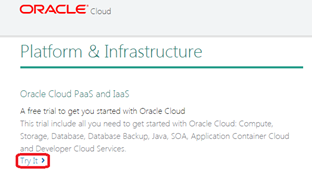
Step 1: Go to URL: https://cloud.oracle.com/tryit and you notice there are mainly two categories as mentioned below.

1. Oracle’s Platform (PaaS) and Infrastructure (IaaS) Cloud Services

2. Application (SaaS) and Data (DaaS)

Under each category there are multiple options available. Since we are working with Oracle SOA Cloud Services and that comes under Paas and IaaS category. So go to that category and select very first option as highlighted in below screen shot.

Step 2: Once you click on “Try It” option, it take you to Oracle login page where you need to enter your credentials.

Note: You need to have Oracle account setup before you proceed to this step, if don’t have Oracle account then you can create it.

Once you enter your credentials, it takes you to next page where you need to enter your details like First Name, Last Name and Company Name etc.  You also need to verify your phone number by entering the verification code. Read the complete article here.

SOA & BPM Partner Community

For regular information on Oracle SOA Suite become a member in the SOA & BPM Partner Community for registration please visit www.oracle.com/goto/emea/soa (OPN account required) If you need support with your account please contact the Oracle Partner Business Center.

Blog Twitter LinkedIn image[7][2][2][2] Facebook clip_image002[8][4][2][2][2] Wiki

Technorati Tags: SOA Community,Oracle SOA,Oracle BPM,OPN,Jürgen Kress

Configuring HTTPS between Integration Cloud Service and Java Cloud Service by Rob Otto

image

In a previous post, I discussed some general topics relating to the usage of HTTPS and certificates within Oracle Public Cloud. In this follow up piece, I will work through a concrete example and explain how to set up a Java Cloud Service instance in such a way that Integration Cloud Service can consume a service deployed to that platform over HTTPS.

The use case we have in mind here is a simple one. A custom REST-based service is deployed to WebLogic on JCS (I’ll use a simple Servlet that returns a JSON payload). An integration defined in Integration Cloud Service uses the REST adaptor to invoke that service over HTTPS. Since JCS is an example of a compute-based PaaS service, it is provisioned by default without an external hostname and with a self-signed certificate mapped to the Load Balancer IP Address. This is different to the ICS instance, which is accessible via an *.oraclecloud.com hostname with an automatically-trusted certificate. The first thing we will do is configure JCS to use a hostname that we provide, rather than the IP address. We’ll then look at how to provision a certificate for that instance and then finally, how to configure ICS.

I’ve used a JCS instance based on WebLogic 12.1.3 and Oracle Traffic Director 11.1.1.9 for this post. Exact steps may differ somewhat for other versions of the service.

Configuring JCS with your own hostname

I’ve deployed my simple Servlet to WebLogic via the console and for now, the only option available to me is to access it via the IP address of the JCS Load Balancer. We can see from the screenshots below that my web browser first prompts me to accept the self-signed certificate before accessing the end point, which is not what we want to happen: Read the complete article here.

SOA & BPM Partner Community

For regular information on Oracle SOA Suite become a member in the SOA & BPM Partner Community for registration please visit www.oracle.com/goto/emea/soa (OPN account required) If you need support with your account please contact the Oracle Partner Business Center.

Blog Twitter LinkedIn image[7][2][2][2] Facebook clip_image002[8][4][2][2][2] Wiki

Technorati Tags: SOA Community,Oracle SOA,Oracle BPM,OPN,Jürgen Kress