Token required to provision an Oracle Integration Cloud instance by Ankur Jain

image

I have seen that most of the people are struggling to create an Oracle Integration Cloud instance due to the mandatory token parameter. The token is a mandatory parameter and without this, you can not create an OIC instance.

You may have seen in one of the OIC videos which show how to provision an OIC instance but in this video, the step is missing as while creating this video, this parameter was not required at all. Oracle has introduced this parameter recently which causing people to find out how to get this token.

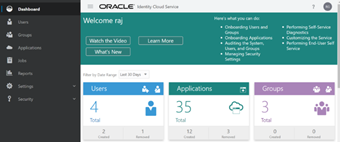
In this article, I will explain all the steps required to generate the token. The token can be extracted from Oracle Identity Cloud Service (IDCS) admin console. Hence you have to navigate to the IDCS console first.

Few links can be helpful

Provisioning the Oracle Integration Cloud (OIC) Instance

Oracle Autonomous Transaction Processing instance provisioning

There are a couple of ways to login to the IDCS admin console.

Login into the IDCS admin console

Solution-1: This is one of the shortest paths to login into the IDCS admin console. Read the complete article here.

PaaS Partner Community

For regular information on Oracle PaaS become a member in the PaaS (Integration & Process) Partner Community please register here.

clip_image003 Blog clip_image005 Twitter clip_image004 LinkedIn image[7][2][2][2] Facebook clip_image002[8][4][2][2][2] Wiki

Technorati Tags: SOA Community,Oracle SOA,Oracle BPM,OPN,Jürgen Kress

B2B – EDI Translation support by Niall Commiskey

image

Another compelling new feature for OIC – EDI X12 support. For those who never heard of X12 – think of it as a set of standard docs allowing companies to do business with each other, e.g. Company A sends an X12 850(Purchase Order) to Company B. You can see the full list of X12 docs here

So nothing like a simple example to illustrate our X12 support. Let’s begin with an Inbound X12 example. In this case, I receive a PO in EDI 850 format. I need to process this and post it to Netsuite, for example. Read the complete article here.

PaaS Partner Community

For regular information on Oracle PaaS become a member in the PaaS (Integration & Process) Partner Community please register here.

clip_image003 Blog clip_image005 Twitter clip_image004 LinkedIn image[7][2][2][2] Facebook clip_image002[8][4][2][2][2] Wiki

Technorati Tags: SOA Community,Oracle SOA,Oracle BPM,OPN,Jürgen Kress
Object Storage with Oracle Integration Cloud – Part 2 by Stan Tanev

image

The first part of this series explored how to setup a connection between Oracle Integration Cloud (OIC) and OCI Object Storage, and how to use Object Storage as a location to write files as part of an integration.

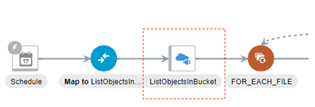
In this blog I will show you how to use Oracle Integration Cloud to consume objects from OCI Object Storage, including listing, reading and deleting those objects. To do this I have prepared an integration which showcases a common integration pattern; consuming a staged file in order to load data into an enterprise system. In this case, the integration will load financial data from Object Storage into Oracle’s ERP Cloud application. Specifically, this integration will:

  1. List Account Payable (AP) Invoice files available on OCI Object Storage
  2. For each source file that it finds in the cloud bucket, it will:
    1. Read & transform the file to the format required by Oracle ERP Cloud
    2. Upload the transformed file to ERP Cloud and trigger the required Import jobs in the application
    3. Delete the now processed file from the OCI Object Storage bucket

If the above flow seems familiar to you this is likely because you have come across requirements to integrate with ERP Cloud before and have used one of the File Based Data Import (FBDI) jobs to load data from a file into the application. Most FBDI import patterns utilize a FTP/SFTP server to host the transient files prior to upload in ERP Cloud. Read the complete article here.

PaaS Partner Community

For regular information on Oracle PaaS become a member in the PaaS (Integration & Process) Partner Community please register here.

clip_image003 Blog clip_image005 Twitter clip_image004 LinkedIn image[7][2][2][2] Facebook clip_image002[8][4][2][2][2] Wiki

Technorati Tags: SOA Community,Oracle SOA,Oracle BPM,OPN,Jürgen Kress
Creating net new apps on top of Netsuite with OIC Visual Builder by Niall Commiskey

image

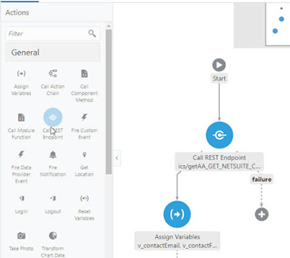
I am probably speaking to the converted here, but for all  those still not aware of the rich functionality OIC provides. OIC is a toolbox containing a set of tools:

1. Integration – to connect apps

2. Process – to extend apps or simply to implement your own custom business workflows

3. Visual Builder – to create net new apps on top of your apis

4. Insight (due soon) – to provide business user dashboards on top of your integrations and processes, e.g. giving HCM professionals insight into an onboarding process – how long it takes, where are the bottlenecks etc.

Today we look at Visual Builder in respect of Netsuite. For those new to VB, just click here for my posts on what it is and how you use it. The scenario today is very simple – allow salespeople to update customer contact data outside of Netsuite, either thru a simple web or mobile app. Read the complete article here.

PaaS Partner Community

For regular information on Oracle PaaS become a member in the PaaS (Integration & Process) Partner Community please register here.

clip_image003 Blog clip_image005 Twitter clip_image004 LinkedIn image[7][2][2][2] Facebook clip_image002[8][4][2][2][2] Wiki

Technorati Tags: SOA Community,Oracle SOA,Oracle BPM,OPN,Jürgen Kress

Chatbot Design best practices for Conversational UX PaaS Partner Community Webcast August 18th 2020

imageWhat is the difference between a good bot and great bot? It is the design: design of intents, utterances and conversations which are as important as the design of your integration or security. In this session Grant Ronald, Director of Technical Center of Excellence for digital assistants at Oracle, focuses on the key design decisions you need to make when building conversational digital assistants. You will learn about the most critical factors in designing conversation, best practices for designing intents, training your model, and the strategies for handling disambiguation, errors and keeping the user engaged. By learning these best practices now you can better ensure you build an awesome conversational experience.

Speaker: Grant Ronald, Director Product Management, Oracle HQ

Schedule: August 18th 2020 16:30-17:30 CET (Berlin time)

For details please visit the registration page here.

Take the opportunity to watch our community webcasts on-demand:

· Connect, Innovate, Extend SaaS KickOff Webcast 2020

· Cloud Platform KickOff Webcast 2020

· Integrate Netsuite

· Integration Insight

· Innovate HCM with Chatbots

· ERP Integration with Application Adapters

· HCM Integration with Application Adapters

· Extend SaaS with Visual Builder Cloud Service

· Integration Adapters

· Integrate SaaS

· Digital Assistant Update

· SOA Cloud Service

· PaaS Overview Webcast

· Process Cloud Service Update

· Integrate ERP Cloud

· Integrate HCM Cloud

· Functions and Cloud Native

· Blockchain

· API Platform Cloud Service part 2

· 3rd Generation API Gateways part1

· Oracle JET

· Oracle Visual Builder Cloud Service

· Container Native Application Development Platform

For the latest information please visit Community Updates Wiki page (SOA Community membership required).

PaaS Partner Community

For regular information on Oracle PaaS become a member in the PaaS (Integration & Process) Partner Community please register here.

clip_image003 Blog clip_image005 Twitter clip_image004 LinkedIn image[7][2][2][2] Facebook clip_image002[8][4][2][2][2] Wiki

Technorati Tags: SOA Community,Oracle SOA,Oracle BPM,OPN,Jürgen Kress,webcast

Netsuite Custom Field Discovery by Sandeep Deshpande

image

Prerequisite

Before using an already existing netsuite connection, refresh metadata needs to be done on it. Make sure the last refresh status is complete for the connection.

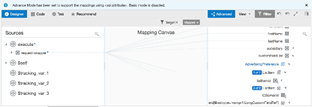
This feature exposes custom fields for standard objects as named fields in the mapper and during netsuite endpoint creation for advanced search and saved search operations. This feature applies to all basic(except delete) and search operations of netsuite. And for both sync and async processing modes.

For Basic CRUD operations, the custom fields is exposed on the mapper as a named field. The custom field name is derived from the name given to custom field in netsuite. This makes it easier to map without needing to know the internalId and scriptId of a particular custom field for standard object. For eg, here is the mapping done for netsuite update operation. The image below shows a request mapping from Rest(trigger) to Netsuite Update operation on Customer Standard Object .

You can check that there are two fields that have been mapped for the netsuite update operation. ICSEmailId and AdvertisingPreferences. ICSEmailId is a simple type custom field, no further work is required on the part of the integration developer. Just use it like any other simpletype field. AdvertisingPreferences is a complex type custom field. It correlates to a multiselect custom field in netsuite. For complex type custom fields, listitemId correlates to the internalId of the listItem. For the invoke request to netsuite update operation to succeed, integration developer needs to ensure listItemId value is mapped. For mapping more than one listItem, just repeat the ListItem and do the required mapping. Read the complete article here.

PaaS Partner Community

For regular information on Oracle PaaS become a member in the PaaS (Integration & Process) Partner Community please register here.

clip_image003 Blog clip_image005 Twitter clip_image004 LinkedIn image[7][2][2][2] Facebook clip_image002[8][4][2][2][2] Wiki

Technorati Tags: SOA Community,Oracle SOA,Oracle BPM,OPN,Jürgen Kress
Kafka Adapter for OIC by Daniel Martins Teixeira

image

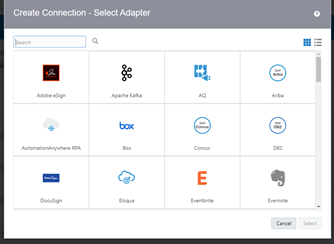
The Kafka adapter for Oracle Integration Cloud came out earlier this month, and it was one of the most anticipated releases.

So what is Kafka? You can find all about it on https://kafka.apache.org/, but in a nutshell:

Apache Kafka is a distributed streaming platform with three main key capabilities:
  • Publish and subscribe to streams of records.
  • Store streams of records in a fault-tolerant durable way.
  • Process streams of records as they occur.

Kafka is run as a cluster on one or more servers that can span multiple data centres. The Kafka cluster stores streams of records in categories called topics, and each record consists of a key, a value, and a timestamp.

Kafka Adapter Capabilities

The Apache Kafka Adapter enables you to create an integration in Oracle Integration that connects to an Apache Kafka messaging system for the publishing and consumption of messages from a Kafka topic.

These are some of the Apache Kafka Adapter benefits:

  • Consumes messages from a Kafka topic and produces messages to a Kafka topic.
  • Enables you to browse the available metadata using the Adapter Endpoint Configuration Wizard (that is, the topics and partitions to which messages are published and consumed).
  • Supports a consumer group. Read the complete article here.

PaaS Partner Community

For regular information on Oracle PaaS become a member in the PaaS (Integration & Process) Partner Community please register here.

clip_image003 Blog clip_image005 Twitter clip_image004 LinkedIn image[7][2][2][2] Facebook clip_image002[8][4][2][2][2] Wiki

Technorati Tags: SOA Community,Oracle SOA,Oracle BPM,OPN,Jürgen Kress
Why is iPaaS adoption growing to handle integrations in cloud architectures? By Daryl Eicher

image

"Integration used to be a lengthy, complicated process, a process that simply would not keep up…"

Software Development Times April 2020 edition features interviews on how to accelerate application connectivity with industry thought leaders including IDC’s Maureen Fleming and Oracle’s VP of Product Management for Digital Assistant and Integration, Suhas Uliyar. Learn why integration Platform as a Service (iPaaS) continues to grow at double-digit rates and what it means to your IoT, AI, analytics, and application refactoring initiatives.

Integration is evolving to meet your need for speed

Find out how machine learning and business insight into end-to-end enterprise processes are helping lean digital business development teams innovate faster, identify bottlenecks, and leverage recommendations for intelligent data mapping.

"One of the top things customers are asking for is more out-of-the-box solutions."

Solutions that tame the expanding complexity of intra-cloud, cloud-to-cloud, and cloud-to-ground integration and process automation. If you need to quickly connect any SaaS, on-premises, or custom business applications with less dependence on scarce IT specialists, check out SDTimes’ article iPaaS adoption growing to handle integrations in cloud architecturesRead the complete article here.

PaaS Partner Community

For regular information on Oracle PaaS become a member in the PaaS (Integration & Process) Partner Community please register here.

clip_image003 Blog clip_image005 Twitter clip_image004 LinkedIn image[7][2][2][2] Facebook clip_image002[8][4][2][2][2] Wiki

Technorati Tags: SOA Community,Oracle SOA,Oracle BPM,OPN,Jürgen Kress

Additional new content PaaS Partner Community

image

Four Priorities for Every CFO’s List in 2020 #1: Move from disconnected spreadsheets to integrated insights. CFOs spend more than two hours a day chasing down and reconciling data from spreadsheets scattered across their organization. That makes it hard for CFOs to see interdependencies across the company and leaves them at a strategic disadvantage. Next on the list.

Autonomous Tech Is Moving Fast Self-driving bulldozers. Self-tuning databases. Self-diagnosing medical apps, with no doctor involved. While futuristic self-driving cars get all the publicity, the fastest change from autonomous tech will likely come in other industries, which are already getting value from these AI-driven systems. Learn about these real-world examples and more in our in-depth story on this trend, Autonomous in Action

Healthcare Technology Should Just Work BJ Moore, CIO of Providence St. Joseph Health, knew caregivers and employees needed simple, accessible, and unified ERP and human capital management (HCM) technology behind the scenes. “Every minute we save our caregivers, is another minute they can spend on patient care,” he writes. “Every dollar we save…is a dollar we can provide to our underserved communities.” Moore’s next move

Introducing Oracle Cloud Data Science Platform

Build, Test, and Deploy Applications on Oracle Cloud—for Free

Video: Introducing Oracle Cloud Free Tier

PaaS Partner Community

For regular information on Oracle PaaS become a member in the PaaS (Integration & Process) Partner Community please register here.

clip_image003 Blog clip_image005 Twitter clip_image004 LinkedIn image[7][2][2][2] Facebook clip_image002[8][4][2][2][2] Wiki

Technorati Tags: SOA Community,Oracle SOA,Oracle BPM,OPN,Jürgen Kress

PaaS Partner YouTube Update August 2020

The August video includes three topics:

• Kickoff Webcasts for PaaS & SaaS partners community on-demand webcast.

• Update your partner finder company profile

• Chatbot best practice design community webcast

For regular updates please subscribe to our YouTube channel here. Thanks for your likes and sharing the video on YouTube and LinkedIn. For the latest PaaS Community information please visit our Community update wiki here (Community membership required).

PaaS Partner Community

For regular information on Oracle PaaS become a member in the PaaS (Integration & Process) Partner Community please register here.

clip_image003 Blog clip_image005 Twitter clip_image004 LinkedIn image[7][2][2][2] Facebook clip_image002[8][4][2][2][2] Wiki

Technorati Tags: YouTube,SOA Community,Oracle SOA,Oracle BPM,Jürgen Kress,Middleware Update,Partner Update