Restoring OSB 12.2.1 Maven Functionality by Robert Patrick

It seems that testing of the Oracle Service Bus (OSB) Maven functionality in the new 12.2.1 release failed to catch a few issues that make the OSB Maven plugin unusable out of the box.  Oracle is aware of the issue and working to create a patch for this.  In the meantime, users can work around the problem with a few simple changes.  This blog documents those changes.

Fixing the com.oracle.servicebus:client POM

The first change we need to make is to edit the com.oracle.servicebus:client POM.  This POM can be found at ${ORACLE_HOME}/osb/plugins/maven/com/oracle/servicebus/client/12.2.1/client-12.2.1.pom.  Open this file in a text editor and make the following changes.

  1. Delete the <dependency> stanza for the com.oracle.weblogic:wlthint3client.  This artifact does not exist.  Fortunately, it is is not needed since the weblogic-server-pom dependency provides all of the connectivity to WebLogic Server that is required.
  2. In the weblogic-server-pom dependency, change the <version> element’s value from “LATEST” to “[12.2.1,12.2.2)” (without the double quotes).
  3. In the com-bea-core-xml-xmlbeans dependency, change the <artifactId> element’s value from “com-bea-core-xml-xmlbeans” to “com.bea.core.xml.xmlbeans” (without the double quotes).
  4. In the com-bea-core-xml-xmlbeans dependency, change the <version> element’s value from “LATEST” to “[12.2.1,12.2.2)” (without the double quotes).

After making these changes, the relevant section of the file should look like the one shown here. Read the complete article here.

SOA & BPM Partner Community

For regular information on Oracle SOA Suite become a member in the SOA & BPM Partner Community for registration please visit www.oracle.com/goto/emea/soa (OPN account required) If you need support with your account please contact the Oracle Partner Business Center.

Blog Twitter LinkedIn image[7][2][2][2] Facebook clip_image002[8][4][2][2][2] Wiki

Technorati Tags: SOA Community,Oracle SOA,Oracle BPM,OPN,Jürgen Kress
Servicebus 12c: Using configuration files for customizing service deployments by Sven Bernhardt

imageIntroduction

In my last projects I faced different challenges in the area of how to manage environment-specific artefact configurations that need to be adjusted during rollout of a particular service component. As a result from that, I decided to write down my experiences and solution approaches regarding the corresponding topics. This article is the starting point for a short blog series dealing with different challenges in this area, where the following topics will be covered:

  • General: Using configuration files for customizing service deployments
  • Adjust environment-specific configurations at deployment time
  • Evaluating environment-specific configurations at runtime
  • Security: Approaches for credentials management

Configuration files in Servicebus

During its lifecycle a specific service component needs to pass different quality gates to ensure quality, correctness and stability before it will be approved for production rollout. For that reason deployments to different environments have to be done. This usually means changes in configurations like service endpoints or timeout parameters, which must be possible without changing a components implementation and rebuilding the component. In Oracle Servicebus this can be achieved by using so called configuration files (aka customization files in OSB 11g). With those it is possible to consistently change service properties and configurations for implementation artefacts like proxy services, service pipelines and business services. Within a configuration file you define actions like replace or search and replace to adjust the corresponding configurations.

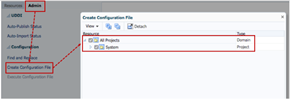
Generating a basic configuration file can be done using Servicebus console.

As it can be seen in the screenshot above the services that should be adjusted by the configuration file can be selected. Doing so, a file is generated containing replace rules for all configurations that are adjustable. Read the complete article here.

SOA & BPM Partner Community

For regular information on Oracle SOA Suite become a member in the SOA & BPM Partner Community for registration please visit www.oracle.com/goto/emea/soa (OPN account required) If you need support with your account please contact the Oracle Partner Business Center.

Blog Twitter LinkedIn image[7][2][2][2] Facebook clip_image002[8][4][2][2][2] Wiki

Technorati Tags: SOA Community,Oracle SOA,Oracle BPM,OPN,Jürgen Kress

SOA Suite 11g and SOA Suite 12c Bundle Patches January 2017


New Bundle Patches for SOA 11.1.1.9 and 12.1.3.0

Product Version

Bundle Patch Name

Bundle Patch Number

SOA 11.1.1.9

Bundle Patch 170102 (11.1.1.9.170102)

Patch 25247644

SOA 12.1.3.0

Bundle Patch 170117 (12.1.3.0.170117)

Patch 24835839

For more information:

1. Note 1485949.1 SOA 11g and 12c: Bundle Patch Reference

2. Note 2061926.1 Oracle Database, Enterprise Manager and Middleware – Change to Patch Numbering from Nov 2015 onwards

3. Fusion Middleware Support Blog

SOA & BPM Partner Community

For regular information on Oracle SOA Suite become a member in the SOA & BPM Partner Community for registration please visit www.oracle.com/goto/emea/soa (OPN account required) If you need support with your account please contact the Oracle Partner Business Center.

Blog Twitter LinkedIn image[7][2][2][2] Facebook clip_image002[8][4][2][2][2] Wiki

Technorati Tags: SOA Community,Oracle SOA,Oracle BPM,OPN,Jürgen Kress
Fee on-demand SOA Suite 12 and BPM Suite 12c Bootcamps

image

In March and April we offer free on-demand Bootcamps for SOA Suite 12c and BPM Suite 12c. For details and registration please visit the training calendar:

Date Training Location By Focus
06-31.03.2017 SOA Suite 12c Bootcamp on-demand OPN Tech
06-31.03.2017 BPM Suite 12c Bootcamp on-demand OPN Tech
03-28.04.2017 SOA Suite 12c Bootcamp on-demand OPN Tech
03-28.04.2016 BPM Suite 12c Bootcamp on-demand OPN Tech

SOA Suite 12c Bootcamp on-demand

What will we cover

Oracle SOA Suite 12c is the latest version of the industry’s most complete and unified application integration and SOA solution. With simplified cloud, mobile, on premises and Internet of Things (IoT) integration capabilities, all within a single platform, Oracle SOA Suite 12c delivers faster time to integration, increased productivity and lower TCO.

The Oracle SOA Suite 12c Implementation Boot Camp provides relevant insight to current and prospective SOA implementers and for those companies interested on becoming Oracle SOA Suite 12c Specialized. Participants will learn how to develop and implement solutions using SOA Suite 12c that will drive their customer organizations run more effectively and efficiently.

Learn to

  • Create, deploy, and manage cross-application process orchestration with BPEL Process Manager
  • Describe tasks for users or groups to perform with Human Task Service
  • Define and modify business logic without programming by using Business Rules
  • Create dashboards, alerts, and reports in real time with no coding using Business Activity Monitoring (BAM)
  • Implement SOA Services with Web Services Manager
  • Manage and monitor integration flow with Enterprise Manager
  • Use Adapters to connect to enterprise applications

· Convert complex point-to-point application integration into simplified, agile, and reusable shared service application infrastructure with Service Bus

For details and registration please visit the training calendar.

Can access the training calendar? Become a community member www.oracle.,com/goto/emea/soa

BPM Suite 12c Bootcamp on-demand

imageWhat will we cover

This boot camp is an ideal starting point for an implementer who is planning to learn Oracle BPM Suite 12c and use it on BPM projects. The course provides a combination of lecture segments that present conceptual and feature background and hands-on labs that provide practice with the tooling.

It introduces process developers to Oracle BPM Suite 12c. It covers the key concepts, features and processes needed to begin using the design-time and run-time capabilities on BPM projects. Throughout the training, you will benefit from hands-on exercises based upon two case studies. At the conclusion of the course, you should feel comfortable to start using BPM Suite 12c for process modeling, simulation, analytics, business rules and human workflow.

Learn to

  • Use BPMN modeling notation to document business process
  • Simulate a process model to identify bottlenecks
  • Create business rules that condition flow through a model
  • Develop a sophisticated human workflow task routing
  • Define key performance metrics
  • Build a dashboard containing charts that show key performance metrics

For details and registration please visit the training calendar.

Can access the training calendar? Become a community member www.oracle.,com/goto/emea/soa


SOA & BPM Partner Community

For regular information on Oracle SOA Suite become a member in the SOA & BPM Partner Community for registration please visit www.oracle.com/goto/emea/soa (OPN account required) If you need support with your account please contact the Oracle Partner Business Center.

Blog Twitter LinkedIn image[7][2][2][2] Facebook clip_image002[8][4][2][2][2] Wiki

Technorati Tags: SOA Community,Oracle SOA,Oracle BPM,OPN,Jürgen Kress

More chaos as an OWSM policy by Jeroen Ninck Blok

imageErrors & failures

So it is very easy to implement a happy flow. However handling errors, rolling back transactions and recovering from errors and failures can be quite challenging. It is not possible to find all the possibilities during development or design. Some errors or failures will only occur when very rare circumstances come into play together. Then all the parts of the application either will handle the error and will ensure that no data is lost and the application survives or not. In the last case people lose data, applications crash and managers get upset.

A very good read on this topic is the book Release It!.

A policy

Most of the time I write services in either Oracle Service Bus or Oracle SOA Suite. I can mock expected error behaviour, however sometimes having errors when you don’t expect them can give you new insite into the stability and resilience of the application.

To create (unexpected) errors a Managed Server can be stopped, data sources can be removed or entire virtual machine’s can be deleted. However these Managed Servers are quite heavy and when I ask somebody if I can break something during a test I am usually asked to get a cup of coffee 😉

So I wanted a different method (unfortunately not implemeted at a customer) so I created an Oracle Web Service Manager (OWSM) policy. I was inspired by the Chaos Monkey application made by Netflix. The Chaos Monkey application creates havoc. The OWSM policy should also create problems, but in a very modest way. It generates an error on a random basis.

The OWSM framework is not really meant for this kind of policies, but it is a start! The sources can be found on my GitHub repository.

Building & installing the policy

The policy is build using JDeveloper. I build it using JDeveloper 12.2.1.1, but I think it can be back ported to 12.1.3. There are two deployment profiles: Read the complete article here.

SOA & BPM Partner Community

For regular information on Oracle SOA Suite become a member in the SOA & BPM Partner Community for registration please visit www.oracle.com/goto/emea/soa (OPN account required) If you need support with your account please contact the Oracle Partner Business Center.

Blog Twitter LinkedIn image[7][2][2][2] Facebook clip_image002[8][4][2][2][2] Wiki

Technorati Tags: SOA Community,Oracle SOA,Oracle BPM,OPN,Jürgen Kress
Configuring Amazon RDS as the Oracle SOA Suite Database by Fabio Douek

imageWe are proud to announce that RDS support is fully integrated and certified against MyST 3.8.2, which was released on 15/Jun/2016. To know more about MyST visit: http://myst.rubiconred.com

1. Overview

We started to provision Oracle Fusion Middleware platforms against AWS in anger about three years ago. From the beginning we took advantage of the ability to create the AWS infrastructure within minutes. We could also use MyST to provision complex Oracle Fusion Middleware EDG (Enterprise Deployment Guide) Compliant platforms in less than an hour.

One challenge that we faced, was that we couldn’t use Oracle RDS as the database for our Oracle Fusion Middleware installations. This was primarily because the RDS master user didn’t have the database privileges required to run the Oracle Repository Creation Utility (RCU). As a result, we implemented our own automation for provisioning the Oracle Database running on EC2 instances.

Whilst this works for running Dev and Test workloads in AWS, when it comes to implementing Production workloads, Oracle RDS provides a number of additional benefits. This includes simplified administration tasks, including backups, software patching, monitoring, and hardware scaling.

In addition, the Multi-AZ deployment option simplifies the implementation of a highly available architecture, as it contains built-in support for automated fail-over from your primary database to a synchronously replicated secondary database in an alternative Availability Zone in case of a failure.

This all started to change late last year, with a number of our customers looking at running Oracle SOA workloads in Production on AWS. Being an AWS Technology Partner, we provided this feedback to AWS, who in return invited us to collaborate with the RDS team.

We spent the last 4 months of this year working with the AWS Oracle RDS Team (a big thank you to Michael and Jinyoung) to test the RCU capability within MyST. This went extremely well, and the RDS team worked closely with us to support the go-live of our first customer on Oracle SOA 12.2.1 on AWS using RDS – what we believe to be a world first!

Our very first customer go-live on RDS was a few weeks ago in June-2016. More recently, Amazon has now announced that RCU is officially supported by Oracle RDS. This is great news for us and our customers. We can can now provision an Oracle Fusion Middleware EDG HA compliant environment within minutes and take advantage of RDS to simplify on-going operations.

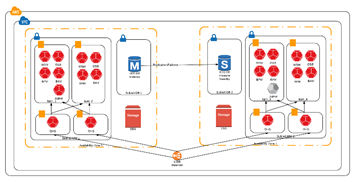
The following diagram depicts a typical highly available Oracle Fusion Middleware deployment in AWS. Note that the number of compute nodes, as well as the components may vary depending on the requirements.

2. Oracle RDS Compatibility

Before getting started with Oracle RDS, its important to check its compatibility with RCU and the corresponding Oracle Fusion Middleware components. The following AWS Oracle RDS edition/version options support RCU. Read the complete post here.

SOA & BPM Partner Community

For regular information on Oracle SOA Suite become a member in the SOA & BPM Partner Community for registration please visit www.oracle.com/goto/emea/soa (OPN account required) If you need support with your account please contact the Oracle Partner Business Center.

Blog Twitter LinkedIn image[7][2][2][2] Facebook clip_image002[8][4][2][2][2] Wiki

Technorati Tags: SOA Community,Oracle SOA,Oracle BPM,OPN,Jürgen Kress
SOA Suite Code Quality: SonarQube Quality Gates, XML Plugin and custom XPath rules by Maarten Smeets

imageThere are several ways to do code quality checks in SOA Suite. In this blog post I will describe a minimal effort setup which uses Jenkins 2.9, SonarQube 5.6 and the SonarQube XML Plugin 1.4.1. SonarQube is a popular tool to check and visualize code quality. An XML Plugin is available for SonarQube which allows you to define custom XPath rules. At the end of this post I will shortly describe several other options which you can consider to help you improve code quality by doing automated checks.

Using SonarQube and the XML Plugin to do code quality checks on SOA Suite components has several benefits compared to other options described at the end of this post.

  • It is very flexible and relatively technology independent. It allows you to scan any XML file such as BPEL, BPMN, OSB, Mediator, Spring, composite.xml files
  • It requires only configuration of SonarQube, the SonarQube XML Plugin and the CI solution (Jenkins in this example)
  • It has few dependencies. It does not require an Oracle Home or custom JAR files on your SonarQube server.
  • The XML Plugin has support (by SonarSource) so high probability it will still work in future versions of SonarQube.
  • Writing rules is simple; XPath expressions. it does not require you to write Java code to create checks.

What we can’t do with this setup is check relations between files since the XPath expressions are executed on single documents (defined with an Ant-style file-mask). Usually though when compiling or deploying SOA Suite composites, it will fail if there are references to files which are not present.

Jenkins / SonarQube setup

Setting up the environment

In this setup I’ve used Git, Jenkins, Maven, SonarQube. I’ve used an Ubuntu Server 16.04 install. The installation of the tools is pretty straightforward. Git and Maven are easiest: sudo apt-get install git maven. Jenkins is also pretty easy since there is a Debian package available. See here. For SonarQube I’ve installed a MySQL server (sudo apt-get install mysql-server). Next I’ve used the following manual. After the installation I’ve set the default admin password to admin (see here). I have also got Sonatype Nexus 3 installed on the server. This required a bit more effort. Nexus 2.x and Nexus 3.x use different API locations. Maven needed to be able to find Nexus (settings.xml file used for Nexus 2 cannot be used OOTB for Nexus 3). The init.d script had some different installation steps. See here.

Of course most people will know how to use Git. I prefer a setup in which the server has a single Git user who owns the repository and grant other users access with SSH keys to that repository. You can see how this is done here.

SonarQube

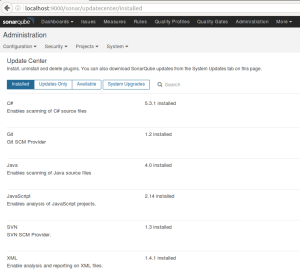
I’ve used the XML Plugin in SonarQube to define XPath rules. This first needs to be installed. Administration, System, Update Center and install the plugin:

You have to define a project in SonarQube. Administration, Projects, Management, Create Project. Read the complete article here.

SOA & BPM Partner Community

For regular information on Oracle SOA Suite become a member in the SOA & BPM Partner Community for registration please visit www.oracle.com/goto/emea/soa (OPN account required) If you need support with your account please contact the Oracle Partner Business Center.

Blog Twitter LinkedIn image[7][2][2][2] Facebook clip_image002[8][4][2][2][2] Wiki

Technorati Tags: SOA Community,Oracle SOA,Oracle BPM,OPN,Jürgen Kress
SOA Suite Unit test with Groovy (11g, 12c) – part 1 by Carlos Giraldo

imageIt’s going to be a little long but if you stay until the last line, you are going to know what i did to create dynamic xml requests and responses usign the unit test framework of the Soa Suite with groovy. (yes, groovy!)
I’m going to give some background of the problem and later my own personal solution. Lets begin 😀
[Update 30/06/2016] Wrote a second blog about subject with more functionality for the tests; JUnit test execution, pre load of dat and post processing of information. http://carlgira.blogspot.com.es/2016/06/oracle-soa-suite-unit-test-with-groovy.html

PROBLEM

I was trying to create Unit Test for some Bpel with several Web Service calls, human task, JCAs to database, and i get really frustated trying to create dynamic requests or responses using the tool within the Jdeveloper.
I wanted to re-create some fields, update dates etc.
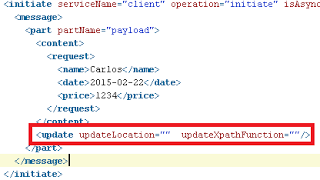
The only thing i found was something that the TestSuites supports but the graphic wizards dont show. You can use small Xpath functions to replace values of the payloads in your TestSuite.
The next image shows the initiation message of a TestCase. You can see that after the payload, there is an element called "update". This element only receives two attributes, the "updateLocation" that refers a XpathLocation of a field to update, and the "updateXpathFunction" with the xpath function with the new value. Read the complete article here.

SOA & BPM Partner Community

For regular information on Oracle SOA Suite become a member in the SOA & BPM Partner Community for registration please visit www.oracle.com/goto/emea/soa (OPN account required) If you need support with your account please contact the Oracle Partner Business Center.

Blog Twitter LinkedIn image[7][2][2][2] Facebook clip_image002[8][4][2][2][2] Wiki

Technorati Tags: SOA Community,Oracle SOA,Oracle BPM,OPN,Jürgen Kress

Publishing Oracle SOA Maven plugin by Maarten Tijhof

image

When setting up a continuous integration solution for Oracle SOA Suite code, it is best to work with mavenized projects, and thus rely on Oracle-provided maven plugins to do the tough job of compiling and deploying artifacts.

This way of working has been introduced by Oracle in the 12c range of products. There are no Maven plugins available for 11g Oracle products.
This post describes how to set up the plugin in a Binary Repository for Maven to be able to fetch it when the time has come to compile a SOA Composite.

Prerequisites:

  • Installed software
    • Maven
    • Oracle SOA Suite (e.g. 12.1.3)
  • Binary repository
    • User + password
    • Right to publish to repository

Binary Repository

The Oracle SOA Maven Plugin needs to be published to a Maven repository, this can be a local repository or a remote repository. Here, we’ll discuss a remote repository, as publishing to your local repository is similar and even easier!

Make sure your binary repository is set up, and you have a user and password with sufficient rights to add binaries to the repository.

Maven Settings

Edit your Maven Settings file, it is located at ~/.m2/settings.xml.

Make sure that you set up a profile, and that the profile/id matches activeProfiles/activeProfile. Also make sure that repository/id matches server/id for the credentials to be used when communicating to the server.
Combined, the settings.xml file would look something like this: Read the complete article here.

SOA & BPM Partner Community

For regular information on Oracle SOA Suite become a member in the SOA & BPM Partner Community for registration please visit www.oracle.com/goto/emea/soa (OPN account required) If you need support with your account please contact the Oracle Partner Business Center.

Blog Twitter LinkedIn image[7][2][2][2] Facebook clip_image002[8][4][2][2][2] Wiki

Technorati Tags: SOA Community,Oracle SOA,Oracle BPM,OPN,Jürgen Kress
SOA vs Microservices Architecture by The SOA mythbusters

imageSo, are you interested in SOA & Service Orientation technologies?, that’s great because we also are, and work with those every single day since a long time ago. As integration professionals, we’ve seen the SOA stack grow, change, incorporating new products and technology with each passing year.

We’re  Arturo Viveros and Rolando Carrasco, the SOA Myth Busters from Mexico, and as we go with this series we will  put to the test a number of questions, myths and urban legends regarding SOA, Digital Transformation and much more, in seek of finding out which myths are true and which are not.

Introduction

Microservices Architecture is one of the disruptive technologies which have definitely taken center stage in these early days of the Digital Transformation era. Its fundamentals and value proposition are very appealing and in context with many of the architectural and functional needs of modern platforms and initiatives, so let’s begin by taking a quick overview:

ed deployment machinery. There is a bare minimum of centralized management of these services, which may be written in different programming languages and use different data storage technologies”“In short, the microservice architectural style is an approach to developing a single application as a suite of small services, each running in its own process and communicating with lightweight mechanisms, often an HTTP resource API. These services are built around business capabilities and independently deployable by fully automat

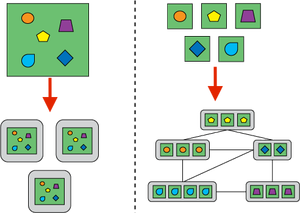
The above definition by Martin Fowler is fairly simple and at first sight doesn’t really introduce any extraordinary or revolutionary concepts. However, the best way to understand this architectural style as well as its differentiators and potential benefits, is contrasting it to what we may call traditional “monolithic” architectures:
With the term “monolith” being one of the most dreaded in IT lore, the design principles for which Microservices stand for become even more impactful: Read the complete article here.

SOA & BPM Partner Community

For regular information on Oracle SOA Suite become a member in the SOA & BPM Partner Community for registration please visit www.oracle.com/goto/emea/soa (OPN account required) If you need support with your account please contact the Oracle Partner Business Center.

Blog Twitter LinkedIn image[7][2][2][2] Facebook clip_image002[8][4][2][2][2] Wiki

Technorati Tags: SOA Community,Oracle SOA,Oracle BPM,OPN,Jürgen Kress