PaaS free trial accounts ICS and PCS, IoT and PaaS for SaaS

image

As part of our communities we do offer free PaaS accounts (only for partners in Europe, Middle East and Africa. In case you are not part of EMEA please contact your local partner manager):

· Integration Cloud Service & Process Cloud Service & SOA Cloud & IoT & PaaS for SaaS Service PaaS Demo Accounts  (Community membership required)

· Java Cloud Service & Application Cloud Container Service & Mobile Cloud Service PaaS Demo Accounts (Community membership required)

Watch the GSE Overview Video! Get an overview of what GSE is and how you can use GSE to help you sell. You can also get long running dedicated PaaS instances, therefore please send us details about your use cases. For instant access please request a sandbox demo

SOA & BPM Partner Community

For regular information on Oracle SOA Suite become a member in the SOA & BPM Partner Community for registration please visit www.oracle.com/goto/emea/soa (OPN account required) If you need support with your account please contact the Oracle Partner Business Center.

Blog Twitter LinkedIn image[7][2][2][2] Facebook clip_image002[8][4][2][2][2] Wiki

Technorati Tags: PaaS,Cloud,ICS,PCS,PaaS4SaaS,SOA Community,Oracle SOA,Oracle BPM,OPN,Jürgen Kress

Patching SOA Composite Instances in Oracle 12.2.1 by Dennis

clip_image002


Introduction

Composite Instance Patching is a new feature introduced in 12.2.1 that allows compatible changes to be made to a SOA composite definition and be applied to long-running active instances. The feature enables you to patch running instances of a composite and recover faulted instances after patching the runtime. You can deliver urgent composite fixes and make compatible/allowed changes that are picked up with long-running instances without aborting them. If a patched running instance comes across a business process that has been fixed by the patch, say a BPEL transformation, then it picks up the fixes applied to the business process.

Prior to 12.2.1, there was no way to make small changes to a composite and have in-flight instances, which could be long running for days/months, or error hospital instances see those changes. The alternatives were to either redeploy an existing composite revision but that causes long running instances to stop processing, or, to create a new composite revision which does preserve existing running instances but those instances do not see the changes introduced in the new revision. Now, with the new Composite Instance Patching feature in 12.2.1, critical fixes can be applied in a timely fashion and have them take effect immediately which is a unique differentiator for Oracle SOA Suite.

In this article I will (1) highlight some of the compatible changes that can be made to a composite, (2) discuss the enhancements to JDeveloper that allow you to quickly and easily design the patch without worrying about making invalid modifications in the composite patch, and (3) outline the steps used to build, validate, and deploy the composite instance patch to the SOA runtime.

Compatible Composite Changes

As mentioned above, there are only a limited set of modifications that can be made to a composite and deemed compatible with running instances.  Some of the compatible changes that you can make include:

  • Non-schema related XSLT changes
  • Changes to fault policy, sensor data, and analytics data
  • Compatible BPEL changes such as sync/async invoke, transformation activity, assign operations, etc.
  • JCA Adapter configuration properties
  • Modifications of token values in composite references

while some of the incompatible changes that you cannot make include:

  • Deleting or renaming composite artifacts
  • Updating binding properties
  • Changes to a WSDL and Schema definition
  • Changes to XQuery mappings
  • Changes to BPEL receive inputs, structured activities, assign mapper source/target/skip conditions

Do not worry about knowing exactly what constitutes a compatible or incompatible change since, as we shall see, all those rules are accounted for in a new SOA Patch Developer mode within JDeveloper which automatically disables changes that cannot be made when constructing the patch.

Composite Instance Patch Development in JDeveloper

To simplify the creation of a composite instance patch a number of enhancements have been made to the JDeveloper tooling.  The first change is the introduction of a new new SOA Patch Developer role.  When launching JDeveloper you must first select the role that matches your requirements. Read the complete article here.

SOA & BPM Partner Community

For regular information on Oracle SOA Suite become a member in the SOA & BPM Partner Community for registration please visit www.oracle.com/goto/emea/soa (OPN account required) If you need support with your account please contact the Oracle Partner Business Center.

Blog Twitter LinkedIn image[7][2][2][2] Facebook clip_image002[8][4][2][2][2] Wiki

Testing-Concepts and Considerations in a SOA landscape that uses the Service Bus Framework by Apostolos Varsamis

clip_image002


Introduction

Due to the ever growing complexity and multiple dependencies of software components in an enterprise landscape, “Automated Testing” is no longer an optional feature of the software development process but a crucial ingredient of the development process and plays a significant role in every successfully launched software project.

Software Development in a SOA environment has its own challenges that differ from, let’s say, purely Java components. One reason is the fact that software testing needs invariant laboratory conditions; but exactly this is hard to achieve in a complex service landscape. So when designing tests it is very important to determine isolation conditions to meet these requirements. Another point worth keeping in mind is the fact that frameworks -like Oracle Fusion Middleware- follow a declarative development approach; this means that testing is possible only after the deployment and never before (because the services are de-facto built up during the deployment). Some artifacts can be tested before the deployment but we get to it later.

In this article focusing on Oracle Service Bus we outline a feasible testing strategy that allows us to implement automated testing of arbitrary complexity; starting from simple service-testing up to end-to-end tests that involve a whole service chain spread over one or more domains.

Test Categories

We assume that the reader is familiar with service classification concepts like “elementary services” or “composite services”. We also assume that the basic concepts of OSB like XQueries, Proxy and business services are well known concepts as well.

Let us focus for the moment on transformation logic. The tools offered by OSB are XQueries and XSLT transformations. These files describe, roughly speaking, how a certain XML structure should be transformed to another one, or how a piece of information can be extracted from it. Hence they can be regarded as functions that receive an XML structure as input and provide another XML structure or simple data as an output. These artifacts can be tested by java Junit means before deployment. One might consider of it as an unnecessary testing step; but it is enormous important, because it guarantees us  that no side effects would remain undetected in case e.g. a namespace or a structural modification in a XML schema has to  be carried out.

So keeping these points in mind, one can make the following distinction:

Pre-deployment Tests

These are tests mainly using Junit techniques and may be considered as “low-level” or basic tests. They should guarantee that basic transformation logic of data structures meets the requirements. Testing the XQuery components help us ensure the XQuery language correctness as well and help us avoid namespace inconsistency and confusion. Read the complete article here.

SOA & BPM Partner Community

For regular information on Oracle SOA Suite become a member in the SOA & BPM Partner Community for registration please visit www.oracle.com/goto/emea/soa (OPN account required) If you need support with your account please contact the Oracle Partner Business Center.

Blog Twitter LinkedIn image[7][2][2][2] Facebook clip_image002[8][4][2][2][2] Wiki

Bug: Typed One Way Pipeline in Oracle Service Bus / OSB 12.2.1 by Frank Munz

clip_image002


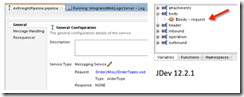
When creating a Service Bus pipeline in JDeveloper 12.2.1 for Oracle Service Bus 12.2.1, based on a typed, one-way business service (either one way WSDL based, or Messaging Service with XML request and XSD type with reply NONE business service) the pipeline won’t correctly use the request message type. It’s annoying because you cannot easily create expressions based on the request type, such as drilling open the $body variable, e.g. for an Order containing a shipping ID. All that is displayed within the pipeline is $body.

This happens although the pipeline configuration displays the correct XSD, eg. OrderType.xsd and the correct Type, eg. OrderType.

I am quite surprised because this is not a very unusual use case. Anyway I couldn’t find a work around for JDeveloper 12.2.1 (let me know if you know one!). Interestingly, testing a proxy service based on the business service works all right (so maybe the bug slipped in when the pipeline construct was separated from the proxy service? just guessing.)

It is possible to work with the good old Service Bus web console /sbconsole. There everything is fine, i.e. the correct structure of the request message is displayed. The working Service Bus console is another indication that the way JDeveloper does it is broken. Read the complete article here.

SOA & BPM Partner Community

For regular information on Oracle SOA Suite become a member in the SOA & BPM Partner Community for registration please visit www.oracle.com/goto/emea/soa (OPN account required) If you need support with your account please contact the Oracle Partner Business Center.

Blog Twitter LinkedIn image[7][2][2][2] Facebook clip_image002[8][4][2][2][2] Wiki

Export and Import Oracle BAM Projects by Waslley Souza

clip_image001


In the real world, you’ll create your Oracle BAM projects in a development environment, and when all is well, you will export it to a test or production environment. Export and import actions are easy to perform using BAMCommand command-line utility.

In this post, we will learn how to export Oracle BAM projects from a source environment and then import it to a target environment.
Download the sample application: BlogProject.zip.

I created an Oracle BAM project called Blog that has Data Object, Business Query, Business Views and Dashboard.

First of all, edit the BAMCommand configuration file, defining the information about the source environment.
It is located at <FMW_HOME>/soa/bam/bin/BAMCommandConfig.xml.

Now you can execute the BAMCommand command-line utility to export your BAM project artifacts.
I could export all Oracle BAM objects in the system, but I have other projects and I just want to export the project called Blog. Read the complete article here.

SOA & BPM Partner Community

For regular information on Oracle SOA Suite become a member in the SOA & BPM Partner Community for registration please visit www.oracle.com/goto/emea/soa (OPN account required) If you need support with your account please contact the Oracle Partner Business Center.

Blog Twitter LinkedIn image[7][2][2][2] Facebook clip_image002[8][4][2][2][2] Wiki

Connecting Stream Explorer and BAM by Waslley Souza

clip_image001


When you are working with Oracle Stream Explorer and you need analytical data about the events, the easiest way is using Oracle BAM. The connection between the Oracle Stream Explorer and Oracle BAM is simple to create. In this post we will learn how to do this connection using JMS.

This is the structure of my CSV file.

In the Oracle Stream Explorer, go to the Exploration that you want to use.
Click Configure a Target.

Complete the form with information about your BAM server and click Finish.

This is the necessary setting in Oracle Stream Explorer.
Now, go to Oracle WebLogic Server and navigate to JMS Modules.

Click BAMJMSSystemResource, and then click New.
Create a new Queue with the same information you entered in Oracle Stream Explorer and click Next. Read the complete article here.

SOA & BPM Partner Community

For regular information on Oracle SOA Suite become a member in the SOA & BPM Partner Community for registration please visit www.oracle.com/goto/emea/soa (OPN account required) If you need support with your account please contact the Oracle Partner Business Center.

Blog Twitter LinkedIn image[7][2][2][2] Facebook clip_image002[8][4][2][2][2] Wiki

Matt Brasier for Oracle Technology Network – Monitoring Oracle SOA Suite

clip_image002Matt Brasier, C2B2 Head of Consulting and the co-author of the Oracle SOA Suite 11g Performance Tuning Cookbook (Packt Publishing) discusses Oracle SOA Suite monitoring in this 2 Minute Oracle Technology Network Tech Tip recorded at the UKOUG Tech15 Conference. Watch the video here.

SOA & BPM Partner Community

For regular information on Oracle SOA Suite become a member in the SOA & BPM Partner Community for registration please visit www.oracle.com/goto/emea/soa (OPN account required) If you need support with your account please contact the Oracle Partner Business Center.

Blog Twitter LinkedIn image[7][2][2][2] Facebook clip_image002[8][4][2][2][2] Wiki

Resiliency: Circuit Breaker

clip_image002

Circuit Breaker is a new resiliency feature in 12.2.1 that helps to simplify operations and ensure system stability when downstream endpoints become unavailable.

This post is meant to be a quick introduction to this new feature so you can start testing it out.

Circuit Breaker overview

Circuit Breaker enables you to configure the system to automatically suspend upstream endpoints when a downstream system is down or unreachable from a SOA composite. This prevents faults from building up in the server and relieves you from having to bulk-recover faulted instances. The upstream endpoints are automatically resumed after the downstream endpoint comes back up.

The circuit breaker feature works by monitoring downstream system failures and after x number of failures over y minutes (where x and y are configurable) any upstream web service, subscriber, or adapter where the failed messages originated from will be suspended.  For adapters and subscribers the messages will not be lost but will not be processed until the downstream system comes back up. Web Service requests will be rejected and it is up to the client program to handle these failures.

Suspended services will show up in the EM dashboard (below),  by clicking on the "Suspended since …" link another dialog will pop up that will allow you to jump to the error in the Error Hospital and/or re-enable the service. 

Once a service is suspended messages are allowed to "trickle" through periodically in order to test the downstream system.  If the downstream invocation succeeds then the upstream service is resumed.

Configuration

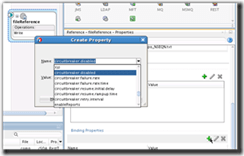
Circuit Breaker can be configured globally and overridden at the downstream endpoint. There may be situations where you don’t want downstream failures to cause services to be suspended, in this case you would disable the circuit breaker at the endpoint level, it is also possible to override the number of failures and failure window at the endpoint level. Conversely you can disable globally and enable at the endpoint level.  It is also possible to set the circuit breaker properties on an endpoint when designing the composite in JDev.

Global configuration

To display the configuration dialog go to SOA Infrastructure -> SOA Administration -> Resiliency Configuration. Read the complete article here.

SOA & BPM Partner Community

For regular information on Oracle SOA Suite become a member in the SOA & BPM Partner Community for registration please visit www.oracle.com/goto/emea/soa (OPN account required) If you need support with your account please contact the Oracle Partner Business Center.

Blog Twitter LinkedIn image[7][2][2][2] Facebook clip_image002[8][4][2][2][2] Wiki

What is SOA 12c ? by Tutorial Diary

clip_image002


Oracle SOA Suite 12c is new version of SOA Suite tool from Oracle. Oracle has introduced lot of new features in this new version. This new version is based upon 4 themes as show below. First two themes (Developer productivity and Industrial SOA) comes as outcome of user/developers feedback and other two themes (Mobile and Cloud) introduced as per industry trend.

SOA 12c Themes

Developer Productivity

This theme is outcome of the community that currently using SOA Suite 11g. Oracle has introduced couple of improvements in this version based upon the feedback from that community. As the name suggest, this theme helps developer to improve their productivity and that comes from the new features introduced.

Industrial SOA

This theme is also a outcome of the community that currently using SOA Suite 11g. Oracle has introduced couple of improvements in this version based upon the feedback from that community.

Mobile & Cloud

These themes has been introduced by seeing current industry trend. Currently everyone talking about mobile & cloud enablement that comes under these themes.

Major Enhancements in SOA 12c

Below are the major enhancements done in this new version (SOA 12c).

• Earlier Service Bus is separate tool from SOA Suite tool and we use to have Eclipse as IDE for service bus development. In this 12c version, Service Bus become part of SOA 12c only i.e. we can do Service Bus development using JDeveloper only, there is no need to use Eclipse anymore.
• As Service Bus become part of SOA 12c so all the adapters becomes accessible to Service Bus also.
• ESS (Enterprise Service Scheduler) is new component introduced in this version that provide scheduling capabilities.
• 1 Single Installer has been introduced that can used to install all the components like Database, Weblogic, SOA Suite, Service Bus etc.
• MFT (Managed File Transfer) has been introduced that does not come by default with SOA 12c but this can be downloaded as separate package that helps to do file transfer.
• Free License for developer on single machine. Read the complete article here.

SOA & BPM Partner Community

For regular information on Oracle SOA Suite become a member in the SOA & BPM Partner Community for registration please visit www.oracle.com/goto/emea/soa (OPN account required) If you need support with your account please contact the Oracle Partner Business Center.

Blog Twitter LinkedIn image[7][2][2][2] Facebook clip_image002[8][4][2][2][2] Wiki

What about to upgrade to Oracle SOA Suite 12.2.1? by Rolando Carrasco

clip_image001

This is my last post of the year.
Strangely this was the year with less posts here in Oracle Radio. And not only that, but I started to do it in English.
Since 2007 I’ve been feeding this blog in Spanish, but for some specific posts I just decided to do it in English to get to a greater audience.
So what about to upgrade to Oracle SOA Site 12.2.1? Is the name of this post.
For the last 7 weeks or so I’ve been upgrading, together with one of my colleagues, around 5 domains of SOA Suite 12.1.3 to 12.2.1. It’s been quite an effort, because those very same domains, were upgraded from 11.1.1.7, so there is a lot of history in them.
They’ve been serving a large SOA implementation, a mission critical implementation that is part of the core for this institution. So the challenge was an important one.
To fail and not be able to rollback was not an option, the maintenance window for the production environment was not that large.
But I insist: what about upgrading it? Does it really work? Is it well documented? Why doing so? 
Well, it is definitely documented by Oracle. It really works. That is the reality. Doing this must be something to have in mind for anyone using 12.1.3.x, I really encourage you to do it. Do not hesitate to do it. It will give you much more stability to your SOA platform.
If you are using Oracle BAM 12c, then this is something you need to do, a lot of bugs were solved with this upgrade. Same thing with BPM. The UI has changed for the ADF ALTA version, which is very clean and even elegant, I would say:
If you are already using Oracle Cloud products, this will be very familiar for you. Oracle Enterprise Manger – Fusion Middleware Control has been always an slow UI. Now is not the exception, but seems to be little less slow. But it is definitive much more intuitive and easy to use, take a look at this: Read the complete article here.

SOA & BPM Partner Community

For regular information on Oracle SOA Suite become a member in the SOA & BPM Partner Community for registration please visit www.oracle.com/goto/emea/soa (OPN account required) If you need support with your account please contact the Oracle Partner Business Center.

Blog Twitter LinkedIn image[7][2][2][2] Facebook clip_image002[8][4][2][2][2] Wiki