I don’t like the Mediator by Luc Gorissen

clip_image002

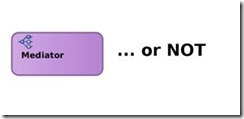
Ok, so there you have it: I just don’t like the Mediator. I don’t really know why. But now that it’s in the open, let’s discuss it.

I often see a pattern where a composite with a synchronous operation is implemented with a Mediator and BPEL component:

I think that in most of these cases, it would be better to either leave out the Mediator component completely. Or replace it with a BPEL component that is run transient, i.e. in-memory.

This article discusses some of the aspects around using a Mediator.

We need to discuss…

Some of the reasons to avoid a Mediator:

  • It adds another ‘technology’ to your developer’s skillset
  • It adds more tasks for system administration
  • It’s bad for performance

Arguments in favor of using the Mediator:

  • One end-point for a composite with multiple operations
  • One external interface hides composite-internal changes

Let’s go.

Yet another developer skill

As developer has to learn a lot when trying to master the SOA Suite completely. Learning all the aspects of BPEL is already a big task. And the Mediator is yet another skill. Arguably, not a big skill. Even more, developers are often inclined to say ‘ah … not hard at all’. But … are you as a developer familiar with all the features of Mediators? Like the resequencing rules? The routing rules priorities? When to specify sequential and parallel execution?

I like simple things.

More tasks for system administration

Like for the developer, the Mediator also introduces new topics for the system administrator: purging and tuning.

Both should not be a big issue, as enough information is available on how to handle them . But … does your system administrator know that there is a Mediator engine that needs to be tuned? Just challenge your system administrators to have a look at  Mediator tuning and ask them how they handled it.

Performance

At the beginning of the article, it was argued that a Mediator with synchronous operation(s) can be replaced with a BPEL component. That BPEL component can then be made transient, i.e. it will run in memory. That would save the DB access by the Mediator engine. Read the complete article here.

SOA & BPM Partner Community

For regular information on Oracle SOA Suite become a member in the SOA & BPM Partner Community for registration please visit www.oracle.com/goto/emea/soa (OPN account required) If you need support with your account please contact the Oracle Partner Business Center.

Blog Twitter LinkedIn image[7][2][2][2] Facebook clip_image002[8][4][2][2][2] Wiki

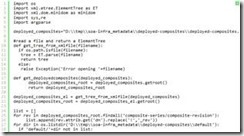
How to find purgeable instances in SOA/BPM 12c by Derek Kam


clip_image002If you are familiar with SOA/BPM 11g purging, after you have upgraded/implemented SOA/BPM 12c, you will not be able to use most of the SQL for 11g to determine the purgeable instances.  This is because SOA/BPM 12c is no longer using composite_instance table for composite instance tracking.

In SOA/BPM 12c, a common component is used to track the state associated with a business flow and report audit information.  This design will reduce the instance tracking data generated and stored in the database, and improve purge performance by minimizing the number of tables that need to be accessed.  Component instance state will no longer be stored in individual table for instance tracking purpose, the overall flow state will be stored in SCA_FLOW_INSTANCE table.

In SCA_FLOW_INSTANCE table, the “active_component_instances” column keeps track of how many component instances are still in a running/active state. These are the instances in one of the following states:

  • RUNNING
  • SUSPENDED
  • MIGRATING
  • WAITING_ON_HUMAN_INTERVENTION

When the “active_component_instances” value reaches 0, this indicates that the Flow is no longer executing. There is another column called “recoverable_faults”, this column keeps track of how many faults can be recovered. This information together with the “active_component_instances” is used to determine whether the Flow can be purged or not.

The SCA_FLOW_ASSOC table is used to record the association between the original Flow that creates the BPEL component instance and the correlated Flow. The SCA_FLOW_ASSOC table is used by the purge logic to ensure that all correlated Flows are purged together when none of the flow is in an active state.

Another important thing to take note: if you create a SOAINFRA schema with LARGE database profile, all transactional tables will be created with range-partition. If you decide to run the SOA purging with the purge script either manually by running the stored procedure or by using auto purge function which can be configured in Oracle Enterprise Manager Fusion Middleware Control, you will need to set the purge_partitioned_component => true (default is false), otherwise the purge logic will skip all partitioned tables when the purge script run and no flow instance will be purged.  You will be able to find all the partition tables in your SOAINFRA schema by using the following SQL: ?select table_name from user_tables where partitioned = ‘YES’;

You can use the following sample PL/SQL to determine whether the SCA_FLOW_INSTANCE has been partitioned and the number of purgeable flow instances in your SOAINFRA schema. Please read the complete article here.

SOA & BPM Partner Community

For regular information on Oracle SOA Suite become a member in the SOA & BPM Partner Community for registration please visit www.oracle.com/goto/emea/soa (OPN account required) If you need support with your account please contact the Oracle Partner Business Center.

Blog Twitter LinkedIn image[7][2][2][2] Facebook clip_image002[8][4][2][2][2] Wiki

Dramatically reduce SOA Suite 11g startup time by cleaning the MDS by Maarten Smeets

clip_image002

SOA Suite can sometimes be a bit slow to start. This is especially the case when there are a lot of composites to load. Customers using different versions of composites can benefit from undeploying non-default revisions of processes which do not have any running instances (see for example here). Undeployment in most cases is an asynchronous process which does not give feedback. It can partially fail without you noticing (apparently not an atomic transaction). This sometimes leaves composite remains; parts of the composite which are still loaded at startup but are not visible from the Enterprise Manager. Removing these can dramatically reduce server startup time. Especially in an environment which has been used for some time and environments with many versions of composites. Reducing the time required to get the soa-infra application fully up and running is of course mostly relevant for 11g SOA installations and less for 12.1.3 (which does some lazy loading) and 12.2.1 (which supports parallel deployments, also during server start-up).

In this article I’ll demonstrate how these left-over composite parts can be identified and removed on an 11.1.1.7 SOA environment. First try this procedure on a development or test environment before executing it in production! Using this method is entirely at your own risk. Only try it if you understand what you are doing. If something breaks, tell me so I can update this article. Thanks!

Please mind that these actions, although they help with the start time and memory usage of your SOA environment, have less impact on run-time performance than for example purging of instances and reducing the amount of deployed composites (or tweaking datasources, soa-infra database, JVM, etc).

Cleaning

What is a composite in the MDS?

WebLogic Server first brings up its Managed SOA server. After this managed server is up and RUNNING, the soa-infra application is started. After the soa-infra application is started, the composites are loaded from the MDS and put in memory. Read the complete article here.

SOA & BPM Partner Community

For regular information on Oracle SOA Suite become a member in the SOA & BPM Partner Community for registration please visit www.oracle.com/goto/emea/soa (OPN account required) If you need support with your account please contact the Oracle Partner Business Center.

Blog Twitter LinkedIn image[7][2][2][2] Facebook clip_image002[8][4][2][2][2] Wiki

SOA Suite 12c: Topology Suggestions by Jay Kasi

In this article, I make some suggestions and provide opinions on topologies for SOA Suite 12c that is commonly used and supported. Only the EDG topology is thoroughly tested by Oracle though.
  • One consideration when deciding on topologies is that Upgrade is always domain wide. All products deployed to the domain must release in the same release train and you should be willing to upgrade all of them at the same time.
  • Centralized administration is one factor but should not be the only reason to put two different products in the same domain. EM Cloud Control could be used as a solution for that.
  • Typically Service Bus and SOA Suite belong in different tiers in an end to end architecture so they would be in separate domains. This is true if Service Bus is being used on an enterprise scale routing to multiple SOA domains and other services. However if Service Bus is used primarily for mediating and providing routing for SOA Suite Composites in a domain, it would be in the same domain, but typically in separate clusters for optimum performance and scalability. However it  is possible starting in 12c to have Service Bus and SOA Suite in the same cluster.  The only possible reason for this is reducing memory and is uncommon.
  • Governance products like OER and UDDI should not be in a SOA Suite or Service Bus domain. They should be in a separate domain. OER should be in a separate domain from UDDI. UDDI is a third party product and putting it in the same domain may cause upgrade issues.
  • You can target multiple products to the same cluster by targeting the appropriate user extensible server group to  the servers in the cluster.
    1. SOA Suite is targeted to a server by targeting either the user extensible server group SOA-MGD-SVRS or SOA-MGD-SVRS-ONLY.
    2. Service Bus is targeted to a server by targeting either the user extensible server group OSB-MGD-SVRS-COMBINED or OSB-MGD-SVRS-ONLY.
    3. BAM is targeted to a server by targeting either the user extensible server group BAM12-MGD-SVRS or BAM12-MGD-SVRS-ONLY.
    4. MFT is targeted to a server by targeting either the user extensible server group MFT-MGD-SVRS or MFT-MGD-SVRS-ONLY.
    5. ESS is targeted to a server by targeting the user extensible server group ESS-MGD-SVRS. .
  • BAM sometimes is used outside of SOA Suite and in this case it is typically in a separate domain from SOA Suite. However BAM should be in a separate cluster in the same domain as SOA Suite if it is primarily used with that SOA Suite instance. In BAM 12c, integration between SOA Suite and BAM is a tight integration and is best done in the same domain. BAM and SOA Suite should not be co-located in the same cluster because BAM uses Automatic Service Migration for HA while SOA Suite uses Whole Server Migration.
  • OWSM Policy Manager must be deployed to only one cluster in a domain. However SOA Suite, OSB, BAM and MFT templates target OWSM PM by default to their own clusters. Read the complete article here.

SOA & BPM Partner Community

For regular information on Oracle SOA Suite become a member in the SOA & BPM Partner Community for registration please visit www.oracle.com/goto/emea/soa (OPN account required) If you need support with your account please contact the Oracle Partner Business Center.

Blog Twitter LinkedIn image[7][2][2][2] Facebook clip_image002[8][4][2][2][2] Wiki

Autumn SOA Suite 12c and BPM Suite 12c free on-demand Bootcamps October 2016

image

Training On-Demand: Oracle Business Process Management 12c

This boot camp is an ideal starting point for an implementer who is planning to learn Oracle BPM Suite 12c and use it on BPM projects. The course provides a combination of lecture segments that present conceptual and feature background and hands-on labs that provide practice with the tooling.

It introduces process developers to Oracle BPM Suite 12c. It covers the key concepts, features and processes needed to begin using the design-time and run-time capabilities on BPM projects. Throughout the training, you will benefit from hands-on exercises based upon two case studies. At the conclusion of the course, you should feel comfortable to start using BPM Suite 12c for process modeling, simulation, analytics, business rules and human workflow.

For details please visit the registration page here.

Training On-demand: Oracle SOA Suite 12c Implementation Specialists

Oracle SOA Suite 12c is the latest version of the industry’s most complete and unified application integration and SOA solution. With simplified cloud, mobile, on premises and Internet of Things (IoT) integration capabilities, all within a single platform, Oracle SOA Suite 12c delivers faster time to integration, increased productivity and lower TCO.

The Oracle SOA Suite 12c Implementation Boot Camp provides relevant insight to current and prospective SOA implementers and for those companies interested on becoming Oracle SOA Suite 12c Specialized. Participants will learn how to develop and implement solutions using SOA Suite 12c that will drive their customer organizations run more effectively and efficiently.

For details please visit the registration page here.

SOA & BPM Partner Community

For regular information on Oracle SOA Suite become a member in the SOA & BPM Partner Community for registration please visit www.oracle.com/goto/emea/soa (OPN account required) If you need support with your account please contact the Oracle Partner Business Center.

Blog Twitter LinkedIn image[7][2][2][2] Facebook clip_image002[8][4][2][2][2] Wiki

SOA Suite 12.2.1 VirtualBox Image available for download

clip_image002

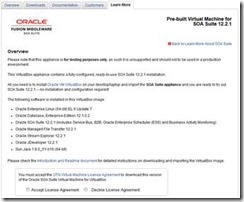
Thanks to the product management team the latest SOA Suite 12.2.1 VirtualBox image is available for download here.

Overview

Please note that this appliance is for testing purposes only, as such it is unsupported and should not to be used in a production environment.

This VirtualBox appliance contains a fully-configured, ready-to-use SOA Suite 12.2.1 installation.

All you need is to install Oracle VM VirtualBox on your desktop/laptop and import the SOA Suite appliance and you are ready to try out SOA Suite 12.2.1 — no installation and configuration required!

The following software is installed in this VirtualBox image:

  • Oracle Enterprise Linux (64-bit) EL 6 Update 7
  • Oracle Database, Enterprise Edition 12.1.0.2
  • Oracle SOA Suite 12.2.1 (includes Service Bus, B2B, Oracle Enterprise Scheduler (ESS) and Business Activity Monitoring)
  • Oracle Managed File Transfer 12.2.1
  • Oracle Stream Explorer 12.2.1
  • Oracle JDeveloper 12.2.1
  • Sun Java 1.8.0_51-b16 (64-bit)

Please check the Introduction and Readme document for detailed instructions on downloading and importing the VirtualBox image. Get the VirtualBox image here.

SOA & BPM Partner Community

For regular information on Oracle SOA Suite become a member in the SOA & BPM Partner Community for registration please visit www.oracle.com/goto/emea/soa (OPN account required) If you need support with your account please contact the Oracle Partner Business Center.

Blog Twitter LinkedIn image[7][2][2][2] Facebook clip_image002[8][4][2][2][2] Wiki

ICS Update – On premise Agent now Available by Arturo Viveros

clip_image001


Hello appreciated readers, here’s hoping to a fun and successful 2016 for you all!!

And for us Oracle FMW practitioners, there are some very exciting news to begin the year:
Yours truly has been following for a while the development and growth of Oracle’s iPaaS platform: "Integration Cloud Service". And it’s been a long wait, but at long last the ultra hyped On-Premise Agent has been released and is now available for all ICS subscriptions.
There are some other cool and useful new features in this release (e.g. content based routing, new adapters, etc.), which we will surely discuss during the next few weeks in a different post. However, in our humble opinion the Agent is a transcendent piece of the puzzle, which will open up a whole new set of use cases and possibilities for the implementation of cloud-driven integrations with ICS. So, what does this mean?, let’s look at it graphically:

Oracle ICS was an already powerful yet simple to implement tool, suited perfectly for Cloud to Cloud Integrations but somehow limited in its potential to participate in hybrid solutions (those which also include on-prem interaction). The obvious problem here is that we know Hybrid Architectures are still predominant among organizations in the midst of a cloud adoption strategy. And that’s why the Agent is a real game-changer: Read the complete article here.

SOA & BPM Partner Community

For regular information on Oracle SOA Suite become a member in the SOA & BPM Partner Community for registration please visit www.oracle.com/goto/emea/soa (OPN account required) If you need support with your account please contact the Oracle Partner Business Center.

Blog Twitter LinkedIn image[7][2][2][2] Facebook clip_image002[8][4][2][2][2] Wiki

New Agent Simplifies Cloud to On-premises Integration by Bruce Tierney


clip_image002Oracle Integration Cloud Service has generated a lot of enthusiasm since the June 2015 Oracle PaaS launch by Larry Ellison.  A major reason for this enthusiasm was the introduction of simplicity to cloud integration…historically a complex process only possible by integration specialists.  We are very pleased to introduce to Integration Cloud Service this same level of simplicity to the integration of on-premises applications allowing for faster and easier integration of existing on-premises applications with cloud SaaS applications.  

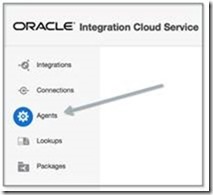
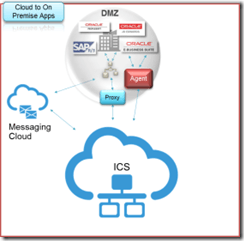
As shown in the image to the right, the new Agent feature within Oracle Integration Cloud Service eliminates common security and complexity issues previously associated with integrating on-premises applications from outside the firewall.   For example, there is no need to open an inbound port to communicate with on-premise systems and no need to expose any private SOA-based Web services.  Access the new Agent from the menu shown in the image below and let the agent simply and securely handle the communication. 

Furthermore, new adapters have been added to Integration Cloud Service to simplify the integration to on-premises applications.  These adapters are for Oracle E-Business Suite, Oracle Siebel Customer Relationship Management, SAP, Oracle Database, and the SOAP technology adapter.  The SOAP adapter can be used to connect to any Web service enabled application, including services exposed on Oracle SOA Suite or other on-premises integration platforms.clip_image006

Prior to creating the Agent or Agents, create your "Connections" to your applications.   Simply select and configure from a wide range of Oracle Applications such as Oracle CPQ Cloud, Sales Cloud, Service Cloud, HCM Cloud to name a few, 3rd party applications such as Salesforce.com, NetSuite and now with this release to on-premises applications.  See the image below to see some of the adapter choices: Read the complete article here.

SOA & BPM Partner Community

For regular information on Oracle SOA Suite become a member in the SOA & BPM Partner Community for registration please visit www.oracle.com/goto/emea/soa (OPN account required) If you need support with your account please contact the Oracle Partner Business Center.

Blog Twitter LinkedIn image[7][2][2][2] Facebook clip_image002[8][4][2][2][2] Wiki

Using Oracle Integration Cloud Service tutorial

clip_image001


When you subscribe to Oracle Integration Cloud Service, you also have the option to install an on-premises version of Oracle Integration Cloud Service in your local environment. This enables you to use on-premises Oracle Integration Cloud Service as a proxy server that sits between your internal company server hidden behind a fire wall and the cloud version of Oracle Integration Cloud Service. After installation, you can create users and assign roles to these users on the Users page of on-premises Oracle Integration Cloud Service. Read the tutorial here. & REST API for Oracle SOA Cloud Service tutorial here.

SOA & BPM Partner Community

For regular information on Oracle SOA Suite become a member in the SOA & BPM Partner Community for registration please visit www.oracle.com/goto/emea/soa (OPN account required) If you need support with your account please contact the Oracle Partner Business Center.

Blog Twitter LinkedIn image[7][2][2][2] Facebook clip_image002[8][4][2][2][2] Wiki

Agent for simplifying Integration between Cloud and On-Premises apps by Robert van Molken


clip_image001In the last few months I mentioned that Oracle is developing an Agent. The Agent easily integrates your on-premises application(s) with the Oracle Cloud Services. The Agent is rolling out on all production instances next week. It was publicly announced by Bruce Tierney on the 3rd of January. He is the Director of Product Marketing for Cloud Integration and SOA. You can read his announcement on the Oracle Integration blog.

In this first article about the Agent I will go into the architectural basics,  which components are included and how it will connect Cloud to On-premises applications. The article is based on information I presented about during OpenWorld 2015.

Current / classic integration approach

The current approach for connecting Cloud / Internet hosted applications with On-premises applications is usually through one or more firewalls, and the use of a reverse proxy, Oracle API Gateway or OHS. For this a variety of expertise is needed for example to open up inbound ports in the firewall, expose a private SOAP/REST service and configure the network routing. The SOAP/REST service can for example be implemented with SOA Suite to for example communicate with the CRM to retrieve customer data.

Let look at the current / classic approach in the diagram below:

This is going to change a lot when using the Agent. It will simplify above diagram.

Common Cloud to On-Premises Integration Patterns

Currently there are three common patterns for Cloud to On-Premises integrations. They are 1. using messaging, 2. through a proxy and 3. using an agent. Read the complete article here.

SOA & BPM Partner Community

For regular information on Oracle SOA Suite become a member in the SOA & BPM Partner Community for registration please visit www.oracle.com/goto/emea/soa (OPN account required) If you need support with your account please contact the Oracle Partner Business Center.

Blog Twitter LinkedIn image[7][2][2][2] Facebook clip_image002[8][4][2][2][2] Wiki