PaaS & IaaS hands-on Bootcamp part of PaaS & Middleware Summer Camps 2016


August 29th – September 2nd 2016 Lisbon Portugal

Please visit our registration page here www.tinyurl.com/ofmSummerCamps2016

Trainer: Niall Commiskey & Chris Peytier


Questions

Please post them in the discussion forum here! All details are posted at our registration page here.


Agenda Highlights:

  • ICS & PCS integration and other goodies (1.5 days to 2 days)
  • IaaS & JCS (1.5 days to 2 days)
  • Developer Cloud Service & Application Container Cloud Service (1day)

Skill Requirements:
Attendees must have the following skills to make sure they get the most out of the training:

Technical Requirements:
Every participant works on his/her own laptop. The minimal hardware requirements are:

  • Laptop 12 GB RAM better 16 GB RAM
  • Pentium 4 with dual-core CPU
  • Minimum 60 GB free disk space
  • Please install the most recent Oracle Virtual box
  • Make sure you have administrator rights on your machine (including bios)

Cloud Requirements:

Niall Commiskey

clip_image002Is a member of the worldwide Oracle PTS team. PTS focuses on partner technical enablement – this runs the gamut from technical evangelisation to project support. Niall’s areas of expertise include SOA, BPM, ICS, PCS, IaaS, JCS. He is also the author of the iconoclastic fictional trilogy – The Hare of the Dog Volumes I to III, available on Amazon.

Chris Peytier

clip_image004BPM Specialist – EMEA Technology Specialist Group.
Providing help and support to the BPM presales team accross EMEA
Topics include
– How PCS is altering the BPM selection procedures with our customers
– Going through some of the use cases that we see now with PCS
PaaS4SaaS integration: How PCS can be an instrument to extend functionalities of Oracle applications.

For details please visit our registration page here www.tinyurl.com/ofmSummerCamps2016

SOA & BPM Partner Community

For regular information on Oracle SOA Suite become a member in the SOA & BPM Partner Community for registration please visit www.oracle.com/goto/emea/soa (OPN account required) If you need support with your account please contact the Oracle Partner Business Center.

Blog Twitter LinkedIn image[7][2][2][2] Facebook clip_image002[8][4][2][2][2] Wiki

Technorati Tags: OFM Summer Camps,Training,enablement,Summer Camps,PaaS,Cloud,SOA Community,Oracle SOA,Oracle BPM,OPN,Jürgen Kress

PaaS free trial accounts ICS and PCS, IoT and PaaS for SaaS

clip_image002


As part of our communities we do offer free PaaS accounts (only for partners in Europe, Middle East and Africa. In case you are not part of EMEA please contact your local partner manager):

· Integration Cloud Service & Process Cloud Service & SOA Cloud & IoT & PaaS for SaaS Service PaaS Demo Accounts  (Community membership required)

· Java Cloud Service & Application Cloud Container Service & Mobile Cloud Service PaaS Demo Accounts (Community membership required)

Watch the GSE Overview Video! Get an overview of what GSE is and how you can use GSE to help you sell. You can also get long running dedicated PaaS instances, therefore please send us details about your use cases. For instant access please request a sandbox demo

SOA & BPM Partner Community

For regular information on Oracle SOA Suite become a member in the SOA & BPM Partner Community for registration please visit www.oracle.com/goto/emea/soa (OPN account required) If you need support with your account please contact the Oracle Partner Business Center.

Blog Twitter LinkedIn image[7][2][2][2] Facebook clip_image002[8][4][2][2][2] Wiki

Technorati Tags: PaaS,Cloud,ICS,PCS,PaaS4SaaS,SOA Community,Oracle SOA,Oracle BPM,OPN,Jürgen Kress
Monitoring Performance Issues with Integrated Workload Statistics – free online training

clip_image001

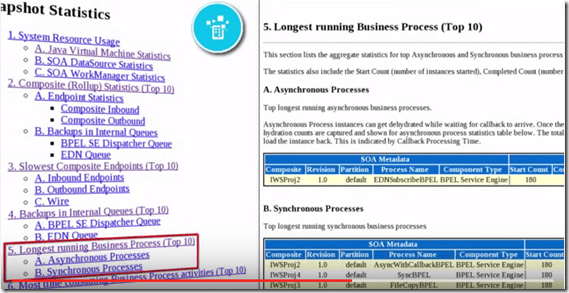
For 2nd review of the Monitoring Performance Issues with Integrated Workload Statistics of Oracle SOA Suite 12c Release 12.2.1. Watch the video here.

SOA & BPM Partner Community

For regular information on Oracle SOA Suite become a member in the SOA & BPM Partner Community for registration please visit www.oracle.com/goto/emea/soa (OPN account required) If you need support with your account please contact the Oracle Partner Business Center.

Blog Twitter LinkedIn image[7][2][2][2] Facebook clip_image002[8][4][2][2][2] Wiki

The SOAMythBusters (featuring Robert Van Mölken) discuss Oracle SOA Cloud Service by OTN


clip_image001

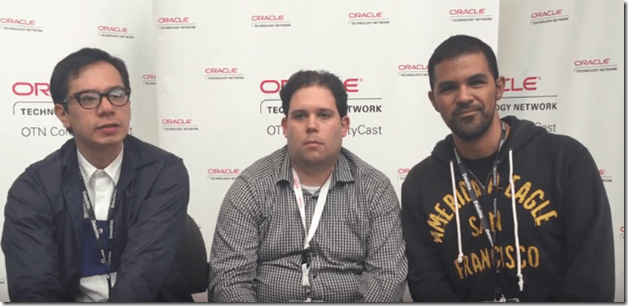
Watch the Mexican SOAMythBusters, Arturo Viveros & Rolando Carrasco, discussing SOA CS at OOW2015 with good friend and fellow ACE Robert Van Molken from AMIS, Netherlands. Watch the video here.

SOA & BPM Partner Community

For regular information on Oracle SOA Suite become a member in the SOA & BPM Partner Community for registration please visit www.oracle.com/goto/emea/soa (OPN account required) If you need support with your account please contact the Oracle Partner Business Center.

Blog Twitter LinkedIn image[7][2][2][2] Facebook clip_image002[8][4][2][2][2] Wiki

OSB 12c – Database Polling using DB adapter by Vivek Garg


clip_image001Oracle introduced couple of new features in 12c version which is recently launched. For OSB, the major shift that we saw in 12c is that now we can use Jdeveloper to do the development which we use to do through OEPE (Eclipse). With that change, we can leverage the existing technology adapter in OSB as well which we use to have in SOA. In OSB 11g version, in case of Database interaction, we use to create DB adapter in Jdeveloper and later import all required files to OEPE and generate required services from that, but in this new version-12c as we development in Jdeveloper itself so we need not to follow same steps again, we can add the DB adapter directly in OSB project and do required operations.

In this post, we show you how to use DB adapter in OSB project. For that we have created a table in database, we poll the data from that table and write that information to one file.

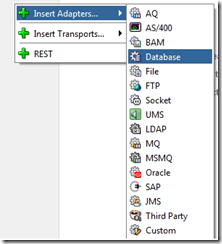
First of all we need to create a new OSB project, so first create a new project and then in composite.xml file, right click on proxy service lane, choose “Insert Adapters” and select Database to add DB adapter.

Provide name to adapter and click on next. In next window, choose DB connection (In our case it is local as we read the data from local table) and click on browse button to select the outbound connection pool created earlier for DB adapter. Read the complete article here.

SOA & BPM Partner Community

For regular information on Oracle SOA Suite become a member in the SOA & BPM Partner Community for registration please visit www.oracle.com/goto/emea/soa (OPN account required) If you need support with your account please contact the Oracle Partner Business Center.

Blog Twitter LinkedIn image[7][2][2][2] Facebook clip_image002[8][4][2][2][2] Wiki

Apply SOA/BPM Bundle Patch 3 to JDeveloper 12c (12.1.3.0.3) by Arda Eralp


clip_image002Step 1: Download Bundle Patch 3

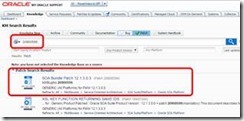
Go to "Oracle Support" and Search bug number (20900599)

Step 2: Run "Command Prompt (cmd)" as Administrator

Step 3: Set "ORACLE_HOME" and add OPatch directory to "PATH" variable

SET ORACLE_HOME=C:\Dev\Oracle\Middleware12c (Oracle direcotry)
SET PATH=%PATH%;C:\Dev\Oracle\Middleware12c\OPatch (OPatch direcotry)

Step 4: Extract the downloaded patch and browse folder via cmd

cd ……\p20900599_121300_Generic\20900599

Step 5: Run "opatch apply" Read the complete article here.

SOA & BPM Partner Community

For regular information on Oracle SOA Suite become a member in the SOA & BPM Partner Community for registration please visit www.oracle.com/goto/emea/soa (OPN account required) If you need support with your account please contact the Oracle Partner Business Center.

Blog Twitter LinkedIn image[7][2][2][2] Facebook clip_image002[8][4][2][2][2] Wiki

Automated Unittesting of XQueries in Oracle OSB by Pascal Brokmeier


clip_image002In order to support a more agile project environment, OPITZ CONSULTING developed a Java/JUnit based SOA Unit Testing Framework. Among others, the framework was capable of using the Oracle libraries to run XQuery tests locally and verify their correctness. Over the course of time, Oracle released 12c and with it, changed its xquery files. A new extension (.xqy instead of .xq) was introduced and with it additional syntax. Oracle added a(:: OracleAnnotationVersion "1.0" ::) . After this, the testing framework needed to be updated to support such tags. Without an update, executing a query with the above annotation gave the following error: Read the complete article here.

SOA & BPM Partner Community

For regular information on Oracle SOA Suite become a member in the SOA & BPM Partner Community for registration please visit www.oracle.com/goto/emea/soa (OPN account required) If you need support with your account please contact the Oracle Partner Business Center.

Blog Twitter LinkedIn image[7][2][2][2] Facebook clip_image002[8][4][2][2][2] Wiki

HCM Atom Feed Subscriber using SOA Cloud Service by Jack Desai


clip_image002Introduction

HCM Atom feeds provide notifications of Oracle Fusion Human Capital Management (HCM) events and are tightly integrated with REST services. When an event occurs in Oracle Fusion HCM, the corresponding Atom feed is delivered automatically to the Atom server. The feed contains details of the REST resource on which the event occurred. Subscribers who consume these Atom feeds use the REST resources to retrieve additional information about the resource.

For more information on Atom, please refer to this.

This post focuses on consuming and processing HCM Atom feeds using Oracle Service Oriented Architecture (SOA) Cloud Service. Oracle SOA Cloud Service provides a PaaS computing platform solution for running Oracle SOA Suite, Oracle Service Bus, and Oracle API Manager in the cloud. For more information on SOA Cloud Service, please refer this.

Oracle SOA is the industry’s most complete and unified application integration and SOA solution. It transforms complex application integration into agile and re-usable service-based connectivity to speed time to market, respond faster to business requirements, and lower costs.. SOA facilitates the development of enterprise applications as modular business web services that can be easily integrated and reused, creating a truly flexible, adaptable IT infrastructure.

For more information on getting started with Oracle SOA, please refer this. For developing SOA applications using SOA Suite, please refer this.

Main Article

Atom feeds enable you to keep track of any changes made to feed-enabled resources in Oracle HCM Cloud. For any updates that may be of interest for downstream applications, such as new hire, terminations, employee transfers and promotions, Oracle HCM Cloud publishes Atom feeds. Your application will be able to read these feeds and take appropriate action.

Atom Publishing Protocol (AtomPub) allows software applications to subscribe to changes that occur on REST resources through published feeds. Updates are published when changes occur to feed-enabled resources in Oracle HCM Cloud. These are the following primary Atom feeds:

Employee Feeds

New hire
Termination
Employee update

Assignment creation, update, and end date

Work Structures Feeds (Creation, update, and end date)

Organizations
Jobs
Positions
Grades
Locations

The above feeds can be consumed programmatically. In this post, Node.js is implemented as one of the solutions consuming “Employee New Hire” feeds, but design and development is similar for all the supported objects in HCM. Read the complete article here.

SOA & BPM Partner Community

For regular information on Oracle SOA Suite become a member in the SOA & BPM Partner Community for registration please visit www.oracle.com/goto/emea/soa (OPN account required) If you need support with your account please contact the Oracle Partner Business Center.

Blog Twitter LinkedIn image[7][2][2][2] Facebook clip_image002[8][4][2][2][2] Wiki

Deploying to the SOA Cloud Service by Greg Draheim Overview


clip_image001On Monday night we obtained access to the SOA Cloud Service here at Flexagon, where we hope to use it for on-demand capacity.  One of our goals with FlexDeploy is to make it easy to move components from one environment or instance to another, enabling a true “lift-and-shift” into the cloud.  Since the SOA Cloud Service is built on top of the same underlying Oracle infrastructure, configuring it as a FlexDeploy target is a breeze.

In this blog article, I will cover how to deploy a set of projects that are currently used on-premise into this new SOA Cloud Service.

Adding a SOA Cloud instance to FlexDeploy

To deploy our composites we had a few steps to complete:

· Added the required datasource and outbound connection pool entries

· Created the SOA partition we deploy to (“order”)

· Created customization and configuration plans for the new environment

· Added the new endpoint and instance to FlexDeploy

· Deployed the composites and OSB components into the SOA Cloud Service instance

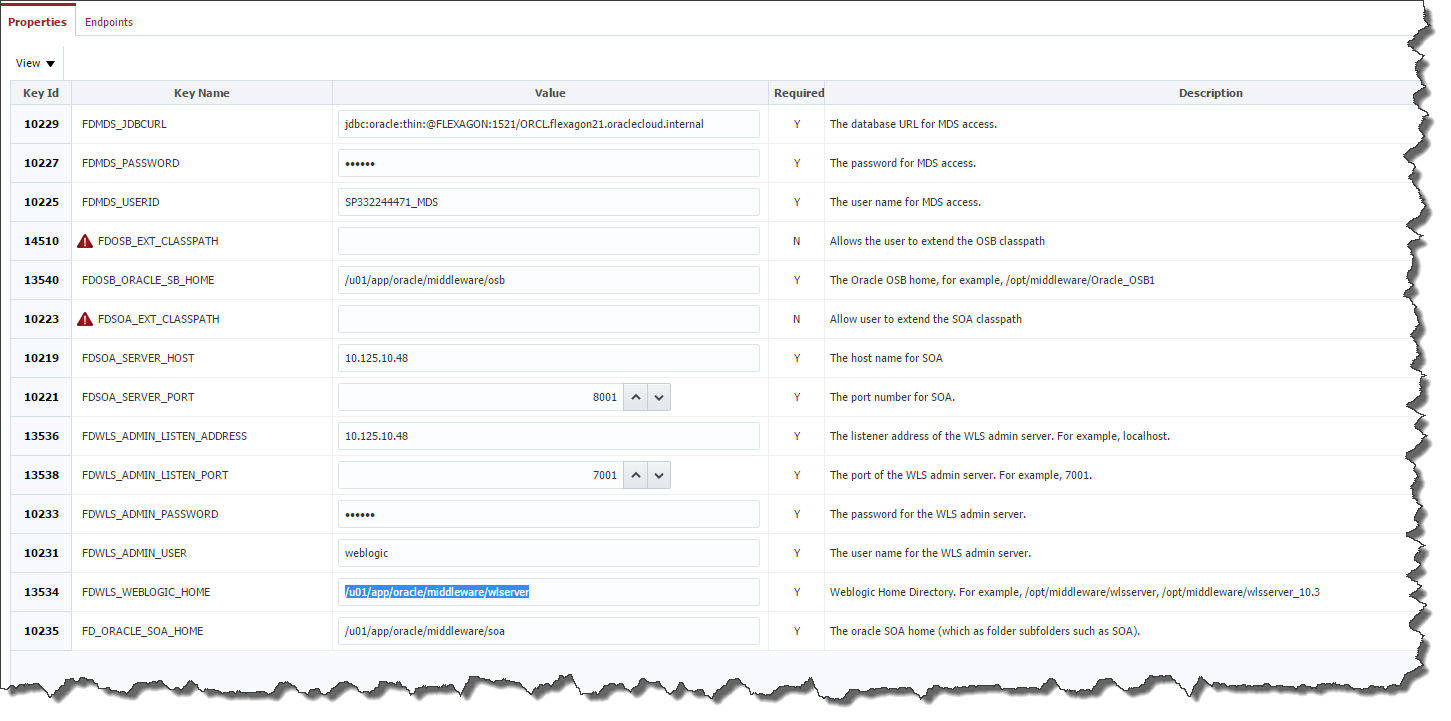
The screen below is the configuration screen for the SOA Cloud instance in FlexDeploy. This one configuration page handles the instance specific configuration. 

Click image to enlarge.

As an interesting note, the instance of FlexDeploy above is running on the Java Cloud Service.

Executing the Deploy

I have a FlexDeploy application that contains 5 projects I plan to deploy:

· PackAndShipService (SOA Composite)

· ProcessOrder (SOA Composite)

· SBOrderEBS (OSB Project)

Read the complete article here.

SOA & BPM Partner Community

For regular information on Oracle SOA Suite become a member in the SOA & BPM Partner Community for registration please visit www.oracle.com/goto/emea/soa (OPN account required) If you need support with your account please contact the Oracle Partner Business Center.

Blog Twitter LinkedIn image[7][2][2][2] Facebook clip_image002[8][4][2][2][2] Wiki

Blurr the cloud lining with NetSuite: Introducing NetSuite Cloud Adapter on Oracle Integration Cloud Service by Rajesh Kalra


clip_image001NetSuite is a leading SaaS business software suite for ERP/financials, eCommerce, and order management. NetSuite cloud applications are commonly used by many mid-market and enterprise level companies, to streamline operations and provide real time visibility for better and faster decisions.

Oracle has introduced an all new NetSuite cloud adapter, in the latest release of its iPaaS –Integration Cloud Service (ICS). This new addition to the catalog of cloud adapters provides agility for NetSuite integrations, and enables organizations to access NetSuite content across business flows quickly and seamlessly.

The NetSuite cloud adapter provides rich and intuitive design time capabilities viz. functional categories of objects to select the business object(s) for integration, besides delivering the elevated user experience common to all cloud adapters.

Now Sales teams at any company can leverage the ICS iPaaS solution to build a lead-to-cash process from any SaaS based CRM (Oracle Sales Cloud or Salesforce.com) to NetSuite, creating quotes/orders in real time, thus eliminating manual order entry. They can access latest financial information, order status, or product availability via the NetSuite cloud adapter, and slash financial close. Read the complete article here.

SOA & BPM Partner Community

For regular information on Oracle SOA Suite become a member in the SOA & BPM Partner Community for registration please visit www.oracle.com/goto/emea/soa (OPN account required) If you need support with your account please contact the Oracle Partner Business Center.

Blog Twitter LinkedIn image[7][2][2][2] Facebook clip_image002[8][4][2][2][2] Wiki