Quick overview of SOA Suite 12.2.1 new features by Maarten Smeets

clip_image002Oracle has just released SOA Suite 12.2.1 which contains several exciting new features. The below entries have shamelessly copied from the developers guide in order to provide a quick overview of highlights for this release of the SOA Suite. Also at the end of the article some links for new features of WebLogic Server 12.2.1 which has also been released.

Patching running instances

See Patching Running Instances of a SOA Composite

Oracle SOA Suite 12c (12.2.1) supports Composite Instance Patching, which enables you to patch running instances of a composite and recover faulted instances after patching the runtime. You can only include those fixes in the patch that are compatible with Composite Instance Patching. Use the SOA Patch Developer role in Oracle JDeveloper to make the fixes and create the patch.

Composite Instance Patching enables you to deliver urgent composite fixes that can be picked up by long running instances. You can make compatible/allowed changes without aborting in-flight instances. If a patched running instance comes across a business process that has been fixed by the patch, say a BPEL transformation, then it picks up the fixes applied to the business process.

When designing the patch, the SOA Patch Developer mode in JDeveloper automatically disables changes that cannot be made to the patch. Some of the compatible changes that you can make include:

  • Non-schema related XSLT changes, changes to fault policy, sensor data, and analytics data.
  • Compatible BPEL changes such as transformation activity, assign operations, etc.
  • JCA Adapter configuration properties.

In-Memory SOA

See Using In-Memory SOA to Improve System Performance

You can leverage the Coherence cache associated with WebLogic Server to run your non-transactional business processes in memory. This improves performance and scalability for these business processes, as read and write operations are performed out of the cache. Database performance and management also improves, as the costs associated with continuous disk reads and writes are significantly reduced.

In-memory SOA enables short-running processes to live in memory. The process state gets written to the database only when faulted, or at regular, deferred intervals using a write-behind thread. The BPEL state information is dehydrated and rehydrated to/from the Coherence cache.

Support for debugging XSLT maps

See Debugging the XSLT Map

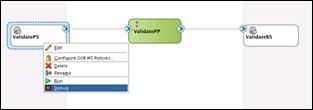
Starting in 12.2.1, you can debug your XSLT maps using the SOA Debugger. You can add breakpoints at strategic locations in the XSLT map. When debugging, the debugger halts execution at the breakpoints, enabling you to verify the data and output.

XSLT maps can be complex, making them difficult to debug. For example, you may have a Java function, or other functionality, that is best tested in the application server. Also, you might find it easier to debug in the application environment, as the XSLT may be invoked from many different applications in the server. The SOA debugger provides remote debugging capability for XSLT maps that have been deployed in the application server.

You can also use the debugger with your Oracle Service Bus projects.

Support for End-to-End JSON and JavaScript

See Integrating REST Operations in SOA Composite Applications

Starting in 12.2.1, your SOA composites can use end-to-end JSON. This means that the REST service can receive the REST request and route it to the BPEL engine without translating it to XML. The BPEL component can use the JavaScript action, and also use JavaScript in conditional and iterative constructs, to work on JSON objects directly. The REST reference can receive the REST message from the BPEL engine and route it to an external REST endpoint without translation. Read the complete article here.

SOA & BPM Partner Community

For regular information on Oracle SOA Suite become a member in the SOA & BPM Partner Community for registration please visit www.oracle.com/goto/emea/soa (OPN account required) If you need support with your account please contact the Oracle Partner Business Center.

Blog Twitter LinkedIn image[7][2][2][2] Facebook clip_image002[8][4][2][2][2] Wiki

Technorati Tags: SOA Community,Oracle SOA,Oracle BPM,OPN,Jürgen Kress,SOA Suite 12c,SOA Suite 12.2.1
SOA Suite 12.2.1 free update Bootcamp for Oracle Partners, May 11th, Utrecht


imageAbstract:

Become hands-on trained in the latest features of SOA Suite 12.2.1.

You will learn in one comprehensive day all about the latest new features of SOA Suite 12.2.1 including live demos of the Integration Cloud Service.

Goal after the workshop is to sell your customers additional services e.g. upgrade them to the latest release.

Agenda:

09h00 – 09h30: Registration

09h30 – 10h00: Overview SOA Suite

10h00 – 11h00: What’s new in SOA Suite 12.2.1

11h00 – 11h15: Break

11h15 – 12h00: Hands-on Labs

12h00 – 13h00: Lunch

13h00 – 15h00: Hands-on Labs

15h00 – 16h00: Integration Cloud Service & Demo

Logistics:

Oracle will provide the laptops to support this training and hands-on lab

Location: Oracle Nederland-  Hertogswetering 163-167, 3543 Utrecht

For details please visit the registration page here


For additional partner trainings please visit our community training calendar here (membership required).

In case you can not attend one of the upcoming trainings please take a look at the SOA Suite 12c Integration Success Workshop training material here (membership required).

SOA & BPM Partner Community

For regular information on Oracle SOA Suite become a member in the SOA & BPM Partner Community for registration please visit www.oracle.com/goto/emea/soa (OPN account required) If you need support with your account please contact the Oracle Partner Business Center.

Blog Twitter LinkedIn image[7][2][2][2] Facebook clip_image002[8][4][2][2][2] Wiki

Difference between WebLogic Server "DbAdapter" and "Data Source" connection pool parameters by Ahmed Aboulnaga


clip_image002For users of Oracle SOA Suite 11g/12c, this blog will attempt to answer whether you should configure your connection pool settings at the adapter level or at the data source level.

Data Source Settings

On Oracle WebLogic Server 11g/12c, navigate to Data Sources > SOADataSource > Configuration > General.

Here, you can obtain the JNDI, such as jdbc/SOADataSource. This JNDI is generally handed to your developers so that they can use it from within their Java code. Keep in mind that this JNDI is also used by the DbAdapter (explained later).

Now click on the Connection Pool tab. Here, you can see the various settings of the connection pool such as the initial and maximum number of connections which you can adjust as necessary. Read the complete article here.

SOA & BPM Partner Community

For regular information on Oracle SOA Suite become a member in the SOA & BPM Partner Community for registration please visit www.oracle.com/goto/emea/soa (OPN account required) If you need support with your account please contact the Oracle Partner Business Center.

Blog Twitter LinkedIn image[7][2][2][2] Facebook clip_image002[8][4][2][2][2] Wiki

Technorati Tags: SOA Community,Oracle SOA,Oracle BPM,OPN,Jürgen Kress

SOA Suite 12.2.1 Workshops in Istanbul, Nairobi and Moscow

Get the latest update on SOA Suite 12.2.1 and visit one of our upcoming trainings:

image25-28.04.2016 SOA Suite Workshop  Istanbul, Turkey
26-29.04.2016 SOA Suite 12c Workshop  Nairobi, Kenya
29.04.2016 SOA Suite 12.2.1 update  Moscow, Russia


For additional partner trainings please visit our community training calendar here (membership required).

In case you can not attend one of the upcoming trainings please take a look at the SOA Suite 12c Integration Success Workshop training material here (membership required).

SOA & BPM Partner Community

For regular information on Oracle SOA Suite become a member in the SOA & BPM Partner Community for registration please visit www.oracle.com/goto/emea/soa (OPN account required) If you need support with your account please contact the Oracle Partner Business Center.

Blog Twitter LinkedIn image[7][2][2][2] Facebook clip_image002[8][4][2][2][2] Wiki

SOA Suite and MFT 12.2.1 and… Real-Time Integration Business Insight (NEW!) – Workshop May 23/24, 2016 Paris France


clip_image001
SOA Suite and MFT 12.2.1 and…

Real-Time Integration Business Insight (NEW!) –

May 23/24, 2016

clip_image003
clip_image005

We are planning a two-day training session on SOA Suite 12.2.1 (incl. BAM and MFT) and our newly released Oracle Real-Time Integration Business Insight product in Colombe, France (close to Paris). This will be a hands-on training for technical personnel who are proficient with SOA Suite 12.1.3. The trainees will be a mix of Oracle SCs and partners.

We have limited seats available for this training and this will be on a first come, first serve basis. Please register ASAP, no later than May 12, by completing a very brief survey here: https://www.surveymonkey.com/r/SOA1221FR2016. Please send any questions or concerns to Simone, Yogi, James and Eric.

Most of the training will be done on VirtualBox images and 16 GB of RAM are recommended as a minimum.

Session Logistics:

Where: 15 Boulevard Charles de Gaulle, 92700 Colombes, France

When: Monday, May 23 and Tuesday, May 24, 8AM-6PM PDT both days

Topics to be covered:

  • Overview of SOA Suite 12.2.1 new features
  • Debugger enhancements
  • End-to-end JSON
  • Integration Continuous Availability
    • SOA in-Memory
    • Resiliency – Circuit Breaker
    • Integration Workload Statistics
    • Composite Instance Patching
    • Automatic Service Migration
  • Real-Time Integration Business Insight 12.2.1
  • BAM  12.2.1
  • Managed File Transfer (MFT) 12.2.1

Hope to see you at the session.

clip_image006
Copyright 2016, Oracle and/or its affiliates.
All rights reserved.
Contact Us | Legal Notices and Terms of Use | Privacy Statement

For additional training please visit our community training calendar here (membership required).

SOA & BPM Partner Community

For regular information on Oracle SOA Suite become a member in the SOA & BPM Partner Community for registration please visit www.oracle.com/goto/emea/soa (OPN account required) If you need support with your account please contact the Oracle Partner Business Center.

Blog Twitter LinkedIn image[7][2][2][2] Facebook clip_image002[8][4][2][2][2] Wiki

SOA & BPM Partner Community Webcast –April 26th 2016 Integration PaaS Sales Plays & Goto Market

clip_image002

Attend our April edition of the SOA & BPM Partner Community Webcast live on April 26th at 16:00 CET.

Oracle Integration PaaS Sales Plays and Go to Market

Ever wondered what customer propositions Oracle takes to the marclip_image003ket for its integration PaaS offering? What we talk to our customers about and what are the common use-cases that we see traction with in the market? In this session we will cover how we position our integration PaaS products, some common use cases and also cover the latest developments around ICS and SOA-CS. Join us for a brief presentation and an interactive Q&A session.

Thrasos Thrasyvoulou

Director PaaS Business Development

Visit the registration page here.

Call ID: 5566478 Call Passcode: 333111

Austria: +43 (0) 192 865 12
Belgium: +32 (0) 240 105 28
Denmark: +45 327 292 22
Finland: +358 (0) 923 193 923
France: +33 (0) 15760 2222
Germany: +49 (0) 692 222 161 06
Ireland: +353 (0) 124 756 50
Italy: +39 (0) 236 008 198
Netherlands: +31 (0) 207 143 543
Spain: +34 914 143 755
Sweden: +46 (0) 856 619 465
Switzerland: +41 (0) 445 804 003
UK: +44 (0) 208 118 1001
United States: 140 877 440 73
More Local Numbers

Schedule:

April 26th 2016 at 16:00-17:00 CET

Visit the registration page here.

Missed our SOA & BPM Partner Community Webcast? – watch the on-demand versions:

· Microservices

· Stream Explorer

· Process Cloud Service V2

· SOA Suite 12.2.1

· Oracle OpenWorld 2015 update

· SOA & API Cloud Service

· Solutions Catalog & Cloud Marketplace

· GSE demo systems

· Hybrid sales plays

For the latest information please visit Community Updates Wiki page (SOA Community membership required).

SOA & BPM Partner Community

For regular information on Oracle SOA Suite become a member in the SOA & BPM Partner Community for registration please visit www.oracle.com/goto/emea/soa (OPN account required) If you need support with your account please contact the Oracle Partner Business Center.

Blog Twitter LinkedIn image[7][2][2][2] Facebook clip_image002[8][4][2][2][2] Wiki

How to create a Large Profile SOA 12c Repository running RCU in Silent Mode by Simon Haslam

clip_image002

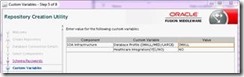
One of the really nice features of SOA 12c is the ability to automatically create partitioned instance tables in the SOA repository. To do this you need to specify a LARGE “Database Profile” in RCU when you install the system:

(see http://docs.oracle.com/middleware/1213/core/RCUUG/rcu_screens.htm#RCUUG381)

Unfortunately none of the documentation that I found (even now, a year after SOA 12c was released) tells you how to do this when running RCU in silent mode. This might have been the obvious place to mention it: https://docs.oracle.com/middleware/1213/core/INSOA/planning.htm#INSOA524

On the RCU command line what you need to do is specify the SOA_PROFILE_TYPE variable (which sounds obvious once you know!), e.g.:

$ORACLE_HOME/oracle_common/bin/rcu -silent -createRepository -connectString <db_connect_string> -dbUser <db_user> -dbRole <db_role> -useSamePasswordForAllSchemaUsers true -schemaPrefix <schema_prefix> -variables SOA_PROFILE_TYPE=LARGE <components> -f < <password_file>

The valid values, as the screen-shot above suggests, are LARGE, MED (not medium) and SMALL. LARGE is the only option to produce partitioned tables. Both MED and SMALL produce an identical SOAINFRA schema in the current release but I assume Oracle might be thinking of more optimisation options later.

Note: the O-box SOA appliance uses partitioned tables for the SOA repository by default – the Partitioning Option for the Oracle Database is relatively inexpensive and, even with the built-in repository purging scripts in 12c, setting up partitioning from the start is much easier than migrating later when a system is very busy or has grown dramatically in size. I’ll write more about this another day.

Anyway, sorry it’s taken me so long to get round to blogging about this but, if you’re just now looking to provision SOA 12c automatically (and you should be of course!), this might save you an evening or so of reverse engineering RCU (a fairly thankless task I can tell you!). Read the complete. Read the complete article here.

SOA & BPM Partner Community

For regular information on Oracle SOA Suite become a member in the SOA & BPM Partner Community for registration please visit www.oracle.com/goto/emea/soa (OPN account required) If you need support with your account please contact the Oracle Partner Business Center.

Blog Twitter LinkedIn image[7][2][2][2] Facebook clip_image002[8][4][2][2][2] Wiki

Technorati Tags: SOA Community,Oracle SOA,Oracle BPM,OPN,Jürgen Kress

Integration Cloud Service Bootcamps Utrecht and Dublin


clip_image001Simplify Integration.

Maximize the value of your investments in SaaS and on-premises applications through a simple and powerful integration platform in the cloud.

  • Fast. Get started in minutes!
  • Simple. Build SaaS to SaaS and SaaS to on-premises integrations in just a few clicks.
  • Enterprise-Grade. A secure, performant and highly available platform for your mission-critical integrations.
  • Integrated. Pre-integrated with your Oracle SaaS applications.

Attend a free hands-on workshop to learn Oracle Integration Cloud Service (ICS) hands-on- Goal of the workshop is to build SaaS and on-premises integrations as well your own cloud adapters with the SDK.

Target audience:

Integration Developers, Solution Architects, Technology Consultants

Registration is free of charge, except in case of cancellation fee € 150 or no-show fee €2000! Please read the registration page very careful before you register here:

Utrecht May 2nd & 3rd 2016

Dublin June 6th & 7th 2016

For details and additional trainings visit our SOA & BPM Partner Community training calendar (SOA Community membership required)

SOA & BPM Partner Community

For regular information on Oracle SOA Suite become a member in the SOA & BPM Partner Community for registration please visit www.oracle.com/goto/emea/soa (OPN account required) If you need support with your account please contact the Oracle Partner Business Center.

Blog Twitter LinkedIn image[7][2][2][2] Facebook clip_image002[8][4][2][2][2] Wiki

Fault Notification Alerts – New Functionality in Oracle SOA 12c by Jennie DeRosa


clip_image002Overview

One of the new features included in Oracle SOA Suite 12c is the ability to define notification rules that will automatically create alerts when something goes wrong. These fault alerts can be routed to communication channels such as email, SMS, and/or IM. Along with this, they can be made visible within the SOA dashboard in Enterprise Manager. The notification of the alerts are also scheduled based on a predefined time frame, allowing for notifications to time based.

Within this blog, the pre-requisites and steps required to configure this new functionality are detailed.

Scheduler Service

The installation of the Enterprise Scheduler Service (ESS) is a prerequisite and is necessary in order to define a notification rule within SOA. An ESS schedule is associated with a notification rule and is used to tell it when to kick off an error notification. One thing to note, ESS is not compatible with the Java Database, which means it cannot be installed within the Integrated WebLogic Server default domain from JDeveloper found in the SOA Suite Quick Start distribution. It is, though, compatible with the Oracle Database Express Edition (XE). This will require the Repository Creation Utility (rcu.bat) to be run after the database is installed. Once this is done, run the config.cmd (part of the Quick Start distribution) to create and configure the compact domain. Be sure to specify the ESS components from the available templates:

Define a Schedule

Prior to creating an alert, a schedule needs to be defined within ESS. This is done within Enterprise Manager (EM) by navigating to ‘Define Schedules’ as shown below: Read complete article here.

SOA & BPM Partner Community

For regular information on Oracle SOA Suite become a member in the SOA & BPM Partner Community for registration please visit www.oracle.com/goto/emea/soa (OPN account required) If you need support with your account please contact the Oracle Partner Business Center.

Blog Twitter LinkedIn image[7][2][2][2] Facebook clip_image002[8][4][2][2][2] Wiki

Technorati Tags: SOA Community,Oracle SOA,Oracle BPM,OPN,Jürgen Kress

Integration Cloud Service Bootcamps Utrecht May 2nd & 3rd and Dublin June 6th & 7th 2016


clip_image001Simplify Integration.

Maximize the value of your investments in SaaS and on-premises applications through a simple and powerful integration platform in the cloud.

  • Fast. Get started in minutes!
  • Simple. Build SaaS to SaaS and SaaS to on-premises integrations in just a few clicks.
  • Enterprise-Grade. A secure, performant and highly available platform for your mission-critical integrations.
  • Integrated. Pre-integrated with your Oracle SaaS applications.

Attend a free hands-on workshop to learn Oracle Integration Cloud Service (ICS) hands-on- Goal of the workshop is to build SaaS and on-premises integrations as well your own cloud adapters with the SDK.

Target audience:

Integration Developers, Solution Architects, Technology Consultants

Registration is free of charge, except in case of cancellation fee € 150 or no-show fee €2000! Please read the registration page very careful before you register here:

Utrecht May 2nd & 3rd 2016

Dublin June 6th & 7th 2016

For details and additional trainings visit our SOA & BPM Partner Community training calendar (SOA Community membership required)

SOA & BPM Partner Community

For regular information on Oracle SOA Suite become a member in the SOA & BPM Partner Community for registration please visit www.oracle.com/goto/emea/soa (OPN account required) If you need support with your account please contact the Oracle Partner Business Center.

Blog Twitter LinkedIn image[7][2][2][2] Facebook clip_image002[8][4][2][2][2] Wiki

Technorati Tags: SOA Community,Oracle SOA,Oracle BPM,OPN,Jürgen Kress