Purging Data From the BPEL Store by Matt Brasier

In this recipe, taken from the book Oracle SOA Suite 11g Performance Tuning Cookbook (ISBN: 9781849688840, Packt Publishing) we will remove old BPEL dehydration data and state from the SOA infrastructure database.
Getting ready
You will need to have access to the database on which the SOA_INFRA schema is hosted. In this recipe we’ll be using a command line local to the host on which we installed the database.
You’ll also need access to the SQL scripts bundled with SOA Suite, if you have SOA Suite installed on the host running the database you can find them under: MW_HOME/SOA_ORACLE_HOME/rcu/integration/soainfra/sql/soa_purge
If the database is running on a separate host then you can simple copy the soa_purge directory from the WebLogic Admin server to a directory on the database host, we’ll be using e:\soa_purge for this purpose.
How to do it…
Follow the steps below to run the soa_purge scripts
1. First log into sqlplus as a user with sysdba privileges, and grant the following permissions to the dev_soainfra user then exit the shell Read the complete article here.

SOA & BPM Partner Community

For regular information on Oracle SOA Suite become a member in the SOA & BPM Partner Community for registration please visit www.oracle.com/goto/emea/soa (OPN account required) If you need support with your account please contact the Oracle Partner Business Center.

Blog Twitter LinkedIn image[7][2][2][2] Facebook clip_image002[8][4][2][2][2] Wiki

Extending the Oracle Sales Cloud with SOA Suite by Gerhard Drasch

Introduction

The Oracle Sales Cloud provides an extensive set of features for extending the user interface, the underlying data model, and allows the use of Groovy scripts to extend or adjust the default business logic. If customers have requirements that go beyond these capabilities, Java Cloud Service is a viable option to build new user interface allowing a seamless UI level integration (see the samples here). If an extension is not driven by UI requirements but rather backend orchestration and integration needs, introducing the Oracle SOA stack is a logical option to consider.

This article describes how business logic implemented in Oracle SOA Suite can be invoked in a secure way while ensuring that the additional logic in SOA Suite can execute in the Sales Cloud user’s security context.
Creating SOA services for the Sales Cloud
For simplicity, we are showing here a basic SOA composite with a BPEL component that is doing nothing than receiving a JWT token from the Sales Cloud and then calling back a web service in the Sales Cloud leveraging this token. Here is an overview of the composite:
Read the complete article here.

SOA & BPM Partner Community

For regular information on Oracle SOA Suite become a member in the SOA & BPM Partner Community for registration please visit www.oracle.com/goto/emea/soa (OPN account required) If you need support with your account please contact the Oracle Partner Business Center.

Blog Twitter LinkedIn image[7][2][2][2] Facebook clip_image002[8][4][2][2][2] Wiki

Set-up a 12c Service Bus Infrastructure by René van Wijk

imageIn this post, we will show how to create automation scripts in order to set-up middleware environments.
Preparation
In the example, we will use the following software

First, we have to decide which directory structure we are going to use. Below an example is given in which the binaries (that create the run-time) are separated from the configuration. Read the complete article here.

SOA & BPM Partner Community

For regular information on Oracle SOA Suite become a member in the SOA & BPM Partner Community for registration please visit www.oracle.com/goto/emea/soa (OPN account required) If you need support with your account please contact the Oracle Partner Business Center.

Blog Twitter LinkedIn image[7][2][2][2] Facebook clip_image002[8][4][2][2][2] Wiki


What’s New in Oracle SOA Suite 12c? by Andrew Pielage

Introduction
With the recent release of SOA Suite 12c, it seems appropriate to give a quick rundown of some of the new features and improvements made to it from the last release. For those of you who don’t know, SOA Suite is a software collection (or suite, if you prefer) that can be used together to realise a Service-Oriented Architecture.
What’s New?
Oracle have implemented loads of new features and improvements in this latest release, far more than this blog could reasonably explain, so if you want the full list you can find it in this white paper published by Oracle: What’s New in Oracle SOA Suite 12c
Read on for an overview of some of the main features…
Cloud Integration
As with much of the 12c range being released by Oracle, a big push has been made in the Cloud department to keep up with the industry and its current fascination with cloud computing.
Cloud Application Adapters
Read the complete article here.

SOA & BPM Partner Community

For regular information on Oracle SOA Suite become a member in the SOA & BPM Partner Community for registration please visit www.oracle.com/goto/emea/soa (OPN account required) If you need support with your account please contact the Oracle Partner Business Center.

Blog Twitter LinkedIn image[7][2][2][2] Facebook clip_image002[8][4][2][2][2] Wiki

SOA Suite 12c article series by Vivek Garg

Thanks to Vivek for all his blog posts about SOA Suite 12c:

Thanks to Vivek for all his blog posts about SOA Suite 12c:

With the release of Oracle SOA 12c, Oracle introduces SOA Debugger in Jdeveloper which helps developer to test and debug the composite. This makes developer life really easy. Earlier in 11g we follow below development cycle.

  • Build code in Jdeveloper
  • Deploy it to Server
  • Test it in EM console and debug it using flow traces

If we see any issue with the code then again we have to repeat above steps. But with the introduction of SOA Debugger development cycle got reduced as trouble shooting environment is provided with in Jdeveloper only. We can add breakpoints in the code and troubleshoot it in debug mode. During debugging you can also change value of the variable or xml element. In this post, I will show how this SOA Debugger works. We will use HelloWorld sample which we built in previous post. Follow below steps to debug your composite using SOA Debugger. First we need to start the debugger if already not started. You can start the debugger in two ways. Either by right-clicking composite file and click on Debug or click on red button in menu bar as highlighted in below screen shot. Read the complete article here.

SOA & BPM Partner Community

For regular information on Oracle SOA Suite become a member in the SOA & BPM Partner Community for registration please visit www.oracle.com/goto/emea/soa (OPN account required) If you need support with your account please contact the Oracle Partner Business Center.

Blog Twitter LinkedIn image[7][2][2][2] Facebook clip_image002[8][4][2][2][2] Wiki

What’s New in SOA Suite 12c – Unified Interface for Service Bus and Event Processing By Bruce Tierney

10gTo11gThis second in a blog series on "What’s New in SOA Suite 12c" focuses on another new feature of this major release of Oracle SOA Suite. In Oracle SOA Suite 11g, the user interface was unified across most of the components with the exception of Oracle Service Bus and Oracle Event Processing. When I talk to existing customers and Oracle technical specialists, I hear a wide range of responses when asked "What is your favorite feature of Oracle SOA Suite 12c". Cloud and Mobile integration are at the top of the list, but one of the other common responses is "Oracle Service Bus" using the same JDeveloper interface as Oracle SOA Suite. This major enhancement has been in the works for years and is now delivered in 12c to allow users to learn one interface for all the components of integration, simplifying integration and providing faster time to integrate, especially when projects span many components of integration.
Here is an excerpt from the "What’s New in Oracle SOA Suite 12c" White Paper by Oracle’s Simone Geib on the unified interface. Download it now to learn about this and many other features:
A key differentiator of Oracle SOA Suite 11g relative to other integration platforms has always been the unified design interface across most of the components for Oracle SOA Suite. Oracle SOA Suite 12c takes this differentiator a big step forward by integrating the remaining major components for Oracle SOA Suite, Oracle Service Bus and Oracle Event Processing, into a single unified experience. This feature simplifies integration by eliminating the need to train developers, administrators, architects and others on separate components for every aspect of integration, which lowers cost and provides a faster time to integrate.
The images below show the main component palette for Oracle SOA Suite which now includes "Service Bus" at the top as well as adapters for technology components, on-premise and cloud applications and other advanced features. On the right, is the same JDeveloper drag and drop component palette showing the objects to be used for Oracle Event Processing. Read the complete article here.

SOA & BPM Partner Community

For regular information on Oracle SOA Suite become a member in the SOA & BPM Partner Community for registration please visit www.oracle.com/goto/emea/soa (OPN account required) If you need support with your account please contact the Oracle Partner Business Center.

Blog Twitter LinkedIn image[7][2][2][2] Facebook clip_image002[8][4][2][2][2] Wiki

Get started with MDS by Vivek Garg

Oracle has introduced couple of new features in Oracle SOA Suite 12c. I have listed couple of new features that Oracle introduced for developer in my post. These new features really make developers life easy as these reduce development cycle.
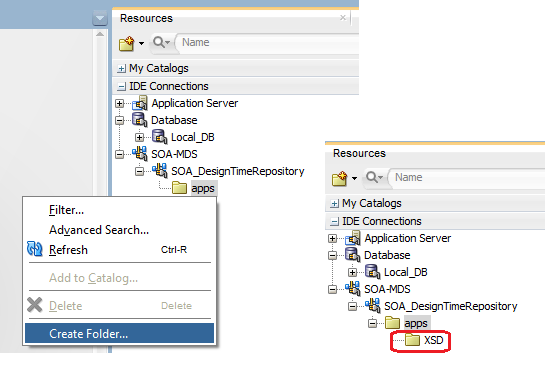
Here we discuss about MDS and what all featured introduced in that. As we know MDS is used to store artifacts like WSDL, XSD, XSLT etc. we have two types of MDS, File based MDS and DB based MDS. In Oracle SOA 12c, when we use default server which is integrated with Jdeveloper then we can use only Design Time MDS (File Based MDS), Run Time MDS (DB Based MDS) is not supported. Check this post to create design time MDS connection. In Oracle SOA 12c release, Oracle provided couple of new options that we can use when we use Design Time MDS, these options were not there in 11g. Below are options available with Design Time MDS. vivek

  • Create and Delete folders
  • Export and Import MDS artifacts
  • Transfer Artifacts between MDS repositories

In this post, we discussed these options one by one. Get started with Oracle SOA 12c.
Create and Delete Folders
We can simple add and remove folders from design time MDS repository. To add a new folder to it, simply right click on the apps folder and choose “Create Folder”. Read the complete article here.

SOA & BPM Partner Community

For regular information on Oracle SOA Suite become a member in the SOA & BPM Partner Community for registration please visit www.oracle.com/goto/emea/soa (OPN account required) If you need support with your account please contact the Oracle Partner Business Center.

Blog Twitter LinkedIn image[7][2][2][2] Facebook clip_image002[8][4][2][2][2] Wiki

BPM Suite 12c and SOA Suite 12c at eProseed World 2014

As most of you know, Oracle officially released SOA Suite 12c (12.1.3) and BPM Suite 12c (12.1.3) a couple of week ago. Exciting times for people like us, who have worked extensively with BPEL Process Manager, Oracle ESB, SOA Suite 10g, and SOA Suite 11g! The same week that 12c was released, eProseed World 2014 took place. During this event all eProseed employees meet for a fun couple of days full of social and work-related sessions. Because Vennster is merging into the eProseed Netherlands office we will soon migrate this blog to an eProseed domain. For us it was an excellent chance to meet all our new colleagues. In between the tour of Luxembourg city and an afternoon full of Highland Games (nobody got injured :-), multiple sessions where organized to present and discuss Oracle BPM and SOA 12c. Get the presentation here.

SOA & BPM Partner Community

For regular information on Oracle SOA Suite become a member in the SOA & BPM Partner Community for registration please visit www.oracle.com/goto/emea/soa (OPN account required) If you need support with your account please contact the Oracle Partner Business Center.

Blog Twitter LinkedIn image[7][2][2][2] Facebook clip_image002[8][4][2][2][2] Wiki

SOA Suite 12c free online learning

Oracle learning library offers three new SOA Suite 12c on-demand classes:
SOA Suite 12c – Performing a Quick Start Installation
SOA Suite 12c – Using the SOA Debugger in JDeveloper
SOA Suite 12c – Leveraging the New SOA Project Templates

SOA & BPM Partner Community

For regular information on Oracle SOA Suite become a member in the SOA & BPM Partner Community for registration please visit www.oracle.com/goto/emea/soa (OPN account required) If you need support with your account please contact the Oracle Partner Business Center.

Blog Twitter LinkedIn image[7][2][2][2] Facebook clip_image002[8][4][2][2][2] Wiki

SOA Suite 12c Now Available!

This major release of Oracle SOA Suite expands Oracle’s leadership to be the most unified and comprehensive solution for simplifying cloud, mobile, and IoT Integration. Learn about all the new assets described below to better understand how Oracle SOA Suite 12c eliminates the need for disparate niche integration toolsets for mobile integration, cloud integration, and IoT integration by unifying into a single platform.

Featured

Featured

New Videos – SOA Suite 12c Customers & Partner

New Podcasts

New Podcasts

Additional Assets

Resource Kits

SOA & BPM Partner Community

For regular information on Oracle SOA Suite become a member in the SOA & BPM Partner Community for registration please visit www.oracle.com/goto/emea/soa (OPN account required) If you need support with your account please contact the Oracle Partner Business Center.

Blog Twitter LinkedIn image[7][2][2][2] Facebook clip_image002[8][4][2][2][2] Wiki