Using an Event Based Pattern with Oracle Integration by Michael Meiner

image

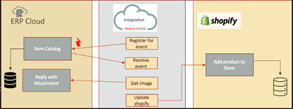
Something happens in your enterprise application. Let’s say a new item is added to your catalog in your Enterprise Resource Planning (ERP) system. We will call this an event. Perhaps you want to find out about this event so you can take some action. Perhaps you need to add this item to your customer-facing web store.

One way to accomplish this is to continually poll the application. The problem with this solution is that you need to expend resources to keep polling, and then you will likely not find out about the event immediately. This is akin to sending a package and then calling the recipient every few minutes to find out whether they received the package. This of course is inefficient (not to mention the annoyance to the recipient!). A much better option is to have the recipient notify you when the package arrives.

Oracle Integration can help satisfy processing such events by using an event-driven architecture. Your integration does not need to poll the application. Rather, your integration can register for an event, sit back and relax — and wait to be notified. As businesses adopt and embrace Digital Transformation, one critical step in this journey is moving to event-driven architectures to replace older, more cumbersome integration methods.

To illustrate this, we using Oracle ERP and Shopify. Oracle ERP will be our system of record for products in our catalog. New products get added to our Oracle ERP system. Whenever a new product is added to Oracle ERP, the product will be added to Shopify so that our customers can begin ordering the product. The process of adding the product to Shopify will be handled by Oracle Integration, via an event-based pattern. Let’s now build the integration. Read the complete article here.

PaaS Partner Community

For regular information on Oracle PaaS become a member in the PaaS (Integration & Process) Partner Community please register here.

clip_image003 Blog clip_image005 Twitter clip_image004 LinkedIn image[7][2][2][2] Facebook clip_image002[8][4][2][2][2] Wiki

Technorati Tags: SOA Community,Oracle SOA,Oracle BPM,OPN,Jürgen Kress

Practical Guide to use HCM Data Loader with Oracle Integration by Harris Qureshi

image

There are many good resources & blogs available that demonstrate how to use Oracle Integration (OIC) to import data into HCM using HDL Import Job. So if you wish to learn how to use the OIC Adapter and create an integration, please refer to the following examples plus there are others available too.

A Simple Guide to Oracle HCM Data Loader (HDL) Job Support in Oracle HCM Cloud Adapter

Import Business Objects with the HCM Data Loader (HDL)

This blog will try to address some key practical steps and pre-requisites needed to make this all work. Some of these are mentioned in these blogs but I feel it demands its own write-up to help guide the new integration developers and this will try to address some overall steps.

How to Generate Business Object Mapping File in HCM

One of the key requirements to load data using OIC for HDL is that you need the integration mapping file (nxsd file) of the relevant business object along with a sample .dat file.

Now if you go to the HCM environment and View Business Objects, the default setting only provides you the sample template file (.dat file) but it does not give you the relevant integration mapping file i.e. nxsd file. Read the complete article here.

PaaS Partner Community

For regular information on Oracle PaaS become a member in the PaaS (Integration & Process) Partner Community please register here.

clip_image003 Blog clip_image005 Twitter clip_image004 LinkedIn image[7][2][2][2] Facebook clip_image002[8][4][2][2][2] Wiki

Technorati Tags: SOA Community,Oracle SOA,Oracle BPM,OPN,Jürgen Kress

Five key Oracle Integration lessons from handling billions of messages monthly by Amit Saxena

imageAutomating end-to-end enterprise business processes involves connecting multiple software-as-a-service (SaaS), on-premises, and custom applications.

One of the most innovative things you can do with your enterprise applications is to integrate them into end-to-end business processes, such as recruit-to-retire, requisition-to-receipt, and lead-to-invoice. When automating processes across multiple event-based services and data sources, you want the ability to adjust and evolve those interactions on the fly.

Many, varied integration patterns pose a complex challenge to traditional integration strategies. To keep pace, our customers need to enable self-service, capitalize on existing APIs, and implement a hybrid integration platform. Watch Oracle Integration Architecture Principles to see for yourself how we can help your connected business strategy support modern integration and automation best practices.

Modernize end-to-end business processes with low-code, polyglot development for Oracle Digital Assistant and BlockChain across SaaS and on-premises applications. Read the complete article here.

PaaS Partner Community

For regular information on Oracle PaaS become a member in the PaaS (Integration & Process) Partner Community please register here.

clip_image003 Blog clip_image005 Twitter clip_image004 LinkedIn image[7][2][2][2] Facebook clip_image002[8][4][2][2][2] Wiki

Technorati Tags: SOA Community,Oracle SOA,Oracle BPM,OPN,Jürgen Kress

Improved Navigation for the OCI Console by Simone Geib

image

We’re excited to announce that the Oracle Cloud Infrastructure (OCI) Console navigation menu is undergoing a major upgrade this month.

As OCI continues to grow, adding new services and expanding our current services, our customers need a more efficient way to navigate the Console. In this change, we’re better organizing the rapidly growing set of OCI services into logical top-level categories and reducing the scrolling and manual searching that customers have to do today.

For more information about key features and how to get started, please go here: Announcing Improved Navigation for the OCI Console.

In the new menu, Oracle Integration (OIC) can be found under "Developer Services -> Application Integration -> Integration". Read the complete article here.

PaaS Partner Community

For regular information on Oracle PaaS become a member in the PaaS (Integration & Process) Partner Community please register here.

clip_image003 Blog clip_image005 Twitter clip_image004 LinkedIn image[7][2][2][2] Facebook clip_image002[8][4][2][2][2] Wiki

Technorati Tags: SOA Community,Oracle SOA,Oracle BPM,OPN,Jürgen Kress
OIC May 21 Release – B2B support for UN EDIFACT Part 2 by Niall Commiskey

image

This post covers the creation of the "missing" backend integration from the previous post.

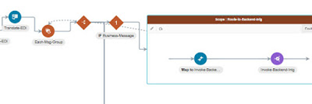
I discussed the auto-generation of the send/receive integrations in the previous post. What I now need to do is create a backend integration for processing my EDFACT Order. That integration will create a Sales Order in Netsuite. It will then be called from the scope below.

Create the Backend Integration

To recap, the "receive" integration has done the formal AS2 and EDIFACT checks – nothing else. The backend integration will do the actual fetch/translate of the document so that OIC can process it further. The basic backend integration flow is as follows – read the complete article here.

PaaS Partner Community

For regular information on Oracle PaaS become a member in the PaaS (Integration & Process) Partner Community please register here.

clip_image003 Blog clip_image005 Twitter clip_image004 LinkedIn image[7][2][2][2] Facebook clip_image002[8][4][2][2][2] Wiki

Technorati Tags: SOA Community,Oracle SOA,Oracle BPM,OPN,Jürgen Kress
OIC May 21 Release – B2B support for UN EDIFACT Part 1 by Niall Commiskey

image

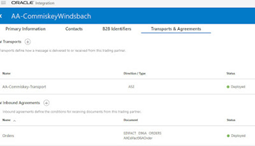
The May 21 release of OIC brings lots of new features to B2B. This post will focus on the new UN EDIFACT support, but will also detail our new auto-generation of – send/receive pre-processor integrations – feature.

The usual caveat from me at the outset – I am not an EDI/EDIFACT expert – many folks tasked with creating such integrations are also not, so this is for you! Version 1 of B2B in OIC supported X12, now we are also providing UN EDIFACT support. So what is the difference between the 2, apart from the fact that the latter is mainly used in Europe? Apparently X12 has made inroads into the healthcare market (HIPAA), whereas UN EDIFACT has not. Both standards are used in areas such as supply chain, government etc.

This post begins with an introduction to the format of an order in UN EDIFACT, it is rather pedestrian, if fact probably boring for most of you, who are at home in EDI. I go through the order document line for line, this I am mainly doing for my own benefit, so that I actually understand the values being sent.

The post continues with a short introduction to the transport protocol I will use, AS2. Finally, we get to the section that covers the implementation of a simple UN EDIFACT orders based B2B transaction in OIC. Read the complete article here.

PaaS Partner Community

For regular information on Oracle PaaS become a member in the PaaS (Integration & Process) Partner Community please register here.

clip_image003 Blog clip_image005 Twitter clip_image004 LinkedIn image[7][2][2][2] Facebook clip_image002[8][4][2][2][2] Wiki

Technorati Tags: SOA Community,Oracle SOA,Oracle BPM,OPN,Jürgen Kress
May 2021 Enhanced Security in Adapters by Michael Meiner

image

Oracle Integration enables our customers to connect applications and technologies in a secure manner. We are thrilled to share that we continue to enhance Oracle Integration to provide additional security settings and functionality. In the May 2021 release, Oracle Integration offers new security-related functionality as described below. This further extends OIC security options and capabilities; see February 2021 OIC Security Adapters blog and  November 2020 OIC Security Adapters blog.

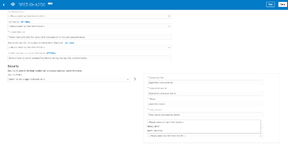
With our May release, we are adding support in the REST adapter for SHA-256 signature method for OAuth 1.0a authentication scheme

We are introducing an option in the REST adapter connections page. By default, SHA1 is used. But you now have the option to select SHA-256. Read the complete article here.

PaaS Partner Community

For regular information on Oracle PaaS become a member in the PaaS (Integration & Process) Partner Community please register here.

clip_image003 Blog clip_image005 Twitter clip_image004 LinkedIn image[7][2][2][2] Facebook clip_image002[8][4][2][2][2] Wiki

Technorati Tags: SOA Community,Oracle SOA,Oracle BPM,OPN,Jürgen Kress

May 2021 Third-Party application adapters update by Michael Meiner

image

Oracle integration has a rich portfolio of adapters for connectivity with 3rd party applications. Lilly our official mascot is happy to announce enhancements to our 3rd party adapters!!  These enhancements are intendend to meet critical usecases required by our customers.

In this release, we are providing the following enhancements to our 3rd party adapters.

  • (new) Jira Adapter
  • Shopify adapter support for multiple domains (i.e., stores)
  • Salesforce Commerce Cloud Adapter: Shop APIs Support
  • Workday adapter: support for additional operations

Jira Adapter

The Jira Adapter is the newest addition in the Social/Productivity segment of adapters. With the May release, the Jira Adapter will enable you to connect with the Jira application. Jira is a powerful work management software and it is used for project management, bug tracking, and issue tracking.

Example usecases with the Jira adapter include:

  • Incident created in Incident tracking system auto creates Issue in Jira
  • Case created/updated in CRM system will create/update issue in Jira
  • Sync new/updated issue from Jira to customer ticketing system

The Jira Adapter connection page needs hostname, username, and password for establishing the connection with the Jira application. On the Connection page, an API token is used (instead of your account password) as a password whenever you programmatically authenticate with basic authentication. Read the complete article here.

PaaS Partner Community

For regular information on Oracle PaaS become a member in the PaaS (Integration & Process) Partner Community please register here.

clip_image003 Blog clip_image005 Twitter clip_image004 LinkedIn image[7][2][2][2] Facebook clip_image002[8][4][2][2][2] Wiki

Technorati Tags: SOA Community,Oracle SOA,Oracle BPM,OPN,Jürgen Kress
May 2021 Technology Improvements in Adapters by Michael Meiner

image

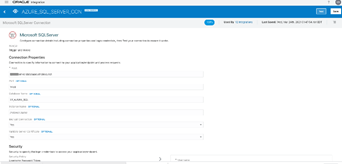
In the May 2021 release, we are making the following updates to our Database adapters and connectivity agent:

  1. MS SQL adapter: support for Azure SQL
  2. My SQL adapter: support for MySQL version 8
  3. Connectivity agent: support for JDK 11

Microsoft SQL on Azure

Many of our customers need to integrate with Microsoft Azure SQL. In this release, you can leverage the same SQL Server adapter that is available in OIC, and connect to Azure SQL. You will set up a connectivity agent, and then use the connections page to fill in the Azure SQL host and port, database name and the credentials.

Once you configure the connection, you can use this connection in an integration flow in exactly the same way as SQL Server on-premise. Note that SQL on Azure can be installed in a private network, where the ports are not open to the internet. For such a setup, the OIC connectivity agent needs to be installed on an Azure VM in the same subnet. This is so the agent will be able to reach the Azure SQL instance. If SQL on Azure is configured with open ports, then the connectivity agent can be installed anywhere (including on Oracle Cloud). We will be adding more options for security policies in an upcoming release. Read the complete article here.

PaaS Partner Community

For regular information on Oracle PaaS become a member in the PaaS (Integration & Process) Partner Community please register here.

clip_image003 Blog clip_image005 Twitter clip_image004 LinkedIn image[7][2][2][2] Facebook clip_image002[8][4][2][2][2] Wiki

Technorati Tags: SOA Community,Oracle SOA,Oracle BPM,OPN,Jürgen Kress

May 2021 Oracle Integration Pre-built Recipes by Michael Meiner


What is a Recipe?image

When cooking a meal, you often use a recipe. You don’t need to start from scratch. The recipe gives you the ingredients and amounts to cook your meal. Similarly, when using OIC recipes, we give you the "ingredients". You start  with one of more pre-assembled solutions that bundle all the resources required by the integrations, such as the connections and lookups, into one package. Use a recipe to quickly get started cooking your meal (or in our case, building your integration).

We continue to add pre-built recipes to our repository. In the May 2021 release, here are some of the recipes we are adding:

  • Retrieve and place files to/from NetSuite File cabinet
  • Create, Update and Delete ServiceNow Incidents
  • Get feeds or posts from Facebook
  • Create channels and push notifications to Slack
  • Send a Docusign envelope and get status

So How Do I Use A Recipe?

Well, I’m glad you asked. It’s actually quite simple. Just log into your OIC console and on the Home Page you will see the recipes. (Note: this Home Page is for Oracle Integration Generation 2 instances). Read the complete article here.

PaaS Partner Community

For regular information on Oracle PaaS become a member in the PaaS (Integration & Process) Partner Community please register here.

clip_image003 Blog clip_image005 Twitter clip_image004 LinkedIn image[7][2][2][2] Facebook clip_image002[8][4][2][2][2] Wiki

Technorati Tags: SOA Community,Oracle SOA,Oracle BPM,OPN,Jürgen Kress