Read BI Report base64 encoded response by Kabir Yadav

image

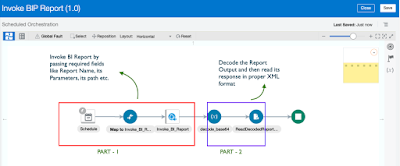
In the previous post we have seen the PART 1 of BI Report Invocation. If you don’t have seen that requesting you to first check that out by clicking here.

In this article we will develop the left part (PART 2) i.e. convert the base64 encoded run report operation response  and then read it in proper XML format using stage activity.

PART 2 : Steps to read the base64 encoded report output.

    • Add Assign activity to decode the run report base64 encoded output

PaaS Partner Community

For regular information on Oracle PaaS become a member in the PaaS (Integration & Process) Partner Community please register here.

clip_image003 Blog clip_image005 Twitter clip_image004 LinkedIn image[7][2][2][2] Facebook clip_image002[8][4][2][2][2] Wiki

Technorati Tags: SOA Community,Oracle SOA,Oracle BPM,OPN,Jürgen Kress
Invoke BI Report in OIC by Kabir Yadav

image

In this article we will see the steps to invoke a BI Report in an Integration and then the steps to read its base64 encoded output. We will do the development by breaking it into 2 parts :

PART 1 : Steps to invoke a BI Report

PART 2 : Steps to read the base64 encoded report output.

Lets start the development : ~ PART 1 :  Steps to invoke a BI Report : Lets develop one schedule integration where we will configure a soap adapter connection to call the BI Report using runReport Operation and then do the mappings. First we will create the connection and then create the integration. Create Connection :

Here we will configure  " ExternalReprtWSSService WSDL URL " which can be used to run a report. The same connection we will use in below steps while developing integration. Navigate to connection window and select SOAP adapter, give any meaningful name for connection. Read the complete article here.

PaaS Partner Community

For regular information on Oracle PaaS become a member in the PaaS (Integration & Process) Partner Community please register here.

clip_image003 Blog clip_image005 Twitter clip_image004 LinkedIn image[7][2][2][2] Facebook clip_image002[8][4][2][2][2] Wiki

Technorati Tags: SOA Community,Oracle SOA,Oracle BPM,OPN,Jürgen Kress
B2B Trading Partner Management by Niall Commiskey

image

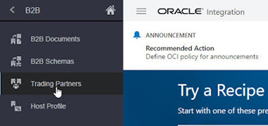
Here we are talking about the concept of a host and her remote trading partners. This brings organization to B2B document exchange, essentially defining who can exchange what documents with me and whether the trading partner’s role is that of sender or receiver. This is all covered by a B2B agreement.

B2B documents contain specific fields for sender and receiver ids. The first line of the EDI X12 850 PO doc includes this information – ISA stands for Interchange Control Header. OIC B2B now supports enforcement of Trading Partners/Agreements; let’s look at how this is implemented. Let’s begin with ourselves, identified as the Host –  Here I click on Host Profile and enter an identifier – this will be used in B2B document exchanges; such documents will contain fields that identify the sender and receiver of the B2B document. Read the complete article here.

PaaS Partner Community

For regular information on Oracle PaaS become a member in the PaaS (Integration & Process) Partner Community please register here.

clip_image003 Blog clip_image005 Twitter clip_image004 LinkedIn image[7][2][2][2] Facebook clip_image002[8][4][2][2][2] Wiki

Technorati Tags: SOA Community,Oracle SOA,Oracle BPM,OPN,Jürgen Kress

Protecting your OIC apis with OCI API Gateway by Niall Commiskey

image
Introduction

OCI Services add a lot of value add to OIC. I have discussed OCI Functions Service and the OCI Streaming Service in previous posts. Today – my first working day of 2021 – it’s the turn of OCI API Gateway.

I’m sure you are all conversant with what API Gateway gives you. If not, check out the overview here

The Gateway setup was very simple and quick – I just followed the instructions here

This blog post covers the following –

1. Virtualizing a publicly available REST api using API Gateway

2. Virtualizing an OIC API

3.  Adding a Throttling Policy at Deployment level

4. Adding a Request Policy – Query Parameter Transformation

Virtualizing a public REST API via OCI API Gateway

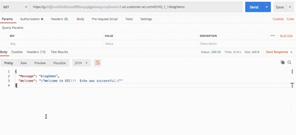
Now to a simple sanity test – I found the following public REST API -  Read the complete article here.

PaaS Partner Community

For regular information on Oracle PaaS become a member in the PaaS (Integration & Process) Partner Community please register here.

clip_image003 Blog clip_image005 Twitter clip_image004 LinkedIn image[7][2][2][2] Facebook clip_image002[8][4][2][2][2] Wiki

Technorati Tags: SOA Community,Oracle SOA,Oracle BPM,OPN,Jürgen Kress
API Gateway Integration: Quick and Easy by Varinder Kaur

imageThis blog is for a new feature coming out in Oracle Integration Cloud (OIC) February 2021 release.

If you struggle with API Gateway Integration, then read this blog as it covers the steps needed to seamlessly integrate with API Gateway.

The API Gateway service enables you to publish APIs with private endpoints that are accessible from within your network, and which you can expose with public IP addresses if you want them to accept internet traffic. Now you can create an Oracle OCI API Gateway Deployment from a OIC Rest based Integration. The API deployment will be created with routing rules pointing to the activated integration.

AssumptionOIC user has already created API Gateway or access to API Gateway.
Creating a Deployment from OIC :

· Configure in API Management settings with OCI Signature V1 Policy : Configure the properties – tenancy OCID, user OCID, fingerprint, private key and passphrase(if present). These properties can be found under your profile menu, tenancy and user settings. Click on Save button after configuring the values, it will validate the credentials and save API gateway settings.

· Activate an Integration: Taking the example of a sample integration here- "Echo" integration ( You can build your own integration). Activate the integration by clicking on Activate icon. The below activate dialog will appear.In the activate dialog, there is an additional action of "Activate and Deploy" which will perform two actions- first activate the integration and then deploy it. Read the complete article here.

PaaS Partner Community

For regular information on Oracle PaaS become a member in the PaaS (Integration & Process) Partner Community please register here.

clip_image003 Blog clip_image005 Twitter clip_image004 LinkedIn image[7][2][2][2] Facebook clip_image002[8][4][2][2][2] Wiki

Technorati Tags: SOA Community,Oracle SOA,Oracle BPM,OPN,Jürgen Kress
Automatic reactivation of Integration after a connection update by Shubham Agrawal

image

This blog is for a new feature coming out in Oracle Integration Cloud (OIC) February 2021 release. This blog covers the issue of applying the changed connection properties to the active integrations.

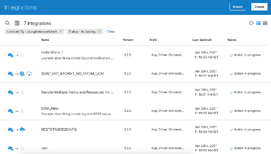
A connection can be used by multiple integration. If connection is updated then Active integrations don’t reflect until they are re-activated. After updating the connection, user currently has to manually go to each integration and re-activate to reflect the updated connection. As an Oracle Integration Cloud user after connection update, user should be able to reactivate all the active integration which are using the same connection.

What does it cover

Users can reactivate the associated integrations for the connection they are trying to update.

User only need to reactivate the integrations if they change connection properties, it does not apply if only primary info is changed, as that would not impact the running integrations.

Now, we can simply reactivate all the associated integrations with a single click, and it will restore the active integrations to its original state (like retain if tracing need to be enabled).

Key Features

Users have option to immediately reactivate the integrations after save or update all the associated resources required to be updated before updating the associated active integrations.

  • User can reactivate integrations along with save with a single button click. To make sure that reactivate works, user should test connection after changing the metadata or credentials of connection. Read the complete article here.

PaaS Partner Community

For regular information on Oracle PaaS become a member in the PaaS (Integration & Process) Partner Community please register here.

clip_image003 Blog clip_image005 Twitter clip_image004 LinkedIn image[7][2][2][2] Facebook clip_image002[8][4][2][2][2] Wiki

Technorati Tags: SOA Community,Oracle SOA,Oracle BPM,OPN,Jürgen Kress
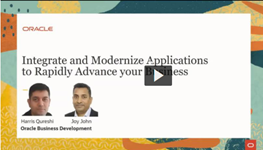
Integrate and Modernize Applications to Rapidly Advance your Business on-demand webinar

imageRemote working, new business processes, new consumer behaviors require extending your applications with Intelligent Automation, Machine Learning, Conversational AI, Robotic Process Automation, Blockchain, IoT and Modern Application Development. Watch this webinar as Oracle experts will explore the potential of application integration combined with emerging technologies to adapt your business with data in the cloud. In this webinar, you will:
Learn about the solutions that will help you adapt your business to the new normal

· Look at the changing world of how customers/employees/partners engage with applications

· Understand how Intelligent Automation, Machine Learning, Conversational AI (Digital Assistants) are changing the landscape for your customers Watch the webinar here.

PaaS Partner Community

For regular information on Oracle PaaS become a member in the PaaS (Integration & Process) Partner Community please register here.

clip_image003 Blog clip_image005 Twitter clip_image004 LinkedIn image[7][2][2][2] Facebook clip_image002[8][4][2][2][2] Wiki

Technorati Tags: SOA Community,Oracle SOA,Oracle BPM,OPN,Jürgen Kress
Explore and Design Patterns and Best Practices

We continue to add new videos to our Training page in the Oracle Help Center. The latest video for your enjoyment is imageUse the Switch Action in Oracle Integration.

Get the documentation here.

PaaS Partner Community

For regular information on Oracle PaaS become a member in the PaaS (Integration & Process) Partner Community please register here.

clip_image003 Blog clip_image005 Twitter clip_image004 LinkedIn image[7][2][2][2] Facebook clip_image002[8][4][2][2][2] Wiki

Technorati Tags: SOA Community,Oracle SOA,Oracle BPM,OPN,Jürgen Kress

February 2021 Oracle Integration Update by Antony Reynolds

image

It is time for the February quarterly update to Oracle Integration. Lilly, the Oracle integration mascot, has lots of exciting new features and improvements to share with you. Note that testing is still underway for these features and, although unlikely, it is possible that some will not meet our quality standard and be deferred to a later release.

Announcements & Update Windows

Currently tenant administrators get notified of OIC Gen 2 updates via notifications in the OCI console. OIC Gen 2 administrators can also see the same upgrade notice in the OIC console, so watch out for the date of your upgrade.

Remember, you can also mark your Gen 2 instance for update in either the first or second upgrade window, as explained in Choose Your Update Window. If you previously tagged your instance, then there is no need to tag it again. If it is not yet tagged for window 1, then the deadline for tagging for February is 14 January. Tags added after this date will take effect for the May release.

API Led Integration

We are making it easier to work with Oracle API products. Previously we supported only Oracle API Platform. We are now building out support for Oracle API Gateway.

  • Auto-generation of API gateway deployment from OIC
    • You can now create an Oracle OCI API Gateway Deployment from a REST based Integration at the click of a button. The API deployment will be created with routing rules pointing to the activated integration. Integrations with multiple verbs/paths will have a rule created for each verb/path.

Developer Productivity Enhancements

We are making the following improvements for developers:

  • Support for attachments in Integration Test UI
    • The testing tool built within Oracle Integration now offers the support for attachments. This will help developers test Integrations with attachment support without having to leave Oracle Integration UI.
  • Ability to edit XLST code in Oracle Integration Mapper
    • Developers can now edit XLST code within the Mapper while building their Integration flows. This will tremendously help them with complex XLST transformations. Avoiding the need to copy the XSLT and then import it back into the mapper. Read the complete article here.

PaaS Partner Community

For regular information on Oracle PaaS become a member in the PaaS (Integration & Process) Partner Community please register here.

clip_image003 Blog clip_image005 Twitter clip_image004 LinkedIn image[7][2][2][2] Facebook clip_image002[8][4][2][2][2] Wiki

Technorati Tags: SOA Community,Oracle SOA,Oracle BPM,OPN,Jürgen Kress

On-demand Integration Platform Partner Advisory Council 2020

image

You missed the 12th edition of the annual global Partner Advisory Council by the Oracle Integration Product Management team? On-demand recordings are available.

Why should watch it? Get the latest product updates and roadmap details from the Oracle Integration Product Management team. Provide feedback based on your customer project experience and discuss with the Oracle team product improvements & future directions.

Who should attend? Senior consultants architects, technical leaders & CTOs, who implemented successful Oracle Integration.

Keynotes watch here:

Andrew Mendelsohn, Executive Vice President, Oracle Data Management Strategy

Bryan Thompson, VP of Product Management, Oracle Cloud Infrastructure

Day 1 watch here:

OIC- Vision and Roadmap and Release Management – Amit Saxena & Team

Extreme Scalability and Enhanced Resilience – Antony Reynolds

Day 2 watch here:

SOA Modernization – Sandhya Lakshmi Gopalan & Ravi Pinto

Adapters & Accelerators & Recipes – Michael Meiner

API Management – Robert Wunderlich

Extend SaaS with Visual Builder Shay Shmeltzer

PaaS Partner Community

For regular information on Oracle PaaS become a member in the PaaS (Integration & Process) Partner Community please register here.

clip_image003 Blog clip_image005 Twitter clip_image004 LinkedIn image[7][2][2][2] Facebook clip_image002[8][4][2][2][2] Wiki

Technorati Tags: SOA Community,Oracle SOA,Oracle BPM,OPN,Jürgen Kress