Choosing Your Update Window by Antony Reynolds

image

Starting in the November Quarterly release we will allow customers to choose between two update windows for their OIC Generation 2 instances.

What is an Update Window?

We currently provide OIC functional updates every quarter. For OIC Generation 2 instances we do this in two windows, usually two weeks apart. Starting with the November release we will allow customers to select the windows in which they wish to be updated. We recommend that non-production instances are updated in the first window and production instances in the second window. This allows customers to sanity check the update before it is applied to production instances.

How Do I Select a Window?

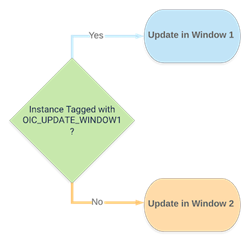
We use the OCI tagging mechanism to identify the window in which an OIC instance should be updated. We currently look at one tag : OIC_UPDATE_WINDOW1. If that tag is set then we update the instance in window 1, otherwise we update it in window 2. Read the complete article here.

PaaS Partner Community

For regular information on Oracle PaaS become a member in the PaaS (Integration & Process) Partner Community please register here.

clip_image003 Blog clip_image005 Twitter clip_image004 LinkedIn image[7][2][2][2] Facebook clip_image002[8][4][2][2][2] Wiki

Technorati Tags: SOA Community,Oracle SOA,Oracle BPM,OPN,Jürgen Kress

Real World SOA Modernization with Keste & Oracle Webcast Part 2 of the Oracle SOA Suite Series on January 21st 2021

imageUpgrade your Oracle SOA Suite to modern Oracle Integration

In this 30-minute webcast Oracle and Keste will talk about the real-world advantages of SOA modernization and highlight 3 different use cases. Learn from these real world customer success stories how to shift your existing Oracle SOA Suite into a cloud based, highly scalable, cost-effective solution that provides better performance at lower cost.
• Use case 1: SOA Suite uplift from on-premises to Cloud (re-host, re-platform)
• Use case 2: Move from SOA Suite to Oracle Integration Cloud
• Use case 3: Connect SaaS (ERP, HCM, CX) with Oracle Integration Cloud

Schedule: January 21st 2021 10:00 am PT/1:00 pm ET

For details please visit the registration page here.

PaaS Partner Community

For regular information on Oracle PaaS become a member in the PaaS (Integration & Process) Partner Community please register here.

clip_image003 Blog clip_image005 Twitter clip_image004 LinkedIn image[7][2][2][2] Facebook clip_image002[8][4][2][2][2] Wiki

Technorati Tags: SOA Community,Oracle SOA,Oracle BPM,OPN,Jürgen Kress
Oracle Integration November 2020 update for Oracle Applications Adapters by Prakash Masand

image

Overview

Oracle Integration is one of the most robust Integration platform for Integrating with Oracle Applications may it be Fusion Applications like ERP Cloud, Engagement Cloud or NetSuite and Service Cloud. Oracle Integration November 2020 update continues to build on the momentum of differentiating Oracle Integration platform for integrating Oracle Applications by providing deep functional, simplified and differentiating features. Thus enabling customers to consume business value from Oracle Applications at a rapid pace in continuum with the Oracle applications updates.

In November 2020 update we are pleased to announce following updates to the Oracle Application adapters:

Fusion Application Adapters Improvements

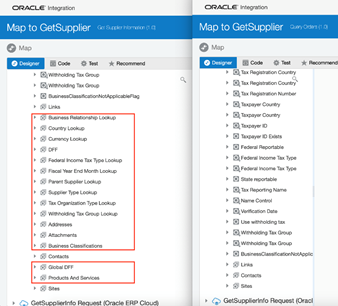
Fusion application adapters are one of they key strategic adapter for the Oracle Integration platform, Oracle Integration continues to update the adapter with the features meeting customer needs and improving overall experience of the adapter. One of such improvement done in November 2020 update is cherry picking child REST resources. This enables Integration architect to pick & chose the child resources that are needed for their businesses. In the absence of this feature Integration architect would end up having all the child resources in the integration artifacts resulting in unmanageable number of elements to traverse through in mapper as well as unnecessary load at the runtime. The second improvement done in the fusion application adapters is support for token based authentication for business events coming from Oracle applications, this will relieve customers from managing Oracle Integration password in the fusion application infrastructure that was required earlier for fusion application to successfully post message on to Oracle Integration. Read the complete article here.

PaaS Partner Community

For regular information on Oracle PaaS become a member in the PaaS (Integration & Process) Partner Community please register here.

clip_image003 Blog clip_image005 Twitter clip_image004 LinkedIn image[7][2][2][2] Facebook clip_image002[8][4][2][2][2] Wiki

Technorati Tags: SOA Community,Oracle SOA,Oracle BPM,OPN,Jürgen Kress

Oracle Integration November 2020 Update by Antony Reynolds

image

It is time for the November quarterly update to Oracle Integration. Lilly the Oracle integration mascot is looking forward to it. We have lots of exciting new features and improvements to share with you. Note that testing is still underway for these features and, although unlikely, it is possible that some will not meet our quality standard and be deferred to a later release.

Announcements & Update Windows

Currently tenant administrators get notified of OIC Gen 2 updates via notifications in the OCI console. Unfortunately most OIC users are not tenant admins and go straight to their OIC instance and so never see the notifications. To make sure users of OIC Gen 2 know when updates are coming we are adding update notifications into the OIC console.

We have also added an ability for customers to mark their Gen 2 instances for one of two update windows. You can read about it in Choosing Your Update Window.

Developer Productivity Enhancements

We are making the following improvements for developers:

  • Local Invoke Enhancements
  • Configurator Enhancements
  • Recover Unsaved Changes from Edit
  • Improved Notification Activity Setup
  • Improved Scheduled Flow Diagnostics

Prebuilt Connectivity Enhancements

We have a lot of enhancements both to existing adapters and new adapters. Read the complete article here.

PaaS Partner Community

For regular information on Oracle PaaS become a member in the PaaS (Integration & Process) Partner Community please register here.

clip_image003 Blog clip_image005 Twitter clip_image004 LinkedIn image[7][2][2][2] Facebook clip_image002[8][4][2][2][2] Wiki

Technorati Tags: SOA Community,Oracle SOA,Oracle BPM,OPN,Jürgen Kress
An Advanced Guide to OIC Notification via Emails by Renukaradhya Dakshinamurthy

image

Introduction:

  • Do you know how SMTP servers detect spoofs or detect the forging of the visible sender?
  • Do you know how SMTP servers detect sender is legitimate?

This blog is an answer to the above questions.

With the migration of customers from OIC Generation 1 to Generation 2, we have changed the underlying stack that sends email from Cloud Notification Service (CNS) to OCI Email Service. With this, the SPF and DKIM configuration previously done will not be valid anymore and these need to be reconfigured to increase the deliverability.

Using your own from address for Gen2

If you are willing to use your own "from" address like no-reply@oraclecloud.com. You have to follow the below 2 steps.

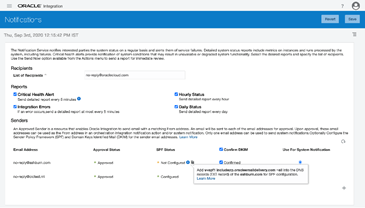
  • You have to register the from address in Settings->Notification Screen.
  • You have to configure SPF and DKIM on the sender domain i.e oraclecloud.com. More information on SPF and DKIM is below.
SPF

SPF is an acronym for “Sender Policy Framework”. SPF is a DNS TXT record that specifies which IP addresses and/or servers are allowed to send email “from” that particular domain. A domain administrator publishes the policy defining mail servers that are authorized to send email from that domain. when an email is received the inbound SMTP server then compares the IP address of the mail sender with the authorized IP addresses defined in the SPF record. An example of SPF record for oraclecloud.com is like below. Read the complete article here.

PaaS Partner Community

For regular information on Oracle PaaS become a member in the PaaS (Integration & Process) Partner Community please register here.

clip_image003 Blog clip_image005 Twitter clip_image004 LinkedIn image[7][2][2][2] Facebook clip_image002[8][4][2][2][2] Wiki

Technorati Tags: SOA Community,Oracle SOA,Oracle BPM,OPN,Jürgen Kress

Creating Complex Local Temporary Variables in OIC by John Graves

image

Introduction

Over the past couple of years, I have been involved in more and more projects and proofs-of-concept moving assets from Oracle SOA Suite to Oracle Integration Cloud.

Now it is important to note that these are quite different products and serve different needs.  SOA Suite is a very extensive tool which allows you to create apps, user interfaces, integrations and much more.  Oracle Integration Cloud (OIC) is more focused on just integration.  However, many companies have used SOA Suite simply for integration purposes and making the move to OIC attractive.

There are many actions in the world of BPEL that don’t yet exist in OIC, but one that is particularly troublesome is the lack of local variables.  It is often convenient in BPEL to use a local variable to make future mappings easier in the integration.  SOA Suite’s BPEL lets you create arbitrary variables of any shape and size based on a schema definition.  In OIC, local variables are either a string or based on a trigger or invoke operation.

Data Stitch

The new Data Stitch action almost gets us there, but again, the stitch variable must be a type already defined by a trigger or invoke.  You can’t define a schema for the variable if it does not already exist.

Solution

STAGE FILE to the rescue!!!

As you may know, you can use the stage file action to create a file on the local, in-memory, temporary filesystem.  This is very handy when manipulating files, performing zip and unzip operations and preparing files for file based integrations such as ERP Cloud.  But it can also be used to create temporary, local variables! Read the complete article here.

PaaS Partner Community

For regular information on Oracle PaaS become a member in the PaaS (Integration & Process) Partner Community please register here.

clip_image003 Blog clip_image005 Twitter clip_image004 LinkedIn image[7][2][2][2] Facebook clip_image002[8][4][2][2][2] Wiki

Technorati Tags: SOA Community,Oracle SOA,Oracle BPM,OPN,Jürgen Kress
OIC Technical Accelerator – Alert Notifications by Niall Commiskey

image
What is it?

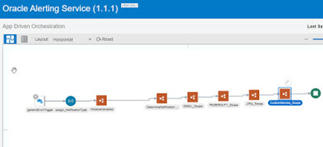
A technical accelerator package that allows one to send Alert Notifications from your integrations, based on a variety of parameters:

  • channels – EMAIL, Pager, JIRA, Custom
  • integrations – different channels/recipents for different integrations etc.
  • Errors/Failure Messages -  different channels/recipients based on the error message thrown etc.

Ergo, this technical accelerator is designed to be called from one or more of your integrations.

What’s in it?

The Accelerator contains the following artifacts –

  • integration – Oracle Alerting Service
  • connection – Oracle altering Service Invoke
  • lookups – 3 of them – discussed below. Read the complete article here.

PaaS Partner Community

For regular information on Oracle PaaS become a member in the PaaS (Integration & Process) Partner Community please register here.

clip_image003 Blog clip_image005 Twitter clip_image004 LinkedIn image[7][2][2][2] Facebook clip_image002[8][4][2][2][2] Wiki

Technorati Tags: SOA Community,Oracle SOA,Oracle BPM,OPN,Jürgen Kress
How to configure endpoints of ORDS Connections in OIC? By Jan Kettenis

image

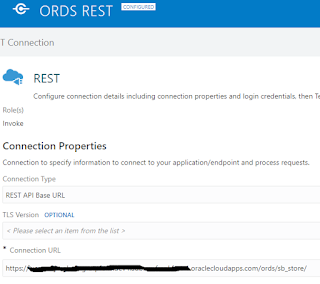
This article discussed how to configure the endpoint of a Connection to an ORDS REST service (AutoREST or REST Module) in such a way that you have the right part of the URI in the right place and can easily refactor it or promote your application to another environment.

To call Oracle Rest Data Services (ORDS) from an Oracle Database (DBCS or ATP) you create a REST Invoke Connection (not also Trigger, as the DB will not call you back).

To make the database supporting ORDS you must enable REST Services on the schema whereby you configure an alias, for example "my_schema_alias" which becomes part of the URL of the endpoint of the REST service. The question is where to put that alias: in the configuration of the Connection or in the relative resource URI’s in the Integrations? Read the complete article here.

PaaS Partner Community

For regular information on Oracle PaaS become a member in the PaaS (Integration & Process) Partner Community please register here.

clip_image003 Blog clip_image005 Twitter clip_image004 LinkedIn image[7][2][2][2] Facebook clip_image002[8][4][2][2][2] Wiki

Technorati Tags: SOA Community,Oracle SOA,Oracle BPM,OPN,Jürgen Kress

How to create a XSLT map that reads many correlated payloads by Jorge Herreria

image

Summary

On this post will see a way for creating XSLT maps that need to loop thought different sources (aka input payloads) which their instances are correlated by key fields.

Example for 1:0..n and 1:1 relationships between sources

I will use the Business units and Employees classic example: Each Business Unit can have  0..n Employees (1:0..n relationship). Also the G/L Accounts source with a 1:1 correlation with Business Units. I want to create a XSLT Map that puts them together. Here are the sources (aka input payloads). Read the complete article here.

PaaS Partner Community

For regular information on Oracle PaaS become a member in the PaaS (Integration & Process) Partner Community please register here.

clip_image003 Blog clip_image005 Twitter clip_image004 LinkedIn image[7][2][2][2] Facebook clip_image002[8][4][2][2][2] Wiki

Technorati Tags: SOA Community,Oracle SOA,Oracle BPM,OPN,Jürgen Kress

OIC Technical Accelerators – Re-sequencer by Niall Commiskey

image

Let’s try out the Re-sequencer – useful for my simple use case of requencing orders by orderNr, before processing them. The job of the re-sequencer is to process the input messages, in my case – orders, based on a sequence id – e.g. orderNr, as opposed to processing them based on time of arrival. In this scenario, each message will be "parked" in an ATP DB for a certain time period. This allows out of sequence orders to arrive and be processed in the correct order.
e.g.
orderNr 3 for Lucia Inc.
orderNr 2 for Phillip Inc.
orderNr 1 for Lucia Inc.

need to be re-sequenced as –
orderNr 1 for Lucia Inc.
orderNr 2 for Lucia Inc.

orderNr 3 for Lucia Inc.

The Re-sequencer has the concept of groups – e.g. the Orders group, the HCM employee update group etc, i.e. the type of messages to be resequenced. There are other key parameters, which are discussed in the documentation, a link to which is provided below. There are also discussed in this post. Before I actually start using the Accelerator, let’s take a detailed look at it in the OIC Home Page – Read the complete article here.

PaaS Partner Community

For regular information on Oracle PaaS become a member in the PaaS (Integration & Process) Partner Community please register here.

clip_image003 Blog clip_image005 Twitter clip_image004 LinkedIn image[7][2][2][2] Facebook clip_image002[8][4][2][2][2] Wiki

Technorati Tags: SOA Community,Oracle SOA,Oracle BPM,OPN,Jürgen Kress