Docker Image for Oracle integration (OIC) Connectivity Agent by Antony Reynolds

image

This image retrieves the Oracle Connectivity Agent from an OIC instance and runs it in a docker container. For more information about the Oracle Integration Connectivity Agent please see Manage the Agent Group and the On-Premises Connectivity Agent in the Oracle Integration documentation. The container automatically connects to your OIC instance and downloads the agent zip file. This image is built on top of the Oracle Java 8 SE (Server JRE) container. A github project contains the build instructions if a customized image is required.

Running the Image

The script run.sh can be used to run the image. I makes use of the script agent_env.sh If the profile properties file (default agent.env) has no entry for the oic_PASSWORD then the container will be started in the foreground to allow entry of the username/password. If the container is started in the foreground after entering the username/password it is recommended to detach from the container (default keystroke is ^P^Q). The run.sh uses a volume to store the agent binaries and configuration. When the container exits the container is removed but the volume persists. The volume is named with the container name. The script uses the following environment variables that are defaulted if not set: Read the complete article here.

PaaS Partner Community

For regular information on Oracle PaaS become a member in the PaaS (Integration & Process) Partner Community please register here.

clip_image003 Blog clip_image005 Twitter clip_image004 LinkedIn image[7][2][2][2] Facebook clip_image002[8][4][2][2][2] Wiki

Technorati Tags: SOA Community,Oracle SOA,Oracle BPM,OPN,Jürgen Kress

Build a smarter and more resilient business with the Cognitive Enterprise for Oracle Cloud – Register for the virtual event series starting Thursday November 5th 2020

clip_image001You are invited to IBM’s virtual event series starting the November 5, 2020 –  TheCognitive Enterprise Powered by IBM and Oracle Cloud. Please invite your clients to this event.
The webinar series will showcase IBM platform where we have built a number of intelligent workflows, integrated to Oracle SaaS, enabling clients to derive additional business value. We deliver the platform for 12 industry solutions. The Cognitive Enterprise for Oracle Cloud Applications is a true differentiator for Finance, Procurement, Supply Chain chain and HCM.

The series consists of six 30 minute sessions. We have a session each week, starting with the keynote and then delving deeper into industry and domain segments.
Hear Rob Churchyard, IBM’s Global Oracle Leader share details about the event
here.
To see more details on the webinar and register, click here.

PaaS Partner Community

For regular information on Oracle PaaS become a member in the PaaS (Integration & Process) Partner Community please register here.

clip_image003 Blog clip_image005 Twitter clip_image004 LinkedIn image[7][2][2][2] Facebook clip_image002[8][4][2][2][2] Wiki

Technorati Tags: SOA Community,Oracle SOA,Oracle BPM,OPN,Jürgen Kress

Leveraging Oracle Integration File Server For File Based Integrations by Kundan Vyas

image

Introduction

While most enterprises want to leverage modern API-based integration technologies to automate their business processes , they are also in need of a File-based integration to enable exchange of data through files. Such enterprises often require a secure file storage solution to exchange files with their trading partners, vendors and suppliers. It is very common for these enterprises to use such a file storage solution with File-based integration to schedule and automate the process of reading and transforming files before exchanging them with multiple systems.

There are multiple use cases where enterprises rely on File-based integration. Learn more about the use cases and File-based integration patterns supported by Oracle Integration in this blog from Michael Meiner.

Introducing File Server In Oracle Integration (OIC)

Oracle is introducing a new functionality called File Server which comes embedded within Oracle Integration (OIC) and offers significant advantages to enterprises which are in need of building and rolling out File based integrations. While customers can provision an SFTP server on Oracle Cloud Infrastructure (OCI) compute resource today, they will now have an option to leverage an Oracle managed SFTP server that is tightly coupled with OIC. Read the complete article here.

PaaS Partner Community

For regular information on Oracle PaaS become a member in the PaaS (Integration & Process) Partner Community please register here.

clip_image003 Blog clip_image005 Twitter clip_image004 LinkedIn image[7][2][2][2] Facebook clip_image002[8][4][2][2][2] Wiki

Technorati Tags: SOA Community,Oracle SOA,Oracle BPM,OPN,Jürgen Kress

OIC –> Updating Product Inventory in Shopify by Niall Commiskey

image

This is a typical use case – I have a eCommerce site that sells the product, I have an ERP that manages the sales lifecycle. In this case I am looking at Netsuite as the ERP and Shopify as the eCommerce site, but I assume one can extrapolate for other ERP apps. Firstly, a big thank you to my colleague Shantala S. for her support here! Now let’s begin by looking at the Product inventory in Shopify – Note from the inventory history, I can see the default location – I have partially obfuscated it but you still see the street number, 168. Ergo, we have 4 of these Leica cases in stock at the default location. As you can see, I can have more than 1 location – Read the complete article here.

PaaS Partner Community

For regular information on Oracle PaaS become a member in the PaaS (Integration & Process) Partner Community please register here.

clip_image003 Blog clip_image005 Twitter clip_image004 LinkedIn image[7][2][2][2] Facebook clip_image002[8][4][2][2][2] Wiki

Technorati Tags: SOA Community,Oracle SOA,Oracle BPM,OPN,Jürgen Kress

Using Pagination with the OIC Shopify adapter by Niall Commiskey

image

Introduction

Starting point is the OIC Shopify adapter doc here Quotes from the doc in italics.
In this simple example I will paginate thru my product list – I have ca. 600 products. The number of products returned per page by Shopify can range from 50 to 250. I will set this value in the Shopify invoke mapping. The OIC integration will use the Shopify Adapter to retrieve all products. The structure returned will have the following format. the page_info value is a link to the next page of results.
So the processing logic is very simple – process all pages! This I will do in a WHILE loop – condition is – while there are still more pages available.

Implementing Shopify Pagination in OIC

I will use a scheduled orchestration – first step in that orchestration is to
Assign the following variables – Read the complete article here.

PaaS Partner Community

For regular information on Oracle PaaS become a member in the PaaS (Integration & Process) Partner Community please register here.

clip_image003 Blog clip_image005 Twitter clip_image004 LinkedIn image[7][2][2][2] Facebook clip_image002[8][4][2][2][2] Wiki

Technorati Tags: SOA Community,Oracle SOA,Oracle BPM,OPN,Jürgen Kress

See how OIC integrations are behaving at runtime by Ankur Jain

image

One of the most inevitable tasks for administrators and developers to monitor the Integrations and see how OIC integrations are behaving in runtime. It’s really important to check the health of Integration regularly to avoid bad situations.

Integration Cloud provides a rich dashboard that helps different personas to monitor the running integrations.

Few Important Links

HCM Data loader in Oracle Integration

Oracle Integration Cloud HCM adapter

Monitor Integrations

The monitoring dashboard provides information and tools to monitor the integration through a rich set of interactive screens. One of the screens of the dashboard allows you to manage the failed integration and take further action upon it. Read the complete article here.

PaaS Partner Community

For regular information on Oracle PaaS become a member in the PaaS (Integration & Process) Partner Community please register here.

clip_image003 Blog clip_image005 Twitter clip_image004 LinkedIn image[7][2][2][2] Facebook clip_image002[8][4][2][2][2] Wiki

Technorati Tags: SOA Community,Oracle SOA,Oracle BPM,OPN,Jürgen Kress

OIC integrating BigCommerce with Netsuite #784 Using Pagination with the OIC Shopify adapter by Niall Commiskey

image

Big Commerce is a very popular SaaS eCommerce platform, used by many Netsuite customers. Ergo, integration between the two is necessary and easy with Oracle Integration (OIC). Welcome to my Hare of the Dog shop on Big Commerce – I add a couple of top quality products – Hare of the Dog T-Shirts – handmade by medieval philosophy students. The material is 100% recycled and recyclable, and is also edible. Read the complete article here.

PaaS Partner Community

For regular information on Oracle PaaS become a member in the PaaS (Integration & Process) Partner Community please register here.

clip_image003 Blog clip_image005 Twitter clip_image004 LinkedIn image[7][2][2][2] Facebook clip_image002[8][4][2][2][2] Wiki

Technorati Tags: SOA Community,Oracle SOA,Oracle BPM,OPN,Jürgen Kress
PeopleSoft Integration using Oracle Integration – Part 2 by Prakash Masand & Jin Park

image

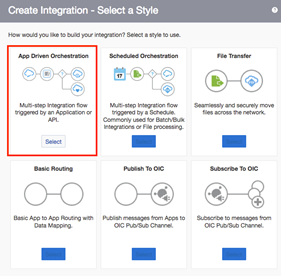
Now we’re ready to create connections and integration in Oracle Integration. Oracle Integration is capable of hybrid integrations. Therefore, you can use Oracle Integration for SaaS integration scenarios such as SaaS and SaaS or SaaS and on-premises. You may need to set up a virtual private network (VPN) between your data centre and Oracle Integration using VPNaaS (VPN as a Service from Oracle) or install Oracle Integration connectivity agent inside your organisation network. It really depends upon the network / security policy of your organisation.

For PeopleSoft, it’s normally located behind corporate firewall. Therefore, make sure you’ve got VPN working or connectivity agent installed. Make sure that you’ve got a successful web service call from public internet using the SOAP / REAT API test client such as Soap UI / Postman. That saves lots of time debugging connectivity issues later. Don’t forget to enable web service request logging. PeopleSoft provides excellent internal tools to monitor web service request which I will explain in the next section. Read the complete article here.

PaaS Partner Community

For regular information on Oracle PaaS become a member in the PaaS (Integration & Process) Partner Community please register here.

clip_image003 Blog clip_image005 Twitter clip_image004 LinkedIn image[7][2][2][2] Facebook clip_image002[8][4][2][2][2] Wiki

Technorati Tags: SOA Community,Oracle SOA,Oracle BPM,OPN,Jürgen Kress
PeopleSoft Integration using Oracle Integration Cloud – Part 1 by Prakash Masand & Jin Park

image

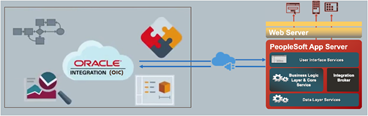
Customers at events, at forums, and through field requests have indicated that they want to integrate PeopleSoft with Oracle and non-Oracle Cloud applications using Oracle Integration. PeopleSoft provides a great integration framework tool set that simplifies, standardizes, and supports a variety of integration patterns. We want to share the enlightened experience that our integration champion Jin Park from Australia had when integrating PeopleSoft with Oracle Integration.

Here is part 1 of Jin Park’s journey.

I’ve got a chance to look at PeopleSoft integration with other SaaS app using OIC (Oracle Integration Cloud) and decided to share what I learned.

If you’re not familiar with PeopleSoft, please visit PeopleSoft Information Portal. You will see that it covers lots of things. Read the complete article here.

PaaS Partner Community

For regular information on Oracle PaaS become a member in the PaaS (Integration & Process) Partner Community please register here.

clip_image003 Blog clip_image005 Twitter clip_image004 LinkedIn image[7][2][2][2] Facebook clip_image002[8][4][2][2][2] Wiki

Technorati Tags: SOA Community,Oracle SOA,Oracle BPM,OPN,Jürgen Kress

User Friendly Names in Mapper by Ishruthilaya Malarvizhi

image

In this blog, we will look at a new integration feature, User Friendly Names in the Mapper UI and see how the Mapper UI has changed with the introduction of this feature. The new feature will become available shortly. The Source and Target tree elements displayed in the Mapper UI are based on the application schemas. Many application schemas define their interfaces with extremely cryptic technical names that are not easy to correlate to the user friendly display names you would see in the end point application’s UI.
This feature provides the option to show display label instead of the technical name directly in the trees and expression builder.

The feature is supported for all types of integration. Currently the below application adapters are supported with the user friendly names generation when configuring the trigger/invoke:

  • Oracle HCM Cloud
  • Oracle Engagement Cloud
  • Oracle ERP Cloud
  • REST
  • Salesforce

Mapper UI Displaying Technical Names (Developer Mode): Read the complete article here.

PaaS Partner Community

For regular information on Oracle PaaS become a member in the PaaS (Integration & Process) Partner Community please register here.

clip_image003 Blog clip_image005 Twitter clip_image004 LinkedIn image[7][2][2][2] Facebook clip_image002[8][4][2][2][2] Wiki

Technorati Tags: SOA Community,Oracle SOA,Oracle BPM,OPN,Jürgen Kress