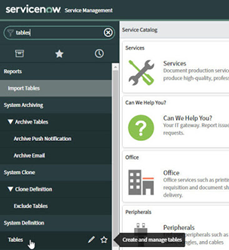
Processing an Incident in ServiceNow by Niall Commiskey

image

One thing that hit me on logging in to ServiceNow was the plethora of functionality on offer.

Introduction to the ServiceNow adapter

ServiceNow provides platform-as-a-service (PaaS) enterprise service management software for human resources, law, facilities management, finance, marketing, and field operations. ServiceNow specializes in IT service management (ITSM) applications and automates common business processes. ServiceNow contains a number of modular applications that can vary by instance and user. ServiceNow contains many modules/plugins and our adapter gives you access to the following – Read the complete article here.

PaaS Partner Community

For regular information on Oracle PaaS become a member in the PaaS (Integration & Process) Partner Community please register here.

clip_image003 Blog clip_image005 Twitter clip_image004 LinkedIn image[7][2][2][2] Facebook clip_image002[8][4][2][2][2] Wiki

Technorati Tags: SOA Community,Oracle SOA,Oracle BPM,OPN,Jürgen Kress
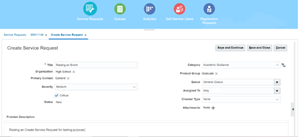
Subscribe Oracle ERP Business Events in Oracle Integration by Ankur Jain

imageSubscription of Business Events is one of the crucial scenarios in the today’s world irrespective of the application. In this article, we will look at how to Subscribe Oracle ERP Business Events in Oracle Integration. The subscription of events makes the real time based integration between Oracle ERP and other SaaS based or on-premise applications.

Important links

How to create ERP connection

ERP Integration using File Based Data Import: Oracle Integration

All oracle fusion based application like Oracle Sales Cloud, HCM, SCM etc. provides business events which can be subscribed by any external applications.

Oracle Integration Cloud allows us to receive to these business events and sent to other down stream application.

In this article we will subscribe “Service Request Created Event” and will forward to SaaS application.

Prerequisites:

Register CSF Key in SaaS

In a FA-based SaaS instance, the outbound call of a webservice uses a OWSM security policy which retrieves the credentials for the call from a CSF Key. This means that you need to register a CSF key for every connection to an external system.

In order to register a csf key follow below steps:

  • Get the Identity Domain and Service Instance from Oracle Integration Cloud page. Click on the username from the top right corner of the OIC page and select About. Concatenate both the values. For example: if Identity Domain is “idcs-85d2f556h145f784f85” and Service Instance is “myoic” then final value will be idcs-85d2f556h145f784f85myoic. This will be used as csf-key in further steps. Read the complete article here.

PaaS Partner Community

For regular information on Oracle PaaS become a member in the PaaS (Integration & Process) Partner Community please register here.

clip_image003 Blog clip_image005 Twitter clip_image004 LinkedIn image[7][2][2][2] Facebook clip_image002[8][4][2][2][2] Wiki

Technorati Tags: SOA Community,Oracle SOA,Oracle BPM,OPN,Jürgen Kress

See How Easily You Can Access Integration’s metadata by Venkatesh Mohanram

image

Many times we may want to use the name of the integration, its version inside the OIC integration flow and we may not want to hardcode the values. And also we may want to access dynamic value like runtime instanceId, invoked by etc., inside the integration flow. All these are possible now with the introduction of a new feature called ‘Integration Metadata Access’ and it allows access to most of the commonly useful metadata. In this blog, we will see what are the metadata that we can access and how we can use it in the integration flow.

The minimum Oracle Integration version required for the feature is 20.34310

List of exposed metadata

  1. Integration
    1. Name
    2. Identifier
    3. Version
  2. Runtime data
    1. Instance ID
    2. Invoked by name
  3. Environment data
    1. Service instance name
    2. Base URL

All these metadata are read-only fields and can be used in any orchestration like Assign activity, Log activity, Notification activity etc., Read the complete article here.

PaaS Partner Community

For regular information on Oracle PaaS become a member in the PaaS (Integration & Process) Partner Community please register here.

clip_image003 Blog clip_image005 Twitter clip_image004 LinkedIn image[7][2][2][2] Facebook clip_image002[8][4][2][2][2] Wiki

Technorati Tags: SOA Community,Oracle SOA,Oracle BPM,OPN,Jürgen Kress
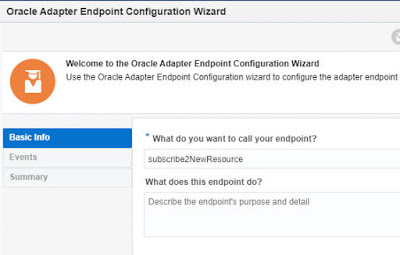
Oracle Field Service adapter –> Subscribing to OFS Events by Niall Commiskey

image

Simple example here –
I want to trigger an OIC integration, when a new Resource is created in OFS.
A resource is one who does the actual work – so all hail our venerable resources!

OIC Trigger Configuration

I drop the OFS connection as a Trigger and configure as follows. Read the complete article here.

PaaS Partner Community

For regular information on Oracle PaaS become a member in the PaaS (Integration & Process) Partner Community please register here.

clip_image003 Blog clip_image005 Twitter clip_image004 LinkedIn image[7][2][2][2] Facebook clip_image002[8][4][2][2][2] Wiki

Technorati Tags: SOA Community,Oracle SOA,Oracle BPM,OPN,Jürgen Kress

See How Easily You Can Access Integration’s metadata by Venkatesh Mohanram

image

Many times we may want to use the name of the integration, its version inside the OIC integration flow and we may not want to hardcode the values. And also we may want to access dynamic value like runtime instanceId, invoked by etc., inside the integration flow. All these are possible now with the introduction of a new feature called ‘Integration Metadata Access’ and it allows access to most of the commonly useful metadata. In this blog, we will see what are the metadata that we can access and how we can use it in the integration flow.

The minimum Oracle Integration version required for the feature is 20.34310

List of exposed metadata

  1. Integration
    1. Name
    2. Identifier
    3. Version
  2. Runtime data
    1. Instance ID
    2. Invoked by name
  3. Environment data
    1. Service instance name
    2. Base URL

All these metadata are read-only fields and can be used in any orchestration like Assign activity, Log activity, Notification activity etc., Read the complete article here.

PaaS Partner Community

For regular information on Oracle PaaS become a member in the PaaS (Integration & Process) Partner Community please register here.

clip_image003 Blog clip_image005 Twitter clip_image004 LinkedIn image[7][2][2][2] Facebook clip_image002[8][4][2][2][2] Wiki

Technorati Tags: SOA Community,Oracle SOA,Oracle BPM,OPN,Jürgen Kress
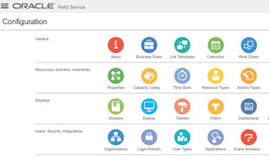
Oracle Field Service Adapter by Niall Commiskey

imageLike all OIC adapters, the OFS adapter has comprehensive documentation.
The users guide is available here

Pre-requisites

There are some pre-requisites, which are discussed in the aforementioned doc. Read the complete article here.

PaaS Partner Community

For regular information on Oracle PaaS become a member in the PaaS (Integration & Process) Partner Community please register here.

clip_image003 Blog clip_image005 Twitter clip_image004 LinkedIn image[7][2][2][2] Facebook clip_image002[8][4][2][2][2] Wiki

Technorati Tags: SOA Community,Oracle SOA,Oracle BPM,OPN,Jürgen Kress

OIC –> Netsuite adapter – processing Customers by Niall Commiskey

image

Simple example – let’s start by creating a customer. I’m not a Netsuite expert – so I begin by creating a Customer in Netsuite

Ok, now I’ve seen the mandatory fields –
So now off to OIC. I create a simple REST based integration that leverages the Netsuite adapter to create a customer in Netsuite. Read the complete article here.

PaaS Partner Community

For regular information on Oracle PaaS become a member in the PaaS (Integration & Process) Partner Community please register here.

clip_image003 Blog clip_image005 Twitter clip_image004 LinkedIn image[7][2][2][2] Facebook clip_image002[8][4][2][2][2] Wiki

Technorati Tags: SOA Community,Oracle SOA,Oracle BPM,OPN,Jürgen Kress
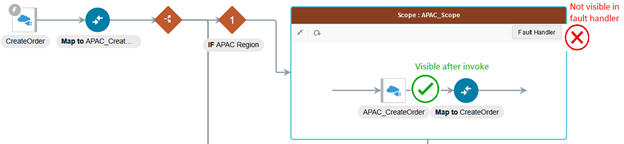
Use Global Variables and Data Stitch to log request payloads by Thomas Hora

imageIn this blog, we will look at 2 new Integration features Global Variables, and Data Stitch.  Data Stitch allows us to make assignments to complex type variables.  We will show how the features can be leveraged to log invoke request payloads in case of fault.

Prerequisite

Enable following features:

  • oic.ics.console.integration.stitch-action
  • oic.ics.console.integration.complex-variables

To enable feature flags – Refer to Blog Enabling Feature Flags in Oracle Integration

The minimum Oracle Integration version required for the feature is 200113.1400.33493

Use case: 

When invoke fails, we want to log the request payload.  Currently, request payloads are visible after the invoke, but not visible inside the fault handlers.

Solution:

We will create a Global Variable based on the request payload.  Global Variables are visible anywhere in the integration, including fault handlers. Read the complete article here.

PaaS Partner Community

For regular information on Oracle PaaS become a member in the PaaS (Integration & Process) Partner Community please register here.

clip_image003 Blog clip_image005 Twitter clip_image004 LinkedIn image[7][2][2][2] Facebook clip_image002[8][4][2][2][2] Wiki

Technorati Tags: SOA Community,Oracle SOA,Oracle BPM,OPN,Jürgen Kress

OCI: When and How to Create an Integration to Call a Service from a Process? By Jan Kettenis

image

With the Oracle Integration Cloud, when you have to call a service from a Process you can choose to call an external service directly or you can put an Integration in between. This article gives some directives why you may want to do the latter, and how to prevent a pitfall that is easy to step in to.

To call a service you have to import the WSDL with it’s XSD’s. With that Business Types are auto-generated for all complexTypes in that XSD. Recently I was refactoring a case where this resulted in some 220 (!) Business Types being generated from 1 single external service, of which only a few were actually used. Granted, it concerned a service with a very complex interface, but for some reason all the external SOAP services we have to consume are moderate to very complex and easily generate 50+ Business Types. Not only that, they also use relatively long namespaces. Can you imagine what will happen when you have to call 5 of these services from the same Process application! You barely can see the forest from the trees, and you may find it pretty difficult to identify the correct Business Type to use for your request. The following example shows the selection list showing the types to chose from when creating a data object for one of the most simple cases we have. Read the complete article here.

PaaS Partner Community

For regular information on Oracle PaaS become a member in the PaaS (Integration & Process) Partner Community please register here.

clip_image003 Blog clip_image005 Twitter clip_image004 LinkedIn image[7][2][2][2] Facebook clip_image002[8][4][2][2][2] Wiki

Technorati Tags: SOA Community,Oracle SOA,Oracle BPM,OPN,Jürgen Kress

Unable to create an error notification rule in Oracle SOA Suite 12.2.1? Patch 26088894 is not the fix by Ahmed Aboulnaga

imageOn Oracle SOA Suite 12.2.1.0.0, when we tried to create an error notification rule to alert on failed ESS scheduled jobs, we experienced an issue where the dropdown was not showing any schedules. Unfortunately, the solution to apply patch 26088894 does not work.

Patch 26088894

Patch 26088894 is a zero downtime ESS patch and applicable for Oracle SOA Suite versions 12.1.3, 12.2.1, 12.2.1.1, and 12.2.1.2.

It addresses the issue of the Adapter Schedule generating a Null Error on the GUI, which may appear to be the issue we experienced, but it is not.

Problem: Error Notification Rule Issue

  1. Log in to the EM Console
  2. Navigate to Scheduling Services > Job Request > Define Schedules
  3. Create a schedule called "Ahmed_Job_10Minutes"
  4. Navigate to SOA > soa-infra (soa_server1) > SOA Infrastructure > Error Notification Rules
  5. Click on Create

When trying to create an error notification rule, you can see that the Schedule dropdown box is empty, preventing us from being able to create a rule. Read the complete article here.

PaaS Partner Community

For regular information on Oracle PaaS become a member in the PaaS (Integration & Process) Partner Community please register here.

clip_image003 Blog clip_image005 Twitter clip_image004 LinkedIn image[7][2][2][2] Facebook clip_image002[8][4][2][2][2] Wiki

Technorati Tags: SOA Community,Oracle SOA,Oracle BPM,OPN,Jürgen Kress