ERP to ATP Integration documentation by Meron Kebede

image

OBJECTIVE

This document outlines a step-by-step guide on how to integrate ERP and ATP in Oracle Integration Cloud (OIC). The purpose of the integration is to create a purchase order in ERP, hash the purchase order details, and send the actual purchase order details along with the hashed values to ATP.

COMPONENTS COVERED

  • How to create and configure ERP and ATP connections in OIC
  • How to generate a CSF key in SOA Composer
  • How to create an integration
  • Assign variables
  • Map attributes between ERP and ATP
  • How to register a custom script in OIC Libraries
  • How to call a custom script as a function in OIC integration orchestration
  • How to activate and monitor integration
  • How to test integration using SQLDeveloper

TOOLS & APPLICATIONS USED

PaaS Partner Community

For regular information on Oracle PaaS become a member in the PaaS (Integration & Process) Partner Community please register here.

clip_image003 Blog clip_image005 Twitter clip_image004 LinkedIn image[7][2][2][2] Facebook clip_image002[8][4][2][2][2] Wiki

Technorati Tags: SOA Community,Oracle SOA,Oracle BPM,OPN,Jürgen Kress

Object Storage with Oracle Integration Cloud – Part 1 by Stan Tanev

imageOver the past few years, in everything from personal photo storage to enterprise development there has been an incredible uptake of cloud storage buckets which provide a simple, low-cost mechanism for storing unstructured data. For much longer than that, there has been a need to consume, stage and produce unstructured data in enterprise integration scenarios. File servers accessible via protocols such as FTP/SFTP, etc. are commonly used to meet the staging requirements of traditional file-based integration use cases.

The practice of using an FTP/SFTP server alongside Oracle’s cloud integration platform – Oracle Integration Cloud (henceforth, OIC), is nothing new and is well documented.

In a series of upcoming blogs, I will explore how we can use Oracle’s cloud storage buckets (Oracle Cloud Infrastructure – Object Storage) instead of a traditional FTP server in cloud-based integrations. In this initial blog I will focus on: Read the complete article here.

PaaS Partner Community

For regular information on Oracle PaaS become a member in the PaaS (Integration & Process) Partner Community please register here.

clip_image003 Blog clip_image005 Twitter clip_image004 LinkedIn image[7][2][2][2] Facebook clip_image002[8][4][2][2][2] Wiki

Technorati Tags: SOA Community,Oracle SOA,Oracle BPM,OPN,Jürgen Kress
Integrate Netsuite PaaS Partner Community Webcast June 17th 2020

Netsuite PaaS Community Webcast June 2020Attend our June edition of the PaaS Partner Community Webcast live on June 17th 2020 at 16:30 CET.

In this session we will discuss how OIC can enable Netsuite in all of the above areas. We will also present an eCommerce orders use case and how OIC enabled Shopify and Netsuite to synchronise orders and customers.

Presenter: Niall Commiskey Director Product Management Oracle HQ

Schedule: Wednesday June 17th 2020 16:30 CET (Berlin time)

Register for the webcast here.image

Take the opportunity to watch our community webcasts on-demand:

· Integration Insight

· Innovate HCM with Chatbots

· ERP Integration with Application Adapters

· HCM Integration with Application Adapters

· Extend SaaS with Visual Builder Cloud Service

· Integration Adapters

· Integrate SaaS

· Digital Assistant Update

· SOA Cloud Service

· PaaS Overview Webcast

· Process Cloud Service Update

· Integrate ERP Cloud

· Integrate HCM Cloud

· Functions and Cloud Native

· Blockchain

· API Platform Cloud Service part 2

· 3rd Generation API Gateways part1

· Oracle JET

· Oracle Visual Builder Cloud Service

· Container Native Application Development Platform

For the latest information please visit Community Updates Wiki page (Community membership required).

PaaS Partner Community

For regular information on Oracle PaaS become a member in the PaaS (Integration & Process) Partner Community please register here.

clip_image003 Blog clip_image005 Twitter clip_image004 LinkedIn image[7][2][2][2] Facebook clip_image002[8][4][2][2][2] Wiki

Technorati Tags: SOA Community,Oracle SOA,Oracle BPM,OPN,Jürgen Kress
Integration Versioning: Oracle Integration Cloud by Ankur Jain

image

In this article, we are going to showcase the concept of Integration Versioning in Oracle Integration Cloud.

Some blogs that might help you extend your knowledge

Multiple resources with single REST: Oracle Integration

Oracle Integration Cloud Service Lookups

What is Versioning

You might be wondering what a number on software’s, integrations and applications. These numbers are called version of the applications.

For example: If we say download a 12C database. Here what 12 mean is, it is nothing, it’s just version of database.

Versioning in Oracle Integration Cloud

OIC supports the model of semantic versioning. It is best recognized as Major, Minor and Patch.

Effect of Versioning

Major: If there is change in the Major version then more than one integration can be activated at a time. For example: Both the integration with versions 01.00.0000 & 02.00.0000 can be activated a same time.

Minor: If there is change in the Minor version then only one integration can be activated at a time. For example: Only one integration with the versions 01.00.0000 & 01.01.0000 can be activated at a time. Read the complete article here.

PaaS Partner Community

For regular information on Oracle PaaS become a member in the PaaS (Integration & Process) Partner Community please register here.

clip_image003 Blog clip_image005 Twitter clip_image004 LinkedIn image[7][2][2][2] Facebook clip_image002[8][4][2][2][2] Wiki

Technorati Tags: SOA Community,Oracle SOA,Oracle BPM,OPN,Jürgen Kress

Integration Cloud Who Are We – Using Headers to Identify IP Addresses by Antony Reynolds

image

Identifying Integration Cloud IP Addresses

In this blog post I will show how to identify IP addresses associated with Integration Cloud.

The Challenge

When whitelisting services we need to know their IP address.  This is easy if we need to identify the inbound address to Integration Cloud, we can just resolve the Integration Cloud hostname to get the IP address of the Integration Cloud load balancer to be whitelisted for inbound traffic to integration Cloud.  This is useful if we need to whitelist outbound calls through a firewall to Integration Cloud.  However for outbound traffic from Integration Cloud we need to do a little more.  This is needed when the target of integration Cloud invokes need to whitelist their caller.

The Solution Part #1 Using an External Service to Look Up Source IP

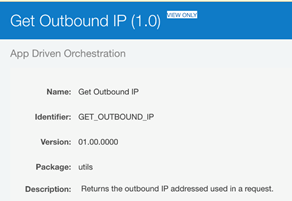
We will create an integration that calls a service that returns the calling IP address.  For outbound traffic from Integration Cloud this will be different from the inbound address.  There is a service call Ipify that returns the calling IP address.  This has a REST API that can be invoked to obtain the IP address. To create it we create a new integration called Get Outbound IP. Read the complete article here.

PaaS Partner Community

For regular information on Oracle PaaS become a member in the PaaS (Integration & Process) Partner Community please register here.

clip_image003 Blog clip_image005 Twitter clip_image004 LinkedIn image[7][2][2][2] Facebook clip_image002[8][4][2][2][2] Wiki

Technorati Tags: SOA Community,Oracle SOA,Oracle BPM,OPN,Jürgen Kress

Oracle Integration Cloud training by Atul Kumar

image

Learn Oracle Integration Cloud Service (OIC), from 

Trainer: Oracle ACE & Cloud Expert,

Atul Kumar & Integration Expert, Akashy M.

What will you get?

  • Training Material with Hands-On Lab Exercise
  • 18×5 Email Support(contact@academy.com)
  • Whatsapp Group Support

Register for the training here.

PaaS Partner Community

For regular information on Oracle PaaS become a member in the PaaS (Integration & Process) Partner Community please register here.

clip_image003 Blog clip_image005 Twitter clip_image004 LinkedIn image[7][2][2][2] Facebook clip_image002[8][4][2][2][2] Wiki

Technorati Tags: SOA Community,Oracle SOA,Oracle BPM,OPN,Jürgen Kress
Invoice Automation in the Cloud into Oracle ERP Cloud, EBS, JDE or PeopleSoft connected with Oracle Integration

image

Arcivate are a dynamic cloud solutions provider offering SaaS Invoice Automation, tightly integrated with Oracle ERP platforms.

Invoice processing can be labour intensive, costing organisations time and money through less than efficient processes. Mi Invoices the Arcivate invoice processing solution, automates the paper-intensive AP invoice process by coupling scanning, capture and imaging technology with workflow to reduce errors, increase throughput and boost efficiency. This allows organisations to shift their focus to the management of information from the processing of data.

Mi Invoices is a SaaS solution providing Oracle Invoice Automation and is a true cloud environment that is multi-tenanted to give a rapid deployment for customers and so maximise benefit of the solution instantly. Mi Invoices forms a critical part of improving your procure to pay, P2P, processes, by automating the capture and processing of supplier invoices. Invoice processing is seamless integrated into ERP Cloud, EBS, JDE & PeopleSoft based on Oracle Integration. For details please visit the Oracle Cloud Marketplace here.

PaaS Partner Community

For regular information on Oracle PaaS become a member in the PaaS (Integration & Process) Partner Community please register here.

clip_image003 Blog clip_image005 Twitter clip_image004 LinkedIn image[7][2][2][2] Facebook clip_image002[8][4][2][2][2] Wiki

Technorati Tags: SOA Community,Oracle SOA,Oracle BPM,OPN,Jürgen Kress

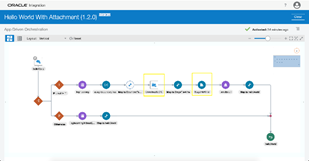
How to send email with attachments in OIC? By Niket Narang

image

Have you ever encountered a scenario where the requirement was to send attachments along with email notification in OIC and you could not? Well, now it is possible. The new feature makes it really easy to configure notification activity to add attachments along with the email.

Prerequisite

  • Enable feature flag: 
oic.ics.console.notification-attachment

Click here to learn on how to enable feature flag. The minimum Oracle Integration version required for the feature is 191020.0200.32001.

Step By Step Guide to Send Notification with Attachment

There are multiple ways in OIC to work with files. Some of the options are i) configure REST adapter to accept attachments as part of the request, ii) use Stage file activity to create a new file or iii) use FTP adapter to download the file to OIC from remote location for further processing. Any file reference(s) created by upstream operations can be used to configure attachments in the notification activity. Let us learn how we can configure notification action to send email with attachments in simple steps:

  • For this blog, we will clone the sample integration ‘Hello World’ that is available with OIC.
  • Navigate to the integration landing page, clone the ‘Hello World’ integration and name it ‘Hello World with Attachment’. Read the complete article here.

PaaS Partner Community

For regular information on Oracle PaaS become a member in the PaaS (Integration & Process) Partner Community please register here.

clip_image003 Blog clip_image005 Twitter clip_image004 LinkedIn image[7][2][2][2] Facebook clip_image002[8][4][2][2][2] Wiki

Technorati Tags: SOA Community,Oracle SOA,Oracle BPM,OPN,Jürgen Kress

Using Stage File Read/Write operation to encrypt/decrypt files by Namratha Narayan

image

You may have a scenario where the requirement is to retrieve an encrypted file from sFTP server and send that to external REST endpoint in encrypted/unencrypted mode with additional capabilities such as processing in the middle.

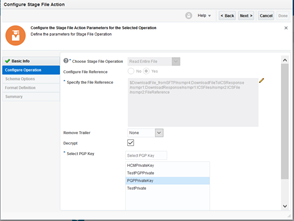
The new feature makes it easy to configure PGP keys in Stage File Read/Write operation to decrypt/encrypt file up to 10 MB in size.

Prerequisite

Enable following features:

  • oic.suite.settings.certificate  (It will allow user to manage certificate life cycle in OIC)
  • oic.ics.stagefile.pgp.key.support (It will allow user to upload and delete PGP keys in stage file)

To enable feature flags – Refer to Blog on Enabling Feature Flags in Oracle Integration

The minimum Oracle Integration version required for the feature is 190904.0200.31130

Step By Step Guide

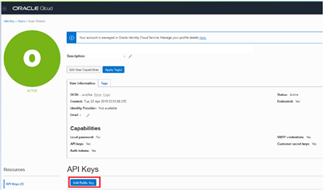
  • Public Key is used for Encryption and Private Key for decryption. In order to use encrypt/decrypt files we have to upload PGP keys in OIC. Read the complete article here.

PaaS Partner Community

For regular information on Oracle PaaS become a member in the PaaS (Integration & Process) Partner Community please register here.

clip_image003 Blog clip_image005 Twitter clip_image004 LinkedIn image[7][2][2][2] Facebook clip_image002[8][4][2][2][2] Wiki

Technorati Tags: SOA Community,Oracle SOA,Oracle BPM,OPN,Jürgen Kress
How To Configure an Integration flow with Binary Content Using Rest Adapter as Trigger in Oracle Integration by Sri Ranga Prashant Padala

image

Binary Content Type Support in Oracle Integration Rest Adapter Trigger

Introduction:

Oracle Integration Rest Adapter now supports application/octet-stream in the trigger request and response, with this new capability, it will be possible to invoke an integration using Binary content over REST. Similarly, it will be possible for an integration flow to return binary content in response to a request over REST. Before we do a deep dive on the feature let us start with understating what is application/octet-stream

About "application/octet-stream" MIME attachments:

A MIME attachment with the content type "application/octet-stream" is a binary file. Typically, it will be an application or a document that must be opened in an application, such as a spreadsheet or word processor. If the attachment has a filename extension associated with it, you may be able to tell what kind of file it is. A .exe extension, for example, indicates it is a Windows or DOS program (executable), while a file ending in .doc is probably meant to be opened in Microsoft Word. Read the complete article here.

PaaS Partner Community

For regular information on Oracle PaaS become a member in the PaaS (Integration & Process) Partner Community please register here.

clip_image003 Blog clip_image005 Twitter clip_image004 LinkedIn image[7][2][2][2] Facebook clip_image002[8][4][2][2][2] Wiki

Technorati Tags: SOA Community,Oracle SOA,Oracle BPM,OPN,Jürgen Kress