Integrate SaaS hands-on Bootcamps in Mexico City, Chennai and Cairo

Integrate SaaS Bootcamp 2019

Do you want to find out why Gartner named Oracle as a Leader in Magic Quadrant for three years in row? Are you able to innovate quickly in the new digital world? Are you looking for ways to integrate systems and data faster using a modern cloud integration platform? Attend the Oracle Integration Bootcamp, a three days hands-on training for Oracle partners!

Oracle Product Management is pleased to invite Oracle Partners to attend a 3-days hands-on workshop on how to integrate with ERP & HCM applications using Oracle Integration Cloud. This Invite-Only hands-on workshop will be delivered at No-Fee to Partners. It will consist of presentations, demos, and hands-on labs.

Oracle Integration Cloud (OIC) offers Integration, Process Automation and Visual design capabilities that help business analysts and IT specialists to automate end to end business processes across departments. Oracle Integration Cloud offers a simple recipe to be successful in this application integration and process automation journey: Build, Integrate and Engage.

Locations:

· Mexico City, Mexico February 11th-13th 2020

· Chennai, India February 24th-26th 2020

· Cairo, Egypt February 25th-27th 2020

For additional location please visit our website here.

PaaS Partner Community

For regular information on Oracle PaaS become a member in the PaaS (Integration & Process) Partner Community please register here.

clip_image003 Blog clip_image005 Twitter clip_image004 LinkedIn image[7][2][2][2] Facebook clip_image002[8][4][2][2][2] Wiki

Technorati Tags: SOA Community,Oracle SOA,Oracle BPM,OPN,Jürgen Kress

How to create ZIP files: Oracle Integration Cloud by Ankur Jain

image

Are you keen to know how to create zip files in Oracle Integration Cloud (OIC)? This is the article, which will let you know how to create zip files on SFTP.

In my old articles, we demonstrate other FTP adapter feature for example: unzip the file, read-write csv/xml files, handle large files etc..

After this article, you will be able to create a zip file containing multiple types of files.

Let’s go into depth and see how to go step by step to achieve this.

  • Create a scheduled process with name ZipFiles_Int
  • Drop an FTP connection on Integration canvas
  • Enter the endpoint name as “ListFiles
  • Read the complete article here.

PaaS Partner Community

For regular information on Oracle PaaS become a member in the PaaS (Integration & Process) Partner Community please register here.

clip_image003 Blog clip_image005 Twitter clip_image004 LinkedIn image[7][2][2][2] Facebook clip_image002[8][4][2][2][2] Wiki

Technorati Tags: SOA Community,Oracle SOA,Oracle BPM,OPN,Jürgen Kress

OIC – First Steps with the ATP adapter by Niall Commiskey

image

ATP = Autonomous Transaction Processing from Oracle.
Oracle Autonomous Transaction Processing delivers a self-driving, self-securing, self-repairing database service that can instantly scale to meet demands of mission critical applications.
More details about ATP here
First step was to get access to an ATP service.
I then connected to this via SQLDeveloper – here I created a new table – Read the complete article here.

PaaS Partner Community

For regular information on Oracle PaaS become a member in the PaaS (Integration & Process) Partner Community please register here.

clip_image003 Blog clip_image005 Twitter clip_image004 LinkedIn image[7][2][2][2] Facebook clip_image002[8][4][2][2][2] Wiki

Technorati Tags: SOA Community,Oracle SOA,Oracle BPM,OPN,Jürgen Kress

Securing files using PGP encryption (Part-2-Decryption): Oracle Integration by Ankur Jain

image

This is the second part of transferring the secured file over SFTP in Oracle Integration Cloud. In the previous blog, we showcased how to create encrypted files using Pretty Good Privacy (PGP) mechanism.

In the article, we’ll process the encrypted file, decrypt it and print the records into the logs.

I’ll recommend you to check the previous article before going ahead.
To decrypt the file, we would be needing the PGP private key along with the password.
The PGP key private key needs to be uploaded into the FTP connection. Open the FTP connection and click on the Configure Security button. Notice the "PGP Private Key" field, click on the Checkbox and click on the Upload button.
Once we click on the Upload button, it will allow us browsing the file. Browser the PGP private key and click on the Upload button
Enter the PGP private key password Read the complete article here.

PaaS Partner Community

For regular information on Oracle PaaS become a member in the PaaS (Integration & Process) Partner Community please register here.

clip_image003 Blog clip_image005 Twitter clip_image004 LinkedIn image[7][2][2][2] Facebook clip_image002[8][4][2][2][2] Wiki

Technorati Tags: SOA Community,Oracle SOA,Oracle BPM,OPN,Jürgen Kress
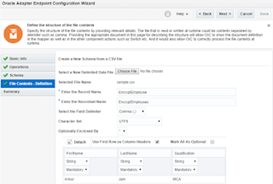
Securing files using PGP encryption (Part-1-Encryption): Oracle Integration by Ankur Jain

image

Are you scared the data can be hijacked during transmission of the files if we are doing transactions using the Integration Cloud? Do not scare, read the article and feel comfortable to transmit the files in a secured manner.
Oracle Integration Cloud provides Pretty Good Privacy (PGP) mechanism to encrypt or decrypt the files which allow us to read/write files in a secure manner.
So, we only required PGP public and private keys to transfer files in a secure manner.

  1. Do you want to encrypt the file?: So use PGP public key to encrypt
  2. Do you want to decrypt the file? Use PGP private key to decrypt

We are dividing encryption and decryption into two parts:

Part 1): Will demonstrate how to  encrypt the files

Part 2): Will demonstrate how to decrypt the files

In this article, we’ll cover Part-1

Use Case: We’ll read the plain CSV from FTP location and create the encrypted CSV file on FTP location

Let’s see how to achieve this.

Before we encrypt the file, we have to upload the PGP public key into the Integration FTP connection. So, I am considering we already have one FTP connection in place. Open the FTP connection and click on the Configure Security button. Notice the PGP Public Key field, click on the Checkbox and click on the Upload button. Read the complete article here.

PaaS Partner Community

For regular information on Oracle PaaS become a member in the PaaS (Integration & Process) Partner Community please register here.

clip_image003 Blog clip_image005 Twitter clip_image004 LinkedIn image[7][2][2][2] Facebook clip_image002[8][4][2][2][2] Wiki

Technorati Tags: SOA Community,Oracle SOA,Oracle BPM,OPN,Jürgen Kress

Using Stage File Write operation(with opaque schema) to copy files by Namratha Narayan

image

The stage file action can process each file downloaded by the FTP Adapter. The stage file action can read, write, zip, unzip, and list files in a staged location known to Oracle Integration Cloud.

For example, you may include a stage file action in an integration as follows:

  • Configure an FTP Adapter with the following settings:
    • Download File operation
    • Unzip the File option
    • Input directory and download directory path
  • Because the ZIP file may contain multiple files, configure a for-each action below the FTP Adapter to iterate over repeated elements.
  • To read each file from the input directory, configure a stage file action below the for-each action to read each file from the input directory as follows:
    • In the Expression Builder, specify the file name and directory from which to read the file.
    • Specify the schema file by loading a file that contains the data structure. Read the complete article here.

PaaS Partner Community

For regular information on Oracle PaaS become a member in the PaaS (Integration & Process) Partner Community please register here.

clip_image003 Blog clip_image005 Twitter clip_image004 LinkedIn image[7][2][2][2] Facebook clip_image002[8][4][2][2][2] Wiki

Technorati Tags: SOA Community,Oracle SOA,Oracle BPM,OPN,Jürgen Kress
How to Capture EBS Business Event in Oracle Integration Cloud by Ankur Jain

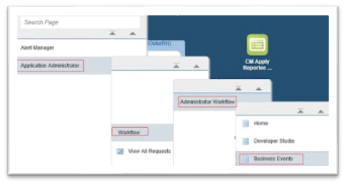
imageIn this article, we are going to describe how to capture Events in Oracle Integration Cloud of Enterprise Business Suite (EBS) using the Oracle EBS adapter.

For example, if an Account Payable (AP) transaction closes for the period the AP raises the event “oracle.apps.ap.CloseProcess.period”. The status of the closed transaction can be sent to the downstream application once it is captured in the Oracle Integration Cloud.

During design time, we need to create an integration called "Close AP Transaction" with Oracle E-Business Suite “Financials” as a trigger (source) connected through the Oracle E-Business Suite Adapter

During run time, if an Account Payable transaction closes, the business event “oracle.apps.ap.CloseProcess.period” is raised in Oracle EBS Account Payable which triggers the Integration.

Pre-requisite to achieve the use case:

Refer section “Deploy the required REST services in Oracle E-Business Suite” to deploy the above required service of a document

  • We must perform the one-time setup tasks in Oracle E-Business Suite to enable the business event. Refer section “Setup Tasks for Using the Oracle E-Business Suite Adapter as a Trigger (Source) Connection” of the document
  • Enable event oracle.apps.ap.CloseProcess.period in Oracle EBS suite. This article will help you to enable events. Read the complete article here.

PaaS Partner Community

For regular information on Oracle PaaS become a member in the PaaS (Integration & Process) Partner Community please register here.

clip_image003 Blog clip_image005 Twitter clip_image004 LinkedIn image[7][2][2][2] Facebook clip_image002[8][4][2][2][2] Wiki

Technorati Tags: SOA Community,Oracle SOA,Oracle BPM,OPN,Jürgen Kress

    How The Co-op Cut Time to Hire in Two Quarters by Daryl Eicher

    image

    We had to re-imagine our recruitment service…

    When you’re one of the largest co-operatives in the world with £9.5 billion in revenue and your hiring managers are spending 4 minutes and 60 clicks to open a job requisition, what will it do for in-store performance to cut that to 30 seconds and 5 clicks? Yvonne Foster, Head of Resourcing Services at The Co-op, wanted to know.

    Connected HCM was part of the answer and her team set out to reduce their time to hire as quickly and cost-effectively as possible. Yvonne spoke with me about their journey to digitize their Recruit to Hire process as part of our customer success series

    The Co-op Reimagines Connected Recruiting

    The Co-op automated their recruitment process to reduce hiring time by connecting and extending their HCM Cloud. Head of Resourcing Services Yvonne Foster shares how Oracle Integration helped accelerate her innovation.

    Finding and engaging enough of the right talent in their retail grocery line of business meant extending and connecting SaaS and on-premises applications including Oracle HCM Cloud, Taleo, and multiple third-party systems.

    After receiving estimates of two years to implement their digital strategy from SaaS and cloud platform vendors, they knew they needed a faster and less risky approach. Using Oracle Integration as their digital transformation platform, they were live in two quarters with game-changing results:

    Congratulations to our partner Capgemini for this successful implementation.

    PaaS Partner Community

    For regular information on Oracle PaaS become a member in the PaaS (Integration & Process) Partner Community please register here.

    clip_image003 Blog clip_image005 Twitter clip_image004 LinkedIn image[7][2][2][2] Facebook clip_image002[8][4][2][2][2] Wiki

    Technorati Tags: SOA Community,Oracle SOA,Oracle BPM,OPN,Jürgen Kress

    Quick steps for setting up a Gateway Node in Oracle API Cloud Service By Sven Bernhardt

    image

    Oracle API Platform Cloud Service (APIP CS) is an API Management Platform for covering the complete API lifecycle. A general overview about the solution is provided in one of my previous blog posts.

    In this blog post, I’ll summarize the steps that are needed to setup a first API Gateway Gateway Node.

    Logical Gateway and Gateway Nodes

    Before getting started with the Gateway setup, a basic concept needs to be clarified.

    Oracle APIP CS support the concept of a so called Logical Gateway, which depicts a logical configuration and management unit for the several Gateway Nodes. A Gateway Node is a physical representation of a API Gateway. It is the runtime component, where APIs are exposed to the outside world and where the defined API policies are enforced, when an API is called by a client.

    From a subscription perspective the number of Logical Gateways is the relevant criterium with respect to the occurring costs. No matter, on how many Gateway Nodes are registered to a Logical Gateway.

    Installation

    Prerequisites

    Before getting started with the installation, a respective Compute Node (OCI, AWS, Azure, On-Premise) instance is needed on which the Gateway Node should be deployed. In my case, I used a OCI Compute instance, which I setup using the OCI console. Read the complete article here.

    PaaS Partner Community

    For regular information on Oracle PaaS become a member in the PaaS (Integration & Process) Partner Community please register here.

    clip_image003 Blog clip_image005 Twitter clip_image004 LinkedIn image[7][2][2][2] Facebook clip_image002[8][4][2][2][2] Wiki

    Technorati Tags: SOA Community,Oracle SOA,Oracle BPM,OPN,Jürgen Kress
    FlexDeploy Loves Oracle API Platform: Series Overview by Joel Wenzel

    image

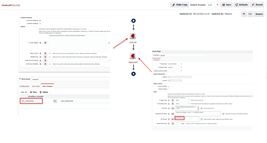
    APIs are everywhere.  The API boom is upon us and Oracle doesn’t intend to sit this one out.  Oracle API Platform, released in 2017, is Oracle’s answer to API lifecyle management and provides everything you would expect from a typical API abstraction layer such as:

    • Direct integration with an API designer (Apiary)
    • About 2 dozen out of the box policies such as OAuth security and API Rate limiting
    • In depth analytics of API requests

    We are excited to announce that FlexDeploy now offers robust support for Oracle’s API Platform.  In the coming posts we are going to walk through the core features of the plugin and discuss some API management strategies. We’ll be covering:

    After reading through this series you will have an understanding on how to provision Oracle API infrastructure as well as several different approaches to managing your APIs via FlexDeploy.

    PaaS Partner Community

    For regular information on Oracle PaaS become a member in the PaaS (Integration & Process) Partner Community please register here.

    clip_image003 Blog clip_image005 Twitter clip_image004 LinkedIn image[7][2][2][2] Facebook clip_image002[8][4][2][2][2] Wiki

    Technorati Tags: SOA Community,Oracle SOA,Oracle BPM,OPN,Jürgen Kress