API Platform Cloud Service – Plans by Niall Commiskey

image

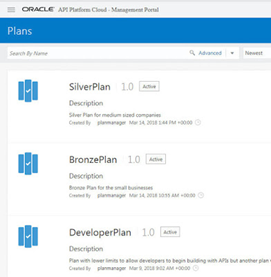
According to the docs, a plan is – an abstraction between applications (the clients consuming APIs) and APIs to allow fine-grained access entitlements to all APIs that are part of a plan.

All APIs are now accessed via plans, in other words, you cannot register applications to use individual APIs outside of a plan. To re-iterate, developers will create an application and register
this with a plan. All this is done in the APIP CS Developer Portal.

There is a new role in APIP CS to manage plans – Plan Manager. I login to the Management Portal as such – Read the complete article here.

PaaS Partner Community

For regular information on Oracle PaaS become a member in the SOA & BPM Partner Community for registration please visit www.oracle.com/goto/emea/soa (OPN account required) If you need support with your account please contact the Oracle Partner Business Center.

Blog Twitter LinkedIn image[7][2][2][2] Facebook clip_image002[8][4][2][2][2] Wiki

Technorati Tags: SOA Community,Oracle SOA,Oracle BPM,OPN,Jürgen Kress
Teaching How to use Terraform to automate Provisioning of Oracle API Platform by Carlos Rodriguez Iturria

image

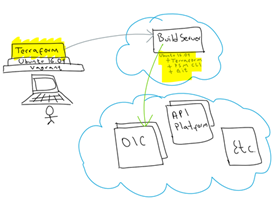
Previously, I showed how to use Terraform and PSM CLI to spin up a “Build Server” and use it to provision Oracle Integration Cloud (OIC) environments. You can find this blog here.

In this blog I am going to show you how to do the same, but to provision Oracle API Platform environments.

The approach that I will be following is the same:

Before we start
  • I encourage you to read the previous blogs, which I am building on top.
  • You need an Oracle Cloud account, if you don’t have one yet, request a trial, they are free.
Create your Build Server:

I already explained with step by step instructions how to build your “Build Server” in a previous blog. Please refer to this blog if you have not yet created your “Build Server”.

The way I create the “Build Server” allows you to deploy any Oracle PaaS, this is a list of some of the available services in my Oracle Cloud environment: Read the complete article here.


PaaS Partner Community

For regular information on Oracle PaaS become a member in the SOA & BPM Partner Community for registration please visit www.oracle.com/goto/emea/soa (OPN account required) If you need support with your account please contact the Oracle Partner Business Center.

Blog Twitter LinkedIn image[7][2][2][2] Facebook clip_image002[8][4][2][2][2] Wiki

Technorati Tags: SOA Community,Oracle SOA,Oracle BPM,OPN,Jürgen Kress
Pre-built Virtual Machine for SOA Suite 12.2.1.3.0

image

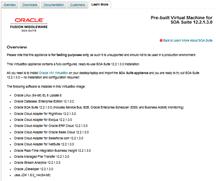
Please note that this appliance is for testing purposes only, as such it is unsupported and should not to be used in a production environment.

This VirtualBox appliance contains a fully-configured, ready-to-use SOA Suite 12.2.1.3.0 installation.

All you need is to install Oracle VM VirtualBox on your desktop/laptop and import the SOA Suite appliance and you are ready to try out SOA Suite 12.2.1.3.0 — no installation and configuration required! Get the virtual box here.

PaaS Partner Community

For regular information on Oracle PaaS become a member in the SOA & BPM Partner Community for registration please visit www.oracle.com/goto/emea/soa (OPN account required) If you need support with your account please contact the Oracle Partner Business Center.

Blog Twitter LinkedIn image[7][2][2][2] Facebook clip_image002[8][4][2][2][2] Wiki

Technorati Tags: SOA Community,Oracle SOA,Oracle BPM,OPN,Jürgen Kress
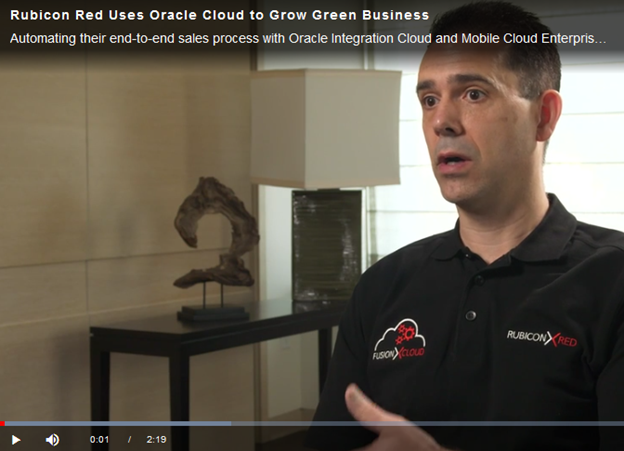
Rubicon Red Uses Oracle Cloud to Grow Green Business

image

Automating their end-to-end sales process with Oracle Integration Cloud and Mobile Cloud Enterprise saved Rubicon Red’s innovative professional services business 90% in cloud costs for trial provisioning and cut time spent from weeks to seconds. Watch the video here.


PaaS Partner Community

For regular information on Oracle PaaS become a member in the SOA & BPM Partner Community for registration please visit www.oracle.com/goto/emea/soa (OPN account required) If you need support with your account please contact the Oracle Partner Business Center.

Blog Twitter LinkedIn image[7][2][2][2] Facebook clip_image002[8][4][2][2][2] Wiki

Technorati Tags: SOA Community,Oracle SOA,Oracle BPM,OPN,Jürgen Kress
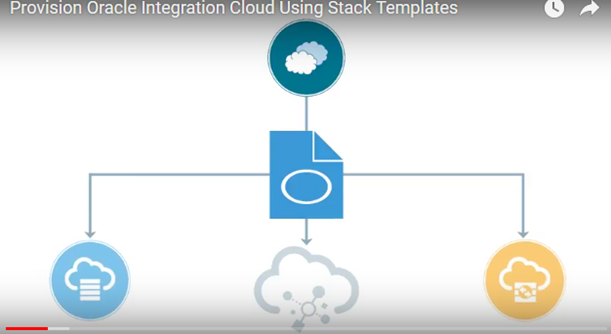
Provision Oracle Integration Cloud Using Stack Templates

image

Complete a template that automatically provisions the required set of services together to get you up and running (Oracle Integration Cloud, Oracle Database Cloud Service, and Oracle Storage Cloud Service for data storage and backups).

For more information, see Creating an Instance with the Oracle Cloud Stack Template


PaaS Partner Community

For regular information on Oracle PaaS become a member in the SOA & BPM Partner Community for registration please visit www.oracle.com/goto/emea/soa (OPN account required) If you need support with your account please contact the Oracle Partner Business Center.

Blog Twitter LinkedIn image[7][2][2][2] Facebook clip_image002[8][4][2][2][2] Wiki

Technorati Tags: SOA Community,Oracle SOA,Oracle BPM,OPN,Jürgen Kress
Integration Cloud – Lets POC and get our feet wet by Kevin King

image

At a recent client, I had a "citizen integrator" ask me to show them some of the orchestrations that I’ve created in ICS, and how I went about creating them.  I began showing off some of the integrations, and some of the POCs that I created.  I didn’t get very far until he stopped me and asked, how I was able to invoke the integrations to test them.  This is when I realized he had previously attempted to create some integrations, but didn’t understand what he created, or how to trigger them and see them in action.

How do I test my integration on Oracle Integration Cloud Service (ICS)?

So, let’s take a common scenario, where you are asked to verify that an integration works from ICS or as a developer you want to explore a new integration you are going to interact with. We are going to look at the most common type of integrations, ‘Orchestration’.  Oracle has this all documented here, so feel free to jump there for more thorough documentation!

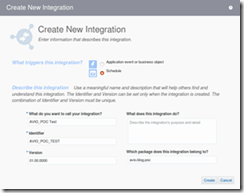
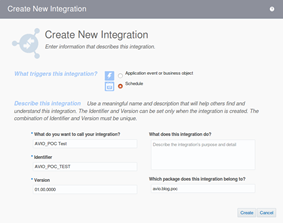
On creating a new Orchestration integration, the first decision is ‘What triggers this integration?’.  There are two options,  ‘Schedule’ and ‘Application event or business object’… So what are these, and what should I choose.

Trigger 1: Schedule

Let’s start with Scheduled, as this is the quickest option to ‘try out’ an integration or mapping.

Creating a ‘Scheduled’ orchestration is meant for exactly as it sounds, a schedule.  You can define it to run every minute, every hour, every Monday, whatever the requirement is…  The bonus feature about this option is the ‘Submit Now’ selection.  This makes it very easy to test!

Now, let’s create a new Orchestration, and select ‘Scheduled’ (make sure you follow best practices and add it to a package!). Read the complete article here.


PaaS Partner Community

For regular information on Oracle PaaS become a member in the SOA & BPM Partner Community for registration please visit www.oracle.com/goto/emea/soa (OPN account required) If you need support with your account please contact the Oracle Partner Business Center.

Blog Twitter LinkedIn image[7][2][2][2] Facebook clip_image002[8][4][2][2][2] Wiki

Technorati Tags: SOA Community,Oracle SOA,Oracle BPM,OPN,Jürgen Kress
Teaching How to Recover Errored Instances with Oracle Integration Cloud by Carlos Rodriguez Iturria

image 

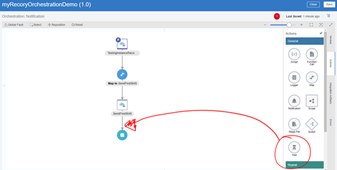
Building Enterprise integrations in the Cloud with iPaaS brings many benefits, including among others: simplicity, agility and scalability. However, these benefits should not be taxed by having a weak core, not able to properly manage common enterprise requirements, such as error management. I’ve been a bit disappointed with how most iPaaS vendors handle runtime exceptions of integration flows. A typical example of this, is not being able to support dehydration for asynchronous flows (i.e. dehydration is crucial to supporting long-running instances by saving their memory state into a database, until a correlation invocation, a.k.a call-back, wakes it up to continue with the flow). This causes that when an error occurs, recovery has to start from the beginning of the integration flow that failed.

In these situations, we would have to either design an integration to be fully idempotent and stateless across all its partner links (service invocations), which is not always possible. Another way to do it is by manually handling the recovery of errored scenarios, this is to avoid state inconsistency across the previous service invocations in the orchestration, prior to the error… But then if we have to manually handle compensation, what about iPaaS being easier? Read the complete article here.

PaaS Partner Community

For regular information on Oracle PaaS become a member in the SOA & BPM Partner Community for registration please visit www.oracle.com/goto/emea/soa (OPN account required) If you need support with your account please contact the Oracle Partner Business Center.

Blog Twitter LinkedIn image[7][2][2][2] Facebook clip_image002[8][4][2][2][2] Wiki

Technorati Tags: SOA Community,Oracle SOA,Oracle BPM,OPN,Jürgen Kress
Teaching How to Design and Secure an API with Oracle API Platform by Carlos Rodriguez Iturria


imageThe image below shows an easy to understand architecture with the various components mentioned above:

Are you ready? Let’s do it!

Pre-requisites

It is expected that you have access to the Oracle API Platform, if not, you can request a free trial at https://cloud.oracle.com/tryit

Also, it is assumed that you have already created your GitHub repository by forking from the MedRec SolutionsANZ repository and obtaining with this the full MedRec NodeJS application with its own API Swagger definition. If you have not completed these pre-requisites steps, please refer to this precursor blog.

API Design – Creating the API Definition with Apiary

In this section you are going to create a new personal Apiary account (in case you still don’t have one) and create a new API Project using the existing MedRec API Swagger definition from the MedRec SolutionsANZ repository.

If you still don’t have a personal Apiary account, follow the next steps:

  • Go to https://apiary.io/
  • You can click on Sign up on the top right corner or in this case we can sign up for free git GitHub, assuming that you already have a GitHub account from the previous blog.

Read the complete article here.

PaaS Partner Community

For regular information on Oracle PaaS become a member in the SOA & BPM Partner Community for registration please visit www.oracle.com/goto/emea/soa (OPN account required) If you need support with your account please contact the Oracle Partner Business Center.

Blog Twitter LinkedIn image[7][2][2][2] Facebook clip_image002[8][4][2][2][2] Wiki

Technorati Tags: SOA Community,Oracle SOA,Oracle BPM,OPN,Jürgen Kress

Teaching how Oracle Integration Cloud (OIC) simplifies Application Integration, Process Automation and API Management by Carlos Rodriguez Iturria

image 

In this blog I am going to show you three new capabilities introduced in Oracle Integration Cloud (OIC) that massively simplify the enablement of Application integration with extensions to Business Process Automation workflows and finally how to expose all of that as secured APIs via the Oracle API Gateway.

These three new capabilities are:

  1. Call your Process Cloud Service (PCS) workflows from an Integration Cloud Service (ICS) orchestration.
  2. Call your ICS integrations from a PCS business process.
  3. Expose your ICS integrations as APIs into the Oracle API Gateway

Our scenario is simple, it is an incident management extension, that requires some human intervention to manage service requests. Read the complete article here.

PaaS Partner Community

For regular information on Oracle PaaS become a member in the SOA & BPM Partner Community for registration please visit www.oracle.com/goto/emea/soa (OPN account required) If you need support with your account please contact the Oracle Partner Business Center.

Blog Twitter LinkedIn image[7][2][2][2] Facebook clip_image002[8][4][2][2][2] Wiki

Technorati Tags: SOA Community,Oracle SOA,Oracle BPM,OPN,Jürgen Kress

Three Quick Tips API Platform CS – Gateway Installation (Part 2) By: Sunny Das

image

This is Part 2 of the blog series (The first part of the series can be accessed here). The aim of the blog post is to provide useful tips, which will enable the installation of the on premise Gateway for Oracle API Platform Cloud Services. If you want to know more about the product, then you can refer here.

The following tips are based on some of the scenarios, we have observed in production.

Essentially,to get past the entropy problem, you need to do the following (for Linux):

·    check the current entropy count by executing:

   cat /proc/sys/kernel/random/entropy_avail. Read the complete article here.


PaaS Partner Community

For regular information on Oracle PaaS become a member in the SOA & BPM Partner Community for registration please visit www.oracle.com/goto/emea/soa (OPN account required) If you need support with your account please contact the Oracle Partner Business Center.

Blog Twitter LinkedIn image[7][2][2][2] Facebook clip_image002[8][4][2][2][2] Wiki

Technorati Tags: SOA Community,Oracle SOA,Oracle BPM,OPN,Jürgen Kress