Jarvis Pizzeria: EAN / GTIN code validation in DMN Service by Marcel van de Glind

Iimagen this blog we describe the implementation of an EAN / GTIN code validator in een Decision Model Service.

As a Pizzeria that wants to treat the customer like a king, we think it is very important that we can always serve the customer with our full range of pizzas.

For this it is necessary that we have a good stock management policy. Every pizza we make must be processed accurately in the system. To simplify this processing, we provide each pizza box with an EAN barcode that needs to be scanned for stock management.

In this blog we describe a Decision Model that can be used to validate the scanned / entered EAN codes.

The purpose of this blog is to demonstrate that it is fairly easy to implement such an algorithm in a Decision Model.

What is EAN / GTIN?

From wikipedia: EAN also known as European Article Number or EAN) is a standard describing a barcode symbology and numbering system used in global trade to identify a specific retail product type, in a specific packaging configuration, from a specific manufacturer. The standard has been subsumed in the Global Trade Item Number standard from the GS1 organization; the same numbers can be referred to as GTINs and can be encoded in other barcode symbologies defined by GS1.

The most commonly used EAN standard is the thirteen-digit EAN-13.

And from the https://www.gs1.org/ website.

The last digit of all fixed-length, numeric GS1 Identification Keys is a check digit that ensures the integrity of the key. The check digit is calculated using a simple algorithm, based on the other numbers in the key. Read the complete article here.

PaaS Partner Community

For regular information on Oracle PaaS become a member in the PaaS (Integration & Process) Partner Community please register here.

clip_image003 Blog clip_image005 Twitter clip_image004 LinkedIn image[7][2][2][2] Facebook clip_image002[8][4][2][2][2] Wiki

Technorati Tags: SOA Community,Oracle SOA,Oracle BPM,OPN,Jürgen Kress
Machine Learning in Digital Process Automation — Part II by Ralf Mueller

image

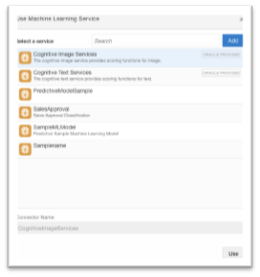
In this second part of the ML in Digital Process Automation article series, we focus on how to consume a Machine Learning Model created in Autonomous Data Warehouse (ADW) for scoring in Integration Cloud Processes. It is assumed that the reader is familiar with the content of Part I. For this article we assume an existing ML model stored on Object Storage. We will give step-by-step instructions on how to bring such models into Oracle Integration Cloud and use them in process automation.

By the time of this writing, the Machine Learning functionality for Integration Cloud Process Automation is in “Limited Availability” mode and must be enabled by a feature flag. Please get in touch with your Integration Cloud representative to get this feature enabled for your Integration Cloud instance.

OML Micro-Services

Oracle Integration Cloud comprises of a new set of micro-services for Machine Learning, the Oracle Machine Learning (OML) micro-services developed by the OML team in Oracle Advanced Analytics organization as part of the Oracle Machine Learning Platform. We will give an in-depth overview of OML micro-services in a later article, for now, it is sufficient to understand the functionality coming with OML micro-services

  • Cognitive Text Services
    Cognitive Text Services provide Machine Learning functionality for Text Classification, Keywords, Summary, Similarity, and Sentiment Analysis. The underlying ML models are pre-trained by Oracle and can be used out-of-the-box. Typical examples in digital process automation include giving a summary of a large text document or give sentiment on customer input.
  • Cognitive Image Services
    Cognitive Image Services provide Machine Learning functionality for Image Classification, NSFW content and Image Similarity. Like with the Cognitive Text Services, the underlying ML models are pre-trained by Oracle. Read the complete article here.

PaaS Partner Community

For regular information on Oracle PaaS become a member in the PaaS (Integration & Process) Partner Community please register here.

clip_image003 Blog clip_image005 Twitter clip_image004 LinkedIn image[7][2][2][2] Facebook clip_image002[8][4][2][2][2] Wiki

Technorati Tags: SOA Community,Oracle SOA,Oracle BPM,OPN,Jürgen Kress

What Is API-Led — An Architectural Approach by Luis Weir

image

Let’s look at this excerpt to find out what API-led means and explore the architectural decisions, implementation patterns, and more.

As APIs open doors to information and functionality, they move well beyond being merely technical interfaces to becoming central actors in new digital business models. However, for such business models to be effective and successful, technical teams are confronted with the unique challenge of API-enabling systems that weren’t necessarily built to provide real-time access. Because of this, there are several implementations beyond the obvious that must be catered for in order to create APIs that are easy to use and can truly scale to handle the sort of volumes expected from real-time systems.

This article is an excerpt from the book Enterprise API Management written by Luis Weir. This book explores the architectural decisions, implementation patterns, and management practices for successful enterprise APIs. This article elaborates on the core concepts and capabilities required to implement API-led architectures. Read the complete article here.

PaaS Partner Community

For regular information on Oracle PaaS become a member in the PaaS (Integration & Process) Partner Community please register here.

clip_image003 Blog clip_image005 Twitter clip_image004 LinkedIn image[7][2][2][2] Facebook clip_image002[8][4][2][2][2] Wiki

Technorati Tags: SOA Community,Oracle SOA,Oracle BPM,OPN,Jürgen Kress

OIC AQ adapter by Niall Commiskey

image
Queue Setup in Oracle Advanced Queuing

First step was to set up the Q in AQ.
CREATE type Message_typ as object (
subject     VARCHAR2(30),
text        VARCHAR2(80)); 
EXECUTE DBMS_AQADM.CREATE_QUEUE_TABLE (queue_table => ‘objmsgs80_qtab’,queue_payload_type => ‘Message_typ’);
EXECUTE DBMS_AQADM.CREATE_QUEUE (queue_name => ‘msg_queue’,queue_table => ‘objmsgs80_qtab’);
EXECUTE DBMS_AQADM.START_QUEUE (queue_name => ‘msg_queue’);
I then created a procedure to create a message –

Read the complete article here.

PaaS Partner Community

For regular information on Oracle PaaS become a member in the PaaS (Integration & Process) Partner Community please register here.

clip_image003 Blog clip_image005 Twitter clip_image004 LinkedIn image[7][2][2][2] Facebook clip_image002[8][4][2][2][2] Wiki

Technorati Tags: SOA Community,Oracle SOA,Oracle BPM,OPN,Jürgen Kress
Call Business Intelligence API in Oracle Integration Cloud by Ankur Jain

image

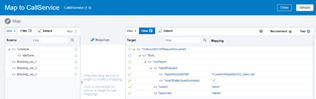
This is a frequent requirement to call Business Intelligence (BI) service in Oracle Integration Cloud (OIC). This article focuses on how to call BI SOAP API in OIC scheduler process and extract data.

See useful links

How to create a SOAP connection
How to create a Scheduled Integration

First, have a look at the sample request and response of BI SOAP API

BI SOPA Endpoint: https://ef-dev1.af.em1.oraclecloud.com/parser/services/v2/ReportService?wsdl

Method: runReport Read the complete article here.

PaaS Partner Community

For regular information on Oracle PaaS become a member in the PaaS (Integration & Process) Partner Community please register here.

clip_image003 Blog clip_image005 Twitter clip_image004 LinkedIn image[7][2][2][2] Facebook clip_image002[8][4][2][2][2] Wiki

Technorati Tags: SOA Community,Oracle SOA,Oracle BPM,OPN,Jürgen Kress

Accelerate ERP Integration with Application Adapters PaaS Partner Community Webcast March 25th 2020

image

Attend our March edition of the PaaS Partner Community Webcast live on March 25th 2020 at 16:30 CET.

Integration to applications is dramatically simplified by the use of application adapters that eliminate the complexity associated with web services and other connectivity methods. Simplify your integration to connect with virtually any application, service, or data store. Oracle offers a library of these adapters to provide you with a standardized way to rapidly connect the various protocols required by each application vendor. In addition to application connectors for CX, ERP, and HCM, there are database, productivity, social, RPA, and technology adapters.

Presenter: Niall Commiskey Director Product Management Oracle HQimage

Schedule: Wednesday March 25th 2020 16:30 CET (Berlin time)

Register for the webcast here.

Take the opportunity to watch our community webcasts on-demand:

· Accelerate HCM Integration with Application Adapters

· Extend SaaS with Visual Builder Cloud Service

· Integration Adapters

· Integrate SaaS

· Digital Assistant Update

· SOA Cloud Service

· PaaS Overview Webcast

· Process Cloud Service Update

· Integrate ERP Cloud

· Integrate HCM Cloud

· Functions and Cloud Native

· Blockchain

· API Platform Cloud Service part 2

· 3rd Generation API Gateways part1

· Oracle JET

· Oracle Visual Builder Cloud Service

· Container Native Application Development Platform

For the latest information please visit Community Updates Wiki page (Community membership required).

PaaS Partner Community

For regular information on Oracle PaaS become a member in the PaaS (Integration & Process) Partner Community please register here.

clip_image003 Blog clip_image005 Twitter clip_image004 LinkedIn image[7][2][2][2] Facebook clip_image002[8][4][2][2][2] Wiki

Technorati Tags: SOA Community,Oracle SOA,Oracle BPM,OPN,Jürgen Kress

Downstream Throttling in Oracle Integration Cloud via Parking Lot Pattern by Chelsea Zhang

image

Background

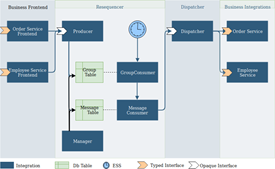
Parking lot pattern is a mature design to store the data in an intermediate stage before processing the data from the intermediate stage to the end system based on the required rate. The detailed implementation of the parking lot pattern can be done in a variety of  storage technologies but strongly recommended a database table to be used for simplicity. In this blog, we will use the parking lot pattern in the Oracle Integration Cloud (OIC) to explore a solution in the downstream throttling.

Problem Definition

In OIC, the downstream throttling was often mentioned as there might be an influx of data that overwhelm the slower downstream systems. Even though, it might be accomplished by the tuning knobs within OIC and WebLogic Server, but when the built-in tuning cannot be adjusted enough capacity to stop flooding the slower system. The parking lot pattern will enable to provide a solution to attend to this scenario.

Design Solution

  1. Process the input data/message based on the order they come in
  2. Each message will be parked in the storage for x minutes (parking time) so the system has a chance to throttle the number of messages processed concurrently. Read the complete article here.

PaaS Partner Community

For regular information on Oracle PaaS become a member in the PaaS (Integration & Process) Partner Community please register here.

clip_image003 Blog clip_image005 Twitter clip_image004 LinkedIn image[7][2][2][2] Facebook clip_image002[8][4][2][2][2] Wiki

Technorati Tags: SOA Community,Oracle SOA,Oracle BPM,OPN,Jürgen Kress
Oracle SOA Suite 12.2.1.4.0 QuickStart Download

image

This page consolidates the download links for evaluating Oracle SOA Suite and includes only the Quick Start install for all platforms.

Visit the Oracle Fusion Middleware Download, Installation, and Configuration Readme Files and Installation for Oracle SOA and BPM Suite for an overview of the installation process and the Oracle Fusion Middleware Supported System Configurations for platform-specific information.

Follow the steps outlined in Installing Oracle SOA Suite and Business Process Management Suite Quick Start for Developers guide to set up a development or evaluation environment for Oracle SOA Suite, including Oracle Service Bus. Get SOA Suite 12c here.

PaaS Partner Community

For regular information on Oracle PaaS become a member in the PaaS (Integration & Process) Partner Community please register here.

clip_image003 Blog clip_image005 Twitter clip_image004 LinkedIn image[7][2][2][2] Facebook clip_image002[8][4][2][2][2] Wiki

Technorati Tags: SOA Community,Oracle SOA,Oracle BPM,OPN,Jürgen Kress

PaaS Partner YouTube Update March 2020

The March video includes three topics:

• Oracle sales kits for Partners

• Hands-on Bootcamps for Integration & Digital Assistant

• Integrate ERP community webcast

For regular updates please subscribe to our YouTube channel here. Thanks for your likes and sharing the video on YouTube and LinkedIn. For the latest PaaS Community information please visit our Community update wiki here (Community membership required).

PaaS Partner Community

For regular information on Oracle PaaS become a member in the PaaS (Integration & Process) Partner Community please register here.

clip_image003 Blog clip_image005 Twitter clip_image004 LinkedIn image[7][2][2][2] Facebook clip_image002[8][4][2][2][2] Wiki

Technorati Tags: SOA Community,Oracle SOA,Oracle BPM,OPN,Jürgen Kress
It’s back – Partner Immersion for FY20! Experience first-hand Oracle’s Sales Training

imagePartner Immersion is back and better than ever. Align yourself with Oracle’s sales strategy, learn to pitch the “Why Oracle, Why Now” declaration, as well as how to answer the question most commonly asked by our customers: “How do I transform my organization?

Immersion is an on-demand learning experience that equips you with the same Oracle laser-focused sales training and messaging delivered to internal sales consultants at the start of each new fiscal year. Get started now

PaaS Partner Community

For regular information on Oracle PaaS become a member in the PaaS (Integration & Process) Partner Community please register here.

clip_image003 Blog clip_image005 Twitter clip_image004 LinkedIn image[7][2][2][2] Facebook clip_image002[8][4][2][2][2] Wiki

Technorati Tags: SOA Community,Oracle SOA,Oracle BPM,OPN,Jürgen Kress