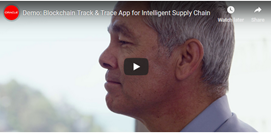
Announcing the Oracle Intelligent Track and Trace Application! By Michael Richter

image

Oracle is a leader in blockchain technology and launched the Oracle Blockchain Platform in July of 2018. With a lot of interest and early adoption by customers, the next step in this evolution was to make it easy for business users to implement and further transform their processes using pre-built blockchain applications.

Four pre-built blockchain applications for supply chain are coming soon. The first of these, Oracle Intelligent Track and Trace, is an application for businesses using supply chain management (available June 13, 2019.)

The application helps to address the challenges of managing complexities in a global network of trading partners. You don’t need to be a developer to use the Oracle Intelligent Track and Trace application because it’s a pre-built application that is ready-to-deploy out of the box. Powered by blockchain technology, the application helps to gain efficiencies for supply chain management by pinpointing where transactions and goods are across the supply chain and trading partners. Read the complete article here.

PaaS Partner Community

For regular information on Oracle PaaS become a member in the PaaS (Integration & Process) Partner Community please register here.

clip_image003 Blog clip_image005 Twitter clip_image004 LinkedIn image[7][2][2][2] Facebook clip_image002[8][4][2][2][2] Wiki

Technorati Tags: SOA Community,Oracle SOA,Oracle BPM,OPN,Jürgen Kress

Enable notification in 5 minutes: Oracle Process Cloud Service by Ankur Jain

imageWould you like to notify the user to take action (approve/reject) or just simply notify that some action has happened in middle of the process? Here is the article which helps you to enable the notifications in Oracle Process Cloud Service.

This article will not take more than 5 minutes to complete. Oracle PCS provides the Notify activity which allows us to send email notifications.

I’m extending my previous blog to enable the notification. So please check the article before you proceed further.

In the PCS, first, we have the turn on the from address. Please see the blog to see how to configure from address so that email can be sent.

Let’s see how to configure the Notify activity.

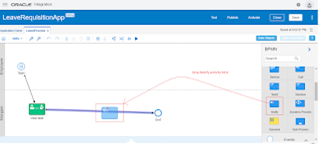
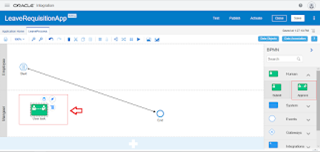
  • Open the LeaveProcess and drop the Notify activity from the System Pallete between User Task and End activity

PaaS Partner Community

For regular information on Oracle PaaS become a member in the PaaS (Integration & Process) Partner Community please register here.

clip_image003 Blog clip_image005 Twitter clip_image004 LinkedIn image[7][2][2][2] Facebook clip_image002[8][4][2][2][2] Wiki

Technorati Tags: SOA Community,Oracle SOA,Oracle BPM,OPN,Jürgen Kress

A Simple application from Scratch: Oracle Process Cloud by Ankur Jain

image

Are you a beginner in Oracle Process Cloud Service and want to learn how to play with this and create processes, forms, etc. So here is the article for you to learn step by step. This guide will only take 30 minutes to complete.

In this article, we will create a simple Leave Requisition process in Oracle Process Cloud Service(PCS) which can help to understand the basics of PCS.

To begin with, you would be needing access to Oracle Process Cloud Service and Sign in Credentials. If you don’t have it right now, create a free 30 days free trial from here

Let’s go ahead and create the process

PaaS Partner Community

For regular information on Oracle PaaS become a member in the PaaS (Integration & Process) Partner Community please register here.

clip_image003 Blog clip_image005 Twitter clip_image004 LinkedIn image[7][2][2][2] Facebook clip_image002[8][4][2][2][2] Wiki

Technorati Tags: SOA Community,Oracle SOA,Oracle BPM,OPN,Jürgen Kress

Top tweets PaaS Partner Community January 2020

imageJanuary top tweets by PaaSCommunity

Send your tweets @soacommunity #PaaSCommunity and follow us at http://twitter.com/soacommunity. Make sure you share your content with the community!

PaaS Partner Community

For regular information on Oracle PaaS become a member in the PaaS (Integration & Process) Partner Community please register here.

clip_image003 Blog clip_image005 Twitter clip_image004 LinkedIn image[7][2][2][2] Facebook clip_image002[8][4][2][2][2] Wiki

Technorati Tags: SOA Community,Oracle SOA,Oracle BPM,OPN,Jürgen Kress, Twitter

How to Update Oracle SOA 11g Timeouts by Sebastian Marucci

image

Imagine your SOA/BPM application is consuming a service (internal or third party) that takes more than 5 minutes to reply, which is more than the default JTA timeout. What would happen in this situation? The result is a faulted instance.

Last month at a Oracle BPM project, we faced a similar situation. After doing some research, we realized that not only do you have to update the EJBs or JTA timeouts, but there are also several other timeouts to tweak. In fact, six different timeouts need to be updated. Five of them related to the Oracle SOA Suite, plus the DB timeout. Here’s an overview of the 6 timeouts that we had to update and how to do so!

Web Service binding timeout

First, you need to identify all composites involved with the long-running service. This will include the composites where the service is called, and the composites calling these composites. Then, in each composite go to the source view and add the following properties to the web service binding (tag <binding.ws/>): Read the complete article here.

PaaS Partner Community

For regular information on Oracle PaaS become a member in the PaaS (Integration & Process) Partner Community please register here.

clip_image003 Blog clip_image005 Twitter clip_image004 LinkedIn image[7][2][2][2] Facebook clip_image002[8][4][2][2][2] Wiki

Technorati Tags: SOA Community,Oracle SOA,Oracle BPM,OPN,Jürgen Kress

Watch Amy Simpson Grange, Capgemini customers love the solution based on the Oracle Cloud Platform.

Capgemini is helping a retail client to schedule faster and easier job interviews with Oracle PaaS.

For more information please visit the solution catalog. Capgemini is one of the world’s foremost providers of consulting, technology and outsourcing services. We are one of very few organisations worldwide to hold Oracle’s highest ‘Diamond Partner’ status, which recognises our broad specialist expertise and successful delivery record. Watch the video here.

We want to promote your customer success! Have you implemented successful a solution based on the Oracle Cloud Platform? Submit your success story via the customer reference program.

PaaS Partner Community

For regular information on Oracle PaaS become a member in the PaaS (Integration & Process) Partner Community please register here.

clip_image003 Blog clip_image005 Twitter clip_image004 LinkedIn image[7][2][2][2] Facebook clip_image002[8][4][2][2][2] Wiki

Technorati Tags: SOA Community,Oracle SOA,Oracle BPM,OPN,Jürgen Kress

Extend SaaS with Visual Builder Cloud Service – PaaS Partner Community Webcast January 29th 2020

imageAttend our January edition of the PaaS Partner Community Webcast live on January 29th 2020 at 16:30 CET.

Extend SaaS with Visual Builder Cloud Service

Rapidly create and deploy engaging Web and Mobile apps directly from the browser using a visual browser-based development environment visit the website here.

Presenter: Angelo Santagata Architect A-Team

Schedule: Wednesday January 29th 2020 at 16:30 CET (Berlin time)

UK: +44 (0) 208 118 1001 & United States: +1 40 877 440 73

ID 5566478 Passcode 288021

Attend the Webcast

Take the opportunity to watch our community webcasts on-demand:

· Integration Adapters

· Integrate SaaS

· Digital Assistant Update

· SOA Cloud Service

· PaaS Overview Webcast

· Process Cloud Service Update

· Integrate ERP Cloud

· Integrate HCM Cloud

· Functions and Cloud Native

· Blockchain

· API Platform Cloud Service part 2

· 3rd Generation API Gateways part1

· Oracle JET

· Oracle Visual Builder Cloud Service

· Container Native Application Development Platform

For the latest information please visit Community Updates Wiki page (Community membership required).

PaaS Partner Community

For regular information on Oracle PaaS become a member in the PaaS (Integration & Process) Partner Community please register here.

clip_image003 Blog clip_image005 Twitter clip_image004 LinkedIn image[7][2][2][2] Facebook clip_image002[8][4][2][2][2] Wiki

Technorati Tags: SOA Community,Oracle SOA,Oracle BPM,OPN,Jürgen Kress

PaaS (Process & Integration) Partner Community Newsletter January 2020

Dear PaaS Partner Community,

Welcome to 2020 a new year with new opportunities. Thanks for all the support and joint business. The Oracle integration business is driven by the SaaS growth, to integrate CX, ERP and HCM within each other, third party and on-premises. Digital Assistant (chatbot) innovates SaaS solution like Service Cloud and Visual Builder extends them. You as an Oracle partner play a key role to continue our successful Cloud Platform journey in the next century!

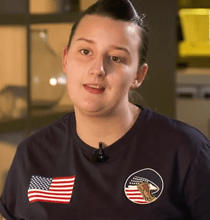
Watch Amy Simpson Grange, Capgemini customers love the solution based on the Oracle Cloud imagePlatform. We want to promote also your customer success, submit your story via the customer reference program.
To become an expert we offer you hands-on Oracle Integration and Digital Assistant bootcamps across the globe. A great prove is the joint customer success! Like Daryl highlighted #12DaysofInnovation will help you chart your course for 2020 with insights from your peers who are shaping the future of work with intelligent automation. You’ll gain actionable insights into how Oracle Integration can help you build your digital business like a boss with:

· Agility so when opportunity knocks you can get from the whiteboard to the boardroom 6-10X faster

· Security across any SaaS or on-premises application including custom apps

· Scalability to ensure that when your customers demand it, you’re built for speed

· Phased modernization of applications and data centers to limit risk and leverage existing IT assets

· Future-proof automation that limits application upgrade headaches and puts you on the fast track to AI

Thanks to the community for sharing all the integration articles: SOA Suite 12.2.1.4 / OIC interoperability & Why and How to Integrate Oracle Policy Automation with Oracle Integration & Send Notification with attachment in Oracle Integration Cloud & Integration Patterns – Publish/Subscribe (Part2) & Oracle Integration Cloud Service Lookups & OIC Integration: defining and using constants & Multiple resources with single REST: Oracle Integration & How to Encrypt/Decrypt Files in OIC & Integration Designer Pages – Progressive Web App UI Experience & How To Configure an Integration flow with Binary Content Using Rest Adapter as Trigger in Oracle Integration & Using Stage File Read/Write operation to encrypt/decrypt files & How to send email with attachments in OIC?.

In the process & innovation section Marcel published a summary of the Decision Model use case: Using a DM in PCS (how to manage versions …) & Using a DM in ICS & How to manage Masterdata of a DM (part 1) & How to manage Masterdata of a DM (part 2) & Managing DM Masterdata Validity Period & Input and Output Storage of Decision Model Invokes.

For a short summery of our monthly key information watch the PaaS Partner Updates on YouTube. The January edition highlights Digital Assistant for SaaS services including CX, HCM and ERP and Oracle OpenWorld in Dubai, London & Singapore. This month’s community webcast will be an update on how to extend SaaS solutions with Visual Builder Cloud by Angelo Santagata. Join our PaaS Partner Community Webcast on January 29th 2020.

Want to publish your best practice article & news in the next community newsletter? Please feel free to send it via Twitter @soaCommunity #PaaSCommunity!

To read the newsletter please visit www.tinyurl.com/PaaSNewsJanuary2020

Please like and share the newsletter at Twitter and LinkedIn

Jürgen Kress

PaaS Partner Adoption
Oracle HQ
Tel. +49 89 1430 1479
E-Mail: juergen.kress@oracle.com
clip_image003Blog clip_image004LinkedIn clip_image005 Twitter

PaaS Newsletter January 2020

PaaS Partner Community

For regular information on Oracle PaaS become a member in the PaaS (Integration & Process) Partner Community please register here.

clip_image003 Blog clip_image005 Twitter clip_image004 LinkedIn image[7][2][2][2] Facebook clip_image002[8][4][2][2][2] Wiki

Technorati Tags: newsletter,SOA Community newsletter,SOA Community,Oracle,OPN,Jürgen Kress
Managing API Gateway Costs with Oracle API Platform by Phil Wilkins

image

The Oracle API Platform adopted an intelligent pricing model by basing costs on API call volumes and Logical gateway node groupings per hour. In our book about the API Platform (more here). We suggested that a good logical grouping would be to reflect the development, test, preproduction and production model. This makes it nice and easy to use gateway based routing to different environments without needing to change the API policy configuration as you promote your solution through environments.

We have also leveraged naming and Role/Group Based Access Controls to make to make it easy to operate the API Platform as a shared service, rather than each team having its own complete instance. In doing so the number of logical gateways needed is limited (I.e. not logical gateway divisions on per team models needed). Group management is very easy through the leveraging of Oracle’s Identity Cloud Service – which is free for managing users on the Oracle solutions, and also happens to a respected product in its own right. Read the complete article here.

PaaS Partner Community

For regular information on Oracle PaaS become a member in the PaaS (Integration & Process) Partner Community please register here.

clip_image003 Blog clip_image005 Twitter clip_image004 LinkedIn image[7][2][2][2] Facebook clip_image002[8][4][2][2][2] Wiki

Technorati Tags: SOA Community,Oracle SOA,Oracle BPM,OPN,Jürgen Kress

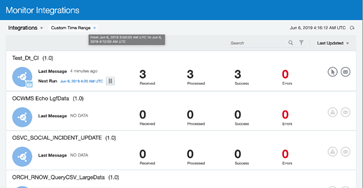
Custom time range filter for monitoring pages in OIC by Arya Sanyal

image

Custom time range filter is a new time based filter being added in the monitoring pages, which allows an user to filter runtime data for a user-defined time period. This filter will be available under feature flag oic.ics.console.monitoring.tracking.filter.custom-date-range.

With this, any user can select a time range as small as a minute and track only those instances which were processed/modified within the specified time range. Similar to other existing time window filters, this filter is preserved by default when user navigates from one monitoring page to another.

Note : The time range selected should be within the retention period, as data beyond Retention period are not retained. Even if selected time range is beyond retention period, only available data will be displayed.

Step-by-step guide

Following steps show how to use the custom time range filter after enabling the feature flag.

1. Select the time window as shown below. "From" and "To" date fields for the new time filter are displayed. Read the complete article here.

PaaS Partner Community

For regular information on Oracle PaaS become a member in the PaaS (Integration & Process) Partner Community please register here.

clip_image003 Blog clip_image005 Twitter clip_image004 LinkedIn image[7][2][2][2] Facebook clip_image002[8][4][2][2][2] Wiki

Technorati Tags: SOA Community,Oracle SOA,Oracle BPM,OPN,Jürgen Kress