PaaS Partner YouTube Update August 2019

The August edition of the PaaS Partner Update contains three topics:

• Certifications and trainings for Partners

• Oracle OpenWorld tips

• SOA Cloud Service Webcast

For regular updates please subscribe to our YouTube channel here. Thanks for your likes and sharing the video on YouTube and LinkedIn. For the latest PaaS Community information please visit our Community update wiki here (Community membership required).

PaaS Partner Community

For regular information on Oracle PaaS become a member in the SOA & BPM Partner Community for registration please visit www.oracle.com/goto/emea/soa (OPN account required) If you need support with your account please contact the Oracle Partner Business Center.

clip_image003 Blog clip_image005 Twitter clip_image004 LinkedIn image[7][2][2][2] Facebook clip_image002[8][4][2][2][2] Wiki

Technorati Tags: YouTube,SOA Community,Oracle SOA,Oracle BPM,Jürgen Kress,Middleware Update,Partner Update

The Power of High Availability Connectivity Agent by Antony Reynolds

image

High Availability with Oracle Integration Connectivity Agent

You want your systems to be resilient to failure and within Integration Cloud Oracle take care to ensure that there is always redundancy in the cloud based components to enable your integrations to continue to run despite potential failures of hardware or software.  However the connectivity agent was a singleton until recently.  That is no longer the case and you can now run more than one agent in an agent group.

Of Connections, Agent Groups & Agents

An agent is a software component installed on your local system that "phones home" to Integration Cloud to allow message transfer between cloud and local systems without opening any firewalls.  Agents are assigned to agent groups which are logical groupings of agents.  A connection may make use of an agent group to gain access to local resources.

The feature flag oic.adapter.connectivity-agent.ha allows two agents per agent group.  This provides an HA solution for the agent, if one agent fails the other continues to process messages.

Agent Networking

Agents require access to Integration Cloud using HTTPS, note that the agent may need to use a proxy to access Integration Cloud.  This allows them to check for messages to be delivered from the cloud to local systems or vice versa.  When using multiple agents in an agent group it is important that all agents in the group can access the same resources across the network.  Failure to do this can cause unexpected failure of messages. Read the complete article here.

PaaS Partner Community

For regular information on Oracle PaaS become a member in the SOA & BPM Partner Community for registration please visit www.oracle.com/goto/emea/soa (OPN account required) If you need support with your account please contact the Oracle Partner Business Center.

clip_image003 Blog clip_image005 Twitter clip_image004 LinkedIn image[7][2][2][2] Facebook clip_image002[8][4][2][2][2] Wiki

Technorati Tags: SOA Community,Oracle SOA,Oracle BPM,OPN,Jürgen Kress
Difference between File and FTP adapter in Oracle Integration Cloud by Ankur Jain

image

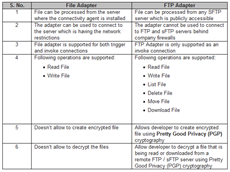
There are two inbuilt adapters offered by Oracle Integration Cloud. One is File and another one is FTP. Users often confused when to use File and when to use FTP adapter and what is the actual difference between these two adapters. The common idea behind these two adapters is to handle File-based processing in the integrations. We are writing this post to describe what is the actual difference between these two adapters? Read the complete article here.


PaaS Partner Community

For regular information on Oracle PaaS become a member in the SOA & BPM Partner Community for registration please visit www.oracle.com/goto/emea/soa (OPN account required) If you need support with your account please contact the Oracle Partner Business Center.

clip_image003 Blog clip_image005 Twitter clip_image004 LinkedIn image[7][2][2][2] Facebook clip_image002[8][4][2][2][2] Wiki

Technorati Tags: SOA Community,Oracle SOA,Oracle BPM,OPN,Jürgen Kress
First steps with Oracle Self Service Integration Cloud by Lucas Jellema

image

An important part of enabling optimal use of SaaS applications is integrating various functions in said applications. Events in one application need to have an effect in others. From simple practical matters such as “send  an email when a specific type of file was uploaded into a certain Dropbox or OneDrive folder” or “Update a Google Document when a IRA issue is created” to more profound actions as “When a new lead is added to Oracle Sales Cloud, a new message is posted in a Slack channel” or “When an Eloqua Account is added, create same account Oracle Sales Cloud.”

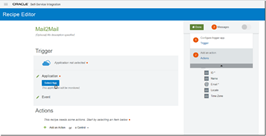
Oracle Self Service Integration Cloud provides a framework for periodically polling a wide range of business applications out of the box as well as any application you add yourself (as long as the application can be polled through calls to a REST API). Any records retrieved in a polling action can be used to trigger actions in other applications. SSI can perform some logic (filter, loop, conditional execution as well as some calculation and conversion) and create a request message to send to a target application. Many recipes are available out of the box, and more can easily be created for all know business applications as well as for those we add ourselves.

Note that SSI will be the foundation for a new Custom Adapter development kit for Oracle Integration Cloud; apparently this it will support a low code, graphical experience with drag and drop for easy creation of adapters.

In this article a few first impressions with SSI.

Step 1: provision an SSI instance

From the Cloud Dashboard, I have opened the Service Console for SSI. Here I have selected the option to create a new instance. Read the complete article here.


PaaS Partner Community

For regular information on Oracle PaaS become a member in the SOA & BPM Partner Community for registration please visit www.oracle.com/goto/emea/soa (OPN account required) If you need support with your account please contact the Oracle Partner Business Center.

clip_image003 Blog clip_image005 Twitter clip_image004 LinkedIn image[7][2][2][2] Facebook clip_image002[8][4][2][2][2] Wiki

Technorati Tags: SOA Community,Oracle SOA,Oracle BPM,OPN,Jürgen Kress
OIC –> VB CS –> Service Connections. Triggering an Integration from VB CS by Niall Commiskey

image

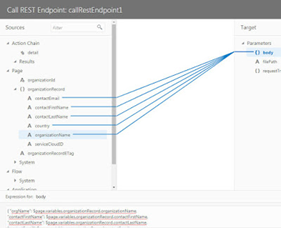
When you want to expose business objects from an external source in your visual application, you can add and manage connections to sources in the Service Connections pane of the Artifact Browser.
Ok, so this allows us to bring external functionality into VB CS.
The previous post showed my Organization Business Object.
I also have an Integration that creates Organizations in Service Cloud.
This Integration is exposed via REST. Read the complete article here.-

PaaS Partner Community

For regular information on Oracle PaaS become a member in the SOA & BPM Partner Community for registration please visit www.oracle.com/goto/emea/soa (OPN account required) If you need support with your account please contact the Oracle Partner Business Center.

clip_image003 Blog clip_image005 Twitter clip_image004 LinkedIn image[7][2][2][2] Facebook clip_image002[8][4][2][2][2] Wiki

Technorati Tags: SOA Community,Oracle SOA,Oracle BPM,OPN,Jürgen Kress
OIC Connectivity Agent Installation Pointers by Greg Mally

image

The connectivity agent has been a feature of Oracle’s integration cloud strategy from the beginning to address the challenge of the cloud/on-premise integration pattern. However, the implementation of the agent differs between Oracle Integration Cloud Service (ICS) and Oracle Integration Cloud (OIC). With both offerings, the pattern for setup remains the same:

  1. 1. Create Agent Group in ICS/OIC Console
  2. 2. Download the connectivity agent installer
  3. 3. “Install” the agent on an on-premise machine using the Agent Group ID from step 1 (this registers the agent with ICS/OIC)
  4. 4. Verify that the agent is communicating with ICS/OIC via the integration console

However, step 3 differs dramatically between ICS and OIC. With ICS, the installation process resulted in a WebLogic Server (WLS) Single-Server configuration (i.e., all-in-one WLS server). Although the setup for the ICS agent has been optimized for an easy installation experience, the end result is fairly heavyweight. Now looking at how the agent is installed on OIC, it is simply a jar file that is kicked off using java -jar connectivityagent.jar. The end result is “behavior wise” is the same, but the footprint and experience from a setup/configuration perspective is radically different. The rest of this blog will focus on what happens when the OIC agent is “installed” and details that may not be obvious from the on-line documentation that can result in some “why does this not work” head scratching.

OIC Connectivity Agent High-Level Installation Steps

  1. 1. Create an Agent Group in the OIC Console
  2. 2. Download the Connectivity Agent zip file from the OIC Console
  3. 3. Unzip the contents of the zip file on the on-premise agent machine
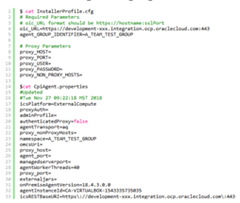
  4. 4. Update the InstallerProfile.cfg with the details of the OIC environment and on-premise network
  5. 5. Run the agent using java -jar connectivityagent.jar

Please refer to the OIC Connectivity Agent on-line documentation for the details associated with the steps mentioned above.


OIC Connectivity Agent Installation Experience

Once the zip file is downloaded from the OIC console and unzipped on the agent machine, you will see something like the following directory structure (as of 18.4.3): Read the complete article here.


PaaS Partner Community

For regular information on Oracle PaaS become a member in the SOA & BPM Partner Community for registration please visit www.oracle.com/goto/emea/soa (OPN account required) If you need support with your account please contact the Oracle Partner Business Center.

clip_image003 Blog clip_image005 Twitter clip_image004 LinkedIn image[7][2][2][2] Facebook clip_image002[8][4][2][2][2] Wiki

Technorati Tags: SOA Community,Oracle SOA,Oracle BPM,OPN,Jürgen Kress

Cloud Platform Partner Advisory Council 2019

imageOn behalf of Oracle, it is our pleasure to announce the annual Partner Advisory Council!

Join us for an exclusive event where you can engage with global Oracle Product Management. This is your opportunity to give feedback and discuss the future enhancements to the Oracle Cloud Platform.

September 13, 2019 | 7:30 AM – 6:00 PM
Oracle Conference Center, 350 Oracle Parkway
Redwood Shores, US

For details please visit the registration page here.


PaaS Partner Community

For regular information on Oracle PaaS become a member in the SOA & BPM Partner Community for registration please visit www.oracle.com/goto/emea/soa (OPN account required) If you need support with your account please contact the Oracle Partner Business Center.

clip_image003 Blog clip_image005 Twitter clip_image004 LinkedIn image[7][2][2][2] Facebook clip_image002[8][4][2][2][2] Wiki

Technorati Tags: SOA Community,Oracle SOA,Oracle BPM,OPN,Jürgen Kress

Opportunity to Order Workflow: Integrating Salesforce with NetSuite – Part 2 by Arijit Chakraborty

image

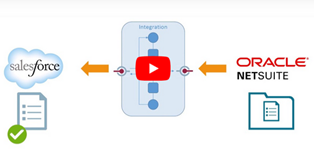
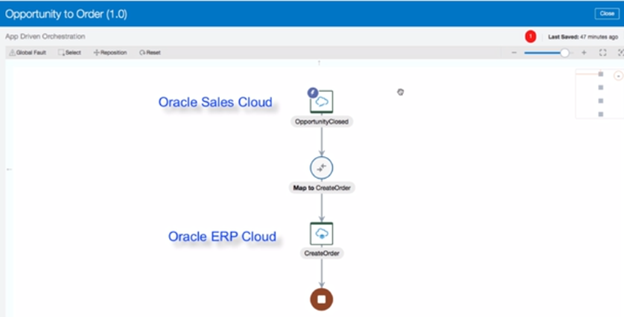
In our previous post, we demonstrated how Oracle Integration Cloud can automate your ‘Opportunity to Order’ workflow to help you achieve synchronization between your Salesforce and NetSuite applications. In this post, I will show you how easy it is to set up this integration flow between Salesforce and NetSuite.

The setup begins with the creation of individual connections for Salesforce and NetSuite using Oracle Integration Cloud’s designer console. First add the authentication credentials to access your application environments. Once the connections are saved and tested, we proceed to the next steps of creating an integration process flow through drag and drop, configuring the adapters, and defining the mapping. Finally a single click activates your integration to achieve bi-directional synchronization between Salesforce and NetSuite.

Watch this video created by the Oracle Learning Library Team (YouTube channel) for a complete demo of the steps involved in using Integration Cloud Service to setup and configure your ‘Opportunity to Order’ workflow between Salesforce and NetSuite. Read the complete article here.


PaaS Partner Community

For regular information on Oracle PaaS become a member in the SOA & BPM Partner Community for registration please visit www.oracle.com/goto/emea/soa (OPN account required) If you need support with your account please contact the Oracle Partner Business Center.

clip_image003 Blog clip_image005 Twitter clip_image004 LinkedIn image[7][2][2][2] Facebook clip_image002[8][4][2][2][2] Wiki

Technorati Tags: SOA Community,Oracle SOA,Oracle BPM,OPN,Jürgen Kress
Oracle Integration Cloud: Recommend Feature Demo

image

Watch the video here.


PaaS Partner Community

For regular information on Oracle PaaS become a member in the SOA & BPM Partner Community for registration please visit www.oracle.com/goto/emea/soa (OPN account required) If you need support with your account please contact the Oracle Partner Business Center.

clip_image003 Blog clip_image005 Twitter clip_image004 LinkedIn image[7][2][2][2] Facebook clip_image002[8][4][2][2][2] Wiki

Technorati Tags: SOA Community,Oracle SOA,Oracle BPM,OPN,Jürgen Kress
Provisioning Oracle API Platform Gateway Nodes using Terraform and Ansible on AWS by Kevin King

image

When using Oracle Autonomous API Platform, an API gets deployed to a logical gateway.  The logical gateway consists of one or more nodes which are instances of the runtime, installed on physical machines, virtual machines, or cloud infrastructure.  The gateway nodes handle the processing of the API requests, but a load balancer is still required to distribute traffic between the nodes.  When performance becomes an issue, more nodes can be added to increase throughput.  Providing an automated way to manage nodes ensures consistency of configurations and the ability to easily add and remove nodes.

The gateway nodes can be installed on-premise or in the cloud, and are not restricted to the Oracle cloud.  This allows for customers who are already using AWS to host their micro-services, to use Oracle’s API Platform platform to be able to monitor and expose their APIs on a central location.  The API Platform portal, provides a central location deploy, activate, deprecate, and secure APIs while having complete visibility of the usages and KPI monitoring.

In this blog, I’ll describe how I’ve created an automated way to provision, configure, and register new API gateway nodes, running on Amazon EC2 into the API Platform using Terraform and Ansible.

Technologies used (and links for more help): APICS: This the Oracle API Platform Cloud Service. Read the complete article here.


PaaS Partner Community

For regular information on Oracle PaaS become a member in the SOA & BPM Partner Community for registration please visit www.oracle.com/goto/emea/soa (OPN account required) If you need support with your account please contact the Oracle Partner Business Center.

clip_image003 Blog clip_image005 Twitter clip_image004 LinkedIn image[7][2][2][2] Facebook clip_image002[8][4][2][2][2] Wiki

Technorati Tags: SOA Community,Oracle SOA,Oracle BPM,OPN,Jürgen Kress