Performance of MFT Cloud Service (MFTCS) with File Storage Service (FSS) using a Hybrid Solution Architecture in Oracle Cloud Infrastructure (OCI) by Shub Lahiri

image

Executive Overview

MFT Cloud Service clusters in Oracle Cloud Infrastructure Classic (OCI-C) are provisioned with database file storage system (DBFS) for shared storage as discussed in one of our earlier blogs[1]. In Oracle Cloud Infrastructure (OCI), customers also have the option of using File Storage Service (FSS) for shared storage. FSS can be used for high throughput use cases where a large number of large files have to be processed within MFTCS. But this alternative of high performance comes at a cost of resiliency. The backup and recovery of the DBFS is automatically achieved by the backup of the database. Although, the backup and recovery recommendations for FSS are well-documented, the implementation has to be managed in a custom layer.

This blog shows the usage of FSS for shared storage in an MFTCS cluster but the same concepts can be applied to meet the shared storage requirements of SOACS as well.

This blog describes a way to setup a high-volume file transfer process within MFTCS in OCI, where files are received in embedded SFTP server and then transferred to a remote Object Storage endpoint in OCI-Classic within Oracle Public Cloud (OPC).

Solution Approach

Use Case Basic Requirements

The overall use case can be described as follows and is also exemplified in Fig.2 below.

  • An external SFTP client sends multiple files of different sizes concurrently via SFTP to the embedded SFTP server running in MFT Cloud Service (MFTCS) within OCI.
  • MFT Server, upon receipt of the files, transfers it to an object file storage service in OCI-Classic domain URL.
  • As the MFT transfers are being executed, multiple concurrent file downloads are also processed by the SFTP server, embedded within MFTCS.
Solution Architecture

The configuration of MFT to receive files via SFTP has been discussed in one of my earlier blogs[2]. In that post, we had shown how MFT can receive files via its embedded SFTP server and save them in a local file system. In this article, we extend the use case by modifying the file system of the target endpoint to point to an object storage service endpoint within an OCI-Classic domain. The shared storage layer of DBFS is replaced with FSS. Apache jMeter is used to simulate the concurrent upload and download traffic volume, comprising of files in different sizes. Read the complete article here.


PaaS Partner Community

For regular information on Oracle PaaS become a member in the SOA & BPM Partner Community for registration please visit www.oracle.com/goto/emea/soa (OPN account required) If you need support with your account please contact the Oracle Partner Business Center.

clip_image003 Blog clip_image005 Twitter clip_image004 LinkedIn image[7][2][2][2] Facebook clip_image002[8][4][2][2][2] Wiki

Technorati Tags: SOA Community,Oracle SOA,Oracle BPM,OPN,Jürgen Kress
See how easily you switch your integration views by Arif Rafique

image

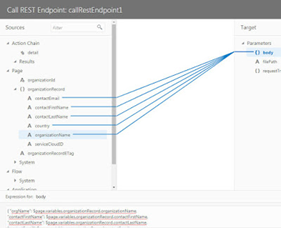
In OIC, we spend most of our time building the integration. Currently, when you view/edit the integration in editor, it shows the integration in vertical layout. Now, you can view/edit the integration in several ways:

· Canvas view

o Vertical: Displays the integration vertically.

o Horizontal: Displays the integration horizontally.

· Pseudo view: Displays the integration vertically with child nodes indented. Details about each node in the integration are displayed to the right.

In addition to the above, you can also view the integration outline style.You will need to enable "oic.ics.console.integration.layout" feature flag to enjoy this feature.

The above diagram shows how to select different views and how the integration looks like in vertical view layout.

Canvas view:

Canvas view allows you to select the layout. There are two options for the layout:

Vertical:

This is the default view mode of the integration. In this mode, the integration is shown vertically.

Horizontal:

While in Canvas view, you can switch the layout to Horizontal and the integration will be shown horizontally. Read the complete article here


PaaS Partner Community

For regular information on Oracle PaaS become a member in the SOA & BPM Partner Community for registration please visit www.oracle.com/goto/emea/soa (OPN account required) If you need support with your account please contact the Oracle Partner Business Center.

clip_image003 Blog clip_image005 Twitter clip_image004 LinkedIn image[7][2][2][2] Facebook clip_image002[8][4][2][2][2] Wiki

Technorati Tags: SOA Community,Oracle SOA,Oracle BPM,OPN,Jürgen Kress

Oracle Integration Cloud: CRUD Operation (Create) using Salesforce Adapter (Part-1) by Ankur Jain

image

We are writing a series of five blogs which will help to perform Create, Read, Update, Delete (CRUD) operation in SFDC using Oracle Integration Cloud Salesforce Adapter.

In the first part of the series, a Create Operation will be executed which will show how to insert data into Salesforce with few steps.

To complete this series, below are the pre-requisite that needs to be completed

  • Oracle Integration Cloud Subscription
  • Salesforce cloud Subscription
  • An SFDC custom object with name Employee__c with below elements

Other parts of the series:


PaaS Partner Community

For regular information on Oracle PaaS become a member in the SOA & BPM Partner Community for registration please visit www.oracle.com/goto/emea/soa (OPN account required) If you need support with your account please contact the Oracle Partner Business Center.

clip_image003 Blog clip_image005 Twitter clip_image004 LinkedIn image[7][2][2][2] Facebook clip_image002[8][4][2][2][2] Wiki

Technorati Tags: SOA Community,Oracle SOA,Oracle BPM,OPN,Jürgen Kress

A simple guide to use nested scope in orchestration by Arif Rafique

image

Wish you cloud have nested scopes in orchestration? Now, you can use nested scope in OIC integration! You will need to enable "oic.ics.console.integration.nested-try-scopes" feature flag to enjoy this feature. In this short blog, I will show you how to use nested Scope in your orchestration.

Scope activities allow users to group other child activities which have their own Variables, Fault and Event Handlers.

  • Create or Edit an integration
  • Drag a Scope activity onto the canvas or use the inline menu.


PaaS Partner Community

For regular information on Oracle PaaS become a member in the SOA & BPM Partner Community for registration please visit www.oracle.com/goto/emea/soa (OPN account required) If you need support with your account please contact the Oracle Partner Business Center.

clip_image003 Blog clip_image005 Twitter clip_image004 LinkedIn image[7][2][2][2] Facebook clip_image002[8][4][2][2][2] Wiki

Technorati Tags: SOA Community,Oracle SOA,Oracle BPM,OPN,Jürgen Kress
OCI – Load Balancer by Niall Commiskey

image

The Oracle Cloud Infrastructure Load Balancing service provides automated traffic distribution from one entry point to multiple servers reachable from your virtual cloud network (VCN). The service offers a load balancer with your choice of a public or private IP address, and provisioned bandwidth.

Public Load Balancer – accepts traffic from the Internet.

A public load balancer is regional in scope and requires two subnets, each in a separate availability domain. One subnet hosts the primary load balancer and the other hosts a standby load balancer to ensure accessibility even during an availability domain outage. 
A public load balancer consumes two private IP addresses, one from each host subnet.

Private Load Balancer To isolate your load balancer from the internet and simplify your security posture, you can create a private load balancer. The Load Balancing service assigns it a private IP address that serves as the entry point for incoming traffic.

So what do I need to try this out? Read the complete article here.


PaaS Partner Community

For regular information on Oracle PaaS become a member in the SOA & BPM Partner Community for registration please visit www.oracle.com/goto/emea/soa (OPN account required) If you need support with your account please contact the Oracle Partner Business Center.

clip_image003 Blog clip_image005 Twitter clip_image004 LinkedIn image[7][2][2][2] Facebook clip_image002[8][4][2][2][2] Wiki

Technorati Tags: SOA Community,Oracle SOA,Oracle BPM,OPN,Jürgen Kress
How to migrate from ICS to OIC? By Muthu Palanisamy

image 

In this blog I’d like to show you how to migrate Metadata from an ICS (Integration Cloud Service) instance to OIC (Oracle Integration Cloud) instance. Metadata that will be migrated includes the following:

· Integrations, Connections, Lookups, Libraries, Packages, Agent Groups, Custom Adapters etc. 

· Integrations in any state (in-progress, activated etc) will be migrated.

· All resources such as Lookups, Connections that are not referenced by integrations also will be migrated.

· Endpoint configuration (configured in connections).

· Certificates.

· Credentials stored in CSF store.

· Settings such as Database, Notification.

The migration tool automates some of the below tasks that otherwise have to be done manually if using manual export and import:

· Bulk export of all integrations along with their dependencies (such as Connections, Lookups etc) into a migration package.

· Migration of endpoint configuration and credentials

· Automatic replacement of host / port from source ICS instance to target OIC instance for "Integration calling Integration" use cases.

· Automatic "Test Connection"

· Automatic activation of previously activated integrations.

Enabling Migration in OIC

A feature flag has to be enabled in OIC to import content into OIC as part of migration. To turn on the feature flag, open a Service Request with Oracle support. Read the complete article here.


PaaS Partner Community

For regular information on Oracle PaaS become a member in the SOA & BPM Partner Community for registration please visit www.oracle.com/goto/emea/soa (OPN account required) If you need support with your account please contact the Oracle Partner Business Center.

clip_image003 Blog clip_image005 Twitter clip_image004 LinkedIn image[7][2][2][2] Facebook clip_image002[8][4][2][2][2] Wiki

Technorati Tags: SOA Community,Oracle SOA,Oracle BPM,OPN,Jürgen Kress

Little known way to change connections in an integration by Arif Rafique

image

Sometimes we want to change the connection(s) we are using in an integration. We may have the following use cases:

  • We have created an integration which uses connection A but want to replace that with connection B.
  • We have imported an integration which uses a Oracle Sales Cloud connection (Sample sales cloud) but we have already a Oracle Sales Cloud connection configured (My Sales Cloud) in our system and want to use that connection instead of using the connection that came with the integration.
  • We have cloned an integration and in the cloned integration we want to use a different connection.

In this blog, I will show you the trick to replace connection(s) in an integration !

Couple of points to remember before updating the connection in an integration.

  • The integration can’t be in locked or activated state.
  • Only connection of same adapter type can be replaced. You can’t replace a connection of Oracle Sales Cloud adapter with a connection of FTP adapter type.

I will utilize the integration update REST API to replace the connection. As an example, I will use the Incident details from Service Cloud Integration which is delivered as sample in OIC and uses ‘Sample Service Cloud’  as one of the connections. I will replace the ‘Sample Service Cloud’ connection with ‘My Service Cloud’ connection which I had already configured.

First, I will use the retrieve integration REST API to see the details of the ‘Incident details from Service Cloud’ integration. You can use curl or Postman REST client. Read the complete article here


PaaS Partner Community

For regular information on Oracle PaaS become a member in the SOA & BPM Partner Community for registration please visit www.oracle.com/goto/emea/soa (OPN account required) If you need support with your account please contact the Oracle Partner Business Center.

clip_image003 Blog clip_image005 Twitter clip_image004 LinkedIn image[7][2][2][2] Facebook clip_image002[8][4][2][2][2] Wiki

Technorati Tags: SOA Community,Oracle SOA,Oracle BPM,OPN,Jürgen Kress
Citi and Oracle Unlock Corporate Access to Treasury Services for Oracle ERP Cloud Customers

image

The Citi and Oracle ERP Banking as a Service (BaaS) Connector is now available, speeding integration and time to payment for the companies’ joint customers. With this, these organizations will be able to easily access Citi’s Treasury and Trade Solutions services via the Connector.

To compete at a global scale, enterprises must have a fast, efficient financial supply chain, from the transaction through to payment. With the Citi and Oracle ERP BaaS Connector, corporations can eliminate friction and complete transactions with one-click, real-time connectivity.

Using the CitiConnect® application programming interfaces (APIs), Oracle ERP Cloud customers can connect to the suite of Citi Treasury and Trade Solutions. This enables easy integration with Citi’s core treasury management functionality, which currently allows payment initiation and is soon expected to extend to transaction status inquiry and balance inquiry.

“At Citi, we are committed to providing clients with omni-channel experiences by seamlessly embedding our solutions into our clients’ existing treasury applications, making it easier to do business,” said Tapodyuti Bose, Global Head of Channel and Enterprise Services, Citi Treasury and Trade Solutions. “The symmetry between our customer base and Oracle’s ERP Cloud customers is extensive. With this offering, we are making it simpler and more time and cost effective for our joint customers to get business done.” Read the complete article here.


PaaS Partner Community

For regular information on Oracle PaaS become a member in the SOA & BPM Partner Community for registration please visit www.oracle.com/goto/emea/soa (OPN account required) If you need support with your account please contact the Oracle Partner Business Center.

clip_image003 Blog clip_image005 Twitter clip_image004 LinkedIn image[7][2][2][2] Facebook clip_image002[8][4][2][2][2] Wiki

Technorati Tags: SOA Community,Oracle SOA,Oracle BPM,OPN,Jürgen Kress
API-Key Based Authentication: Quickly and Easily by Anuj Kaushal

image

API-Key based authentication is a simple way for providing secure access to APIs. This involves the following steps:

  1. Pre-requisite: User logs in to the service portal and finds or generates an API-Key.
  2. The API-Key is shared with the client application.
  3. The client application makes a request for a resource using the API key.

Steps required in API Key based authentication.

* An API-key is simply a token that a client provides when making API calls.

How to invoke a REST API protected with an API-Key using Oracle Integration Cloud?

Oracle REST Adapter provides a comprehensive way for consuming external RESTful APIs. It provides a re-usable connection that can be used to specify the security policy for accessing protected APIs. Read the complete article here.


PaaS Partner Community

For regular information on Oracle PaaS become a member in the SOA & BPM Partner Community for registration please visit www.oracle.com/goto/emea/soa (OPN account required) If you need support with your account please contact the Oracle Partner Business Center.

clip_image003 Blog clip_image005 Twitter clip_image004 LinkedIn image[7][2][2][2] Facebook clip_image002[8][4][2][2][2] Wiki

Technorati Tags: SOA Community,Oracle SOA,Oracle BPM,OPN,Jürgen Kress
Innovate, Extend and Integrate Oracle SaaS – Evosys Oracle Webcast July 19th 2019 16:00 CET

Evosys Oracle WebcastSaaS applications alone are often not enough – extend & integrate them with PaaS powered solutions. 
Whether you are just starting your journey to the cloud or have fully embraced it, Oracle Cloud Platform has the most comprehensive suite of PaaS solutions to help you increase business agility and drive innovation in the cloud.


Boarding PaaS to cloud innovation

Agenda:
Introduction on Oracle PaaS services
Oracle PaaS solutions for Industry use cases Evosys
Oracle PaaS and Innovation Offerings from Evosys
Questions and Answers 

Speakers:
Ian Wallis, Business Development Director, Oracle EMEA
Dhwani Shah, Principal Consultant – Oracle PaaS Solutions and Oracle Technologies, Evosys

Schedule: July 19th 2019 16:00-17:00 CET

For details please visit the registration page here.


PaaS Partner Community

For regular information on Oracle PaaS become a member in the SOA & BPM Partner Community for registration please visit www.oracle.com/goto/emea/soa (OPN account required) If you need support with your account please contact the Oracle Partner Business Center.

clip_image003 Blog clip_image005 Twitter clip_image004 LinkedIn image[7][2][2][2] Facebook clip_image002[8][4][2][2][2] Wiki

Technorati Tags: SOA Community,Oracle SOA,Oracle BPM,OPN,Jürgen Kress