AIC – VB CS calling Process by Niall Commiskey

image

Very simple scenario here –
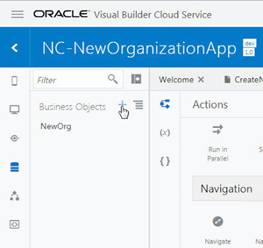
I create a new organization in a VB CS generated UI.
From this UI, I can kick off a PCS Process to approve the new organization.
It is very easy to create Business Object definitions in VB CS. the first 4 fields above are created by default (creationDate etc). VB CS knows about the processes deployed in my AIC instance, in my case, only the one.Read the complete article here.

PaaS Partner Community

For regular information on Oracle PaaS become a member in the SOA & BPM Partner Community for registration please visit www.oracle.com/goto/emea/soa (OPN account required) If you need support with your account please contact the Oracle Partner Business Center.

clip_image003 Blog clip_image005 Twitter clip_image004 LinkedIn image[7][2][2][2] Facebook clip_image002[8][4][2][2][2] Wiki

Technorati Tags: SOA Community,Oracle SOA,Oracle BPM,OPN,Jürgen Kress
Dynamic Process, Conditions and Scope by Jan Kettenis

image

In Oracle Integration Cloud’s Dynamic Processes activation/termination conditions can be based on case events. These events are related to the scope of the components they relate to, which implies some restrictions. The below explains how this works, and how to work around these restrictions.
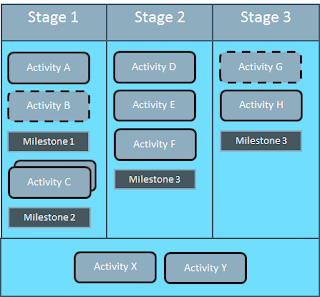
A Dynamic Process or Case (as I will call it in this article) in the Oracle Integration Cloud consists of four component types: the Case itself, Stages (phases), Activities, and Milestones. An Activity or Milestone is either in a particular Stage (in the picture below Activities A to H are), or global (Activities X and Y). Cases, Processes, Stages, Activities and Miletones cannot be nested (but a Case can initiate a sub-Case via an Activity, which I will discuss another time).

Except for the case itself, all other components can explicitly be activated/enabled or terminated/completed based on conditions. For example in the dynamic process above Milestone 1 is activated once Activity A is completed, and Stage 2 is to be activated once Stage 1 is completed.
A Stage implicitly completes when all work in that stage is done (i.e. all Activities), and a Case implicitly completes when all work in the case is done. Currently the status of a Case cannot be explicitly set using conditions, but I would expect this to become possible in some next version. In the meantime there is a REST API that can be used to close or complete a case. Read the complete article here.


PaaS Partner Community

For regular information on Oracle PaaS become a member in the SOA & BPM Partner Community for registration please visit www.oracle.com/goto/emea/soa (OPN account required) If you need support with your account please contact the Oracle Partner Business Center.

clip_image003 Blog clip_image005 Twitter clip_image004 LinkedIn image[7][2][2][2] Facebook clip_image002[8][4][2][2][2] Wiki

Technorati Tags: SOA Community,Oracle SOA,Oracle BPM,OPN,Jürgen Kress
Emerging PaaS Partner Community Forum 2019 April 8th-10th 2019 Spain

The conference for Oracle PaaS & SaaS Partnersimage

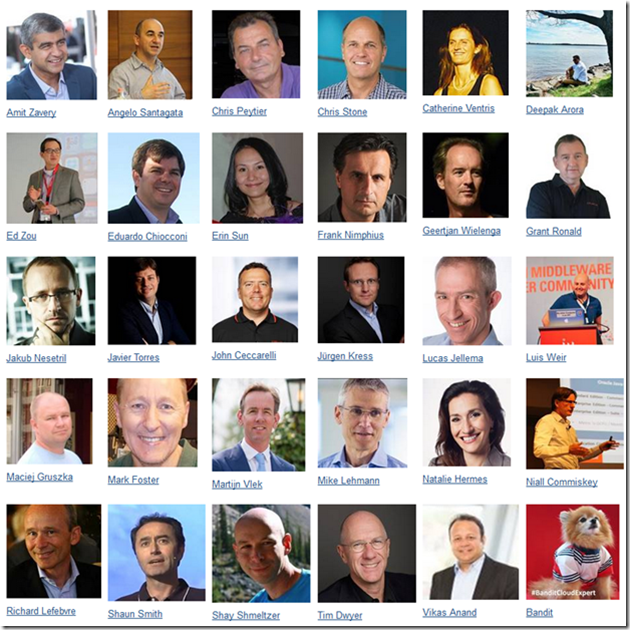
The Oracle emerging PaaS Partner Community Forum is a one week conference for cutting-edge software consultants, engineers and enterprise-level professionals. The #PaaSForum brings together partners who innovate SaaS and the world’s leading Oracle PaaS experts in the fields of integration, API management, process management, microservices & serverless, machine learning, digital assistant, content management and Blockchain.

Speakers:

image

For a complete list of speakers and the latest updates please see the conference program here.

Location & Schedule:

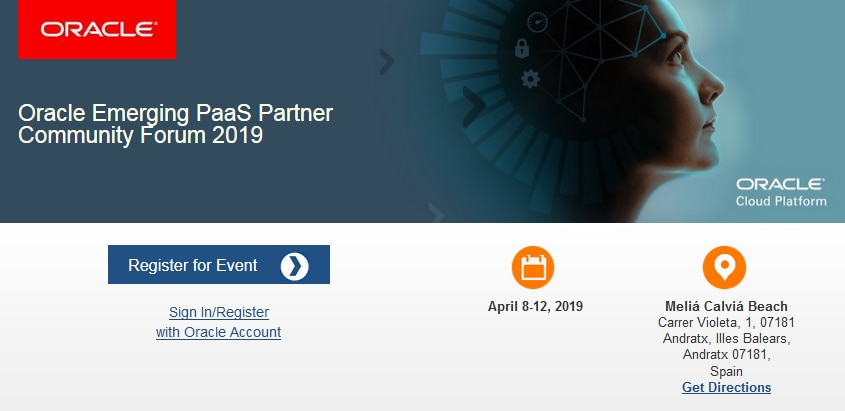
Meliá Calviá Beach
Carrer Violeta, 1, 07181 Andratx, Illes Balears, Spain
April 8th to April 12th 2019

For details please visit the registration page here.

PaaS Partner Community

For regular information on Oracle PaaS become a member in the SOA & BPM Partner Community for registration please visit www.oracle.com/goto/emea/soa (OPN account required) If you need support with your account please contact the Oracle Partner Business Center.

clip_image003 Blog clip_image005 Twitter clip_image004 LinkedIn image[7][2][2][2] Facebook clip_image002[8][4][2][2][2] Wiki

Technorati Tags: SOA Community,Oracle SOA,Oracle BPM,OPN,Jürgen Kress

Jarvis Pizzeria: Business Reports & Dashboards by Richard Olrichs & Marcel van de Glind & Marc Kuijpers

image 

Within the workspace there are some out of the box dashboards that you can use to monitor your instance. When you go to My Tasks and click Dashboard, by default the Health dashboard is shown.

There are a total of 5 default dashboards, Health, Open, Workload, Trend & Closed. You can use the filters on the right hand side to filter the dashboard.

The health dashboard will give you an instant, real-time view of the number of active processes running on your instance at this very moment, differentiated between the various states:

  • Active: this process is going on currently. Some tasks are being assigned or worked on.
  • Suspended: This process is currently suspended, waiting for some actions to occur. This would be the case if the process is triggered by some message catch, or other event.
  • Recoverable: your process has encountered some errors, and has an incomplete state, waiting to be recovered manually

To learn more about the default dashboards, visit the Process Cloud Documentation

Next to the default out of the box dashboards, it is also possible to create custom System Reports. For this we go to the second tab of the Dashboard, called Business Analytics. Here you can select your Data Source type, in this example Process with the Jarvis_Pizzeria application. You can pick from several Process related data for both the X Axis as well as the Y Axis. Read the complete article here.

PaaS Partner Community

For regular information on Oracle PaaS become a member in the SOA & BPM Partner Community for registration please visit www.oracle.com/goto/emea/soa (OPN account required) If you need support with your account please contact the Oracle Partner Business Center.

clip_image003 Blog clip_image005 Twitter clip_image004 LinkedIn image[7][2][2][2] Facebook clip_image002[8][4][2][2][2] Wiki

Technorati Tags: SOA Community,Oracle SOA,Oracle BPM,OPN,Jürgen Kress
Why to attend the Oracle emerging PaaS Partner Community Forum 2019?

Watch a short video partners talking about the conference.

The Oracle Emerging Partner Community Forum is a one week conference for cutting-edge software consultants, engineers and enterprise-level professionals. The #PaaSForum brings together partners who innovate SaaS and the world’s leading Oracle PaaS experts in the fields of integration, API management, process management, microservices & serverless, machine learning, digital assistant, content management and blockchain.

Location & Schedule

Meliá Calviá Beach

Carrer Violeta, 1, 07181 Andratx, Illes Balears, Spain

April 8th to April 10th 2019

For details please visit the registration page here.

PaaS Partner Community

For regular information on Oracle PaaS become a member in the SOA & BPM Partner Community for registration please visit www.oracle.com/goto/emea/soa (OPN account required) If you need support with your account please contact the Oracle Partner Business Center.

clip_image003 Blog clip_image005 Twitter clip_image004 LinkedIn image[7][2][2][2] Facebook clip_image002[8][4][2][2][2] Wiki

Technorati Tags: SOA Community,Oracle SOA,Oracle BPM,OPN,Jürgen Kress

Integrate HCM Cloud with Oracle Integration Cloud – PaaS Partner Community Webcast February 27th 2019

Attend our February edition of the PaaS Partner Community imageWebcast live on February 27th 2019.

Integrate HCM Cloud (global hr, talent management, workforce rewards, workforce management, work life)

Oracle Integration eliminates barriers between business applications through a combination of machine learning, embedded best-practice guidance, prebuilt integration, and process automation. Oracle Integration is unique in the market by leveraging Oracle application expertise to build an extensive library of adapters to Oracle and 3rd party SaaS and on-premises applications to enable you to deliver new business services faster. For more information please visit www.tinyurl.com/integrateSaaS

Presenter: Niall Commiskeyimage

Director Product Management

Visit the registration page here.

Call ID: 5566478 and Passcode: 264331

UK: +44 (0) 208 118 1001 & United States: 140 877 440 73

More Local Numbers

Schedule:

Wednesday February 27th 2019 16:00-17:00 CET

Watch live here

Missed our PaaS Partner Community Webcast? – watch the on-demand versions:

· Functions and Cloud Native

· Cloud trials & community update

· Oracle Integration Cloud Update

· Oracle OpenWorld 2018 Preview

· Innovate, Extend and Integrate SaaS Overview and Pricing

· Robotic Process Automation

· Autonomous Mobile Cloud

· PaaS Overview Webcast

· Blockchain

· API Platform Cloud Service part 2

· 3rd Generation API Gateways part1

· Oracle JET

· Oracle Visual Builder Cloud Service

· Container Native Application Development Platform

For the latest information please visit Community Updates Wiki page (Community membership required).


PaaS Partner Community

For regular information on Oracle PaaS become a member in the SOA & BPM Partner Community for registration please visit www.oracle.com/goto/emea/soa (OPN account required) If you need support with your account please contact the Oracle Partner Business Center.

clip_image003 Blog clip_image005 Twitter clip_image004 LinkedIn image[7][2][2][2] Facebook clip_image002[8][4][2][2][2] Wiki

Technorati Tags: SOA Community,Oracle SOA,Oracle BPM,OPN,Jürgen Kress
PaaS Partner YouTube Update February 2019

The February edition of the PaaS & Middleware Partner Update contains three topics:

  • emerging PaaS Partner Community Forum 2019
  • Digital assistant and Innovate SaaS hands-on trainings
  • HCM integration

For regular updates please subscribe to our YouTube channel here. Thanks for your likes and sharing the video on YouTube and LinkedIn. For the latest PaaS Community information please visit our Community update wiki here (Community membership required).

clip_image003 Blog clip_image005 Twitter clip_image004 LinkedIn image[7][2][2][2] Facebook clip_image002[8][4][2][2][2] Wiki

Technorati Tags: YouTube,SOA Community,Oracle SOA,Oracle BPM,Jürgen Kress,Middleware Update,Partner Update

SOA Suite 12c in Docker containers. Only a couple of commands, no installers, no third party scripts by Maarten Smeet

image

For developers, installing a full blown local SOA Suite environment has never been a favorite (except for a select few). It is time consuming and requires you to download and run various installers after each other. If you want to start clean (and you haven’t taken precautions), it could be you have to start all over again.

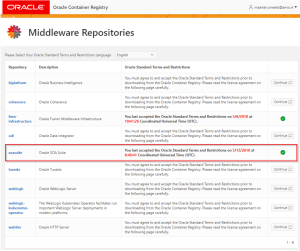
There is a new and easy way to get a SOA Suite environment up and running without downloading any installers in only a couple of commands without depending on scripts provided by any party other than Oracle. The resulting environment is an Oracle Enterprise Edition database, an Admin Server and a Managed Server. All of them running in separate Docker containers with ports exposed to the host. The 3 containers can run together within an 8Gb RAM VM.

The documentation Oracle provides in its Container Registry for the SOA Suite images, should be used as base, but since you will encounter some errors if you follow it, you can use this blog post to help you solve them quickly.

A short history

QuickStart and different installers

During the 11g times, a developer, if he wanted to run a local environment, he needed to install a database (usually XE), WebLogic Server, SOA Infrastructure, run the Repository Creation Utility (RCU) and one or more of SOA, BPM, OSB. In 12c, the SOA Suite QuickStart was introduced. The QuickStart uses an Apache Derby database instead of the Oracle database and lacks features like ESS, split Admin Server / Managed Server, NodeManager and several other features, making this environment not really comparable to customer environments. If you wanted to install a standalone version, you still needed to go through all the manual steps or automate them yourself (with response files for the installers and WLST files for domain creation). As an alternative, during these times, Oracle has been so kind as to provide VirtualBox images (like this one or this one) with everything pre-installed. For more complex set-ups Edwin Biemond / Lucas Jellema have provided Vagrant files and blog posts to quickly create a 12c environment. Read the complete article here.


PaaS Partner Community

For regular information on Oracle PaaS become a member in the SOA & BPM Partner Community for registration please visit www.oracle.com/goto/emea/soa (OPN account required) If you need support with your account please contact the Oracle Partner Business Center.

clip_image003 Blog clip_image005 Twitter clip_image004 LinkedIn image[7][2][2][2] Facebook clip_image002[8][4][2][2][2] Wiki

Technorati Tags: SOA Community,Oracle SOA,Oracle BPM,OPN,Jürgen Kress

Lessons in Oracle Cloud Password Management by Phil Wilkins

image

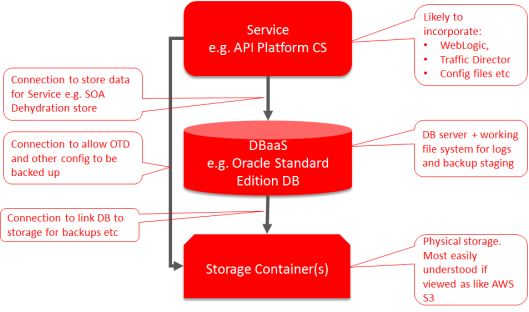
Oracle Cloud is growing and maturing at a tremendous rate if the breadth of PaaS capabilities is any indication.  However, there are a few gotchas out there, that can cause some headaches if they get you. These typically relate to processes that impact across different functional areas. A common middleware stack (API CS, SOA CS, OIC etc) will look something like the following:

As the diagram shows when you build the cloud services, the layers get configured with credentials to the lower layers needed (although Oracle have in the pipeline the Oracle managed version of many services where this is probably going to be hidden from us).when comes credentials Oracle (rightly so) reminds you that your password should be changed on a regular basis.  What is not so clear is that this has an impact on the linkages between the layers.

Once you have changed you password, if you created and used your credentials to authenticate between layers, if you don’t then correct the details on each of the layers then things will start breaking.  Whilst the service to database is obvious and relatively easy to remember, after all these services are more than likely on your dashboard as well. But, because storage isn’t by default shown on the dashboard it becomes very easy to over look.

The impact of this can be subtle at first, as the DBaaS appears to run its DB storage within the VM it will continue to run without issue.  If you have the DB configured to backup automatically, the backups will kind of work.  I say kind of, because what happens is that the DB writes to a file partition on the DBaaS VM, once the backup completes, these files get transferred to Storage. But, now the credentials are impacted this fails, but the cloud doesn’t automatically alert you to the fact, so unless you check regularly backups could fail for a longtime. You only see trouble when the file partition becomes full. This also impacts any DB working space. Net result, is sooner or later the DB can’t handle queries from the application and everything grinds to a stop. Read the complete article here.

PaaS Partner Community

For regular information on Oracle PaaS become a member in the SOA & BPM Partner Community for registration please visit www.oracle.com/goto/emea/soa (OPN account required) If you need support with your account please contact the Oracle Partner Business Center.

clip_image003 Blog clip_image005 Twitter clip_image004 LinkedIn image[7][2][2][2] Facebook clip_image002[8][4][2][2][2] Wiki

Technorati Tags: SOA Community,Oracle SOA,Oracle BPM,OPN,Jürgen Kress
Oracle Emerging PaaS Partner Community Forum April 8th-10th 2019

imageThe Oracle Emerging Partner Community Forum is a one week conference for cutting-edge software consultants, engineers and enterprise-level professionals. The #PaaSForum brings together partners who innovate SaaS and the world’s leading Oracle PaaS experts in the fields of integration, API management, process management, microservices & serverless, machine learning, digital assistant, content management and blockchain.

Conference tracks

  Enterprise Integration & Process

Logo  Application Development with Microservices, Containers and Serverless

  Innovate, extend and integrate SaaS

  Development tools, digital assistant & DevOps

  Innovation with blockchain, machine learning, IoT & content

  Best practices from partners & ACE team

Location & Schedule

Meliá Calviá Beach

Carrer Violeta, 1, 07181 Andratx, Illes Balears, Spain

April 8th to April 10th 2019

For details please visit the registration page here.

PaaS Partner Community

For regular information on Oracle PaaS become a member in the SOA & BPM Partner Community for registration please visit www.oracle.com/goto/emea/soa (OPN account required) If you need support with your account please contact the Oracle Partner Business Center.

clip_image003 Blog clip_image005 Twitter clip_image004 LinkedIn image[7][2][2][2] Facebook clip_image002[8][4][2][2][2] Wiki

Technorati Tags: SOA Community,Oracle SOA,Oracle BPM,OPN,Jürgen Kress