Oracle Management Cloud: Find SOA Suite issues quick and easy by MichelSchildmeijer

image

One of the services which are delivered by the Oracle Management Cloud is the monitoring of infrastructure. Now in this case, infrastructure spans from host to software platform. In this blogpost I will try to explain how you can effectively behind issues in your Oracle SOA Suite operational environment. OMC can monitor some parts specific to the SOA suite, in fact all the engines which are enclosed in a SOA Suite running envrioment. These are:

  • The BPEL engine
  • The Mediator engine
  • The Descion Service Engine or Business Rules Engine

I simulated a test which processed a lot of transactions through the payment process of my company. SOA Suite was handling this payment process through an OSB service in the frontend and an enrichment though a SOA composite which did a validation based on some rules.

The company deployed a new release and adapter to get more benefit out of it.

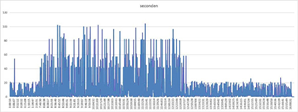
During tests, I suddeny received an alert from OMC that the error rate on the BPEL engine was increased. When I looked into the Performance table of my soainfra entity I found the following:

Click on the SOA Composite field I could detect which composite was causing the error, the ValidatePayment. Read the complete article here.

PaaS Partner Community

For regular information on Oracle PaaS become a member in the SOA & BPM Partner Community for registration please visit www.oracle.com/goto/emea/soa (OPN account required) If you need support with your account please contact the Oracle Partner Business Center.

Blog Twitter LinkedIn image[7][2][2][2] Facebook clip_image002[8][4][2][2][2] Wiki

Technorati Tags: SOA Community,Oracle SOA,Oracle BPM,OPN,Jürgen Kress
OSB: Disable Chunked Streaming Mode recommendation by Martien van den Akker

image 
Intro

These weeks I got involved in a document generation performance issue. This ran for several months, maybe years even. But it stayed quite unclear what the actual issue was.
Often we got complaints that document generation from the front-end application (based on Siebel) was taking very long. End users often hit the button several times, but with no luck. Asking further, it did not mean that there appeared a document in the content management system (Oracle UCM/WCC). So, we concluded that it wasn’t so much a performance issue, but an exception along the process of document generation. Since we upgraded BI Publisher to 12c, it was figured that it might got something to do with that. But we did not find any problems with BI Publisher, itself. Also, there was an issue with Siebel it’s self, but that’s also out of the scope of this article.

The investigation

First, on OSB the retry interval of the particular Business Service was decreased from 60 seconds to 10. And the performance increased. Since the retry interval was shorter, OSB does a retry on shorter notice. But of course this did not solve the problem.
As Service developers we often are quite laconical about retries. We make up some settings. Quite default is an interval of 30 seconds and a retry count of 3. But, we should actually think about this and figure out what the possible failures could be and what a sensible retry setting would be. For instance: is it likely that the remote system is out of order? What are the SLA’s for hoisting it back up again? If the system startup is 10 minutes, then a retry count of 3 and interval of 30 seconds is not making sense. The retries are done long before the system’s up again. But of course, in our case sensible settings for system outage would cause delays being too long. We apparently needed to cater for network issues. Read the complete article here.

PaaS Partner Community

For regular information on Oracle PaaS become a member in the SOA & BPM Partner Community for registration please visit www.oracle.com/goto/emea/soa (OPN account required) If you need support with your account please contact the Oracle Partner Business Center.

Blog Twitter LinkedIn image[7][2][2][2] Facebook clip_image002[8][4][2][2][2] Wiki

Technorati Tags: SOA Community,Oracle SOA,Oracle BPM,OPN,Jürgen Kress
SOA Suite 12c: keep running instances using ANT by Martien van den Akker

image

At my current customer I implemented a poor man’s devops solution for Release and Deploy. It was based on a framework created as bunch of Ant projects, that I created years ago. It was based on scripts from Edwin Biemond. See for instance here, here and here. I never wrote about my solution, because although I refactored them quite intensively, the basics were already described thoroughly by him.
What I did was that I modularized the lot, split the environment property files, added logging, added OSB 12c  support, based on the config jar tool, etc.
One thing I ran into this week was that at first deployment from our team to the test environment using my framework, the running instances for the BPM projects were aborted.
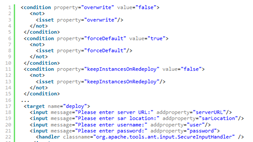
Now, if you take a look at the deploy.sarLocation target in Edwin’s article about deploying soa suite composites  you’ll find that he also supported the overwrite and forceDefault properties.
When re-deploying a composite from JDeveloper you’re probably familiar with the ‘keep running instances’ checkbox. I was looking for the ANT alternative in the ${oracle.home}/bin/ant-sca-deploy.xml scripting. First I looked in the 12c docs (see 47.9.4 How to Use ant to Deploy a SOA Composite Application), but it is not documented there.
But when I opened the particular ant-sca-deploy.xml script I read: Read the complete article here.

PaaS Partner Community

For regular information on Oracle PaaS become a member in the SOA & BPM Partner Community for registration please visit www.oracle.com/goto/emea/soa (OPN account required) If you need support with your account please contact the Oracle Partner Business Center.

Blog Twitter LinkedIn image[7][2][2][2] Facebook clip_image002[8][4][2][2][2] Wiki

Technorati Tags: SOA Community,Oracle SOA,Oracle BPM,OPN,Jürgen Kress
Good SOA Pipeline Plumbing by Gregory Hughlett

image

Starting Up

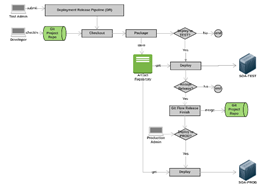
The arrival of the Jenkins Pipeline feature coincided with the the addition of Maven in the Oracle Fusion Middleware 12c release.  Jenkins pipelines now easily leverage Maven phases and goals for Fusion Middleware application deployments, including SOA/BPM composite applications and Service Bus projects.  This is the first in a series of blogs that will present three deployment workflows (pipelines) implemented in Jenkins for Oracle SOA projects.  The workflows will utilize Git source control, Git Flow branching methodology and scripts.  It also assumes the use of a managed Maven repository where application and FMW Maven artifacts are centralized.  Although the blogs primarily address SOA, there will be discussions about Metadata Services (MDS) and Service Bus (OSB) deployments.     

Although the approach defined here in Jenkins is leverages open source tools organizations should weigh the approach outlined here to the benefits (e.g. support and upgrades) that a commercial product brings to the table, like MyST from Rubicon Red.  MyST provides both platform provisioning and application release management tools that enable you to move the associated WebLogic artifacts (like data sources, queues, topics) when the application is promoted to higher environments.  Both are versioned nicely in MyST and easily migrated in the MyST release management dashboard. 

Jenkins however is the most widely adopted open source build server available, highly scalable, with a very large library of plugins to accomplish virtually any build task.  Jenkins provides a way to automate the tasks associated with building and deploying a application component using the Groovy language that leverages an extensive plugin library exposed through Java, referred to as a "pipeline".   The pipeline provides a graphical view of the deployment, as a series of stages, e.g. "Checkout", "Package", "Deploy", "Test".   Additionally there are manual gateways that can be implemented in a pipeline that only certain groups or users can performed, in the form of role-based assignments. Read the complete article here.

PaaS Partner Community

For regular information on Oracle PaaS become a member in the SOA & BPM Partner Community for registration please visit www.oracle.com/goto/emea/soa (OPN account required) If you need support with your account please contact the Oracle Partner Business Center.

Blog Twitter LinkedIn image[7][2][2][2] Facebook clip_image002[8][4][2][2][2] Wiki

Technorati Tags: SOA Community,Oracle SOA,Oracle BPM,OPN,Jürgen Kress
Enable WebService test client on SOA/BPM production mode environments by Martien van den Akker

image


At my current assignment I need to trouble shoot the identity service because of a BPM->OID coupling. I use the support document 1327140.1 for it, that suggest to test http://<soa-server&gt;:<port>/integration/services/IdentityService/identity
Doing so in a production mode soa or bpm environment, you’ll soon find out that it uses the WebService test client via uri /ws_utc, and that this does not work. Resulting in http-404 Not found errors.
First I found a blog of Maarten of Amis mentioning this as well. But unfortunately, he could not get around it either. But luckily I found note 1915317.1, that tells me that the WebServices test Client is not enabled by default.
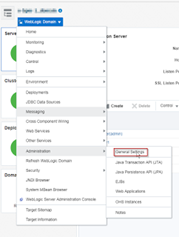
You can enable it on your domain via the EM: Read the complete article here.

PaaS Partner Community

For regular information on Oracle PaaS become a member in the SOA & BPM Partner Community for registration please visit www.oracle.com/goto/emea/soa (OPN account required) If you need support with your account please contact the Oracle Partner Business Center.

Blog Twitter LinkedIn image[7][2][2][2] Facebook clip_image002[8][4][2][2][2] Wiki

Technorati Tags: SOA Community,Oracle SOA,Oracle BPM,OPN,Jürgen Kress
PaaS – How to setup an Oracle Integration Cloud instance by Onkar Shoker

image

What is Oracle Cloud Integration?
As you may be aware, Oracle have released the next installment of their PaaS Integration products: Oracle Integration Cloud. Don’t be alarmed, the Oracle Integration Cloud is not a brand new product, but it is rather a bundle of existing PaaS offerings.
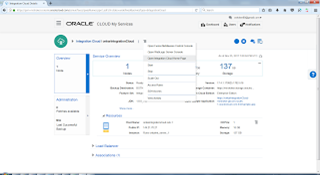
A new option has been added under the PaaS Integration options: ‘App Integration’ (Oracle Integration Cloud).
Oracle Integration Cloud comes with:

  • Integrations (ICS)
  • Processes (PCS)
  • Visual Builder (VBCS, previously known as ABCS)
  • Insights / Integration Analytics

Oracle Integration Cloud, Oracle’s compelling new cloud offering combines Application Integration, Process Automation, Visual Application Building and Integration Analytics into one unified cloud service. Read the complete article here.


PaaS Partner Community

For regular information on Oracle PaaS become a member in the SOA & BPM Partner Community for registration please visit www.oracle.com/goto/emea/soa (OPN account required) If you need support with your account please contact the Oracle Partner Business Center.

Blog Twitter LinkedIn image[7][2][2][2] Facebook clip_image002[8][4][2][2][2] Wiki

Technorati Tags: SOA Community,Oracle SOA,Oracle BPM,OPN,Jürgen Kress

Create Connection using external WSDL in Oracle Integration Cloud Service by Ankur Jain

image

Let’s assume we have some custom WSDL and want to use this WSDL in Oracle Integration Cloud Service.
ICS provides SOAP adapter that allows us to create SOAP connection with the WSDL that is locally saved in our desktop. Let’s deep dive and see how to use the existing WSDL.
Create a SOAP connection with below steps:

  • Click Create button from the Connection page
  • Search SOAP and Select SOAP adapter

PaaS Partner Community

For regular information on Oracle PaaS become a member in the SOA & BPM Partner Community for registration please visit www.oracle.com/goto/emea/soa (OPN account required) If you need support with your account please contact the Oracle Partner Business Center.

Blog Twitter LinkedIn image[7][2][2][2] Facebook clip_image002[8][4][2][2][2] Wiki

Technorati Tags: SOA Community,Oracle SOA,Oracle BPM,OPN,Jürgen Kress
Integrate Sugar CRM & Eloqua in few hours using Oracle Integration Cloud Service by Ramanandh (Ram) Sankaralingam

image

Integration projects are traditionally considered as time consuming and expensive and the same old story doesn’t apply any more in modern Cloud platform era.

With services like ICS, customers can integrate enterprise applications and go live in 2-3 weeks and this has been leveraged by quite a number of customers in ANZ recently.

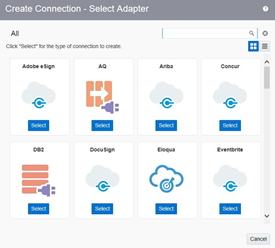
This article is aimed at showcasing one such quick integration developed between most popular open source Sugar CRM and a very commonly used marketing application(Oracle Eloqua). The rest of the article shows the detailed steps how to do this integration in just few hours without writing any code.

Step 1 : Log into ICS

Log into ICS console using your credentials. Read the complete article here.

PaaS Partner Community

For regular information on Oracle PaaS become a member in the SOA & BPM Partner Community for registration please visit www.oracle.com/goto/emea/soa (OPN account required) If you need support with your account please contact the Oracle Partner Business Center.

Blog Twitter LinkedIn image[7][2][2][2] Facebook clip_image002[8][4][2][2][2] Wiki

Technorati Tags: SOA Community,Oracle SOA,Oracle BPM,OPN,Jürgen Kress
Oracle Integration Cloud (OIC) – the cloud platform for Integration and Automation by Niall Commiskey

image

Here a simple example, concentrating on Integration and Process.
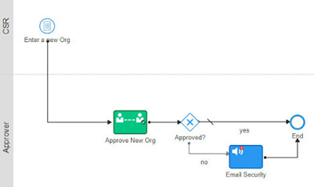
The use case – user enters a new organization via a form, PCS is called too kick off an approvals process, if approved – call ICS to create the Organization in Service Cloud.

I begin by creating an Integration that accepts an organization name(String), maps that to the Name field in the Service Cloud Organization business object and then creates the Organization in Service Cloud.
I click on the Integrations link above to enter the Integration design time – yes, it is ICS. Read the complete article here.


PaaS Partner Community

For regular information on Oracle PaaS become a member in the SOA & BPM Partner Community for registration please visit www.oracle.com/goto/emea/soa (OPN account required) If you need support with your account please contact the Oracle Partner Business Center.

Blog Twitter LinkedIn image[7][2][2][2] Facebook clip_image002[8][4][2][2][2] Wiki

Technorati Tags: SOA Community,Oracle SOA,Oracle BPM,OPN,Jürgen Kress
Integration Insight in Oracle Integration Cloud (OIC) by Niall Commiskey

image

Insight is a great value add to integration and process in OIC.
It allows you to see exactly whats going on in your Integrations and Processes,
be they in the cloud, on prem, or a combination of both. Here is an Analytics tool
that works OOTB with SOA Suite, SOA CS, ICS and PCS.

Key Features

1. Business Monitoring of Integration Cloud applications and heterogeneous cloud
    and on-premises environments
2. Define Business Milestones and Metrics from your browser with no coding
3. Identify problems when they happen
4. Facilitate business to IT communication

Benefits

1. Real-time visibility into the business
2. Puts business owner in control
3. Provides early warnings to prevent business failure
4. No costly development engagement

Check out the full OIC docs, which are available here
So now to Insight – what are the actual components and the mechanics of using it?
If you are new to it, then I suggest you check out my previous post here for a concise
introduction to the product and its components.
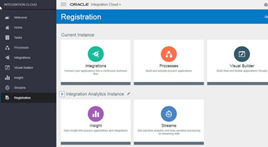
Within OIC – Insight is provisioned separately so –

Step 1 – make sure Insight is registered in your environment. Read the complete article here.

PaaS Partner Community

For regular information on Oracle PaaS become a member in the SOA & BPM Partner Community for registration please visit www.oracle.com/goto/emea/soa (OPN account required) If you need support with your account please contact the Oracle Partner Business Center.

Blog Twitter LinkedIn image[7][2][2][2] Facebook clip_image002[8][4][2][2][2] Wiki

Technorati Tags: SOA Community,Oracle SOA,Oracle BPM,OPN,Jürgen Kress