Using a Multi-Instance Subprocess as a Complex Gateway in Oracle PCS by Dan Atwood

image

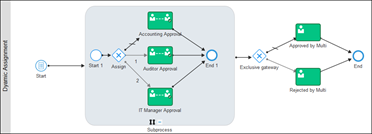
To speed the time it takes for a work item instance to flow through a process, copies of the instance can be sent to people in multiple roles simultaneously in the Oracle Integration Cloud Process Cloud Service (PCS).  Someone in each of the roles can then approve or reject the work item instance.  The challenge comes when an early release from all of the parallel copies is desired when anyone in any of the roles rejects their instance and the original work item instance should then continue in the process.

The Business Process Model and Notation (BPMN) has a complex gateway artifact with this process pattern in mind. When needed, the complex gateway’s early release capability makes it one of the most powerful tools process modelers have today when designing executable BPMN processes.  Currently, PCS does not support complex gateways. Because its functionality often needed, this blog describes how to duplicate its functionality when modeling processes using PCS.

Recently added to PCS in May 2017, I recommend that the use of a multi-instance subprocess to do this because:

  • One of the multi-instance subprocess activity’s options is to send work item instances to people in multiple roles simultaneously
  • Each person in a role can approve or reject the work item instances sent to them
  • If one person rejects the instance, an early release can occur by defining a termination condition in its properties and the original instance can then leave the multi-instance subprocess
  • If a rejection occurs, all of the other copies can automatically be removed from the other role queues

Antonis Antoniou has written an excellent blog on the PCS multi-instance subprocess.  This expands the scope of what he wrote a little to include how to assign the instances spawned to people in different roles, and shows how to cause an early release occur when a one person rejects their copy of the instance. Read the complete article here.

PaaS Partner Community

For regular information on Oracle PaaS become a member in the SOA & BPM Partner Community for registration please visit www.oracle.com/goto/emea/soa (OPN account required) If you need support with your account please contact the Oracle Partner Business Center.

Blog Twitter LinkedIn image[7][2][2][2] Facebook clip_image002[8][4][2][2][2] Wiki

Technorati Tags: SOA Community,Oracle SOA,Oracle BPM,OPN,Jürgen Kress
Jarvis Pizzeria: Using the REST interface to start a Process by Richard Olrichs & Marcel van de Glind

image

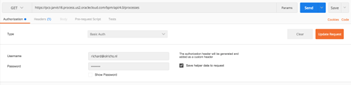
In the previous blog, we already explained how you can start your process from a SOAP interface. It is also possible to do this with a REST call. For this you need to find out a couple of things about your process after which you can do a post on the Oracle API to start the process. You can use any REST client you want, in this example we use Postman.

First of all, you need to query the process definitions API. This can be found by putting /bpm/api/4.0/process-definitions after the baseUrl, in our example: Read the complete article here.

PaaS Partner Community

For regular information on Oracle PaaS become a member in the SOA & BPM Partner Community for registration please visit www.oracle.com/goto/emea/soa (OPN account required) If you need support with your account please contact the Oracle Partner Business Center.

Blog Twitter LinkedIn image[7][2][2][2] Facebook clip_image002[8][4][2][2][2] Wiki

Technorati Tags: SOA Community,Oracle SOA,Oracle BPM,OPN,Jürgen Kress
Jarvis Pizzeria: Deployment and using the workspace by Richard Olrichs & Marcel van de Glind

image

Having played around with all the features PCS has to offer it is now time to see some action. In this blog we will show you how to deploy your application, start the application and see how it behaves within the workspace.

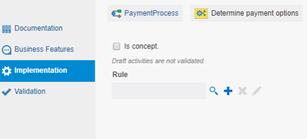
But first of all, we need to have a application that is ready to deploy. In other words, our minimal deployable product consists of an application without any errors. Pressing the validate button in the top-right corner will tell you the current state of the implementation.

Unfortunately, we ran into a bunch of errors! Mostly due to missing implementations of service calls. The good thing however is the “Fix” link.

In contrast to JDeveloper, clicking the “Fix”-link will bring you directly to the – in this scenario – properties screen to fix the issue. Oops, we forgot to select a ruleset for our business rule activity. Read the complete article here.

PaaS Partner Community

For regular information on Oracle PaaS become a member in the SOA & BPM Partner Community for registration please visit www.oracle.com/goto/emea/soa (OPN account required) If you need support with your account please contact the Oracle Partner Business Center.

Blog Twitter LinkedIn image[7][2][2][2] Facebook clip_image002[8][4][2][2][2] Wiki

Technorati Tags: SOA Community,Oracle SOA,Oracle BPM,OPN,Jürgen Kress
Jarvis Pizzeria: Using an imported XSD in PCS by Richard Olrichs & Marcel van de Glind

image

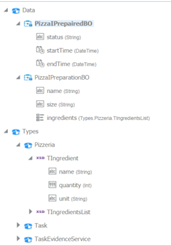
In the post  Import the 12c On-premises Preparation Process we saw the Business Types that were imported (also shown here)

We already stated that we had an issue with enumerations. But is this the only issue with the xsd? Unfortunately not, as will become clear soon.

Making task forms was not part of the import blog, however, in this blog we are going to do this. We will do this based on the imported xsd. So let’s get started. Read the complete article here.

PaaS Partner Community

For regular information on Oracle PaaS become a member in the SOA & BPM Partner Community for registration please visit www.oracle.com/goto/emea/soa (OPN account required) If you need support with your account please contact the Oracle Partner Business Center.

Blog Twitter LinkedIn image[7][2][2][2] Facebook clip_image002[8][4][2][2][2] Wiki

Technorati Tags: SOA Community,Oracle SOA,Oracle BPM,OPN,Jürgen Kress

Jarvis Pizzeria: Testing in PCS against the Development or Production environment by Richard Olrichs & Marcel van de Glind

image

Within PCS there are actually two different environments, a development environment and the production environment. Once you have deployed your application it is available in the production environment as a certain version of the application. However, you might want to test your application before you deploy a new version. You can also test your environment against the so called ‘development environment’.

The blue button bar has a Test as well as an Deploy button on the top right. Read the complete article here.

PaaS Partner Community

For regular information on Oracle PaaS become a member in the SOA & BPM Partner Community for registration please visit www.oracle.com/goto/emea/soa (OPN account required) If you need support with your account please contact the Oracle Partner Business Center.

Blog Twitter LinkedIn image[7][2][2][2] Facebook clip_image002[8][4][2][2][2] Wiki

Technorati Tags: SOA Community,Oracle SOA,Oracle BPM,OPN,Jürgen Kress

Jarvis Pizzeria: Handling SOAP Faults in PCS by Richard Olrichs & Marcel van de Glind

image 

As we are very optimistic developer we started out with modeling and testing the happy flow of our Jarvis pizzeria. But as experience learns it is the big bad world that obliges us to deal with both expected and unexpected failures. This blog post we will look into the handling of SOAP faults that PCS has to offer out-of-the-box.

As a starting point we have created a basic process with one service call:

This SOAP Fault service is connected to mockable.io service that is configured to throw back a remote fault, i.e. the invoked service endpoint cannot be reached. Let’s deploy the process, start an instance and see in the workspace what has happened.

Note: to use the OOTB error handling leave the fault policy checkbox marked during deployment: Read the complete article here.

PaaS Partner Community

For regular information on Oracle PaaS become a member in the SOA & BPM Partner Community for registration please visit www.oracle.com/goto/emea/soa (OPN account required) If you need support with your account please contact the Oracle Partner Business Center.

Blog Twitter LinkedIn image[7][2][2][2] Facebook clip_image002[8][4][2][2][2] Wiki

Technorati Tags: SOA Community,Oracle SOA,Oracle BPM,OPN,Jürgen Kress
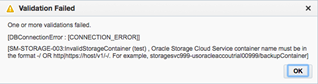
Fixed SOA Suite CS Error in Oracle Cloud: Validation Failed – Unable to Create Service / Invalid Storage Container by Frank Munz

image

This post should provide some help for those working for the first time with SOA CS in the Oracle Cloud.

After working a lot with ACCS, OCCS, Developer CS, and JCS, surprisingly I struggled with the provisioning of SOA CS in the Oracle Cloud. Part of the problem was that the storage service seems to be accessed in (at least) three different ways within OPC .

  1. The syntax StorageName-IDDomain/chosenContainerName workes fine for DB and Java CS. There also you can create the storage container while provisioning the service.
  2. I have seen slides at OOW2017 where the storage container name was specified as a single identifier, e.g. “xyzcontainer” (however I cannot find the my paparazzi for that cloud service right now).
  3. For SOA CS none of this worked. Also the reported solution in the ODC forum did not apply in this case. The tooltip actually suggested the syntax 1).
    Also the error message(s) is not that helpful. “Validation Failed” could mean anything. “Check the log file for the real cause” makes me wonder in case of a PaaS service. What worked for SOA CS is using pre-creating the container and using the REST endpoint of the storage service.
Some Details

For SOA CS, when using the syntax that nicely worked for DB and JCS as described in 1) be prepared to see the following error message: Read the complete article here.

PaaS Partner Community

For regular information on Oracle PaaS become a member in the SOA & BPM Partner Community for registration please visit www.oracle.com/goto/emea/soa (OPN account required) If you need support with your account please contact the Oracle Partner Business Center.

Blog Twitter LinkedIn image[7][2][2][2] Facebook clip_image002[8][4][2][2][2] Wiki

Technorati Tags: SOA Community,Oracle SOA,Oracle BPM,OPN,Jürgen Kress
Provisioning Oracle SOA Cloud Service

image

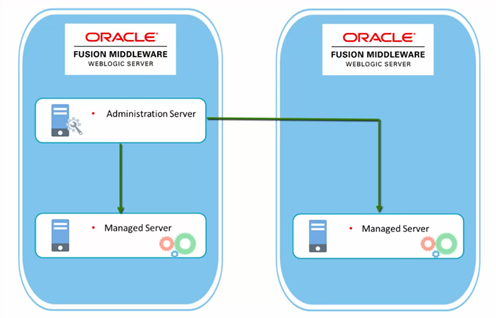
This video is part of the My First Day of SOA Cloud Service hands-on tour. It presents conceptual information in support of companion hands-on activity that guides you through Provisioning Oracle SOA Cloud Service. Watch the video here.

PaaS Partner Community

For regular information on Oracle PaaS become a member in the SOA & BPM Partner Community for registration please visit www.oracle.com/goto/emea/soa (OPN account required) If you need support with your account please contact the Oracle Partner Business Center.

Blog Twitter LinkedIn image[7][2][2][2] Facebook clip_image002[8][4][2][2][2] Wiki

Technorati Tags: SOA Community,Oracle SOA,Oracle BPM,OPN,Jürgen Kress

ICS –> NetSuite to Zendesk integration by Niall Commiskey

image

Here is a simple example of integrating NetSuite with Zendesk.

We will raise a ticket in Zendesk for a case, created in NetSuite.

I start by creating a NetSuite connection. This process is described in the previous post, available here
I then leverage the ICS REST adapter to access Zendesk. BTW. I logged in to Zendesk and took advantage of their free 30 day trial offer. So my Zendesk account is as follows. Read the complete article here.

PaaS Partner Community

For regular information on Oracle PaaS become a member in the SOA & BPM Partner Community for registration please visit www.oracle.com/goto/emea/soa (OPN account required) If you need support with your account please contact the Oracle Partner Business Center.

Blog Twitter LinkedIn image[7][2][2][2] Facebook clip_image002[8][4][2][2][2] Wiki

Technorati Tags: SOA Community,Oracle SOA,Oracle BPM,OPN,Jürgen Kress

Oracle Critical Patch Update Advisory Fusion Middleware – July 2018

Affected Products and Patch Information

Security vulnerabilities addressed by this Critical Patch Update affect the products listed below. The product area is shown in the Patch Availability Document column. Please click on the links in the Patch Availability Document column below to access the documentation for patch availability information and installation instructions.

For details please visit the website here.

Affected Products and Versions

FMW Platform, versions 12.2.1.2.0, 12.2.1.3.0

Hyperion Data Relationship Management, version 11.1.2.4.330

Hyperion Financial Reporting, version 11.1.2

Oracle API Gateway, version 11.1.2.4.0

Oracle BI Publisher, versions 11.1.1.7.0, 11.1.1.9.0, 12.2.1.2.0, 12.2.1.3.0

Oracle Business Process Management Suite, versions 11.1.1.7.0, 11.1.1.9.0, 12.1.3.0.0, 12.2.1.2.0, 12.2.1.3.0

Oracle Endeca Information Discovery Studio, versions 3.1, 3.2

Oracle Enterprise Data Quality, version 12.2.1.3.0

Oracle Enterprise Repository, versions 11.1.1.7.0, 12.1.3.0.0

Oracle Fusion Middleware MapViewer, versions 12.2.1.2, 12.2.1.3

Oracle Fusion Middleware, versions 12.2.1.2, 12.2.1.3

Oracle Internet Directory, version 11.1.1.9.0

Oracle Java SE Embedded, version 8u171

Oracle Java SE, versions 6u191, 7u181, 8u172, 10.0.1

Oracle JDeveloper, versions 12.1.3.0.0, 12.2.1.2.0, 12.2.1.3.0

Oracle JRockit, version R28.3.18

Oracle Outside In Technology, version 8.5.3

Oracle SOA Suite, versions 11.1.1.7.0, 11.1.1.9.0, 12.1.3.0.0, 12.2.1.2.0, 12.2.1.3.0

Oracle Tuxedo, versions 12.1.1, 12.1.3, 12.2.2

Oracle WebCenter Portal, versions 11.1.1.9.0, 12.2.1.2.0, 12.2.1.3.0

Oracle WebLogic Server, versions 10.3.6.0, 12.1.3.0, 12.2.1.2, 12.2.1.3


For details please visit the website here.


PaaS Partner Community

For regular information on Oracle PaaS become a member in the SOA & BPM Partner Community for registration please visit www.oracle.com/goto/emea/soa (OPN account required) If you need support with your account please contact the Oracle Partner Business Center.

Blog Twitter LinkedIn image[7][2][2][2] Facebook clip_image002[8][4][2][2][2] Wiki

Technorati Tags: SOA Community,Oracle SOA,Oracle BPM,OPN,Jürgen Kress