Delivering the Enterprise to the Edge

image

Introducing an integrated, end-to-end solution for the Internet of Things (IoT) from Oracle and Wind River®. Extend the enterprise to the edge.

Industrial companies can now spend less time managing device connectivity, manageability, and security.

Oracle IoT Cloud Service has integrated with Wind River Helix Device Cloud to automate the contextualization of sensor data at the edge with enterprise applications. Device data can be quickly connected to back-end ERP, CRM, and asset management, and other domain-specific enterprise applications. This integration offers a simple configuration and deployment experience, so customers can power-on a device and have it securely direct data to their enterprise applications.

This new integrated platform for industrial customers reduces time spent on infrastructure construction and device management, so more focus can be placed on realizing IoT business outcomes. Read the complete article here.

SOA & BPM Partner Community

For regular information on Oracle SOA Suite become a member in the SOA & BPM Partner Community for registration please visit www.oracle.com/goto/emea/soa (OPN account required) If you need support with your account please contact the Oracle Partner Business Center.

Blog Twitter LinkedIn image[7][2][2][2] Facebook clip_image002[8][4][2][2][2] Wiki

Technorati Tags: SOA Community,Oracle SOA,Oracle BPM,OPN,Jürgen Kress
Uncovering Decaying Supply Chain Links with IOT Asset Monitoring by Supreet Oberoi

image

A Tale of Two Wines
I’ve spent most my life in the Bay area. The weather is mild, and the traffic not. Over time, I’ve become fond of a particular French wine sold in a chain grocery store. The wine had good character and depth, but its price initially made me think I’d be drinking vinegar! So, when I had to relocate to (hot! hot!) Arizona for two years, I found the same chain grocery store to buy my wine. Everything inside the store was arranged in exactly the same way as in California.  More surprising, they had all the same products, including perishables, as in my California store. And there it was — my favorite cheap wine! I thanked the supply chain gods for making this happen.

I took my wine to the corporate housing, feeling very much like I was home. I opened the bottle and let the wine breathe. First sip… it tasted not just like vinegar, but bad vinegar! Second sip… still the same. I went back and got another bottle… same taste. Obviously, somewhere during the transit of the cargo, this delicate, cheap wine was exposed to the hostile Arizona heat for too long. That killed it. I was so disappointed.
So what does this really have to do with the supply chain process you ask?

Decayed Links in the Supply Chain Process

When we started doing IoT development at Oracle, one of the most common customer concerns was reducing theft and waste in the transport of perishable goods (for example, groceries, poultry) and semi-perishable goods (such as wine). Though we offer the best practices to tune your supply chain logistics to reduce your hazards when moving your perishable goods, we realized many risks still weren’t being  addressed.

Risk 1: Asset Is Missing

What do we mean by assets? An asset may be a keg waiting to be loaded in a yard, or it could be an excavator, a loader, lathe, drill, blood infusion pump, or a patient bed. Assets could be goods moving through the supply chain system, or a tool enabling the movement of those goods. Some of us sheltered within our software world don’t ever consider the loss of physical assets – it takes us by surprise. How can an asset get lost? Read the complete article here.

SOA & BPM Partner Community

For regular information on Oracle SOA Suite become a member in the SOA & BPM Partner Community for registration please visit www.oracle.com/goto/emea/soa (OPN account required) If you need support with your account please contact the Oracle Partner Business Center.

Blog Twitter LinkedIn image[7][2][2][2] Facebook clip_image002[8][4][2][2][2] Wiki

Technorati Tags: SOA Community,Oracle SOA,Oracle BPM,OPN,Jürgen Kress
Oracle Integration Cloud (OIC) – PaaS Partner Community Webcast – November 21st 2017

imageAttend our November edition of the PaaS Partner Community Webcast live on November 21st 2017 at 16:30 CET. In the webcast Niall Commiskey will update you on the new Oracle Integration Cloud (OIC) service.

Niall Commiskey LinkedIn & Twitterimage

Visit the registration page here.

Call ID: 5566478 Call Passcode: 245555

UK: +44 (0) 208 118 1001 & United States: 140 877 440 73

More Local Numbers

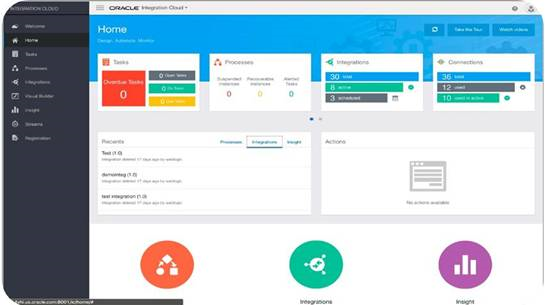
Oracle Integration Cloud simplifies application integration, process automation, adaptive case management, and more! Use recipes, pre-built integrations, 100+ SaaS adapters, a visual development environment, and operational and stream analytics — all available in a unified, seamless platform.

Schedule:

Tuesday November 21st 2017 16:30 – 17:30 CET

Visit the registration page here.

Missed our PaaS Partner Community Webcast? – watch the on-demand versions:

· Adaptive Case Management in PCS November 31st 2017

· Oracle OpenWorld 2017 September 25th 2017

· Cloud Compliance & Certification August 2017

· Wercker July 21st 2017

· Sales Play webcast June 28th 2017

· Process Cloud Service update – DMN capabilities May 23rd 2017

· Drive DevOps Agility and Operational Efficiency with Oracle Management Cloud April 25th 2017

· Implementing DevOps and Agile Methodologies in Oracle Projects March 21st 2017

· Mobile Cloud Service & Chat Bots February 28th 2017

· b2b January 31st 2017

· Community Resources & free Cloud trails December 20th 2016

· SOA 12 & BPM Suite 12c Roadmap update November 29th 2016

· Microservices October 25th 2016

· Oracle OpenWorld 2016 update September 27th 2016

· API Cloud Platform Service August 30th 2016

· BPM Suite & PCS Update July 26th 2016

· Integration Cloud Service June 28th 2016

· Sales Plays Webcast June 9th 2016

· Real-Time Integration Business Insight May 31st 2016

For the latest information please visit Community Updates Wiki page (SOA Community membership required).

SOA & BPM Partner Community

For regular information on Oracle SOA Suite become a member in the SOA & BPM Partner Community for registration please visit www.oracle.com/goto/emea/soa (OPN account required) If you need support with your account please contact the Oracle Partner Business Center.

Blog Twitter LinkedIn image[7][2][2][2] Facebook clip_image002[8][4][2][2][2] Wiki

Technorati Tags: SOA Community,Oracle SOA,Oracle BPM,OPN,Jürgen Kress

Service Bus: Pipeline alerts in Splunk using SNMP traps by Maarten Smeets

image


Oracle Service Bus provides a reporting activity called Alert. The OSB pipeline alerts use a persistent store. This store is file based. Changing the persistent store to JDBC based, does not cause pipeline alerts to be stored in a database instead of on disk. When the persistent store on disk becomes large, opening pipeline alerts in the Enterprise Manager (12c) or Service Bus console (11g) can suffer from poor performance. If you put an archive setting on pipeline alerts (see here), the space from the persistent store on disk is not reduced when alerts get deleted. You can compact the store to reduce space (see here), but this requires the store to be offline and this might require shutting down the Service Bus. This can be cumbersome to do often and is not good for your availability.

If you do not want to use the EM / SB console or have the issues with the filestore, there is an alternative. Pipeline alerts can produce SNMP traps. SNMP traps can be forwarded by a WebLogic SNMP Agent to an SNMP Manager. This manager can store the SNMP traps in a file and Splunk can monitor the file. Splunk makes searching alerts and visualizing them easy. In this blog I will describe the steps needed to get a minimal setup with SNMP traps going and how to see the pipeline alerts in Splunk. Read the complete article here.

WebLogic Partner Community

For regular information become a member in the WebLogic Partner Community please visit: http://www.oracle.com/partners/goto/wls-emea ( OPN account required). If you need support with your account please contact the Oracle Partner Business Center.

Blog Twitter LinkedIn Forum Wiki

Technorati Tags: PaaS,Cloud,Middleware Update,WebLogic,WebLogic Community,Oracle,OPN,Jürgen Kress

Automated Fusion Middleware 12c Migration – Part 1 – Introduction

image

Watch the video here.

SOA & BPM Partner Community

For regular information on Oracle SOA Suite become a member in the SOA & BPM Partner Community for registration please visit www.oracle.com/goto/emea/soa (OPN account required) If you need support with your account please contact the Oracle Partner Business Center.

Blog Twitter LinkedIn image[7][2][2][2] Facebook clip_image002[8][4][2][2][2] Wiki

Technorati Tags: SOA Community,Oracle SOA,Oracle BPM,OPN,Jürgen Kress

SOA 12.2.1.2.0: Schedule your Integration Workload Statistics (IWS) Report by Command Line by Dirk Nachbar

image

From Oracle SOA Suite 12.2.1 on, Oracle added a nice feature – The Integration Workload Statistics, which you can compare to an Oracle Database AWR report for your SOA Suite.
Kevin King from AVIO Consulting has released for this a really good blog post about the IWS http://www.avioconsulting.com/blog/no-more-hidden-soa-performance-problems
As I am more coming from the Administration site, I prefer to have script-based solutions.
Here I will show you how to scheduled an automated way for the generation of your Integration Workload Statistics including mailing of the report for UNIX platforms:
On your server which is hosting your SOA suite simply perform following steps as SOA Suite Software owner: Read the complete article here.

SOA & BPM Partner Community

For regular information on Oracle SOA Suite become a member in the SOA & BPM Partner Community for registration please visit www.oracle.com/goto/emea/soa (OPN account required) If you need support with your account please contact the Oracle Partner Business Center.

Blog Twitter LinkedIn image[7][2][2][2] Facebook clip_image002[8][4][2][2][2] Wiki

Technorati Tags: SOA Community,Oracle SOA,Oracle BPM,OPN,Jürgen Kress

SOA Suite 11g and SOA Suite 12c Bundle Patches


New Bundle Patches for SOA 11.1.1.9 and 12.1.3.0

Product Version

Bundle Patch Name

Bundle Patch Number

SOA 11.1.1.9

Bundle Patch 170102 (11.1.1.9.170102)

Patch 25247644

SOA 12.1.3.0

Bundle Patch 170117 (12.1.3.0.170117)

Patch 24835839

For more information:

1. Note 1485949.1 SOA 11g and 12c: Bundle Patch Reference

2. Note 2061926.1 Oracle Database, Enterprise Manager and Middleware – Change to Patch Numbering from Nov 2015 onwards

3. Fusion Middleware Support Blog

SOA & BPM Partner Community

For regular information on Oracle SOA Suite become a member in the SOA & BPM Partner Community for registration please visit www.oracle.com/goto/emea/soa (OPN account required) If you need support with your account please contact the Oracle Partner Business Center.

Blog Twitter LinkedIn image[7][2][2][2] Facebook clip_image002[8][4][2][2][2] Wiki

Technorati Tags: SOA Community,Oracle SOA,Oracle BPM,OPN,Jürgen Kress

Using Integration Versioning – ICS Definitive Tip #2 by Phil Wilkins

image

In this Definitive Tip, we are going to look at the ability to use Versioning on Integrations to seamlessly deploy update integrations is an important requirement of any enterprise integration platform.

ICS supports the model of semantic versioning, perhaps better recognised as versioning as Major, Minor and patch.  Which is best described at http://semver.org/.

This post will demo a minor and then a major version change. So we can see how change as the behaviours change between the two. A major change indicates an likely change in definition and minor one reflects logical change.

Seeing Versioning in Action

To demonstrate versioning we need an integration that is currently active. Ideally, you will have some sort of data feed or test framework, such as SoapUI or even a simple cURL script regularly triggering the integration. We need this script running to demonstrate the impact of the cutover.

In our example we’re going to use the service from Definitive Guide #1 (DG1), but given that we are not going to really modify the service itself, this will work with any service you want. Read the complete article here.

SOA & BPM Partner Community

For regular information on Oracle SOA Suite become a member in the SOA & BPM Partner Community for registration please visit www.oracle.com/goto/emea/soa (OPN account required) If you need support with your account please contact the Oracle Partner Business Center.

Blog Twitter LinkedIn image[7][2][2][2] Facebook clip_image002[8][4][2][2][2] Wiki

Technorati Tags: SOA Community,Oracle SOA,Oracle BPM,OPN,Jürgen Kress
Teaching how to use the Integration Cloud Service Connectivity Agent by Carlos Rodriguez Iturria

image

I have been Integrating applications for the last 15+ years and normally every integration is a new challenge. It really doesn’t matter what technology or standards you use or have used in the past, the reality is that integrations come a new set of challenges. In the past few years the pre-built adapters have simplified in a way these challenges, but with hybrid architectures a new set of challenges comes to the picture, for example; connectivity, security, simplicity, message reliability, etc.

I was very excited when I learned the way Oracle Cloud is using to solve this problem. It is with something called Oracle ICS (Integration Cloud Service) Connectivity Agents, that basically get installed close to the Application being integrated, for example on-premise or in IaaS. Then using ICS in a browser, you can introspect into the backend application as if it was close to ICS, in fact with this solution ICS is completely oblivious of the location of the actual backend application. The Connectivity Agent will in this case connect internally with the back-end applications and communicate to ICS by pushing out messages via Messaging Cloud Service.

This agent is installed and runs in an on-premises environment on the same network as internal systems such as Oracle E-Business Suite, Oracle Siebel, Oracle Database, and others. You download the on-premises agent installer from the Agents page in Oracle Integration Cloud Service to your on-premises environment for installation. Multiple agents can run on a single host. There can be multiple host systems, each running one or more agents, in a cloud/on premises topology. Read the complete article here.

SOA & BPM Partner Community

For regular information on Oracle SOA Suite become a member in the SOA & BPM Partner Community for registration please visit www.oracle.com/goto/emea/soa (OPN account required) If you need support with your account please contact the Oracle Partner Business Center.

Blog Twitter LinkedIn image[7][2][2][2] Facebook clip_image002[8][4][2][2][2] Wiki

Technorati Tags: SOA Community,Oracle SOA,Oracle BPM,OPN,Jürgen Kress

Designer Content Filters – ICS Definitive Tip #1 by Phil Wilkins

image

Definitive Tips, like our Definitive Guide posts address features could not be incorporated into the book, either simply because the feature is new or simply down to the fact the new feature arrived since the book has been published. Unlike the Definitive Guide entries, the tips will always remain very short. The first tip will address content filters in the designer.

Designer Content Filters

Release 16.4.5 introduced a new filter feature to help improve the location of Integrations, Connections and other designer elements. If you visit the Integrations  parts of the designer for example, you will now see  additional options included in the banner as highlighted in the following screenshot:

Some of the designer views only have one filter option, although most have two. The following tables show the different filters available in each part of the Designer. Read the complete article here.

SOA & BPM Partner Community

For regular information on Oracle SOA Suite become a member in the SOA & BPM Partner Community for registration please visit www.oracle.com/goto/emea/soa (OPN account required) If you need support with your account please contact the Oracle Partner Business Center.

Blog Twitter LinkedIn image[7][2][2][2] Facebook clip_image002[8][4][2][2][2] Wiki

Technorati Tags: SOA Community,Oracle SOA,Oracle BPM,OPN,Jürgen Kress