Matt Wright talks Oracle SOA Cloud Service


image

Rubicon Red CTO, Matt Wright outlines the reasoning behind the company’s purchase of Oracle SOA Cloud Service – primarily the ability to do development and testing in the cloud and then seamlessly implement on premises.

Watch the video here

SOA & BPM Partner Community

For regular information on Oracle SOA Suite become a member in the SOA & BPM Partner Community for registration please visit www.oracle.com/goto/emea/soa (OPN account required) If you need support with your account please contact the Oracle Partner Business Center.

Blog Twitter LinkedIn image[7][2][2][2] Facebook clip_image002[8][4][2][2][2] Wiki

Technorati Tags: SOA Community,Oracle SOA,Oracle BPM,OPN,Jürgen Kress
Top tweets SOA Partner Community – July 2017

image

July 2017 top tweets by soaCommunity

Send your tweets @soacommunity #soaCommunity and follow us at http://twitter.com/soacommunity. Make sure you share your content with the community!

SOA & BPM Partner Community

For regular information on Oracle SOA Suite become a member in the SOA & BPM Partner Community for registration please visit www.oracle.com/goto/emea/soa (OPN account required) If you need support with your account please contact the Oracle Partner Business Center.

Blog Twitter LinkedIn image[7][2][2][2] Facebook clip_image002[8][4][2][2][2] Wiki

Technorati Tags: twitter,SOA Community,Oracle SOA,Oracle BPM,OPN,Jürgen Kress,SOA Community twitter

Configure and send email notifications with UMS Notification Service in Service Bus 12c by Markus Lohn

image


This blog post provides a detailed description how to configure and send an email notification with User Notification Service (UMS). In detail it shows how to configure the following properties in a OSB pipeline:

  • the subject
  • the receiver of the email
  • the sender of the email
  • the message body

There exists a lot of interesting blog entries about using UMS, but they don’t show how to set the above email properties in a OSB pipeline. The instructions afterwards are tested with OSB 12.2.1.1.

Prerequisites

  • Prepare an Email Server to receive messages. You can use FakeSMTP (https://nilhcem.github.io/FakeSMTP/) as a simple solution.
  • Prepare a SOA Quickstart environment.
  • Configure and start the IntegratedWebLogicServer in JDeveloper 12.2.1.1.
  • Configure an Email Driver via Oracle Enterprise Manager (see References)

Configuration Steps

1. Open a Service Bus project in JDeveloper (Example: SendEmailTest). Read the complete article here.

SOA & BPM Partner Community

For regular information on Oracle SOA Suite become a member in the SOA & BPM Partner Community for registration please visit www.oracle.com/goto/emea/soa (OPN account required) If you need support with your account please contact the Oracle Partner Business Center.

Blog Twitter LinkedIn image[7][2][2][2] Facebook clip_image002[8][4][2][2][2] Wiki

Technorati Tags: SOA Community,Oracle SOA,Oracle BPM,OPN,Jürgen Kress
My private Corner – thanks to the Community!

image

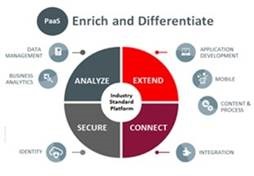
The Oracle fiscal year results are public – I want to say the biggest THANKS the PaaS Partner Community! Your contribution is key to the Oracle cloud success and cloud utilization! It’s summer time enjoy, take a rest and spend time with your family and friends.

Once you are back from holiday it’s time to get and update on the Oracle PaaS portfolio and the latest sales kits. In case you want to go back to the beach – attend our Summer Camp!

SOA & BPM Partner Community

For regular information on Oracle SOA Suite become a member in the SOA & BPM Partner Community for registration please visit www.oracle.com/goto/emea/soa (OPN account required) If you need support with your account please contact the Oracle Partner Business Center.

Blog Twitter LinkedIn image[7][2][2][2] Facebook clip_image002[8][4][2][2][2] Wiki

Technorati Tags: SOA Community,Oracle SOA,Oracle BPM,OPN,Jürgen Kress

Service Bus: A quickstart for the Kafka transport by Maarten Smeets

image

As mentioned on the following blog post by Lucas Jellema, Kafka is going to play a part in several Oracle products. For some usecases it might eventually even replace JMS. In order to allow for easy integration with Kafka, you can use Oracle Service Bus to create a virtualization layer around Kafka. Ricardo Ferreira from Oracle’s A-Team has done some great work on making a custom Kafka Service Bus transport available to us. Read more about this here: http://www.ateam-oracle.com/osb-transport-for-apache-kafka-part-1/, http://www.ateam-oracle.com/oracle-service-bus-transport-for-apache-kafka-part-2/ and http://www.ateam-oracle.com/custom-transports-in-osb-12-2-1/. The Kafka transport is not an ‘officially supported’ transport. Quote from the A-team blog: ‘The Kafka transport is provided for free to use “AS-IS” but without any official support from Oracle. The A-Team reserves the right of help in the best-effort capacity.’. I hope it will become an officially supported part of the Service Bus product in the future. Read the complete article here.


SOA & BPM Partner Community

For regular information on Oracle SOA Suite become a member in the SOA & BPM Partner Community for registration please visit www.oracle.com/goto/emea/soa (OPN account required) If you need support with your account please contact the Oracle Partner Business Center.

Blog Twitter LinkedIn image[7][2][2][2] Facebook clip_image002[8][4][2][2][2] Wiki

Technorati Tags: SOA Community,Oracle SOA,Oracle BPM,OPN,Jürgen Kress
Service Bus 12c (12.2.1) What You Always Wanted to Know by Frank Munz

image

Get the presentation here.

SOA & BPM Partner Community

For regular information on Oracle SOA Suite become a member in the SOA & BPM Partner Community for registration please visit www.oracle.com/goto/emea/soa (OPN account required) If you need support with your account please contact the Oracle Partner Business Center.

Blog Twitter LinkedIn image[7][2][2][2] Facebook clip_image002[8][4][2][2][2] Wiki

Technorati Tags: SOA Community,Oracle SOA,Oracle BPM,OPN,Jürgen Kress
Use HTML Content with UMS Adapters in OSB 12c by Chris Laurente

image

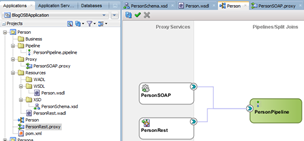
In this post, we will learn how to send html content for the emails using a UMS adapter in OSB 12c. There we go:

Pre-requirements

First, we need to verify that we have the UMS adapter and the email driver already working. These configurations are in the previous post Using UMS Adapter to send emails with OSB 12c.

Steps

So first we have to edit the UMS adapter and go to the step 5, Set the option “Message is Opaque (Base64Binary)”

Now, we need to encode the information to Base64 and use use it in the businees service. To accomplish this task we could use a Java callout and use it to encode the information. I have created a Jar file that encode and decode as Base64 and you can download it here.

Extract the jar library and import into the SB Project. Read the complete article here.

SOA & BPM Partner Community

For regular information on Oracle SOA Suite become a member in the SOA & BPM Partner Community for registration please visit www.oracle.com/goto/emea/soa (OPN account required) If you need support with your account please contact the Oracle Partner Business Center.

Blog Twitter LinkedIn image[7][2][2][2] Facebook clip_image002[8][4][2][2][2] Wiki

Technorati Tags: SOA Community,Oracle SOA,Oracle BPM,OPN,Jürgen Kress
Oracle North America Cloud Partner Technical Forum August 15th–18th 2017 Redwood Shores

imageOracle North America Cloud Partner Technical Forum free hands-on technical training by the Oracle product managenent team

Join us at the Cloud Partner Technical Forum West to learn the latest in Oracle Public Cloud Services technical features and directions, attend hands-on technical implementation training courses, network with your peers and develop relationship with key Oracle Product Management team members.

What will we cover

During this event, you will hear from our Product Management leaders the latest updates of Oracle Cloud Services and then our Oracle Development experts will host a series of Cloud Implementation hands-on workshops of Oracle PaaS and IaaS solutions. These workshops include presentations, live demos and hands-on laboratory exercises in areas such as Application Development, Integration, Security, PaaS for SaaS and Industry Solutions.

Schedule:

August 15th – 18th 2016

Oracle HQ Redwood Shores


For details please visit the registration page here.

SOA & BPM Partner Community

For regular information on Oracle SOA Suite become a member in the SOA & BPM Partner Community for registration please visit www.oracle.com/goto/emea/soa (OPN account required) If you need support with your account please contact the Oracle Partner Business Center.

Blog Twitter LinkedIn image[7][2][2][2] Facebook clip_image002[8][4][2][2][2] Wiki

Technorati Tags: SOA Community,Oracle SOA,Oracle BPM,OPN,Jürgen Kress
Create Compact Domain automatically by Markus Lohn

image

The Oracle SOA Suite and Oracle Business Process Management Suite Quick Start distributions allow you to quickly install a development or evaluation environment on a single host computer. The Quick Start distribution provides  the following Domain Types:

Default Domain

  • Created within JDeveloper and normally known as Integrated WebLogic Server.
  • Pre-configured with SOA and OSB components.
  • Fusion Middleware schemas are configured in a Java DB (Apache Derby)
  • Runs only when JDeveloper is up and running.

Read the complete article here.

SOA & BPM Partner Community

For regular information on Oracle SOA Suite become a member in the SOA & BPM Partner Community for registration please visit www.oracle.com/goto/emea/soa (OPN account required) If you need support with your account please contact the Oracle Partner Business Center.

Blog Twitter LinkedIn image[7][2][2][2] Facebook clip_image002[8][4][2][2][2] Wiki

Technorati Tags: SOA Community,Oracle SOA,Oracle BPM,OPN,Jürgen Kress

SOA Suite monitoring – Using Metric Extensions in Enterprise Manage Cloud Control by MichelSchildmeijer

image

As a follow up to my 2 minute Tech Tip taken by @BobRhubart about SOA Suite monitoring I’d like to give you some more context than that fuzzy performance of me during Oracle Open World 2016.

Monitoring your SOA Suite is a tough job because of the complexity of the environment. Usually Adminstrators stick to some CPU, memory, disk and basic WebLogic Monitoring, some have monitoring in place for some more advanced stuff such as JVM, JMS, JDBC, but when it comes to "Who monitors the Error Hospital on Business Faults?" or "Who is looking after SOA housekeeping?", than no one knows what i’m talking about.

And, in many cases, the necessary SOA Management pack hasn’t been licensed, or switched on to make use of all the nice features you can get out of this pack. This pack transforms your local Fusion Middleware Console into an EM dashboard, can monitor the Error Hospital, trace on Instance flows and even monitor the Dehydration Store Performance the SOA Suite repository. So, who needs the local Fusion Middleware Console(EM)?

Impression of the screens in Enterprise Manager Cloud Control

However, if you are not licensed to use the SOA Suite management pack, than you are not permitted to use al these nice features.

As I told in the video, Oracle Enterprise Manager Cloud control has a feature called metric extensions. These are extensions if collected metrics which are delivered in a certain pack are not sufficient enough or maybe are not there at all. I did some research for a customer who used the SOA Suite but had no management pack for it. Read the complete article here & watch the video here.

SOA & BPM Partner Community

For regular information on Oracle SOA Suite become a member in the SOA & BPM Partner Community for registration please visit www.oracle.com/goto/emea/soa (OPN account required) If you need support with your account please contact the Oracle Partner Business Center.

Blog Twitter LinkedIn image[7][2][2][2] Facebook clip_image002[8][4][2][2][2] Wiki

Technorati Tags: SOA Community,Oracle SOA,Oracle BPM,OPN,Jürgen Kress